

Website Screenshot — Full-Page, Mobile & PDF, No Cookie Banners
Pricing
from $3.50 / 1,000 screenshot captureds
Website Screenshot — Full-Page, Mobile & PDF, No Cookie Banners
Capture full-page, viewport, element or fixed-height screenshots and PDFs of any website in bulk. Desktop, tablet & mobile, cookie banners hidden, lazy images loaded, stealth Chrome for blocked sites. Flat price per screenshot; failures are free.
Pricing
from $3.50 / 1,000 screenshot captureds
Rating
0.0
(0)
Developer

Leandro Zanatta
Maintained by CommunityActor stats
0
Bookmarked
3
Total users
2
Monthly active users
14 days ago
Last modified
Categories
Share
Capture clean screenshots of any website in bulk: full page (with lazy images loaded), visible area, fixed height, one element by CSS selector, or PDF. Desktop, laptop, tablet and real mobile layouts. Cookie banners and consent pop-ups are hidden, ads and chat bubbles are blocked, and pages that block automated browsers are retried automatically in stealth mode with real Google Chrome. Flat price per screenshot, and failed or blocked pages are free.
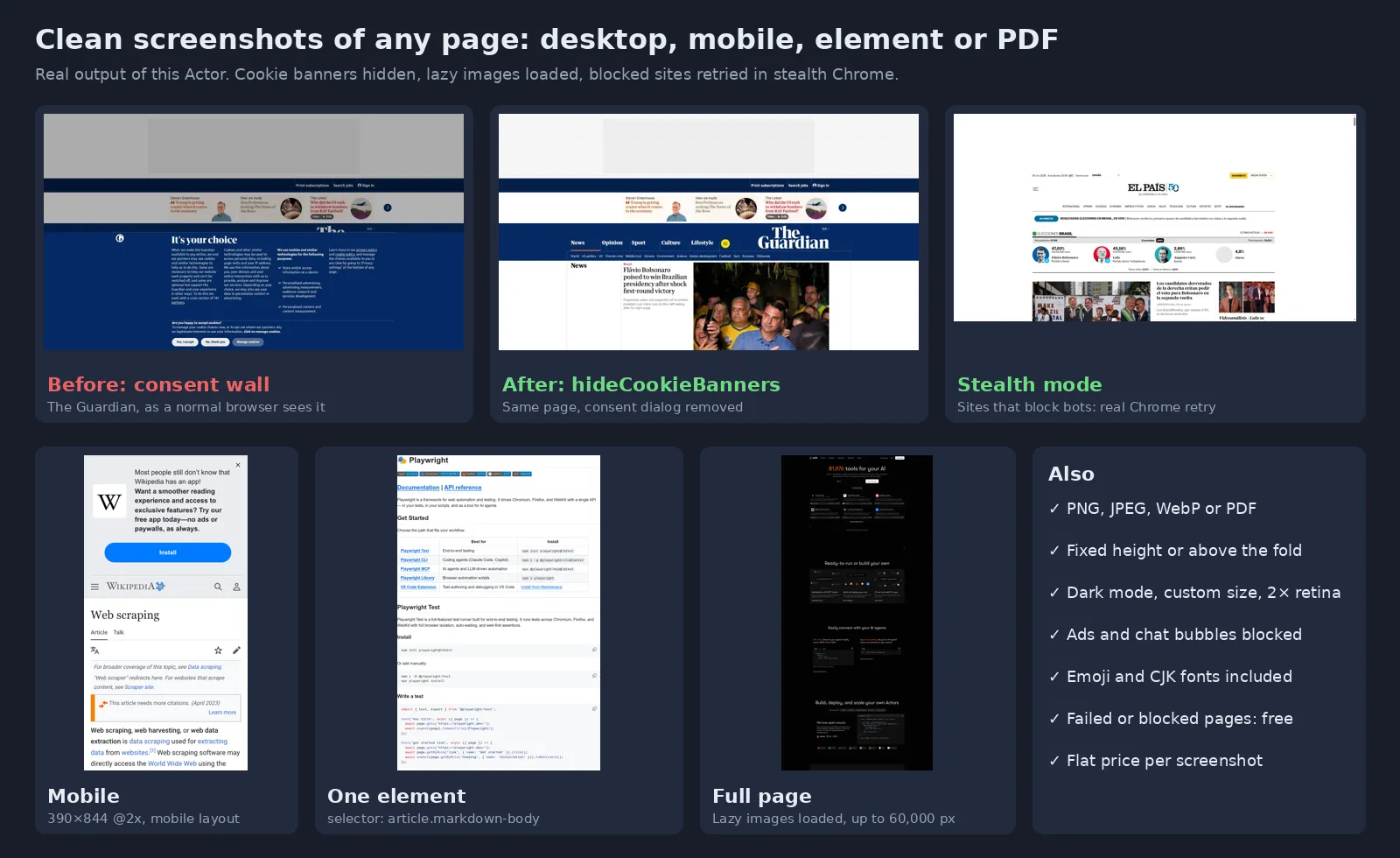
Real output of this Actor.
Why this screenshot Actor
Built from what users of other screenshot tools complain about:
| Common complaint | What this Actor does |
|---|---|
| "Slow and expensive: minutes and cents per screenshot" | Several pages in parallel in one browser, flat price per screenshot (see Pricing) instead of paying for compute time |
| "It didn't work and still used my credits" | Pages answering 4xx/5xx, bot checks and errors are not billed and get a clear reason |
| "Full page only captures above the fold" | Scrolls the whole page first so lazy images and sections load, then captures up to 60,000 px |
| "Can't set the height / capture only the top" | Modes Visible area, Fixed height (any pixel height) and Element (CSS selector) |
| "Sticky header repeated / page not loaded yet" | Native full-page capture (no stitching), waits for the network and fonts, optional extra delay |
| "Emojis show as boxes" | Color emoji and CJK fonts installed |
| Cookie walls covering the page | Consent dialogs of the common platforms (OneTrust, Cookiebot, Didomi, Quantcast, Sourcepoint, Usercentrics…) and generic cookie bars are hidden, never accepted on your behalf |
| Sites that block bots (403, "Just a moment…") | Automatic stealth retry with undetected-chromedriver and real Google Chrome |
Who uses it
| Use | Typical setup |
|---|---|
| Website monitoring & visual change tracking | Schedule daily full-page screenshots and compare them |
| SEO, marketing & agencies | Capture client and competitor landing pages, ads landing pages and SERPs for reports |
| QA & design review | Desktop, tablet and mobile screenshots of every page of a site |
| Compliance & legal evidence | Timestamped captures of terms, prices, claims or ads, as PNG or PDF |
| E-commerce & price intelligence | Product pages and pricing tables as images for audits |
| AI agents & LLM pipelines | Give a vision model a clean picture of a page (no cookie wall in the way) |
| Link previews & thumbnails | Visible-area JPEG/WebP thumbnails for directories and dashboards |
Capture modes
| Mode | Result |
|---|---|
| Full page (default) | The whole page down to Max height (16,000 px by default, up to 60,000), after scrolling to load lazy content |
| Visible area | Exactly what fits the screen (above the fold) |
| Fixed height | The top N pixels of the page (e.g. 1,500), even beyond the screen |
| Element | One element by CSS selector, e.g. #pricing, .product-card, article |
| Printable PDF (A4 or Letter) with backgrounds |
| Device | Screen |
|---|---|
| Desktop (default) | 1920×1080 |
| Laptop | 1366×768 |
| Tablet | 820×1180, 2× density, touch, mobile user agent |
| Mobile | 390×844 (iPhone size), 2× density, touch, mobile user agent |
Custom width, height and pixel density (1–3×) override the device.
Input
| Field | Default | Description |
|---|---|---|
Page URLs (urls) | — | Pages to capture; https:// is added if missing |
What to capture (mode) | fullPage | fullPage, viewport, fixedHeight, element, pdf |
Device (device) | desktop | desktop, laptop, tablet, mobile |
Image format (format) | png | png, jpeg, webp |
Hide cookie banners (hideCookieBanners) | true | Hide consent dialogs and unlock scrolling |
Block ads and chat widgets (blockAds) | true | Cleaner and faster pages |
Browser engine (engine) | auto | auto (fast, stealth if blocked), fast, stealth |
Height for Fixed height (clipHeight) | 1080 | Pixels from the top |
Max height for full page (maxHeight) | 16000 | Cut very long / infinite pages |
CSS selector (selector) | — | For element mode |
Also hide these elements (hideSelectors) | — | Extra CSS selectors to hide (promo bars, app banners…) |
Extra wait (delaySeconds) | 0 | For animations and slow widgets |
Scroll to load lazy content (scrollToLoad) | true | For full-page and fixed-height captures |
Dark mode (darkMode) | false | Request the page's dark theme |
| Custom width / height / pixel density | device | viewportWidth, viewportHeight, scaleFactor |
JPEG/WebP quality (quality) | 85 | 30–100 |
PDF paper size (pdfFormat) | A4 | A4 or Letter |
Browser language (locale) | en-US | e.g. pt-BR, de-DE |
Page timeout (timeoutSeconds) | 45 | Per page |
Capture error pages too (captureErrorPages) | false | Also capture 4xx/5xx and bot-check pages (billed) |
Max parallel pages (maxConcurrency) | 8 | Also limited by memory (1 page per GB) |
Proxy (proxyConfiguration) | none | Apify Proxy, e.g. residential or a country, for strict sites or local versions |
Output
One dataset row per page; files are stored in the run's key-value store.
engine tells you whether the fast browser or stealth mode was used. Failed pages have an error field explaining why (blocked, 404, timeout…) and are not billed.
Pricing
Flat pay per screenshot, plus a tiny per-run start fee. No compute-time surprises. See the Pricing tab for current prices and plan discounts.
- Screenshot captured: every successful image or PDF.
- Stealth mode used: small extra, only when a site blocked the fast browser and stealth Chrome got the page.
- Failed, blocked or error pages: free.
Set a maximum cost per run to cap spending; the Actor stops cleanly at the limit.
Measured on the platform
On 20 well-known sites (news, tech, e-commerce, government) captured from the Apify cloud with default settings, 18 succeeded in one run, including Reddit through the automatic stealth retry; the two misses (a page that reloads itself and a very heavy news page) were fixed and captured in the next version. In stealth mode the Actor got through sites that answer 403 to headless browsers in our tests (El País, Stack Overflow, Reddit, The New York Times). Some sites block data-center IP addresses entirely; for those, add Apify Proxy (residential).
Use it from code or an AI agent
Python
JavaScript
HTTP (one request, waits for the result)
No-code and agents: schedule daily captures, send them to Slack, Drive or e-mail with Make, Zapier or n8n, or let an AI agent take screenshots through the Apify MCP server.
FAQ
Are cookies accepted to remove the banner? No. Banners are hidden with CSS; nothing is clicked or accepted. The page is shown as it looks behind the dialog.
Does stealth mode solve CAPTCHAs? No. If a site still requires a CAPTCHA or human check, the page is reported as blocked and not billed.
Can I log in to a site? Not in this version. Public pages only.
Why is a page cut? Full-page captures stop at Max height (16,000 px by default). Raise it up to 60,000 px for very long pages.
Can I capture a specific country's version of a site? Use Proxy with an Apify Proxy country, and set Browser language (e.g. pt-BR).
Is it legal? Taking screenshots of public web pages is common practice. Respect each site's terms and copyright when you reuse the images.
Related Actors
- EXIF & GPS Cleaner — remove hidden metadata from photos
- Image Quality Checker — flag blurry, dark and duplicate images
- Image & Video Anonymizer — blur faces and license plates in screenshots before sharing
- PII Masker — mask personal data in texts and datasets
Support
A page that doesn't look right? Open an issue in the Issues tab with the URL and the settings you used; it will be answered there.
Need a different tool? Request it
Missing a feature, an input or output format, or a whole different tool for your workflow? Open an issue in the Issues tab and describe what you need:
- what goes in (files, URLs, data) and what should come out,
- roughly how much you process (per day or month),
- one example, if you can share it.
Requests with a real use case get built, either as a new option in this Actor or as a new Actor in this collection, and you get notified in the issue when it's live. Every request is read.


