

Welcome to the Jungle Jobs Scraper: France Jobs & Salaries
Pricing
from $1.19 / 1,000 jobs
Welcome to the Jungle Jobs Scraper: France Jobs & Salaries
Scrape public Welcome to the Jungle job ads in France and Europe by keyword, country, contract and remote policy. Title, company, salary, location, date, full description and apply link. No login.
Pricing
from $1.19 / 1,000 jobs
Rating
0.0
(0)
Developer

Cliqto Media
Maintained by CommunityActor stats
0
Bookmarked
2
Total users
1
Monthly active users
8 days ago
Last modified
Categories
Features
Share
Scrape public job ads from Welcome to the Jungle, the job board of France and Europe. Search by keyword, country, city, contract type and remote policy, and get one row per job with title, company, location, salary, contract, remote policy, date, full description and apply link.
Use it for recruiting research, salary benchmarks, hiring leads or a daily job feed. The prefilled run (product manager in France, 20 jobs) usually takes under 10 seconds and costs about $0.036. No login and no account.
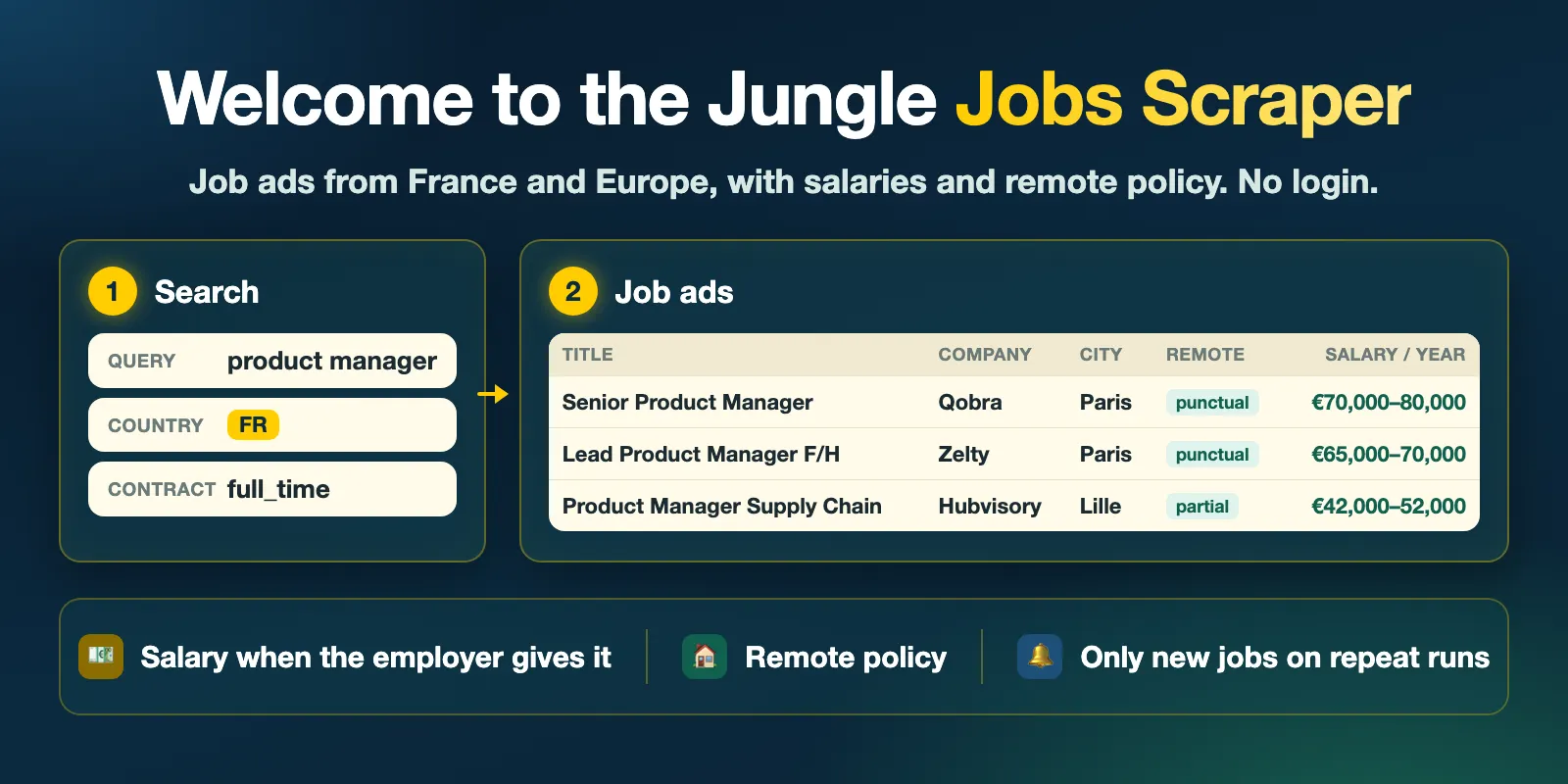
Table of contents
- What it does
- How it works
- Quick start
- Use cases
- Input
- Output
- Pricing
- Limits
- API, export and integrations
- Troubleshooting
- FAQ
- Related Actors
- Support
What it does
The Actor reads the public job search of Welcome to the Jungle (welcometothejungle.com). Most jobs are in France; there are also jobs in Belgium, Spain, Germany, Czechia, Switzerland and other countries. You give keywords and filters, or paste links from the site. You get one row per job ad, or one row per company in companies mode.
| You give | You get |
|---|---|
a keyword and filters, for example product manager in FR, full-time, partly remote | one row per job: title, company, city, country, contract type, remote policy, salary, experience, published date, full description, apply link, company size and sectors |
| search links from welcometothejungle.com/jobs | the same job rows; the keyword and filters are read from the link |
job links, for example https://www.welcometothejungle.com/en/companies/qobra/jobs/senior-product-manager_paris | one job row per link |
company names (slugs) or company links, for example doctolib | all open jobs of these companies, or their company profiles in companies mode |
It reads only what the site shows to a visitor who is not logged in. It does not collect candidates or recruiter profiles. The job description stays as the employer wrote it.
Good fit
- Collect all open jobs for a role in a country or a city and compare companies.
- Build a salary benchmark: employers give a salary in about 1 of 5 jobs.
- Find companies that hire right now, with their size and sectors, as recruiting or sales leads.
- Get only new jobs every day with a schedule and Only new since last run.
How it works
- You give a keyword (or several), filters and countries, or links from the site.
- The Actor runs each search on the site's own search index. The site gives at most 1,000 jobs per search; for bigger searches, the Actor splits the search by publish date and gets all jobs.
- For each job it opens the job page to get the full description, skills, profile and company data. Turn off Full job details for faster, shorter rows.
- It saves one row per job in the Dataset and removes jobs it already saved in the same run. It also writes a run summary (
RUN_SUMMARY) with the result of each search.
Quick start
-
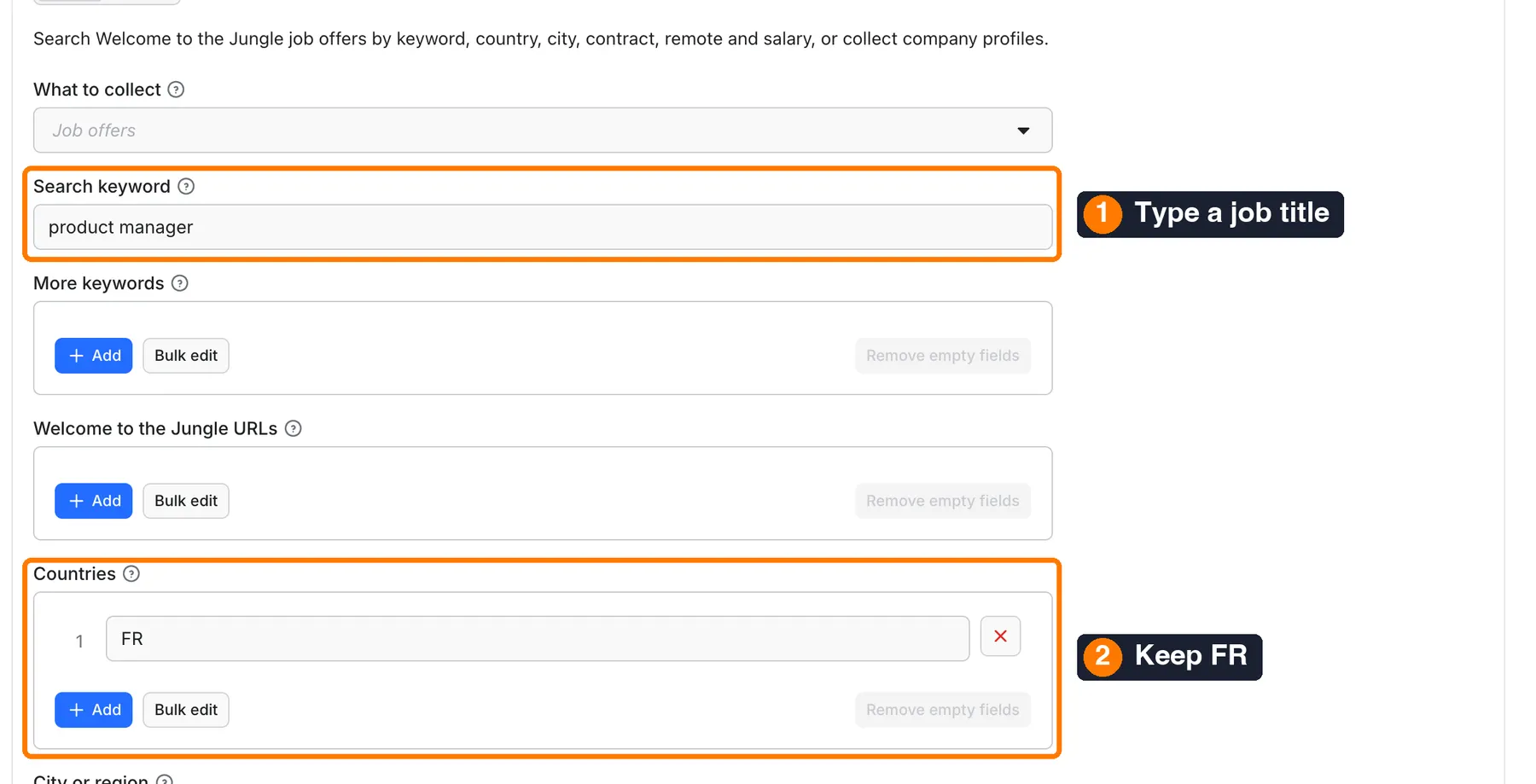
Open the Input tab. Type a job title in Search keyword, for example
product manager(box 1). -
Keep
FRin Countries (box 2). AddBEorESfor more countries, or leave it empty for all countries. -
Keep Max results at 20, the form's prefill (lower in the form).
-
Click Start.
-
Open the Output tab. The Jobs view shows title, company, location, contract type, remote policy and salary first (box 3).
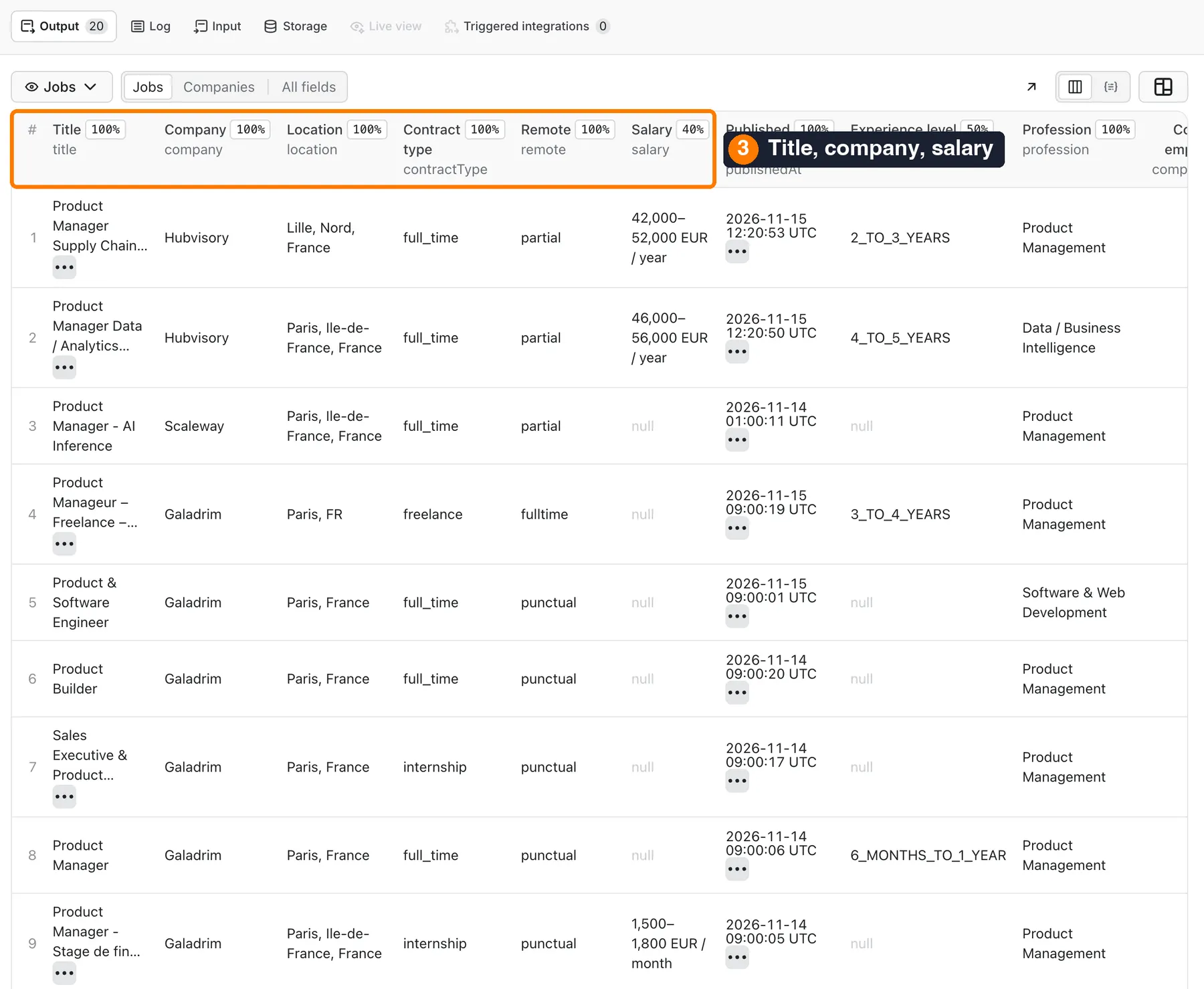
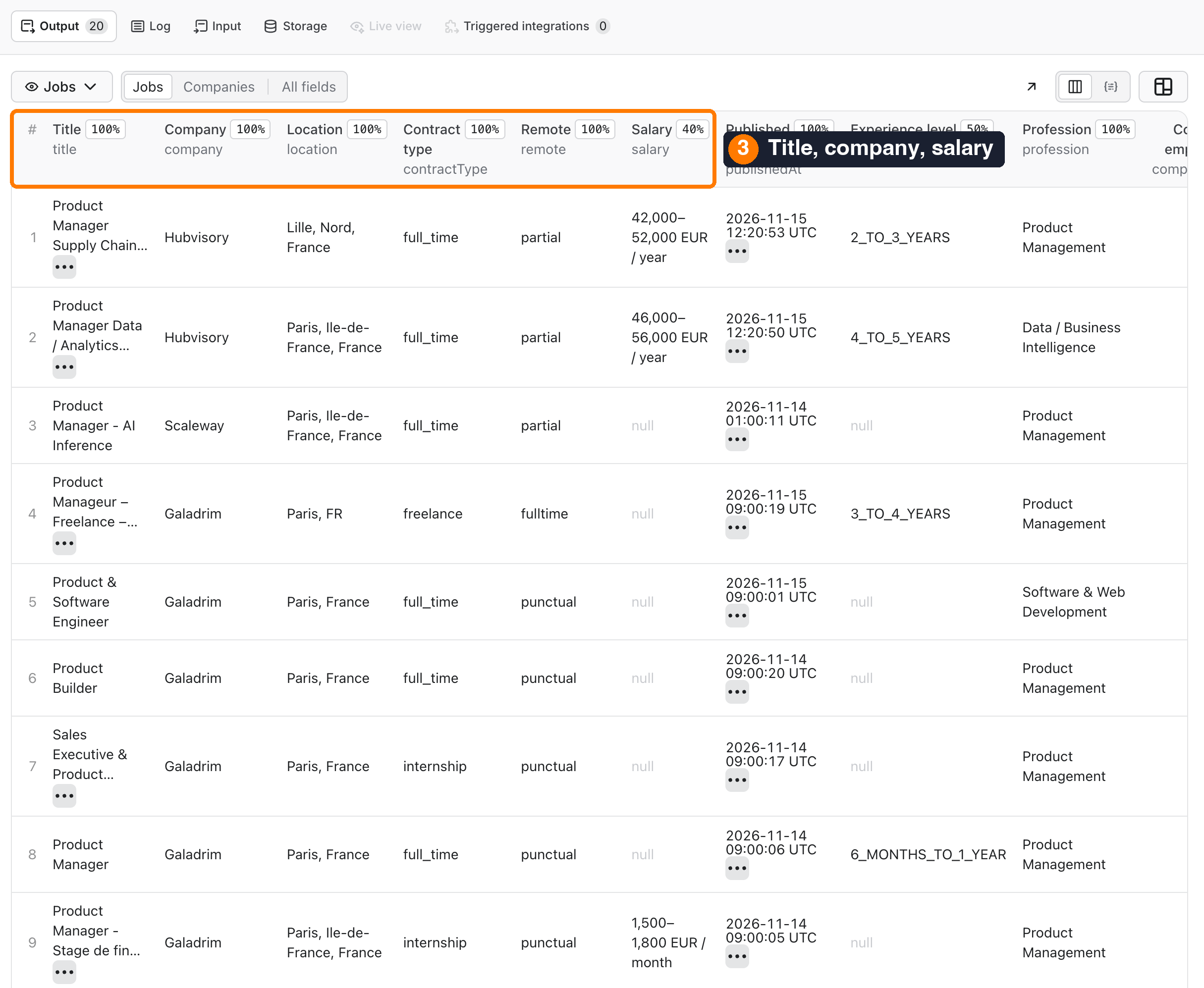
Expected result: 20 job rows for product manager in France, in the site's relevance order, usually in under 10 seconds.
Use cases
| Buyer job | Input path | Output entity | Key fields | Next integration |
|---|---|---|---|---|
| Recruiting research | query, country, contractType | job | title, company, city, publishedAt, url | export to CSV or Google Sheets |
| Salary benchmark | query, onlyWithSalary, salaryMin | job | salaryMin, salaryMax, salaryPeriod, experienceLevel | spreadsheet, BI tool |
| Hiring leads | query, publishedWithinDays: 7, companySize | job | company, companyEmployees, companySectors, companyWebsite | CRM import |
| Daily new jobs | query, onlyNew: true, schedule | job | title, company, url, publishedAt | Slack or Notion |
| Company list | mode: companies, sectors, country | company | name, employees, jobsCount, website | CRM, lead list |
Input
Input fields
| Field | Plain name | Type | Default / prefill | Allowed values | Effect |
|---|---|---|---|---|---|
mode | What to collect | string | jobs | jobs, companies | Job rows or company rows |
query | Search keyword | string | prefill product manager | any text | Empty = all jobs that match the filters |
queries | More keywords | array of strings | empty | up to 50 | Each keyword is a separate search; duplicates are removed |
startUrls | Welcome to the Jungle URLs | array | empty | up to 1,000 search, job or company links | When set, the keyword fields are not used |
country | Countries | array | prefill FR | up to 120 two-letter codes, for example FR, BE, ES, DE, CZ | Country of the job office. Empty = all countries |
location | City or region | string | empty | the exact name on the site, for example Paris, Lyon, Île-de-France | Only jobs with an office there |
radiusKm | Radius around the city (km) | integer | empty | 1 – 500 | Jobs within this distance of location or of latitude/longitude |
latitude, longitude | Latitude, Longitude | number | empty | −90 – 90, −180 – 180 | Centre of a radius search instead of a city; without radiusKm the radius is 25 km |
contractType | Contract type | array | empty (all) | full_time, part_time, temporary, freelance, internship, apprenticeship, vie, graduate_program, volunteer, idv, other | Only these contracts |
remote | Remote work | array | empty (all) | fulltime (full remote), partial (some days a week), punctual (sometimes), no, unknown (not stated) | Only these remote policies |
experienceLevel | Experience | array | empty (all) | lt1, 1to3, 3to5, 5to10, gt10 (years) | Only these levels |
minExperienceYears, maxExperienceYears | Minimum / maximum experience (years) | integer | empty | 0 – 40 | Exact years instead of levels |
salaryMin | Minimum yearly salary | integer | empty | 0 – 10,000,000 | Keeps jobs whose yearly minimum (in the job currency, usually EUR) is at least this; jobs without a salary are dropped |
onlyWithSalary | Only jobs with a salary | boolean | false | Drops jobs without a salary | |
publishedWithinDays | Published in the last (days) | integer | empty | 1 – 3,650 | Only jobs published in this period |
companySize | Company size | array | empty (all) | lt15, 15to50, 50to250, 250to2000, gt2000 (employees) | Only companies of this size |
sectors | Sectors | array | empty | up to 100 names as on the site, for example Software, Fintech | Unknown names stop the run with a list of valid names |
professions | Job categories | array | empty | up to 100 names as on the site, for example Tech, Sales | Unknown names stop the run with a list of valid names |
companySlugs | Companies | array | empty | up to 1,000 slugs or company links, for example doctolib | Jobs of these companies, or their profiles in companies mode |
educationLevel | Education level | array | empty | no_diploma, cap, bep, bac, bac_1 … bac_5, phd | Only these levels (French diploma scale) |
jobLanguage | Job posting language | array | empty | fr, en, de, it, es, pt, cs, nl, da, pl, sv, zh, ja, sr | Only ads written in these languages |
searchOnlyInJobTitle | Match keyword in job title only | boolean | false | Ignores matches in descriptions and company names | |
excludePromoted | Exclude promoted jobs | boolean | false | Skips jobs boosted by the employer | |
sortBy | Order | string | relevance | relevance, date | date = newest first |
includeDetails | Full job details | boolean | true | Off: faster rows from the search card only, without the full description, profile and company links | |
descriptionFormat | Description format | string | text | text, markdown, html | Format of the long text fields |
descriptionMaxLength | Cut long texts at (characters) | integer | empty (full text) | 0 – 200,000 | Shortens each long text field |
compact | Compact rows | boolean | false | Only the main columns | |
siteLanguage | Site language | string | en | en, fr, es, cs, sk | Language of URLs and labels (sector, company size); job texts stay as written |
onlyNew | Only new since last run | boolean | false | Skips jobs or companies saved by earlier runs with the same tracking name | |
stateName | Tracking name | string | default | 1 – 40 letters, digits, - or _ | Separate memory for different searches |
skipReposts | Skip reposted jobs | boolean | false | Skips a job when the same company posted the same title before in this run (with onlyNew: in the last 30 days) | |
maxItems | Max results | integer | 100 (prefill 20) | 0 – 100,000 | The run stops after this many rows; 0 = all (up to 100,000) |
deliveryConnector | Send results to (optional) | string | empty | your MCP connector | Posts a short summary after the run |
deliveryTarget | Notion page or channel (optional) | string | empty | Notion page link or Slack channel ID | Where the summary goes |
An empty form searches all jobs. A value over a limit, a wrong type, an unknown sector or job category, or a city the site does not know stops the run with INVALID_INPUT and a valid example. Unknown input fields are ignored and listed in RUN_SUMMARY.
Interacting settings
| When | Input A | Input B | Effective behavior |
|---|---|---|---|
| Links and keywords | startUrls | query, queries | Only the links run; the keyword fields are not used |
| Search links and form filters | startUrls (search links) | country, contractType, … | A search link keeps the keyword and filters it has; form filters are not added |
| Company links | startUrls (company links) or companySlugs | form filters | Jobs of these companies, with the form filters applied |
| Radius | radiusKm | location or latitude/longitude | radiusKm needs one of them, else INVALID_INPUT; a centre without radiusKm uses 25 km |
| Country and city | country | location | Both must match the same office |
| Salary filters | salaryMin | onlyWithSalary | salaryMin already drops jobs without a salary |
| Companies mode | mode: companies | other filters | Only query, country, companySize, sectors and companySlugs are used |
| Daily runs | onlyNew | stateName | Each tracking name has its own memory; use one name per search |
| Same job twice | queries | startUrls | A job found by two searches is saved once |
| Max results in two places | maxItems | platform Max items option | The smaller of the two is used |
Input examples
Product manager jobs in France
Expected behavior: one search, 20 jobs with full details.
Expected output: 20 job rows with title, company, city, remote, salary, publishedAt, description.
Full-time jobs with a salary, partly remote, last 7 days
Expected behavior: one search with all filters, newest jobs first.
Expected output: job rows where salaryMin is set and remote is partial or fulltime.
Jobs near Lyon
Expected behavior: jobs with an office within 20 km of Lyon, for example in Lyon, Villeurbanne or Écully.
Expected output: job rows; city is the main office, offices lists all offices of the job.
New jobs every day (for a schedule)
Expected behavior: the first run saves all matching jobs; each later run saves only jobs it has not saved before.
Expected output: only new job rows; a run with nothing new ends with status NO_RESULTS and costs only the start fee.
Company profiles in a sector
Expected behavior: searches companies, not jobs.
Expected output: company rows with name, employees, sectors, jobsCount, headquartersCity, website.
Output
Output fields
Every row has recordType (job, company or status), recordStatus, searchQuery and scrapedAt.
Job rows:
| Field | Meaning | Type | Can be empty? |
|---|---|---|---|
jobId, reference, title | Job ID, the site's job reference and job title | string | no |
url, applyUrl | Job page and the employer's apply link | string | applyUrl sometimes |
company, companySlug, companyUrl | Employer | string | no |
location, city, region, country, countryCode, postalCode, address, latitude, longitude | Main office of the job | string, number | postalCode and address sometimes |
offices | All offices of the job | array | no |
contractType, contractDurationMinMonths, contractDurationMaxMonths | Contract and its length | string, number | length often (only for fixed-term contracts) |
remote | fulltime, partial, punctual, no or unknown | string | no |
salary | Salary as text, for example 70,000–80,000 EUR / year | string | yes: about 4 of 5 jobs have no salary |
salaryMin, salaryMax, salaryCurrency, salaryPeriod | Salary as numbers and its period (yearly, monthly, daily, …) | number, string | same as salary |
salaryYearlyMin | Yearly minimum from the site, used by salaryMin | number | same as salary |
experienceLevel, experienceMinYears, educationLevel, language | Experience, education and language of the ad | string, number | sometimes |
profession, professionCategory, professionSubcategory | Job category on the site | string | rarely |
benefits, skills, tools | Lists from the job page | array | can be empty |
summary, keyMissions, description, profile, recruitmentProcess | Job texts | string, array | empty with includeDetails: false; profile and recruitmentProcess often |
startDate, publishedAt, updatedAt | Dates | ISO date | startDate often |
promoted | true when the employer paid to boost the job | boolean | no |
companyEmployees, companyCreationYear, companyIndustry, companySectors, companyJobsCount, companyHeadquarters, companyWebsite, companyLinkedin, … | Company data from the job page (also logo, cover image, summary, description, labels, parity, social links) | mixed | some, often |
detailsStatus, errorMessage | ok, not_requested, not_found or error for the job page | string | errorMessage when ok |
Company rows (companies mode): companyId, name, slug, url, logoUrl, coverImageUrl, employees, sizeLabel, jobsCount (open jobs now), sectors, labels, description, headquartersCity, headquartersCountryCode, offices, countryCodes, tools, languages, acceptsSpontaneousApplication, website, defaultLanguage, publishedAt, updatedAt, detailsStatus.
Output entities and surfaces
| Situation | Where | Result shape | What to do |
|---|---|---|---|
| Normal job or company | Dataset | one row with recordStatus: ok | open the Output tab or export |
| Job page removed after the search | Dataset | job row with detailsStatus: not_found; search fields are kept | the ad is gone from the site |
| Search found nothing | Dataset + RUN_SUMMARY | one free row with recordType: status, recordStatus: not_found | try another keyword or fewer filters |
| Link to a removed job or company | Dataset + RUN_SUMMARY | one free status row with not_found | check the link |
| Site error | Dataset + RUN_SUMMARY | one free status row with recordStatus: error, errorMessage | run again later |
| Run stopped at a limit | RUN_SUMMARY | limitReached: MAX_ITEMS (status stays COMPLETE); cost limit or timeout: status: PARTIAL with reason CHARGE_LIMIT or DEADLINE | raise the limit and run again |
RUN_SUMMARY in the key-value store has status (COMPLETE, PARTIAL, NO_RESULTS, NOT_FOUND, ERROR, INVALID_INPUT, CANCELLED), reason, counts (matched, saved, not found, duplicates, skipped as already seen, skipped reposts), the result of each search, and warnings. The Output tab has two views: Jobs and Companies.
Output example
One job row from the Quick start search, trimmed (long texts shortened, some company fields removed):
null means the site did not show the value; it never means zero.
Data notes:
city,regionandcountryare the job's main office as the site gives it. A job with several offices lists all of them inoffices, so a job found bycountry: ["BE"]can show a main office in France when it also has an office in Belgium.salaryandsalaryYearlyMinare the employer's entry as shown on the site. If the employer typed a yearly amount as monthly (for example70,000 monthly),salaryYearlyMinbecomes 840,000. The Actor keeps the value as given; checksalaryPeriod.companyJobsCountandjobsCountare the number of open jobs on the site at run time.
Send results to Slack or Notion
Pick your connector in the optional deliveryConnector field. After the run saves its data, the Actor posts a short summary (up to 25 rows and a link to the full dataset) there. Put a Notion page link or a Slack channel ID in deliveryTarget: in Notion every run is added on top of that one page, so your workspace does not fill up with new pages. Without a page link, Notion delivery is skipped and the run summary says so. A delivery error never fails the run and costs nothing extra. Connect a service once in Apify Console → MCP connectors.
Use case → fields
| Buyer job | Input path | Output entity | Key fields | Next integration |
|---|---|---|---|---|
| Salary benchmark | query, onlyWithSalary | job | salaryMin, salaryMax, salaryPeriod, experienceMinYears | spreadsheet |
| Hiring companies | query, publishedWithinDays | job | company, companyEmployees, companyWebsite, companyLinkedin | CRM |
| Daily feed | onlyNew, schedule | job | title, url, publishedAt | Slack or Notion |
| Company list | mode: companies | company | name, employees, jobsCount, website | lead list |
Pricing
Pricing unit
You pay per saved job or company, plus a small start fee:
| Event | Price (free plan) | When |
|---|---|---|
| Actor start | $0.0015 | once per run, per 1 GB of memory |
| Job | $0.0017 ($1.70 per 1,000) | each job row with recordStatus: ok |
| Company | $0.0017 ($1.70 per 1,000) | each company row in companies mode |
Higher Apify plans get a lower job and company price: Bronze −10 %, Silver −20 %, Gold and above −30 %. Platform usage is included. The start fee is charged once for each 1 GB of run memory, at least once; with the default 256 MB it is one fee of $0.0015.
Status rows (not_found, error) are free. A run that finds nothing costs only the start fee. The run stops at Max results or at the maximum cost per run you set, and never charges more.
Cost examples
Free plan:
| Scenario | Input scope | Rows | Total |
|---|---|---|---|
| Quick start | product manager, FR, maxItems: 20 | 20 jobs | $0.036 |
| 100 jobs | 1 keyword, maxItems: 100 | 100 jobs | $0.17 |
| 1,000 jobs | 1 keyword or a whole country | 1,000 jobs | $1.70 |
| 10,000 jobs | several countries, maxItems: 10000 | 10,000 jobs | $17.00 |
| 20 companies | mode: companies, maxItems: 20 | 20 companies | $0.036 |
| Nothing found or nothing new | any | 0 | $0.0015 |
Limits
- Up to 100,000 rows per run (
maxItems: 0means this maximum). With full details that is many hours of work: for more than about 14,000 jobs, raise the timeout or split the search into several runs (for example by country). - Input limits: 50 keywords, 1,000 links, 1,000 company slugs, 120 countries, 100 sectors and 100 job categories. More gives
INVALID_INPUTwith the exact limit. - The site gives at most 1,000 jobs per search. The Actor splits bigger searches by publish date, so a whole country works.
- Speed with full details: about 4 jobs per second, about 15,000 jobs per hour. 1,000 jobs take about 4 minutes. Without details it is much faster.
- The default run timeout is 60 minutes. For more than about 14,000 jobs with details, raise the timeout in the run options. A run that hits its timeout keeps the saved rows and ends with
PARTIALandDEADLINE. - About 4 of 5 jobs have no salary: the salary fields are null.
- With many links, the run stops checking after 100 links or searches in a row that are not found;
RUN_SUMMARYshows how many were not checked. - Links that are not Welcome to the Jungle links are skipped: the first 20 get a free
errorrow, the rest share one summary row, andRUN_SUMMARYlists them all. onlyNewremembers up to 100,000 IDs per tracking name.- Only public job ads and company pages. No candidates, no recruiter profiles, no login.
API, export and integrations
- API: start a run with the input JSON above through the Apify API and read the Dataset items.
- Export: JSON, CSV, Excel, XML or HTML from the Output tab or the API.
- Scheduling: create a schedule in Apify Console with
onlyNew: trueand astateNameto get only new jobs every day. - Webhooks / no-code: use Apify integrations (Make, Zapier, n8n, webhooks) to send each finished run's Dataset to the next tool.
- Slack or Notion: set
deliveryConnector(see Output).
Use with AI agents (MCP)
- MCP server URL with only this Actor:
https://mcp.apify.com?tools=cliqtomedia/welcome-to-the-jungle-jobs. - Smallest useful input:
{"query": "product manager", "country": ["FR"], "maxItems": 20}. - Key output fields:
title(job),company(employer),cityandcountryCode(place),contractType,remote,salaryMinandsalaryMaxwithsalaryPeriod(pay),publishedAt(date),url(link to the ad). - Limits: up to 50 keywords and 1,000 links per run, up to 100,000 rows (about 14,000 jobs with details fit the default 60-minute timeout); public job ads only.
- Typical run: under 10 seconds and about $0.036 for 20 jobs. Set
includeDetails: falsefor a faster, shorter answer.
Troubleshooting
The run saved no jobs
Symptom: status NOT_FOUND with one free not_found status row (nothing matches), or status NO_RESULTS with an empty Dataset (onlyNew and every match was saved before).
Likely reason: no job matches the keyword and filters, or onlyNew already saved all matching jobs before.
Check: RUN_SUMMARY → counts.matched and counts.skippedAlreadySeen.
Action: use a more common keyword, fewer filters, or a new stateName.
The run stopped with INVALID_INPUT
Symptom: status INVALID_INPUT, the run is marked failed, no paid rows.
Likely reason: radiusKm without location or latitude/longitude, a city the site does not know, an unknown sector or job category, or a value over a limit.
Check: the run message; it names the field and shows a valid example or a list of valid values.
Action: fix the field and run again. Only the start fee is charged.
The run stopped early
Symptom: status PARTIAL and reason CHARGE_LIMIT or DEADLINE.
Likely reason: the maximum cost per run or the timeout was reached.
Check: the run message and RUN_SUMMARY.
Action: raise the cost limit or the timeout and run again. Rows already saved stay in the Dataset. If limitReached is MAX_ITEMS, raise Max results or the platform Max items option.
A salary looks too high
Symptom: salaryYearlyMin is 12 times salaryMin, for example 840,000.
Likely reason: the employer entered a yearly amount with the period monthly.
Check: salary and salaryPeriod in the row.
Action: filter by salaryPeriod, or fix such rows in your sheet.
Some rows have no description
Symptom: detailsStatus is not_found or error, and the text fields are empty.
Likely reason: the job was removed between the search and the details request, or the job page did not answer.
Check: detailsStatus and errorMessage; the run message counts these rows.
Action: run again later if you need these texts. A row without details keeps the search fields.
The run failed with a site error
Symptom: status ERROR or PARTIAL with reason SOURCE_ERROR, RATE_LIMITED or SOURCE_BLOCKED.
Likely reason: the site did not answer or limited requests after several retries.
Check: error status rows and warnings in RUN_SUMMARY. Rows saved before the error stay in the Dataset.
Action: run again later, or with a smaller maxItems.
FAQ
Do I need a Welcome to the Jungle account or cookies?
No. The Actor reads only the public job search and job pages that the site shows without login.
Which countries can I search?
Any country with jobs on the site. Most jobs are in France; there are also many in Belgium, Spain, Germany, Czechia and Switzerland. Leave country empty to search all countries.
Can I get only new jobs every day?
Yes. Set onlyNew: true and a stateName, and create a schedule. Each run saves only jobs that earlier runs with the same stateName did not save. Add skipReposts: true to skip a job that the same company posted again with the same title within 30 days.
Why do the results differ from the site?
The site's search may show jobs in another order or mix in promoted jobs. The Actor uses the same search index and the same filters. Use sortBy: date for a stable order and excludePromoted: true to skip boosted jobs.
Is it legal to scrape Welcome to the Jungle?
The Actor reads only public job ads and company pages, not candidates or private data. You are responsible for using the data in line with the site's terms and the laws that apply to you (for example GDPR). This is an unofficial tool, not affiliated with Welcome to the Jungle.
Related Actors
- XING Jobs Scraper: DACH Job Ads, Salaries & Descriptions: job ads from Germany, Austria and Switzerland.
- StepStone Jobs Scraper DE, AT, BE, NL — New Jobs, No Login: job ads from StepStone in Germany, Austria, Belgium and the Netherlands.
- Indeed Jobs Scraper: Salaries, Skills, No Login: job ads from Indeed.
- Google Jobs Scraper - Salary, Apply Links & Dates, No Login: job ads from Google search.
Support
For a bug, question or feature request, open the Actor's Issues tab on Apify. Include the run ID, your input and the error text. Never send tokens, cookies or private data.
⭐ Found it useful? Rate this Actor. Something wrong? Report a problem — we fix reported problems.


