

Google Jobs Scraper - Salary, Apply Links & Dates, No Login
Pricing
from $0.85 / 1,000 job listings
Google Jobs Scraper - Salary, Apply Links & Dates, No Login
Scrape Google Jobs listings for your job searches: title, company, location, salary, job type, posting date, full description and direct apply links. Pick the city and country; deep mode finds more jobs per search. No login.
Pricing
from $0.85 / 1,000 job listings
Rating
0.0
(0)
Developer

Cliqto Media
Maintained by CommunityActor stats
0
Bookmarked
2
Total users
1
Monthly active users
2 days ago
Last modified
Categories
Share
Google Jobs Scraper searches Google Jobs for your job titles and a location and returns one row per job: title, company, location, salary, job type, posting age, full description and the apply links to LinkedIn, Indeed or the employer site. It reads the public Google Jobs results page, so you need no Google login and no API key. The default input (python developer in Berlin, 10 jobs) usually takes 10–60 seconds and costs $0.033.
Use it for job market research, recruiting lead lists, salary checks and job feeds. The smallest run is one job title in the Job searches field.
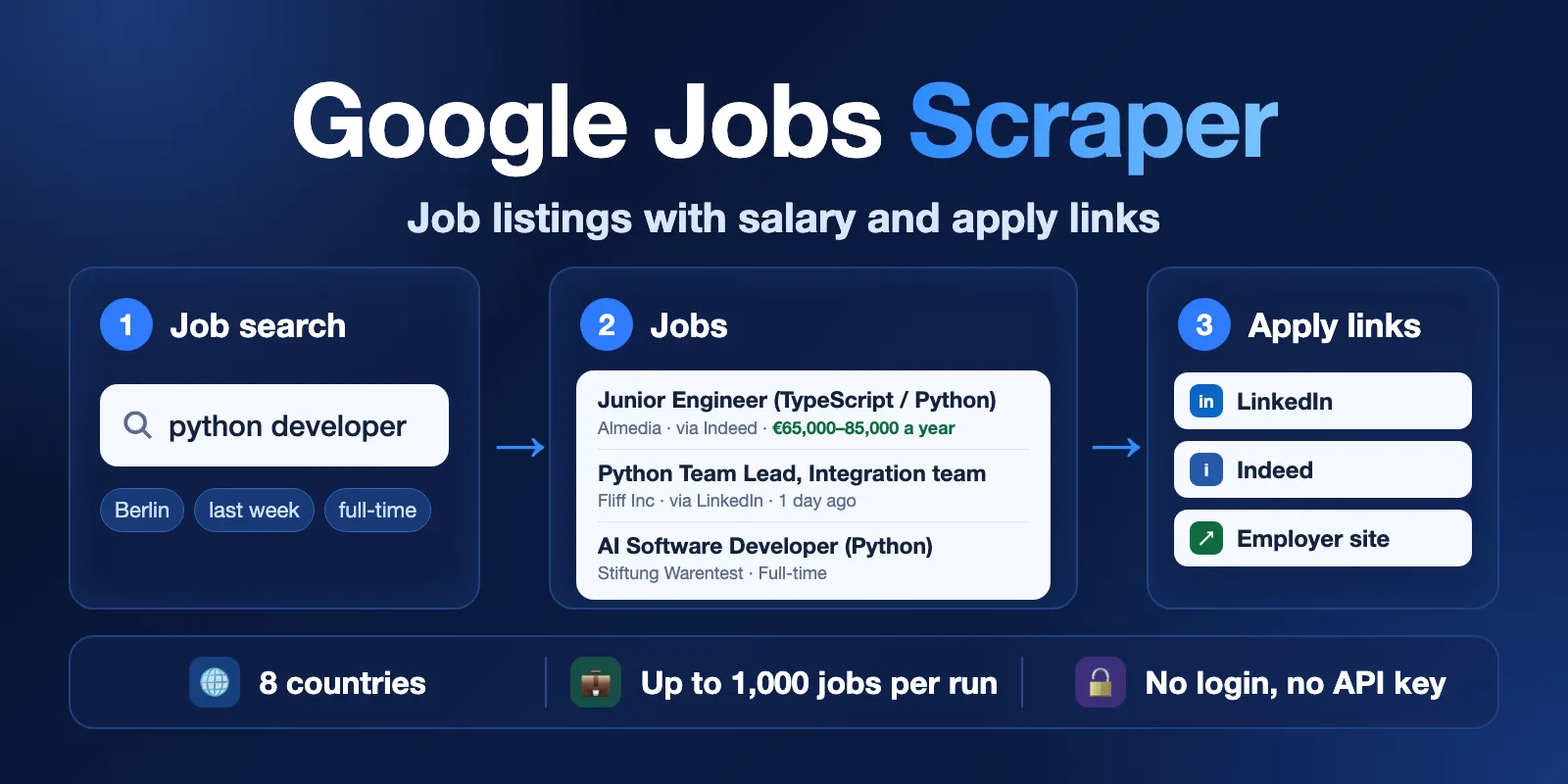
Table of contents
- What it does
- Quick start
- Use cases
- Input
- Output
- Pricing and limits
- API, export and integrations
- Troubleshooting
- FAQ
- Related Actors
- Support
What it does
- You add one or more job searches, for example
python developerorregistered nurse, and a location. - The Actor opens the Google Jobs results page for each search in the right Google country.
- It reads every job card: title, company, location, the site Google found the job on (
via), posting age, salary and job type. - It reads the job panel too: the full description, Google's highlights and all apply links, without tracking parameters.
- It removes duplicate jobs (same Google job id) and saves one Dataset row per job.
- Fast mode reads one Google page per search, about 10 jobs. Deep mode repeats each search with Google's date and job-type filters and removes duplicates, so you get several times more jobs.
Good fit
- Job market research: who hires for a role in a city, and on which job boards.
- Lead lists for recruiters and staffing agencies: companies with open roles, with the link to each job.
- Salary checks: Google's salary text where the job has one.
- A daily job feed for a niche job board, a Slack channel or a spreadsheet.
Not a fit / limits
- 8 countries only: United States, United Kingdom, Canada, India, Germany, France, Spain and Brazil (
countryCode). Google shows the texts in the language of that country, for examplevor 1 TagandVollzeitin Germany. - Google shows about 10 jobs per search page. Fast mode gives about 10 jobs per search; deep mode about 20–70 (our tests). For more jobs, add more searches (up to 50) or more specific titles.
salaryis oftennull: Google shows a salary only for some jobs (0–40 % in our tests).highlightsis oftennullin fast mode: Google does not send this block on many pages. The fulldescriptionis still there.- No recruiter names, emails or phone numbers. The Actor saves only the public job post.
- Google decides which jobs it shows. Two runs a few minutes apart can return a slightly different set or order.
- Google's terms do not allow automated access to Google Search. You are responsible for how you use the data.
Quick start
- Open the Input tab.
- In Job searches (
queries), keeppython developeror add your own job title. - Keep Location
Berlinand Max jobs10, or change them. Countryautopicks the country from the location. - Click Start.
- Open the Output tab. The Jobs table shows
title,company,location,salaryand the apply links.
Expected result: about 10 Python developer jobs in Berlin in Google's order, each with company, posting age and at least one apply link.
Use cases
| Buyer job | Input path | Output entity | Key fields | Next integration |
|---|---|---|---|---|
| Job market research | queries + location, mode: "deep" | Job | title, company, via, postedAt | CSV or Excel export |
| Recruiting lead list | queries like "sales manager" + datePosted: "week" | Job | company, title, location, applyLinks | Google Sheets or CRM through Apify integrations |
| Salary check | queries + location | Job | salary, employmentType, title | Spreadsheet |
| Daily job feed | queries + datePosted: "today" on a schedule | Job | jobId, title, googleJobsUrl | Slack, email or a website through webhooks |
Input
Input fields
| Field | Plain name | Type | Required | Default / prefill | Allowed values | Effect | Example | Recommendation |
|---|---|---|---|---|---|---|---|---|
queries | Job searches | array of strings | yes | prefill ["python developer"] | 1–50 searches | One Google Jobs search per item | ["data analyst", "nurse"] | Use job titles people really write in job posts |
location | Location | string | no | prefill Berlin | City, region or remote | Added to every search | "Austin, TX" | Leave empty to search the whole country |
countryCode | Country | string | no | auto | auto, us, gb, ca, in, de, fr, es, br | Google country and language | "gb" | Keep auto when the location is a known city |
datePosted | Date posted | string | no | any | any, today, 3days, week, month | Only jobs posted in this period | "week" | Use today for a daily feed |
employmentType | Job type | string | no | any | any, fulltime, parttime, contractor, internship | Only jobs of this type | "fulltime" | |
mode | Search depth | string | no | fast | fast, deep | deep repeats each search with Google's filters | "deep" | Use deep when 10 jobs per search are not enough |
maxJobs | Max jobs | integer | no | default 50, prefill 10 | 1–1,000 | Stops the run at this many jobs in total | 200 | Keep the default 900-second timeout for more than 300 jobs |
includeDescription | Include description | boolean | no | true | true / false | false leaves out description and highlights | false | Turn off for smaller rows; the price is the same |
Duplicate searches (same text, any case) run only once. A job that two searches find is saved once. If queries is empty, the run fails at once with INVALID_INPUT and makes no requests. A country outside the list above is rejected by the input form.
Interacting settings
| When | Input A | Input B | Effective behavior | Example | Cost/result effect |
|---|---|---|---|---|---|
| Empty location | location: "" | countryCode | The country name is added to the search, because Google Jobs needs a place | "nurse" → nurse USA | none |
| Country auto | countryCode: "auto" | location | Country from the location; unknown places use the United States | "Lyon" → France | none |
| Date or type filter | datePosted, employmentType | Google's results | Google's own filter, then jobs whose shown date or type does not match are dropped (filteredOut in RUN_SUMMARY). Jobs without a shown date or type are kept | datePosted: "week" | Dropped jobs are free; the page is still charged |
| Deep mode | mode: "deep" | datePosted, employmentType | Up to 9 Google pages per search: the base search, plus one per date filter if datePosted is any, plus one per job type if employmentType is any. With both filters set, deep mode is the same as fast | mode: "deep" | Up to 9 charged pages per search, several times more jobs |
| Job limit | maxJobs | queries | Searches run in order and stop at maxJobs; later searches may not run | maxJobs: 10 with 3 searches | RUN_SUMMARY.stopReason: "MAX_JOBS" |
Input examples
Python jobs in Berlin (prefill)
Expected behavior: one Google Jobs page in Germany (countryCode auto → de).
Expected output: 10 job rows with title, company, via, postedAt and applyLinks.
Limit or cost note: $0.033 on the Free plan; about 10 seconds in our last test.
More jobs per search: deep mode in Houston
Expected behavior: up to 9 Google pages per search (base, 4 date filters, 4 job types); duplicates removed. In our test these two searches found 60 and 59 jobs.
Expected output: 100 jobs with searchVariant showing which search found each job.
Limit or cost note: at most $0.34 on the Free plan (1 start, up to 18 pages, 100 jobs); usually a few minutes.
Output
The Actor saves one row per job in the default Dataset. A search with no jobs gets one free not_found row, and a search that failed gets one free error row, so you always see what happened to each search. A run overview is saved as RUN_SUMMARY in the default Key-value store.
Output fields
| Field | Meaning | Type | Can be empty? | Example / enum | Source / notes |
|---|---|---|---|---|---|
status | Row result | string | no | complete, partial, not_found, error | partial = deep search where some Google pages did not answer |
title | Job title | string | yes | Python Team Lead, Integration team | As the employer wrote it |
company | Employer | string | yes | Fliff Inc | |
location | Job location as Google shows it | string | yes | Berlin, Beliebiger Ort (anywhere) | In the language of the country |
via | Site Google found the job on | string | yes | LinkedIn, Indeed | |
postedAt | Posting age as Google shows it | string | yes | vor 1 Tag, 2 days ago | null when Google shows no date |
postedAtApprox | Approximate posting date | string (YYYY-MM-DD) | yes | 2026-10-14 | fetchedAt minus postedAt |
salary | Salary as Google shows it | string | yes | 65.000 € bis 85.000 € pro Jahr | null = Google shows no salary (not zero) |
employmentType | Job type as Google shows it | string | yes | Full-time, Vollzeit | |
workFromHome | Remote job tag | boolean | yes | true | null when Google does not say |
description | Full job description, plain text | string | yes | We're looking for a Python Team Lead… | null when includeDescription is off |
highlights | Qualifications, Responsibilities, Benefits | array | yes | [{"title": "Qualifications", "items": ["…"]}] | Often null in fast mode |
applyLinks | Where to apply | array | yes | [{"title": "LinkedIn", "url": "https://…"}] | Tracking parameters removed |
jobId | Google's job id | string | yes | eAHxzL0ATotpbjXSAAAAAA== | Same job, same id across runs |
googleJobsUrl | Google page that opens this job | string | yes | https://www.google.de/search?ibp=htl;jobs&… | |
position | Order in this search after removing duplicates | integer | yes | 2 | null on not_found and error rows |
query, searchLocation, countryCode | Your search, your location, the Google country | string | searchLocation yes | python developer, Berlin, de | |
searchVariant | Which deep search found the job | string | yes | datePosted:week | null in fast mode |
source, sourceUrl | Source name and the Google URL that was read | string | no | google_jobs | |
fetchedAt | When the page was read, UTC | string (ISO 8601) | no | 2026-10-15T06:20:55.335Z | |
statusReason, errorCode | Why a row is not complete | string | yes | SOURCE_TIMEOUT | null on complete rows |
null means "Google shows no value"; it never means zero.
Output entities and surfaces
| Situation | Dataset/API/KVS/live view | Result shape | User action |
|---|---|---|---|
| Normal item | Dataset, view Jobs | status: "complete" job row | Use title, company, applyLinks |
| No jobs for a search | Dataset | one free not_found row with statusReason | Try a wider location or another title |
| Partial result | Dataset | status: "partial" rows of a deep search | Run again later for the missing pages |
| Technical failure | Dataset + RUN_SUMMARY | free error row with errorCode; run status PARTIAL or ERROR | Run again later; see Troubleshooting |
| Run overview | Key-value store record RUN_SUMMARY | status, stop reason, counts per search, charged pages and jobs | Check status, stopReason and counts |
Output example
This is one row from the prefill run. The description, one apply link and the end of googleJobsUrl are shortened here. This job has no salary on Google, so salary is null.
Moving from another Google Jobs Actor
Field names are different from other Google Jobs Actors, so this Actor is not a drop-in replacement. Common changes: company_name → company, share_link → googleJobsUrl, job_highlights → highlights, apply_options → applyLinks (with url instead of link), job_id → jobId (Google's own id), search_timestamp → fetchedAt. Google's tag list (extensions) is split into salary, employmentType, postedAt and workFromHome.
Pricing and limits
Pricing unit
This Actor uses pay-per-event pricing. You pay for:
| Event | When it is charged | Price |
|---|---|---|
Actor start (apify-actor-start) | Once per run (runs up to 1 GB memory) | $0.01 |
Search page (search-page) | Each Google Jobs page that Google answered (up to 10 jobs), also a page with no jobs | $0.013 |
Job (job) | Each unique job saved to the Dataset | $0.001 (Free plan), $0.00095 (Bronze), $0.0009 (Silver), $0.00085 (Gold and higher) |
Duplicates, jobs dropped by your date or type filter, not_found rows and error rows are free. Pages that failed are not charged, and a page that answers after maxJobs is reached is not charged. A search with no jobs costs one search page ($0.013). Apify platform usage (compute, proxy, storage) is included; you do not pay it separately.
If you set a maximum charge for the run, the Actor stops before it goes over it: RUN_SUMMARY.status: "CAPPED", stopReason: "CHARGE_LIMIT".
Cost examples
Prices on the Free plan, from our test runs.
| Scenario | Input scope | Pages | Jobs | Total |
|---|---|---|---|---|
| Prefill | 1 search, fast, 10 jobs | 1 | 10 | $0.033 |
| 100 jobs | 10 searches, fast | 10 | 100 | $0.24 |
| 1,000 jobs | 22 searches, deep | 196 | 1,000 | $3.56 |
| Nothing found | 1 search, no jobs | 1 | 0 | $0.023 |
Measured run times: 10 jobs in about 10–60 seconds (up to about 3 minutes when Google answers slowly), 100 jobs in about 2 minutes, 500 jobs in about 8 minutes, 1,000 jobs in about 8–9 minutes. Google answers each page in 4–20 seconds; more memory does not make it faster.
The default run timeout is 900 seconds. If a run reaches its timeout, the Actor stops by itself and keeps what it saved (status: "CAPPED", stopReason: "DEADLINE"). For more than 300 jobs, keep the timeout at 600 seconds or more, or split the searches into several runs.
API, export and integrations
- API: start the Actor with the Apify API and read rows from the default Dataset (view
jobs). - Export: download the Dataset as JSON, CSV, Excel, XML or HTML from the Output tab.
- Scheduling: create a schedule with
datePosted: "today"for a daily job feed. UsejobIdto skip jobs you already have. - Webhooks / no-code: send new rows to Slack, Google Sheets, Make, Zapier or n8n through Apify integrations.
Use with AI agents (MCP)
- MCP server with only this Actor:
https://mcp.apify.com?tools=cliqtomedia/google-jobs-scraper. - Smallest useful input:
- Key output fields:
title(job title),company(employer),location,salary(text ornull),applyLinks(where to apply),status(complete,partial,not_foundorerror). - A 10-job run usually takes 10–60 seconds and costs $0.033 on the Free plan. Keep
maxJobssmall (10–50) andmode: "fast"for agent calls; 1,000 jobs take about 8 minutes.
Troubleshooting
The run failed at once
Symptom: run status FAILED in a few seconds, no rows.
Likely reason: invalid input (INVALID_INPUT), for example no searches.
Check: the run log and RUN_SUMMARY.message.
Action: fix the input and start again.
A search returned one not_found row
Symptom: one row with status: "not_found".
Likely reason: Google Jobs has no jobs for this search, place and filter.
Check: statusReason and sourceUrl; open sourceUrl in a browser.
Action: try a more common job title, a bigger city, or datePosted: "any".
Error rows with SOURCE_TIMEOUT or SOURCE_BLOCKED
Symptom: free error rows with errorCode SOURCE_TIMEOUT, SOURCE_UNAVAILABLE or SOURCE_BLOCKED.
Likely reason: Google did not answer in 60 seconds after retries, or refused the request.
Check: RUN_SUMMARY.http (requests, retries, timeouts, blocked).
Action: run these searches again later. The Actor does not solve CAPTCHAs.
The run stopped with CAPPED and DEADLINE
Symptom: RUN_SUMMARY.status: "CAPPED", stopReason: "DEADLINE", fewer jobs than maxJobs.
Likely reason: the run timeout was too short for the number of jobs.
Check: the run timeout in the run options.
Action: keep the default 900 seconds, or split the searches into several runs. Searches that did not start get free error rows.
Fewer jobs than maxJobs
Symptom: the run is COMPLETE with fewer jobs than you asked for.
Likely reason: in fast mode Google shows about 10 jobs per search; filters drop jobs that do not match.
Check: RUN_SUMMARY.counts (jobs, duplicates, filteredOut).
Action: use mode: "deep" or add more searches.
FAQ
Do I need a Google account or API key?
No. The Actor reads the public Google Jobs results page without login, cookies or keys.
Is this the official Google Jobs API?
No. Google has no public API for Google Jobs search results. This Actor is not made by or linked to Google.
Why are some texts in German or French?
Google shows jobs in the language of the country you search. Search in Germany, and postedAt says vor 2 Tagen and employmentType says Vollzeit. postedAtApprox gives a date that is the same in every language.
Why is salary empty for most jobs?
Google shows a salary only when the job post or job board gives one. The Actor does not guess: no salary on Google means salary: null.
Can I get the recruiter's email or phone?
No. The Actor saves only the public job post and does not collect personal contact data.
Related Actors
- Remote Jobs Aggregator — remote jobs from RemoteOK, We Work Remotely and Himalayas.
- Greenhouse Jobs Scraper & Monitor — all jobs of a company that you found on Google, straight from its Greenhouse job board.
- Lever Job Scraper — the same for companies on Lever.
Support
For bugs, questions or feature requests, open an issue on the Issues tab of this Actor. Include the run ID, your input and the error text. Never send tokens, cookies or private data.


