

YouTube Playlist Export (Data API), No Login
Pricing
from $0.21 / 1,000 playlist videos
YouTube Playlist Export (Data API), No Login
Export every video of a YouTube playlist to CSV, Excel or JSON: position, title, channel, date, duration, views and likes. Up to 20,000 videos per playlist. Official Data API with your own free key. No login.
Pricing
from $0.21 / 1,000 playlist videos
Rating
0.0
(0)
Developer

Cliqto Media
Maintained by CommunityActor stats
0
Bookmarked
2
Total users
1
Monthly active users
4 days ago
Last modified
Features
Share
YouTube Playlist Export turns public YouTube playlists into a table: one row per playlist position, with the video title, channel, publish date, duration, views, likes, comments and link. You paste playlist links or IDs and add your own free YouTube Data API v3 key, and you get the whole playlist in the same order as on YouTube. The price is $0.30 per 1,000 videos on the Free plan.
The Actor uses only the official YouTube Data API v3: no login, no cookies, no proxy and no page scraping. You need an API key. Without a key the run returns one api_key_required row and stops. Getting a key is free and takes about 5 minutes (how).
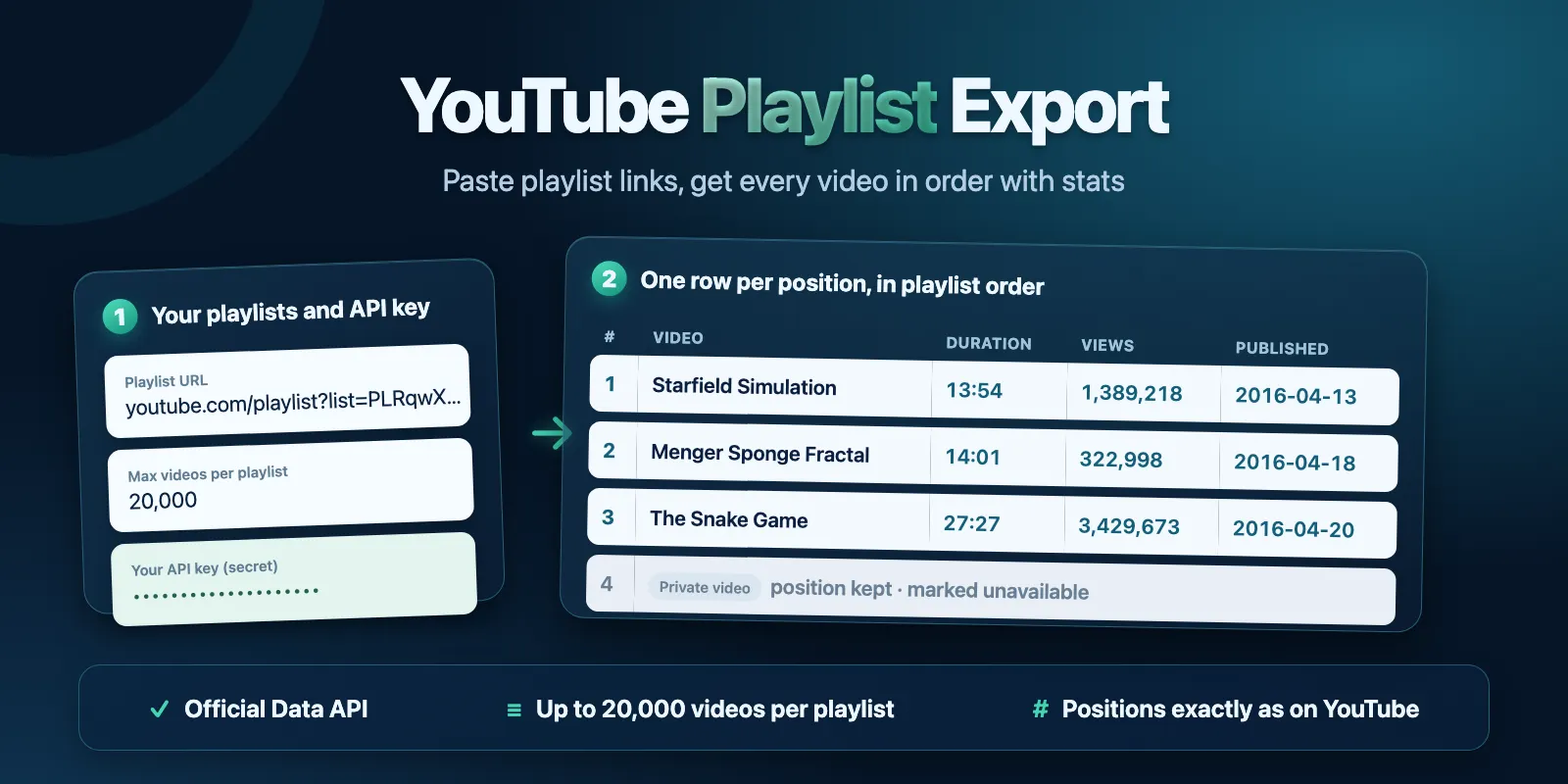
Table of contents
- What it does
- Get your API key
- Quick start
- Input
- Input examples
- Output example
- Output fields
- Pricing and cost examples
- Use cases
- API, export and AI agents
- Limits and partial results
- Troubleshooting
- FAQ
- Related Actors
- Support
What it does
You give one or more playlists. For each playlist the Actor reads the playlist name and owner, then walks the playlist 50 entries at a time and saves one row per entry:
positionis the place in the playlist, starting at 1, exactly as in the YouTube player.- A private or deleted video keeps its position. Its row has status
unavailableandunavailableReason(privateordeleted), so there are no holes and no renumbering. - With Include duration and view/like/comment counts on (the default), each row also has
durationSec,views,likesandcomments. nullmeans "no value from YouTube" (for example, hidden likes). It is never written as0.- Accepted inputs:
youtube.com/playlist?list=…, a watch link with&list=…,youtu.be/…?list=…,music.youtube.complaylist links,m.youtube.comlinks, or bare playlist IDs (PL…,UU…,OL…and others). The same playlist given twice is exported once. - A channel's uploads playlist works too: take the channel ID
UC…and change the first two letters toUU. If you paste a channel link, the row tells you this ID.
Good fit
- You need the full list of videos of a course, podcast, music or tutorial playlist in a sheet.
- You audit or catalog many playlists and need exact positions and numbers.
- You want an official, stable data source with a clear quota.
Not a fit
- You have no API key and do not want one. This Actor does not work without a key.
- Watch later and Liked videos (
WL,LL) and private playlists. Google gives them only to their owner after a sign-in, never with an API key. - Comments, transcripts or search results. See Related Actors.
Get your API key
The key is free.
- Open the Google Cloud Console and make or pick a project.
- Go to APIs & Services → Library, find YouTube Data API v3 and click Enable.
- Go to APIs & Services → Credentials → Create credentials → API key.
- Copy the key into the YouTube Data API key field of this Actor.
Tip: in the key settings, limit the key to YouTube Data API v3 only.
Quota cost for you. Google gives each project 10,000 quota units per day for free. Every request of this Actor costs 1 unit:
- 1 unit per 50 playlist entries;
- 1 more unit per 50 videos when Include duration and view/like/comment counts is on;
- 1 unit per run for the playlist names (up to 50 playlists).
| Videos in a run | Quota units with counts | Without counts | Share of the free daily quota (with counts) |
|---|---|---|---|
| 10 (the prefill) | 3 | 2 | 0.03% |
| 200 | 9 | 5 | 0.09% |
| 1,000 | 41 | 21 | 0.4% |
| 20,000 | 801 | 401 | 8% |
The quota resets at midnight Pacific Time. You can see your usage in Google Cloud Console → APIs & Services → YouTube Data API v3 → Quotas. Google does not charge money for this quota. See the Google quota page.
The key is a secret field: Apify stores it encrypted. The Actor sends it only to Google, in a request header. It never writes the key to the dataset, the logs or the run summary, and it removes it from any error text.
Quick start
- Get a key (see above).
- The Playlist URLs or IDs field already has one example playlist, and Max videos per playlist is set to 10.
- Paste your key into YouTube Data API key.
- Click Start. Ten videos take a few seconds.
- Open the Videos view of the dataset, or download it as CSV, Excel or JSON.
To export whole playlists, set Max videos per playlist higher (the default is 200, the maximum is 20,000).
If you click Start without a key, the run still ends as SUCCEEDED, with one api_key_required row that tells you how to get a key. Nothing is fetched and no video is charged. Apify charges the Actor start fee for every run, including this one (see Pricing).
Input
| Field | Type | Required | Default | Range | What it does |
|---|---|---|---|---|---|
playlistUrls | array of strings | yes | prefill: 1 example playlist | 1–100 playlists | Playlist links or IDs, one per line. The same playlist twice is exported once. |
apiKey | string, secret | yes, for real data | none | — | Your YouTube Data API v3 key. Without it you get one api_key_required row. |
maxItems | integer | no | 200 (prefill 10) | 1–20,000 | Stop each playlist after this many entries. Private and deleted entries count too. |
includeStats | boolean | no | true | — | Fill durationSec, duration, views, likes, comments. Costs 1 more quota unit per 50 videos. The Apify price is the same. |
maxItems works per playlist: with 3 playlists and maxItems 100 you get up to 300 rows.
Input examples
One playlist, first 10 videos (the prefill plus your key)
Whole playlists, titles and dates only (half the quota)
The second line is the same playlist as the first, so it is exported once.
Output example
A real row (the description is cut here):
A private video in another playlist (fields that are null are left out here):
Output fields
The Videos view shows the main columns. The Status and errors view shows the status, error code and message of every row; sort or filter it by status to find rows that are not ok.
| Field | Type | Can be null | Example | Meaning |
|---|---|---|---|---|
status | string | no | ok | Row status, see the table below. |
playlistId | string | yes | PLRqwX-V7Uu6… | Playlist ID. null for a line that is not a playlist. |
playlistTitle | string | yes | Coding Challenges | Playlist name. |
playlistChannelTitle | string | yes | The Coding Train | Who owns the playlist. |
playlistUrl | string | yes | https://www.youtube.com/playlist?list=… | Playlist link. |
position | integer | yes | 1 | Place in the playlist, from 1. null only for status rows. |
videoId | string | yes | 17WoOqgXsRM | Video ID. |
url | string | yes | https://www.youtube.com/watch?v=…&list=… | Opens the video inside the playlist. |
title | string | yes | Coding Challenge 1: Starfield Simulation | Video title. null for private and deleted videos. |
description | string | yes | Video description. | |
channelTitle, channelId | string | yes | The Coding Train | Who uploaded the video. It can differ from the playlist owner. |
publishedAt | string, ISO date UTC | yes | 2016-04-13T03:17:50Z | When the video was published. |
addedAt | string, ISO date UTC | yes | 2016-04-13T03:17:51Z | When the video was added to the playlist. |
durationSec | integer | yes | 834 | Length in seconds. null for a live or upcoming stream, or when counts are off. |
duration | string | yes | PT13M54S | Length as YouTube gives it (ISO 8601). |
views, likes, comments | integer | yes | 1389218 | Counts. null when the owner hides them, or when counts are off. |
thumbnailUrl | string | yes | https://i.ytimg.com/vi/…/maxresdefault.jpg | Biggest thumbnail. |
privacyStatus | string | yes | public | public, unlisted, private or privacyStatusUnspecified. |
unavailableReason | string | yes | private | private, deleted or unknown, for unavailable rows. |
errorCode, message | string | yes | PLAYLIST_NOT_FOUND | Reason, for rows that are not ok. |
input | string | yes | Your original line, as you typed it. | |
source | string | no | youtube-data-api-v3 | Data source. |
fetchedAt | string, ISO date UTC | no | 2026-10-22T05:14:19.638Z | When the run read the data. |
Row statuses
status | When | Charged |
|---|---|---|
ok | A video at this position | playlist-video event |
unavailable | The video at this position is private or deleted | small empty-result event |
not_found | The playlist does not exist, or it is private | small empty-result event |
invalid_input | The line is not a playlist (for example a channel link, WL or LL) | small empty-result event |
api_key_required | No key in the input (one row per run) | no event |
api_key_error | Google rejected the key, or the API is not enabled for it (one row per run) | no event |
quota_exceeded | Your daily quota ran out (one row) | no event |
error | Google kept failing for a playlist after retries | no event |
Run summary
The run's key-value store has a RUN_SUMMARY record: run status (SUCCEEDED, PARTIAL, EMPTY, API_KEY_REQUIRED, API_KEY_ERROR, QUOTA_EXCEEDED, INVALID_INPUT, ERROR), stop reason (QUOTA_LIMIT, CHARGE_LIMIT, TIME_LIMIT, SOURCE_ERROR, ABORTED or none), row counts, quota units used, and one line per playlist with its outcome and size. The run's status message says the same in one line, for example Exported 10 videos from 1 playlist(s).
Pricing and cost examples
Pay per event. Apify platform usage is included. Google does not charge for the API quota.
| Event | When | Free | Bronze | Silver | Gold and above |
|---|---|---|---|---|---|
| Actor start | once per run, charged by Apify automatically | $0.0008 | $0.0008 | $0.0008 | $0.0008 |
| Playlist video | per ok row | $0.0003 | $0.00027 | $0.00024 | $0.00021 |
| Empty result | per unavailable, not_found or invalid_input row | $0.00003 | $0.00003 | $0.00003 | $0.00003 |
That is $0.30 per 1,000 videos on the Free plan and $0.21 on Gold. Include duration and view/like/comment counts does not change the price.
| Example run | Free | Bronze | Silver | Gold+ |
|---|---|---|---|---|
No key (one api_key_required row) | $0.0008 | $0.0008 | $0.0008 | $0.0008 |
| 10 videos (the prefill) | $0.0038 | $0.0035 | $0.0032 | $0.0029 |
| 100 videos | $0.031 | $0.028 | $0.025 | $0.022 |
| 1,000 videos | $0.30 | $0.27 | $0.24 | $0.21 |
| 20,000 videos | $6.00 | $5.40 | $4.80 | $4.20 |
| 100 entries, all private or deleted | $0.0038 | $0.0038 | $0.0038 | $0.0038 |
Every run pays the start fee, also a run without a key or with a wrong key. Apify charges it automatically when a paid Actor starts. Put many playlists in one run instead of many small runs.
Set Maximum cost per run in the run options to cap a run. The Actor checks the limit before it saves each page of rows. It stops before a charge would go above the limit, keeps what it saved and ends as PARTIAL with reason CHARGE_LIMIT.
Use cases
| Buyer job | Input | Key fields | Next step |
|---|---|---|---|
| Course or tutorial outline | the course playlist | position, title, durationSec, url | Make a syllabus or a watch plan with total hours |
| Audit a channel's playlists | the channel's playlist links | views, likes, publishedAt, unavailableReason | Find weak, private or deleted videos |
| Archive or back up a playlist | any public playlist | videoId, title, channelTitle, addedAt | Keep a record of what was in it |
| Content research | competitor playlists | title, views, durationSec, publishedAt | Compare topics, length and reach |
| Catalog for an app or model | many playlists | all fields | Join on videoId or playlistId |
API, export and AI agents
- Export: download the dataset as JSON, CSV, Excel, XML or HTML.
- API: start a run with
POST https://api.apify.com/v2/acts/cliqtomedia~youtube-playlist-export/runsand the input JSON. Read rows from the run's default dataset. - Scheduling: use an Apify Schedule to export the same playlists every day or week and see new videos and new counts. The Actor does not keep data between runs.
- Integrations: Make, Zapier, n8n, webhooks and Google Sheets work through the standard Apify integrations. Use
playlistId+positionorvideoIdas a key.
Use with AI agents (MCP)
- MCP server with only this Actor:
https://mcp.apify.com?tools=cliqtomedia/youtube-playlist-export - Smallest useful input:
{"playlistUrls": ["PLRqwX-V7Uu6ZiZxtDDRCi6uhfTH4FilpH"], "maxItems": 10, "apiKey": "<the user's key>"} - Key output fields:
position,title,videoId,durationSec,views,status. - 10 videos take a few seconds. In our tests 1,000 videos took about 10 seconds and 20,000 videos about 5 minutes.
- The agent needs the user's own YouTube Data API key. Without it the run returns
api_key_required.
Limits and partial results
- Up to 100 playlists per run and up to 20,000 entries per playlist. We tested one run with 20,000 videos: done in about 300 seconds, 801 quota units, 79 MB of memory.
- YouTube itself gives at most 20,000 entries for a channel's uploads (
UU…) playlist, so very big channels are cut there. - The default run timeout is 600 seconds. For more than about 30,000 videos in one run, set a higher timeout in the run options. The Actor stops reading at 30 minutes or 20 seconds before the timeout, whichever comes first, keeps the saved rows and ends as
PARTIALwith reasonTIME_LIMIT. - If your daily quota runs out during a run, the Actor keeps the rows it saved, ends as
PARTIALwith reasonQUOTA_LIMIT, and the run SUCCEEDED. Run the rest after the quota resets. - If Google keeps failing for two playlists in a row, the run keeps saved rows and ends with reason
SOURCE_ERROR. - Counts are live at
fetchedAtand change all the time.
Data comes from the YouTube Data API v3 under your own key and Google project. Please follow the YouTube API Services Terms of Service: they say you should not keep statistics such as views and likes for more than 30 days without refreshing them. Refresh them with a new run, or delete old datasets. This Actor is not affiliated with or endorsed by YouTube or Google.
Troubleshooting
I got one api_key_required row
The YouTube Data API key field is empty. Get a key and run again.
I got one api_key_error row
Likely reasons: a typo in the key, the key was deleted, YouTube Data API v3 is not enabled in the key's project, or the key is limited to other APIs or websites. Check APIs & Services → Enabled APIs in Google Cloud Console. Enable the API, or make a new key.
The run ended with QUOTA_LIMIT
Your project used its 10,000 daily units. The rows saved before that are kept. Run again after midnight Pacific Time, or turn off Include duration and view/like/comment counts to use half the quota.
A playlist gives not_found
The playlist was deleted, is private, or the ID has a typo. Open playlistUrl in a browser while signed out. Only public and unlisted playlists can be read.
A line gives invalid_input
The line is not a playlist link or ID. For a channel link, the message gives the channel's uploads playlist ID (UU…): paste that instead. WL and LL are private to their owner. If no line in the run is a playlist, the run ends as FAILED with status INVALID_INPUT; the Actor start and the invalid_input rows are still charged as shown above.
Some rows are unavailable
The video at that position is private or deleted. YouTube hides its title and channel, so only the position, videoId and addedAt are known.
FAQ
Do I need a YouTube or Google account?
You need a Google account to make the free API key. The Actor does not log in to YouTube and does not use cookies.
Why are some positions not in a row 1, 2, 3?
They are. Every entry gets a row, also private and deleted ones, so position always matches the YouTube player. Filter by status = ok if you want only playable videos.
Can I export my Watch later or Liked videos?
No. Google serves these lists only to their owner after a sign-in (OAuth). An API key cannot read them. You can copy the videos into a normal public or unlisted playlist first.
Does it cost Google money?
No. The YouTube Data API is free within the daily quota. You pay only the Apify price above.
Is personal data included?
Only public playlist and video data that YouTube shows: playlist and channel names and IDs. No viewer data.
Related Actors
- YouTube Search Results Scraper — find videos by keyword.
- YouTube Comments Scraper — get the comments of a video from your playlist.
- YouTube Subtitles & Transcript Scraper — get the text of the videos.
Support
For a bug, question or feature request, open an issue on the Actor's Issues tab. Add the run ID and your input, but never post your API key.


