

Property Price Tax History
Pricing
from $11.00 / 1,000 results
Property Price Tax History
Property price and tax history scraper that pulls records in bulk by property ID, listing URL, or address.
Pricing
from $11.00 / 1,000 results
Rating
0.0
(0)
Developer

Luffy
Maintained by CommunityActor stats
0
Bookmarked
2
Total users
0
Monthly active users
5 months ago
Last modified
Categories
Share

Property Price & Tax History
Property Price & Tax History is an Apify actor that pulls price history and tax history records for residential and commercial properties. Give it a list of property IDs, listing URLs, or street addresses, and it returns structured data you can analyze, export, or feed into your own workflows.
If you work in real estate research, investment analysis, or market comparisons, knowing what a property sold for five years ago and what its tax bill looked like is basic due diligence. This actor handles the fetch layer so you're not clicking through listing pages one at a time.
Use cases
- Investment due diligence: pull the full price and tax history for a target property before making an offer
- Market trend analysis: batch-fetch price history for hundreds of properties to find pricing patterns across a neighborhood over time
- Tax assessment research: compare annual assessed values against sale prices across a portfolio or geographic area
- Portfolio monitoring: run on a schedule to keep historical records current as new transactions get recorded
- Data pipeline work: feed structured output directly into spreadsheets, databases, or BI tools via Apify integrations
- Academic and journalistic research: collect property transaction data for housing market studies or investigative reporting
What data does this actor extract?
For each property, the actor returns price history and tax history in a single structured record. Price history includes sale dates, sale prices, listing dates, and price change events. Tax history includes annual records with assessed value and tax amount. Each record also carries the original input value you provided so you can trace results back to your source list.
Input
| Parameter | Type | Description |
|---|---|---|
zpidIds | array of strings | Property IDs, one per line. Each ID is fetched as a separate property. |
listingUrls | array of strings | Listing page URLs, one per line. Both URL formats are supported (see below). |
addressQueries | array of strings | Full street addresses, one per line. |
You need at least one of zpidIds, listingUrls, or addressQueries. You can mix all three input types in a single run.
URL formats
The actor handles two listing URL formats:
With property ID in the URL:
The property ID is extracted directly from the URL. No extra lookup needed.
Without property ID in the URL:
The actor extracts the address slug from the path, looks up the property ID automatically, then fetches the history. Both formats produce identical output.
Example input
Output
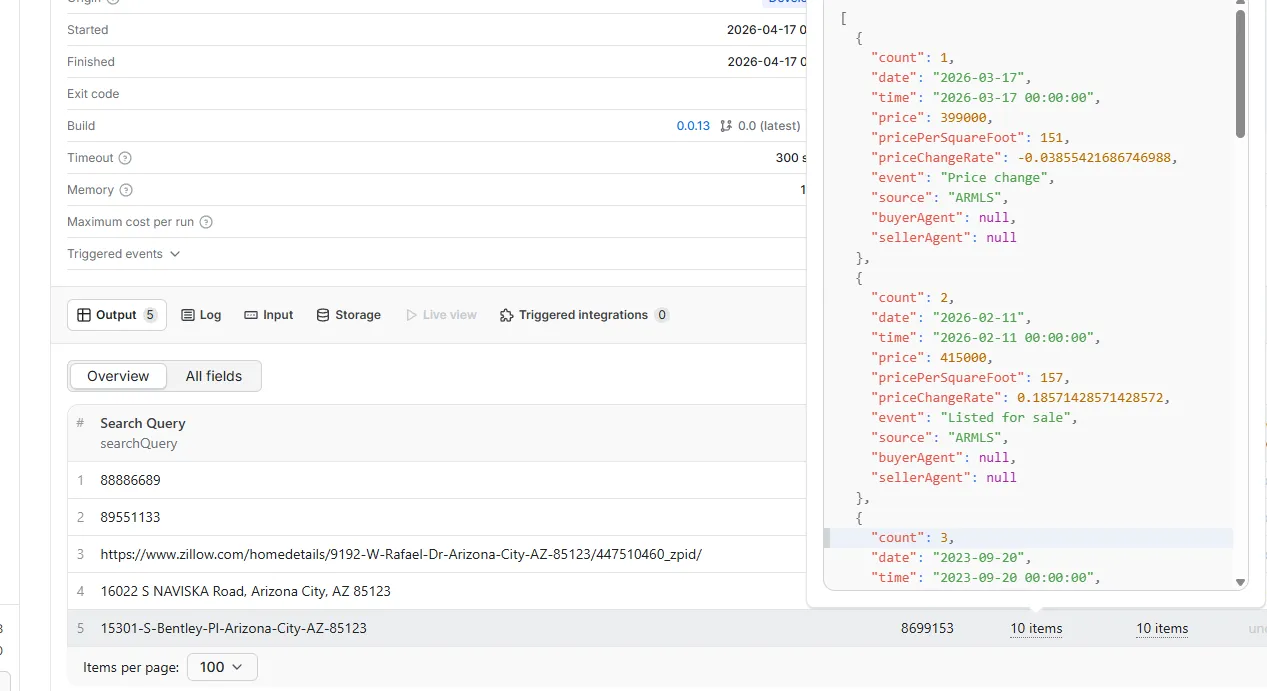
Results land in an Apify dataset, one record per property. A typical record looks like this:
Output fields
| Field | Type | Description |
|---|---|---|
searchQuery | string | The original input value used to look up this property (ID, URL, or address) |
zpid | string | Property ID |
priceHistory | array | Price events in reverse chronological order (date, price, event type) |
taxHistory | array | Annual tax records (year, tax paid, assessed value) |
error | string | Present only if the fetch failed after all retry attempts |
fetchedAt | string | ISO 8601 timestamp of when the record was retrieved |
If a property fetch fails after all retry attempts, the actor writes an error record with the error and searchQuery fields instead of crashing. The rest of your batch keeps running.
How it works
- The actor reads your input list. You can pass property IDs, listing URLs, or street addresses in any combination.
- For URLs that contain a property ID, the ID is extracted directly with no extra request.
- For URLs without a property ID, the address slug in the path is used to look up the property ID first.
- For street addresses, the actor looks up the property ID before fetching history.
- Once the property ID is known, the actor fetches price and tax history and pushes the result to your dataset.
- If a request fails, the actor retries up to 5 times before moving on.
FAQ
What input formats does this actor support?
Three: property IDs, listing URLs, and full street addresses. You can mix all three in a single run. The actor processes each entry independently and combines everything into one dataset.
How many records does this actor return per property?
Up to 10 price history records and 10 tax history records per property.
Can I run this on a schedule?
Yes. Connect it to the Apify scheduler to pull fresh data at whatever interval makes sense for your workflow.


