
Meta Facebook Ads Library Scraper
Pricing
from $2.00 / 1,000 results
Meta Facebook Ads Library Scraper
Scrape ads from the Facebook (Meta) Ad Library by keyword, advertiser page, ad ID or URL: ad copy, images, videos, dates, platforms, spend and impressions ranges, EU reach and targeting. Filters for country, status, media and dates. Cache for new ads only. Export JSON, CSV or Excel.
Pricing
from $2.00 / 1,000 results
Rating
0.0
(0)
Developer

ActorFlow
Maintained by CommunityActor stats
0
Bookmarked
2
Total users
1
Monthly active users
a day ago
Last modified
Categories
Security
Limited permissionsShare
Facebook Ads Library (Meta Ad Library) Scraper - Ads by Keyword or Page
Scrape ads from the Facebook Ads Library (facebook.com/ads/library) by keyword, advertiser page, ad ID or Ad Library link: ad copy, images, videos, carousel cards, dates, platforms and call to action, plus spend, impressions, EU reach and targeting where the library shows them. Type a brand, press Start, and export JSON, CSV or Excel, or call it as an API.
Target website: facebook.com/ads/library
✨ Features of this Facebook Ads Library scraper
- Ad extraction — ad text, headline, link, call to action, images, videos (HD and SD), carousel cards, display format, start and end dates, active status and platforms (Facebook, Instagram, Messenger, Audience Network, Threads).
- Four ways to search — keywords, advertiser pages (page ID, page URL or just the page name), single ad IDs, or any Ad Library link copied from your browser with its filters.
- Advertiser details — page name, URL, likes, categories, and with details on also Instagram account and followers, verification, about text and lifetime spend.
- Spend, impressions and reach — spend and impression ranges for political and issue ads, who paid for the ad, and for ads shown in the EU the targeted age, gender, locations and reach breakdown.
- Filters — country (one, several or all), active or inactive, ad category, image, video or meme, platform, language, start date range, exact phrase, and sort by impressions.
- Count only mode — one row per search with the number of ads the library shows, for tracking how many ads a brand runs.
- Pagination support — the library is scrolled like a visitor, and searches too big to scroll through are split automatically by country, date and filters.
- Cache for new ads only — scheduled runs return only ads not seen before.
- Proxy support — runs work from any Apify proxy.
🚀 How to scrape Facebook ads in 5 steps
- Sign up for a free Apify account — includes $5 monthly credit.
- Open the actor page and click Try for free.
- Add a keyword such as a brand name, or an advertiser page.
- Click Start and wait for the run to complete.
- Download results from the Output tab in JSON, CSV, or Excel format.
You can also run this actor via the Apify API or integrate it directly into your workflows using Zapier, Make, or n8n.
💰 Pricing for the Facebook Ads Library scraper
This actor uses pay-per-result billing: you pay for each ad saved. Ads skipped by the cache are not charged.
- New Apify accounts include $5 of free monthly credit.
- Turning on ad details opens a panel per ad and makes runs slower.
🖼️ Facebook Ads Library scraper input screenshot
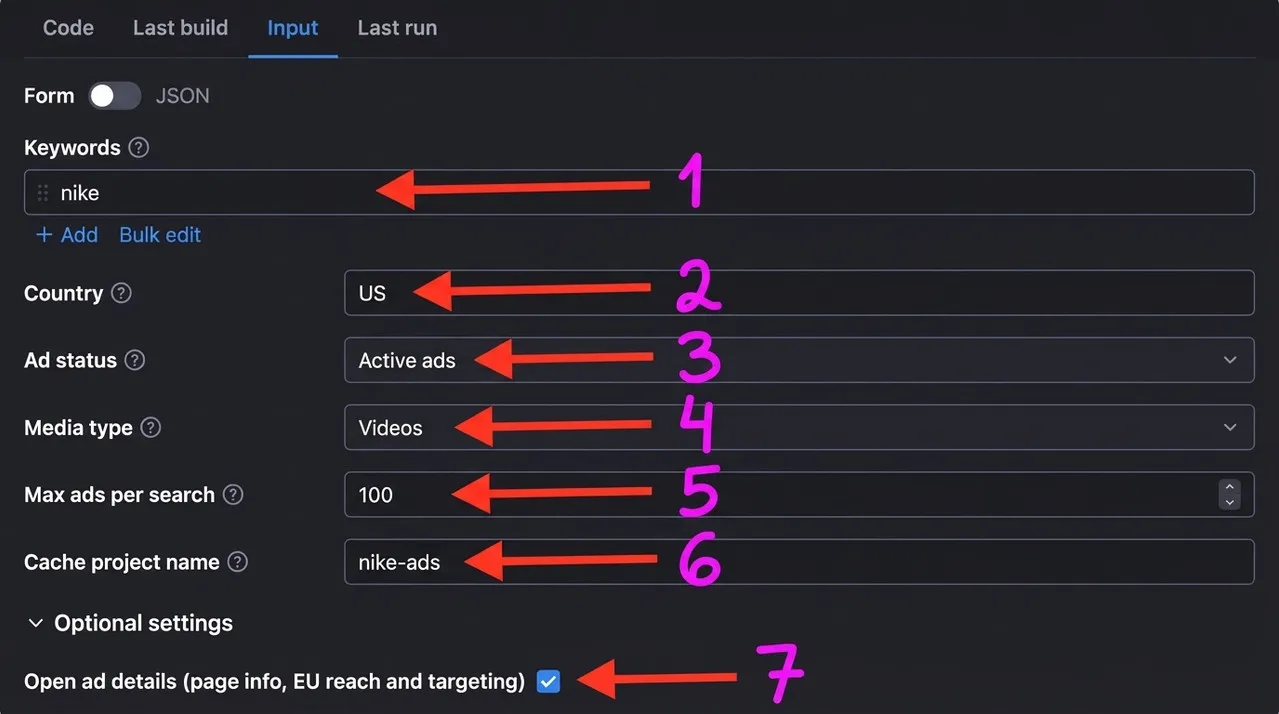
The numbers match the input fields below:
- Keywords: brands or topics to search for in the Ad Library.
- Country: the country whose ads are searched.
- Ad status: active ads, inactive ads or all ads.
- Media type: all ads, or only images, videos or memes.
- Max ads per search: the ad limit for each search.
- Cache project name: reuse the same name on each run to get only new ads.
- Open ad details (page info, EU reach and targeting): adds the advertiser's page info and, for EU ads, targeting and reach.
🔧 Facebook Ads Library scraper input configuration
| Field | Type | Required | Default | Description |
|---|---|---|---|---|
| Keywords | array | — | ["nike"] | Search by brand or phrase. One search per keyword. |
| Advertiser pages | array | — | — | Page IDs, Facebook page URLs or page names. Lists every ad of the advertiser. |
| Ad Library URLs | array | — | — | Ad Library search, advertiser or single ad links; their filters are kept. |
| Ad IDs | array | — | — | Library IDs of single ads. |
| Country | string | — | US | Country code, several separated by commas, or ALL. One search per country. |
| Ad status | string | — | active | active, inactive or all. |
| Ad category | string | — | all | All ads, political and issue, housing, employment or credit ads. |
| Media type | string | — | all | all, image, video, meme or none. |
| Platforms | array | — | — | Only ads shown on these platforms. |
| Ad languages | array | — | — | Language codes of the ad text, like en, de. |
| Date range | string | — | — | Ads started in the last 24 hours, 7, 14 or 30 days. |
| Started after / before | string | — | — | Start date window, YYYY-MM-DD. |
| Match exact phrase | boolean | — | false | Search the keyword as one phrase. |
| Sort by | string | — | relevance | Relevance or impressions. |
| Only count the ads | boolean | — | false | One row per search with the total number of ads. |
| Max ads per search | integer | — | 5 | Limit for each keyword, page or URL. |
| Max ads in total | integer | — | — | Optional limit for the whole run. |
| Cache project name | string | — | — | Same name on each run returns only new ads. |
| Open ad details | boolean | — | false | Adds page info, payer and EU targeting and reach. |
| Proxy configuration | object | — | Residential | Proxy settings for the run. |
Supported URL types:
https://www.facebook.com/ads/library/?active_status=active&ad_type=all&country=US&q=nike&search_type=keyword_unorderedhttps://www.facebook.com/ads/library/?view_all_page_id=15087023444&country=US&active_status=allhttps://www.facebook.com/ads/library/?id=1550534860016399
📦 Facebook Ads Library scraper output data
Each row is one ad in JSON with the fields adArchiveId, adUrl, collationId, collationCount, pageId, pageName, pageUrl, pageProfilePictureUrl, pageLikeCount, pageCategories, isActive, startDate, endDate, platforms, displayFormat, adText, title, linkDescription, caption, linkUrl, ctaText, ctaType, images, videos, videoPreviewImages, cards, paidForBy, categories, spend, currency, impressions, reachEstimate, targetedOrReachedCountries, pageAlias, pageIgUsername, pageIgFollowers, pageVerification, pageAbout, pageLifetimeSpend, payer, beneficiary, euTargetsEu, euTotalReach, euAgeMin, euAgeMax, euGender, euLocations, euReachBreakdown, detailsScraped, changeType, searchInput, totalAds and scrapedAt. Fields that do not apply to an ad are null.
The dataset has 2 views: Overview (advertiser, dates, copy, format, link) and Spend and reach (payer, spend, impressions and EU reach for political and issue ads).
Output at a glance:
| Ad | Advertiser | Started | Active | Format | CTA | Platforms |
|---|---|---|---|---|---|---|
| 1550534860016399 | Perfect themes | 2026-05-19 | true | IMAGE | Install now | 5 |
| 962050096457659 | Depop | 2026-09-11 | true | IMAGE | Shop now | 3 |
| 8932462163548008 | Shiekh Shoes | 2025-02-03 | true | DPA | Shop now | 4 |
Sample output (raw JSON):
🔁 Scrape only new Facebook ads with the cache
Set the same Cache project name on every scheduled run. Ads already saved under that name are skipped, not charged and not counted towards Max ads per search, and each new ad gets changeType: "new". Different names keep separate caches, so you can follow one brand per project. Use an Apify Schedule to run it daily or weekly.
🐍 How to scrape Facebook ads with Python, JavaScript or the API
Run the actor programmatically with the official Apify clients. Replace <YOUR_API_TOKEN> with the token from your Apify Console.
Python (pip install apify-client):
JavaScript (npm install apify-client):
cURL — start a run and wait for the dataset:
💡 What you can use Facebook Ads Library data for
- Competitor ad monitoring: see every creative, offer and call to action a rival runs.
- Creative research: collect images, videos and carousels for a niche to find what works.
- Political and issue ad tracking: spend, impressions and who paid for the ad.
- EU ad transparency research: targeting, age, gender and reach by country.
- Ad volume tracking over time with the count only mode.
Marketers, agencies, e-commerce brands, journalists and researchers use this data across advertising, politics, retail and media.
⚠️ Limitations of the Facebook Ads Library scraper
- Public data only — the actor sees what the Ad Library shows to a visitor who is not logged in.
- Spend and impressions — shown by the library only for political and issue ads; targeting and reach only for ads shown in the EU.
- Speed — ads load in groups of about 10 per scroll, so large runs take time, and opening ad details makes them slower.
- Very big searches — the library stops after a few hundred ads per search; the actor splits big searches into narrower ones, but heavy filters work best.
❓ Facebook Ads Library scraper FAQ
Can I scrape the Facebook Ads Library legally?
The actor only collects ads that the Meta Ad Library shows publicly, without logging in. Scraping publicly available data is generally considered lawful (see hiQ Labs v. LinkedIn), but you are responsible for following Meta's terms and applicable laws such as GDPR when you use the data.
What data does the Facebook Ads Library scraper return?
Ad copy, headline, link, call to action, images, videos, carousel cards, dates, status, platforms and the advertiser page. With Open ad details it adds the advertiser's Instagram account, about text, lifetime spend, payer and EU targeting and reach.
How many ads can I scrape from one search?
Max ads per search applies to each keyword, page or URL, and Max ads in total limits the whole run. The library scrolls a few hundred ads at a time, so bigger searches are split into narrower ones by date, country and filters.
Do I need a proxy to scrape the Facebook Ads Library?
The input defaults to residential proxies, which work reliably. Runs also work without a proxy or with datacenter proxies, though results can vary.
How do I scrape the Facebook Ads Library with Python?
Use the Python example above, then iterate over the dataset items.
Can I run this Facebook ads scraper on a schedule?
Yes, with Apify Schedules. Add a Cache project name and every run returns only ads not seen before under that name.
What output formats are supported?
JSON, CSV, Excel, XML and RSS, either from the Output tab or through the Apify API.
Why do some ads have no spend or impressions?
The Ad Library publishes spend and impression ranges only for political and issue ads, and targeting only for ads delivered in the EU, so those fields are null for other ads.
🔗 Relevant actors for Facebook ads data
| Scraper | Description |
|---|---|
| Google Ads Transparency Center Scraper | Scrape ads from the Google Ads Transparency Center by advertiser or domain. |
| TikTok Ad Library Scraper | Scrape ads from the TikTok Ad Library by keyword or advertiser. |
| Facebook Events Scraper | Scrape public Facebook events by keyword, location and date, no login. |
🔗 Other actors you may find useful
| Scraper | Description |
|---|---|
| Kiwi.com Flight Scraper | Scrapes flight prices and routes from Kiwi.com. |
| Total Wine Scraper | Scrape Total Wine & More products, prices and stock. |
| Carousell Products Scraper | Scrape Carousell listings with prices and seller details. |
| WHOIS Domain Lookup Scraper | Bulk WHOIS lookups for domain owners and dates. |
| Incidecoder Scraper | Scrapes skincare products and ingredient analysis. |
💬 Support & contact
If you encounter any issues or have questions, please open an issue.
You can also find more of our actors on the Actor Flow page.


