
Facebook Events Scraper — Search Events, Pages & URLs
Pricing
from $2.00 / 1,000 results
Facebook Events Scraper — Search Events, Pages & URLs
Scrape public Facebook events without logging in. Search by keyword, location and date, collect events from city and organizer pages, or provide event URLs and IDs. Get names, dates, venues, ticket links, hosts and attendance, with caching that skips previously scraped events on repeat runs.
Pricing
from $2.00 / 1,000 results
Rating
5.0
(2)
Developer
ActorFlow
Maintained by CommunityActor stats
0
Bookmarked
4
Total users
4
Monthly active users
0.46 hours
Issues response
3 days ago
Last modified
Categories
Share
Facebook Events Scraper — Search Events, Organizer Pages & Event URLs
Use this Facebook events scraper to find and export public events from Facebook without logging in. Search Facebook events by keyword, location and date, scrape a city events page or organizer page, or provide direct Facebook event URLs and IDs. Get event names, descriptions, dates, venues, ticket links, hosts, attendance counts and cover photos as structured data. Export results as JSON, CSV or Excel, call the scraper through the Apify API, or schedule recurring runs that return only new events.
Target website: facebook.com/events
✨ Features of this Facebook events scraper
- Event data extraction — name, description, start and end date with time zone, venue name, address, city and coordinates, online and canceled flags, ticket link and price, hosts, interested-and-going count, cover photo and event flags
- Four ways to find events — keyword search (with optional place and date window), a city's events page (hundreds of events, with today, tomorrow, this week, this weekend and next week views), the events tab of an organizer page, or direct event URLs and IDs
- Pagination support — keeps paging through search results and city event lists until Facebook runs out or your limit is reached
- Date and place filtering — set a date window and a location on keyword searches; use several windows to collect more events than one wide search returns
- Upcoming, past or both — choose which events an organizer page or search should return
- Fast list mode — return only the name, link, image and date line straight from the search results, about 4 times faster than full details
- Recurring events handled — a recurring event link is resolved to its next occurrence
- Smart caching — skips previously scraped events — name a cache project and events scraped in earlier runs are skipped (and not charged), so each scheduled run returns only new events
- One consistent output — every row has the same fields; anything unavailable is
null - Proxy support — optional Apify proxy for large runs
- No browser required — fast runs (hundreds of events per minute) that need no proxy for normal use
🚀 How to scrape Facebook events in 5 steps
- Sign up for a free Apify account — includes $5 monthly credit.
- Open the actor page and click Try for free.
- Add Facebook URLs, search keywords or event IDs in the Input tab.
- Click Start and wait for the run to complete.
- Download results from the Output tab in JSON, CSV, or Excel format.
You can also run this actor via the Apify API or integrate it directly into your workflows using Zapier, Make, or n8n.
💰 Pricing
This actor uses pay-per-result billing: you pay for each event saved to the dataset.
- New Apify accounts include $5 of free monthly credit.
- The actor uses plain HTTP requests rather than a browser, so it costs significantly less to run than browser-based scrapers.
- Events you already have in your cache project, and events that are private or deleted, are not charged.
- Leaving the proxy off keeps runs cheapest; turn it on only if you see blocks.
🔧 Input configuration
Use the numbered guide below to configure the Facebook events scraper. The image labels match the corresponding fields in the actor's Input tab.
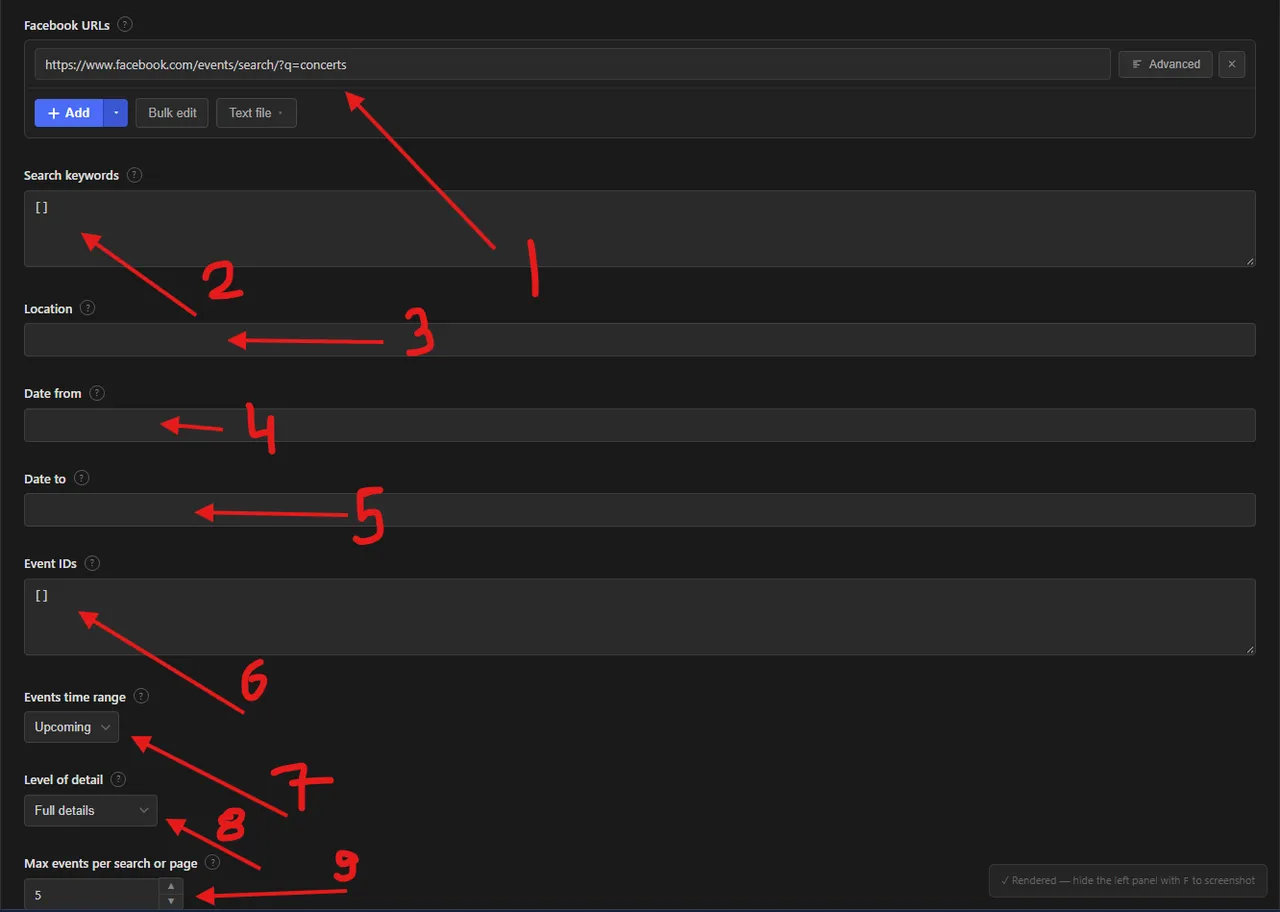
Facebook event scraper input fields
- Facebook URLs (
startUrls) — add Facebook event pages, event search URLs, city events pages, or organizer pages. Use Add for one URL, Bulk edit for multiple URLs, or Text file to import a list. A default search URL for concerts is provided. - Search keywords (
searchQueries) — enter terms to find events, such asconcertsoryoga. Multiple keywords can be supplied. Keywords are added to the supplied search URLs; they can also be combined with a location and date window. - Location (
location) — enter a city or place, such asLondon, to narrow keyword searches. Facebook's logged-out search does not provide a precise location filter, so matches are best-effort. - Date from (
dateFrom) — set the earliest event start date for keyword searches, usingYYYY-MM-DDformat. - Date to (
dateTo) — set the latest event start date for keyword searches, usingYYYY-MM-DDformat. Splitting a long period into smaller date windows can help find more results. - Event IDs (
eventIds) — provide Facebook event IDs or event URLs to scrape specific events directly, without searching. - Events time range (
eventsTimeRange) — choose Upcoming, Past or Both. This filter applies to full event details and organizer-page results. - Level of detail (
eventDetail) — choose Full details to open event pages and collect available event information, or List only for a faster result with the event name, link, image and date line. - Max events per search or page (
maxItems) — set the result limit for each keyword, search URL, city events page or organizer page (1–1,000). Facebook may show fewer results than the limit, especially for logged-out keyword searches.
Additional settings are available below the fields shown in the image:
- Cache project name (
cacheProjectName) — optional. ⚡ This actor uses caching to skip previously scraped events. Reuse the same name across scheduled runs and events already saved under that name are skipped and not charged, so you receive only new events. - Proxy configuration (
proxyConfiguration) — optional. The Apify proxy is enabled by default in the input; public Facebook pages also work without a proxy from many networks.
| Field | Type | Required | Default | Description |
|---|---|---|---|---|
Facebook URLs (startUrls) | array | — | Search for "concerts" | Event pages, event search pages, city events pages or organizer pages. |
Search keywords (searchQueries) | array | — | — | Keywords to search events for, added to the URLs. |
Location (location) | string | — | — | A city or place added to each keyword ("concerts in London"). Best-effort. |
Date from (dateFrom) | string | — | — | Keyword searches: earliest start date, YYYY-MM-DD. |
Date to (dateTo) | string | — | — | Keyword searches: latest start date, YYYY-MM-DD. |
Event IDs (eventIds) | array | — | — | Event IDs or URLs to scrape directly. |
Events time range (eventsTimeRange) | string | — | upcoming | upcoming, past or both. |
Level of detail (eventDetail) | string | — | full | full opens each event page; list returns only search-result fields, much faster. |
Max events per search or page (maxItems) | integer | — | 5 | Limit per keyword, search URL, city events page or organizer page (1–1000). |
Cache project name (cacheProjectName) | string | — | — | Skips events already scraped under this name in earlier runs. |
Proxy configuration (proxyConfiguration) | object | — | Apify proxy on | Optional Apify proxy; works without one from many networks. |
Supported URL types:
- Event:
https://www.facebook.com/events/1124937143546348/ - Event search:
https://www.facebook.com/events/search/?q=concerts - City events:
https://www.facebook.com/events/explore/bend-oregon/108137335874390(add/today,/tomorrow,/this_week,/this_weekendor/next_weekfor a time view) - Organizer page:
https://www.facebook.com/hubartclub(also/upcoming_hosted_events,/past_hosted_events,profile.php?id=...)
The event dashboard and group event pages need a login and are not supported.
📦 Facebook events scraper output data
The output is a dataset with one record per event, all with the same fields (null or an empty list when a value is not available). Each record contains: id, url, name, description, startDate, endDate, timezone, dateText, isOnline, isCanceled, isPast, isRecurring, privacy, place (name, address, city, latitude, longitude, placeId, placeUrl), ticketUrl, priceInfo, imageUrl, imageCaption, respondedCount, interestedCount, goingCount, hosts (id, name, url, isVerified, profilePictureUrl), flags, scrapedAt and sourceUrl. interestedCount and goingCount are filled for events found through keyword searches and city event lists, because Facebook shows the separate counts only on those event cards (Facebook rounds large numbers on the cards, e.g. 14K; with full details the exact interested count is worked out from the event page total); for events read straight from their page (event URLs, IDs, organizer pages) they are null and only the combined respondedCount is available. In list mode only id, url, name, imageUrl, dateText, interestedCount, goingCount, scrapedAt and sourceUrl are filled. The dataset has an Events view: a table of cover photo, name, start date, venue, city, online flag, interested-and-going count, ticket link and event link.
Output at a glance:
| Event | Starts (UTC) | Venue | Online | Interested + going |
|---|---|---|---|---|
| Seth Lakeman at St Georges, Bristol | 2026-10-13 18:00 | St George's, Bristol | No | 2 |
| Schoolboy Q | 2026-10-10 03:00 | Hollywood Palladium - Los Angeles, CA | No | 1 |
| Johnny Blue Skies & The Dark Clouds at Xfinity Mobile Arena | 2026-10-16 02:00 | Xfinity Mobile Arena - Philadelphia, PA | No | 2 |
Sample output (raw JSON):
JavaScript (npm install apify-client):
cURL — start a run and wait for the dataset:
💡 What you can use Facebook events data for
- Building local event calendars, listings and "what's on" newsletters
- Tracking competitor and venue programming, ticket links and attendance interest
- Lead generation from event organizers and hosts
- Market research on festivals, conferences and meetups by city and date
- Feeding event discovery apps, travel guides and recommendation engines
Event marketers, ticketing platforms, venue managers, tourism boards and local media typically use this data.
❓ Frequently asked questions
Can I scrape Facebook events legally?
The actor only collects event data that is already publicly visible on Facebook — no login, private group or private event is accessed. Scraping publicly available data is generally considered lawful (see hiQ Labs v. LinkedIn), but you are responsible for complying with Facebook's Terms of Service and applicable laws such as GDPR or CCPA, especially if you process host names or other personal data.
What data does the Facebook events scraper return?
Name, description, start and end time, time zone, venue name, address, city and coordinates, online and canceled flags, ticket link and price, hosts, interested-and-going count, cover photo and event flags. In list mode only name, link, image and the date line are returned.
Can I scrape a specific Facebook event by URL or ID?
Yes. Add one or more public event page URLs under Facebook URLs, or enter event IDs or event URLs under Event IDs to scrape those events directly. Events that are private, deleted or require login are skipped.
Can I search Facebook events by location and date?
Yes. Add a city or place to Location and set Date from and Date to in YYYY-MM-DD format. These options refine keyword searches; Facebook's logged-out location matching is approximate. For broader coverage, try multiple keywords and shorter date windows.
Can I scrape events from a Facebook city or organizer page?
Yes. Add a supported public city events page or organizer page under Facebook URLs. City pages can expose Facebook's built-in time views, while organizer pages can return upcoming, past or both events. Login-required group and event dashboard pages are not supported.
How many events can I scrape from one search or page?
maxItems limits the events returned for each keyword, search URL, city events page and organizer page separately. Facebook shows a logged-out visitor only a limited number of keyword search results (often 10 to 30), so use a city events page, or several keywords or date windows, to collect more.
Do I need a proxy to scrape facebook.com?
No — the actor works without a proxy from many networks, and the input leaves the Apify proxy option on by default as a safe choice for large runs. If you see blocks, keep the Apify proxy on; switch to residential proxies only if datacenter ones are blocked.
How do I scrape Facebook events with Python?
Use the Python example above: call the actor with the Apify client and iterate over the dataset items.
Can I run this Facebook events scraper on a schedule?
Yes, use Apify Schedules. Set the same Cache project name on every run and each scheduled run returns only events that were not saved in earlier runs, which also means you are not charged twice for the same event.
What output formats are supported?
JSON, CSV, Excel, XML and RSS, either from the Output tab or through the Apify API.
Why does a search return fewer events than I see on Facebook?
Facebook shows logged-in users far more search results than logged-out visitors. This actor reads what is publicly available, so split a big search into several keywords, locations or date windows.
🔗 Other actors you may find useful
| Actor | Description |
|---|---|
| 📸 Snapchat Profile Scraper | Public Snapchat profiles with Spotlights, stories, lenses and engagement. |
💬 Support & contact
If you encounter any issues or have questions, please open an issue or reach out via the Apify Community Forum.
You can also find more of our actors on the Actor Flow page.


