
Facebook Events Scraper — Venue GPS, Start/End Times & Hosts
Pricing
from $4.00 / 1,000 event scrapeds
Facebook Events Scraper — Venue GPS, Start/End Times & Hosts
Scrape Facebook events by event URL or page/organizer. Returns name, description, start AND end times, timezone, venue with GPS coordinates, hosts, privacy, duration, categories and cover image. No login, no cookies, no tokens.
Pricing
from $4.00 / 1,000 event scrapeds
Rating
5.0
(1)
Developer

Muhamed Didovic
Maintained by CommunityActor stats
0
Bookmarked
36
Total users
13
Monthly active users
19 hours ago
Last modified
Categories
Share
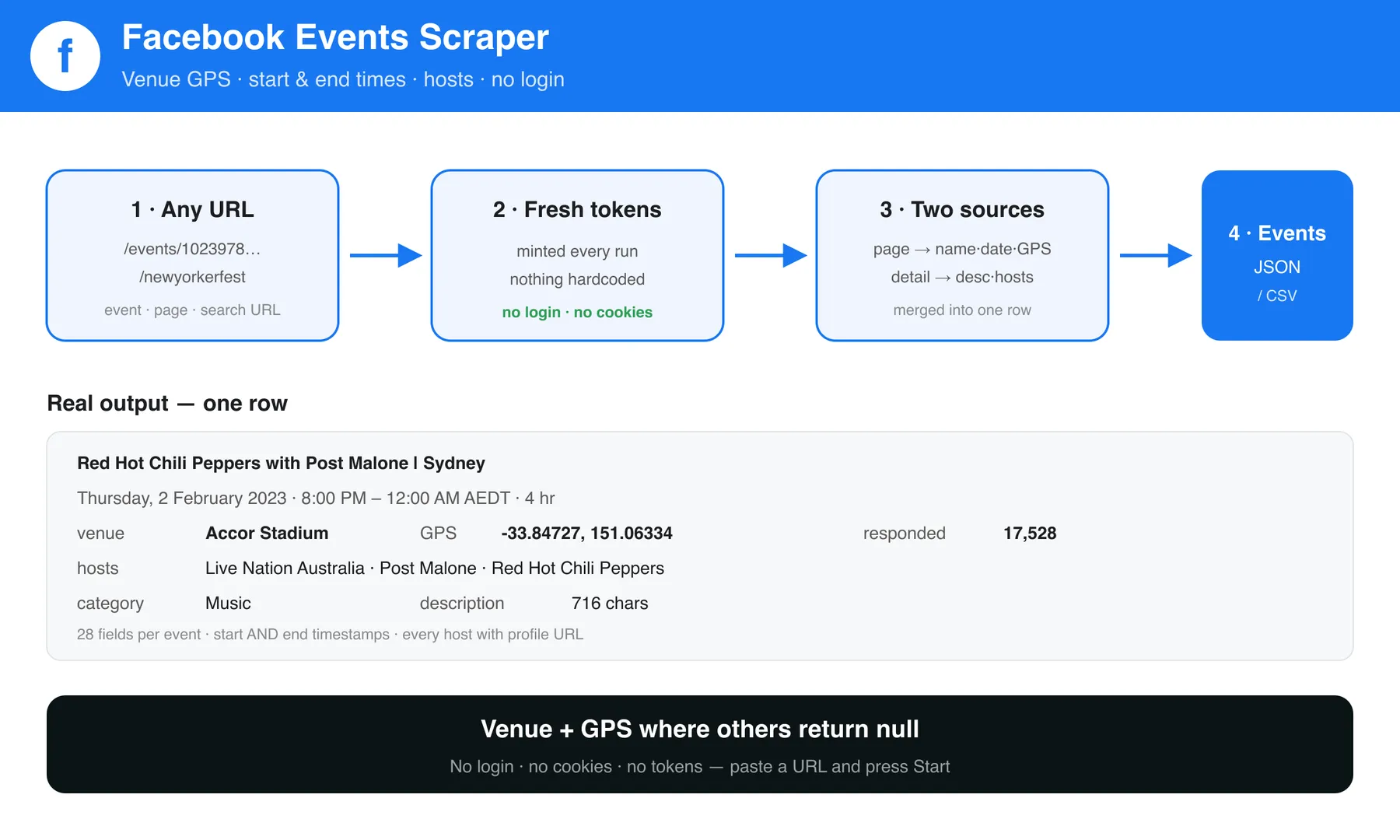
Get the whole event, not half of it. Paste a Facebook event URL or a page/organizer URL and get back the full record: name, description, start and end time, timezone, the venue with GPS coordinates, every host with their profile links, duration, categories and cover image.
No login. No cookies. No tokens. Nothing to configure — press Start.
| You provide | You get back |
|---|---|
An event URL — facebook.com/events/1023978871819924 | That event, fully detailed |
A page or organizer — facebook.com/LiveNationAustralia | Their full calendar — three event tabs, paginated and merged |
A group — facebook.com/groups/123456789 | The group's upcoming and past events |
A city explore page — facebook.com/events/explore/fr-paris/110774245616525 | Events happening in that city |
A search URL — facebook.com/events/search/?q=jazz | The events matching that search |
A plain keyword — "jazz concert" | Matching events anywhere, or in a city you pick |
Why use it
- Venue and GPS, not
null. Most Facebook event scrapers return an empty location field. This one returns the venue name plus latitude and longitude, so events land straight on a map. - End times, not just start times. Both timestamps, in unix and ISO, plus the timezone.
- Hosts as data. Each host as a structured record with id, name and profile URL — not one flattened string.
- Zero setup. No Facebook account, no session cookie, no API key.
How it works
- The actor mints fresh Facebook page tokens at the start of every run, so nothing is hardcoded or expiring.
- Each start URL is classified: direct event, page/organizer, group, city explore, or search URL.
- Page URLs are read three ways —
/events,/upcoming_hosted_eventsand/past_hosted_events— and the results de-duplicated, because Facebook serves a different slice on each. Groups and city pages resolve to their single tab. - Each event needs exactly one request: Facebook embeds the whole record — description, hosts, categories, venue, coordinates and response counts — in the event page itself.
⬇️ Input
Facebook Events Scraper takes URLs — paste them into startUrls. Five kinds work.
🔗 Event URL
A specific event. Everything available is extracted for each one.
https://www.facebook.com/events/1023978871819924
📄 Pages and organizers
Give the page and the scraper reads all three of its event tabs and merges them, so you get more than any single tab returns:
https://www.facebook.com/LiveNationAustralia
It fetches /events, /upcoming_hosted_events and /past_hosted_events, follows Facebook's pagination cursor on each, and de-duplicates. Facebook only embeds ~8 events per tab in the page itself; this Actor pages past that, so a busy calendar returns dozens rather than a handful (48 unique events on a live test where a single tab gives 8). Raise maxEvents to go deeper. You can also pass any one of those URLs directly if you only want that tab.
👥 Groups
Both upcoming and past events of a group:
https://www.facebook.com/groups/GROUP_NAME/events
🌍 City explore
Every event Facebook is surfacing for a city:
https://www.facebook.com/events/explore/fr-paris/110774245616525
Get the URL by opening Facebook Events and picking a city — the address bar gives you the slug and location id.
🔍 Keyword search
Put keywords in searchQueries and skip URLs entirely:
Each keyword is searched and paginated, so you get dozens of matches rather than the handful Facebook shows on the first screen. A live run for jazz concert returned 25 events across three pages. Keep the default residential proxy — Facebook rate-limits its search query by IP, and pagination stops at the first page from a datacenter address.
Pin it to a city with searchLocation. Without it, Facebook picks the area from your proxy's exit IP, so the same keyword returns Norway, North Carolina and Sri Lanka in one batch. Pass a Facebook place id, or a city explore URL and the trailing number is used:
"searchLocation": "110774245616525""searchLocation": "https://www.facebook.com/events/explore/fr-paris/110774245616525"
With Paris set, concert returns Accor Arena, Port de la Villette and boulevard Poissonnière — nothing else.
To find a city's id, open Facebook Events, pick a city, and copy the number off the end of the URL. Facebook's own city-name lookup requires a login, so this Actor takes the id rather than pretending to resolve names it cannot see.
You can also paste a search URL straight into startUrls, with or without Facebook's own filter parameters:
https://www.facebook.com/events/search/?q=Comedy
Mixing inputs
Pass as many URLs of any kind as you like in one run. maxEvents caps the whole run, not each URL, so a run is never more expensive than you set it.
Only future events, or a date range
Set Future events only (onlyFutureEvents) and the run returns nothing that has already started. For a narrower slice, add Start date from / Start date to.
Both date fields accept a plain date (2026-09-01), a full ISO timestamp (2026-09-01T18:00:00Z), or an offset from the run time (7 days, -1 month, 2 weeks). A plain date used as the upper bound covers that whole day.
Two things this does beyond filtering the output:
- The page's
past_hosted_eventstab is not requested at all on a future-only run, and a group's past bucket is skipped. Fewer requests, faster runs. - Facebook publishes each event's start time in the listing, so an out-of-window event is dropped before its page is fetched. Excluded events never become results, so
maxEventsis spent entirely on events you asked for — a run capped at 50 returns 50 matching events, not 50 events of which some match.
Filtering is on the event start time. Events Facebook lists without a start time are kept rather than guessed at.
Input fields
| Field | Type | Required | Notes |
|---|---|---|---|
startUrls | array | no* | Any mix of the five kinds above. |
searchQueries | array | no* | Keywords to search, e.g. ["jazz concert"]. Paginated. |
searchLocation | string | no | Facebook place id or city explore URL; pins keyword search to one city. |
maxEvents | integer | no | Caps the whole run. Default 100. |
onlyFutureEvents | boolean | no | Skip anything already started. Default false. |
startDateFrom | string | no | Keep events starting on or after this. Date, ISO timestamp, or offset like 7 days. |
startDateTo | string | no | Keep events starting on or before this. Same formats. |
proxyConfiguration | object | no | Residential by default and recommended. Set an exit country, or your own proxy URLs, and the run uses exactly that. |
* Provide startUrls, searchQueries, or both. A run with neither fails immediately.
Output
One row per event. Real result, abridged:
Key fields
| Field | Description |
|---|---|
startTimestamp / endTimestamp | Unix seconds. startTimeIso / endTimeIso are the same in ISO 8601. |
venueName, latitude, longitude | The venue and its coordinates. Online events report Online event with no coordinates. |
hosts[] | Every host with id, name and profile url. |
usersResponded | People who responded to the event. |
categories[] | Facebook's own discovery categories, e.g. Music, Theater. |
onlineUrl | For online events, the external stream or meeting link when Facebook exposes one. |
Pricing
Pay-per-result. You pay for events returned, nothing else.
Notes & limitations
- Keyword search is location-sensitive. With no
searchLocation, Facebook decides the area from the proxy exit IP, so results scatter across countries. Set a city id for predictable output. - Keyword search depth is bounded by
maxEventsand an internal cap of 40 search pages per keyword (~9 events per page). Search pagination rides a persisted Facebook query id; if Facebook rotates it, the Actor logs a warning and keeps the first page of results rather than failing the run. - Keyword search past the first page needs the proxy. Facebook rate-limits its search query hard by IP: with the default residential proxy each request draws a fresh IP and pagination runs normally, but with
useApifyProxy: falsefrom a shared datacenter address it answers "Rate limit exceeded" after the first page. The Actor warns and keeps the ~7 embedded results instead of failing. If a keyword returns exactly 7 events and the log shows that warning, the proxy is the reason. - Earlier versions of this Actor refused bare keyword URLs, on the basis that Facebook answered "We didn't find any results" for them. That was re-tested on 2026-08-26 and is no longer true — keyword search now returns relevant, upcoming, paginated events with no login. The refusal has been removed.
- Page coverage is bounded by
maxEvents, not by Facebook. Facebook embeds only ~8 events per tab, but this Actor follows the pagination cursor behind them, so raisingmaxEventsgoes deeper (8 → 48 on a live test). Very large calendars stop at an internal safety cap of 40 pagination pages per tab. If Facebook rotates the internal id behind that query, the Actor logs a warning and returns the embedded events rather than failing the run. usersInterestedis deliberately not emitted. The interested count on an event page belongs to the related-events rail rather than the event you asked for, so reporting it would attribute another event's number to yours.ticketUrl,onlineUrlandsiblingEvents(other dates of a recurring event) are populated only when Facebook exposes them, which is a minority of events.- No
privacyInfofield: Facebook ships it as an empty placeholder on the page, and it only restatedeventKindplushostedBy, which are both emitted as real fields. - Past events remain fully scrapable;
isPastandstartTimeIsotell you which. SetonlyFutureEvents(or astartDateFrom/startDateTorange) to exclude them — excluded events are dropped before they are fetched, so they cost nothing. - A date filter that matches nothing is reported as a successful empty run, not a failure. A run that finds no events at all still fails loudly, because that means a block or a markup change.
FAQ
Do I need a Facebook account? No. Nothing to log into, no cookie to paste.
Can I scrape a venue's or promoter's whole calendar? Yes — give the page URL and the actor reads its events tab.
Can I search by keyword? Yes — put keywords in searchQueries. Add searchLocation to pin them to a city, otherwise Facebook picks the area from your proxy's exit IP.
Why did my keyword return nothing? Either the keyword is too narrow, or a filter excluded everything. Check searchLocation and the date fields first — a nonsense keyword genuinely returns zero, which is Facebook answering honestly.
🤖 For AI Agents & LLM Apps
- Purpose: turn Facebook event or page URLs into structured event records with venue coordinates and precise timing.
- Minimal input:
{ "startUrls": ["https://www.facebook.com/events/1023978871819924"] }— no auth. - Output fields:
id, url, name, description, dateTimeSentence, startTimestamp, endTimestamp, startTimeIso, endTimeIso, timezone, duration, isPast, isOnline, isCanceled, eventKind, venueName, city, latitude, longitude, onlineUrl, coverImageUrl, usersResponded, hosts[], hostedBy, categories[], siblingEvents[], ticketUrl, sourceUrl. - Date filtering:
onlyFutureEvents(boolean),startDateFrom/startDateTo(date, ISO timestamp, or relative offset such as7 days). Applied to the event start time, and applied before fetching wherever Facebook exposes the start time in the listing. - Billing: pay-per-result;
maxEventsbounds cost. One request per event. Date-excluded events produce no result and no charge. - Keyword search:
searchQueries(array of keywords) with optionalsearchLocation(Facebook place id or city explore URL). Paginated;maxEventsbounds depth. EitherstartUrlsorsearchQueriesis required — neither alone is mandatory.
⚠️ Disclaimer
This actor collects only publicly visible Facebook event information, without logging in or bypassing any access control. Use it in compliance with Facebook's Terms of Service and applicable law, including data-protection rules. You are responsible for how you use the data. This tool is not affiliated with or endorsed by Meta Platforms, Inc.
SEO Keywords
Facebook events scraper, scrape Facebook events, Facebook event data, event API, Facebook event extractor, venue GPS coordinates, event listings scraper, Facebook page events, organizer events, event start end time, local events data, event aggregator, Facebook events export, no login Facebook scraper.
![ForRentUniversity.com [$1.25💰] Scraper · Emails avatar](https://images.apifyusercontent.com/knob38rf08RjbTFOtyPTLKbUpJqNv69gLvD9GZvNHdY/rs:fill:76:76/cb:1/aHR0cHM6Ly9hcGlmeS1pbWFnZS11cGxvYWRzLXByb2QuczMudXMtZWFzdC0xLmFtYXpvbmF3cy5jb20vbmduOHZSRVNUa3NleVdFNnAtYWN0b3Itb2ZkQkJZZ0QzMndpZHZSemotT25mdk55NHJTQS1mcnUuanBlZw.webp)


![Collecting Cars [$3💰] | 33k SOLD prices + live bids avatar](https://images.apifyusercontent.com/Hbn_LDWbVTHAyPL8k_edq8GAZOEin7g5i4_bFf2WimM/rs:fill:76:76/cb:1/aHR0cHM6Ly9hcGlmeS1pbWFnZS11cGxvYWRzLXByb2QuczMudXMtZWFzdC0xLmFtYXpvbmF3cy5jb20vbmduOHZSRVNUa3NleVdFNnAtYWN0b3ItRm1EYVRESkEyWGNYU0s4N24tVkJhU3V5RENuYi1Db2xsZWN0aW5nX0NhcnMud2VicA.webp)


