

Snapchat Profile Scraper — Spotlights, Stories
Pricing
from $1.00 / 1,000 results
Snapchat Profile Scraper — Spotlights, Stories
Scrapes public Snapchat profiles from snapchat.com: subscribers, bio, category, verified badge, Spotlight videos with views and shares, stories, highlights, lenses and related accounts. Optionally adds Spotlight comments, transcripts and contact details, and skips records from earlier runs.
Pricing
from $1.00 / 1,000 results
Rating
5.0
(1)
Developer
ActorFlow
Maintained by CommunityActor stats
0
Bookmarked
1
Total users
1
Monthly active users
3 days ago
Last modified
Categories
Share
Snapchat Profile Scraper — Spotlights, Stories, Lenses, Comments & Transcripts
Scrape public Snapchat profiles (snapchat.com) — get each account's subscribers, bio, category and verified badge, plus its Spotlight videos with views and shares, live story, highlights, lenses and related accounts. Switch on options to add Spotlight comments, video transcripts and contact details (emails, phones, social handles). Results export as JSON, CSV or Excel and the actor can be called as an API. Paste a profile URL or a username and press Start; give a cache project name and repeat runs return only new records.
Target website: snapchat.com
✨ Features of this Snapchat profile scraper
- Profile data extraction — display name, username, verified badge, exact subscriber count, bio, website, address, category, profile and hero images, snapcode, creation and update dates, and related accounts
- Spotlight videos — views, shares, caption, hashtags, duration, size, sound, upload date and direct video, thumbnail and transcript links
- Stories, highlights and lenses — every snap of the live story and curated highlights with media links and dates, plus each lens with its preview and unlock link
- Engagement summary — Spotlight count, total, average and top views per profile
- One consistent output — every row is one account with the same fields; anything unavailable is
null - Spotlight comments and transcripts (optional) — up to 25 top comments per video and the spoken text as plain text
- Contact extraction (optional) — emails, phone numbers, Instagram, TikTok, YouTube, X/Twitter, Facebook and Telegram handles, and link-in-bio pages
- Cache project — name a cache project and records scraped in earlier runs are skipped (and not charged), so each scheduled run returns only new data
- Proxy support — optional Apify proxy for large runs
- No browser required — fast, low-cost runs that need no proxy for normal use
🚀 How to scrape Snapchat profiles in 5 steps
- Sign up for a free Apify account — includes $5 monthly credit.
- Open the actor page and click Try for free.
- Paste Snapchat profile URLs, or type usernames, in the Input tab.
- Click Start and wait for the run to complete.
- Download results from the Output tab in JSON, CSV, or Excel format.
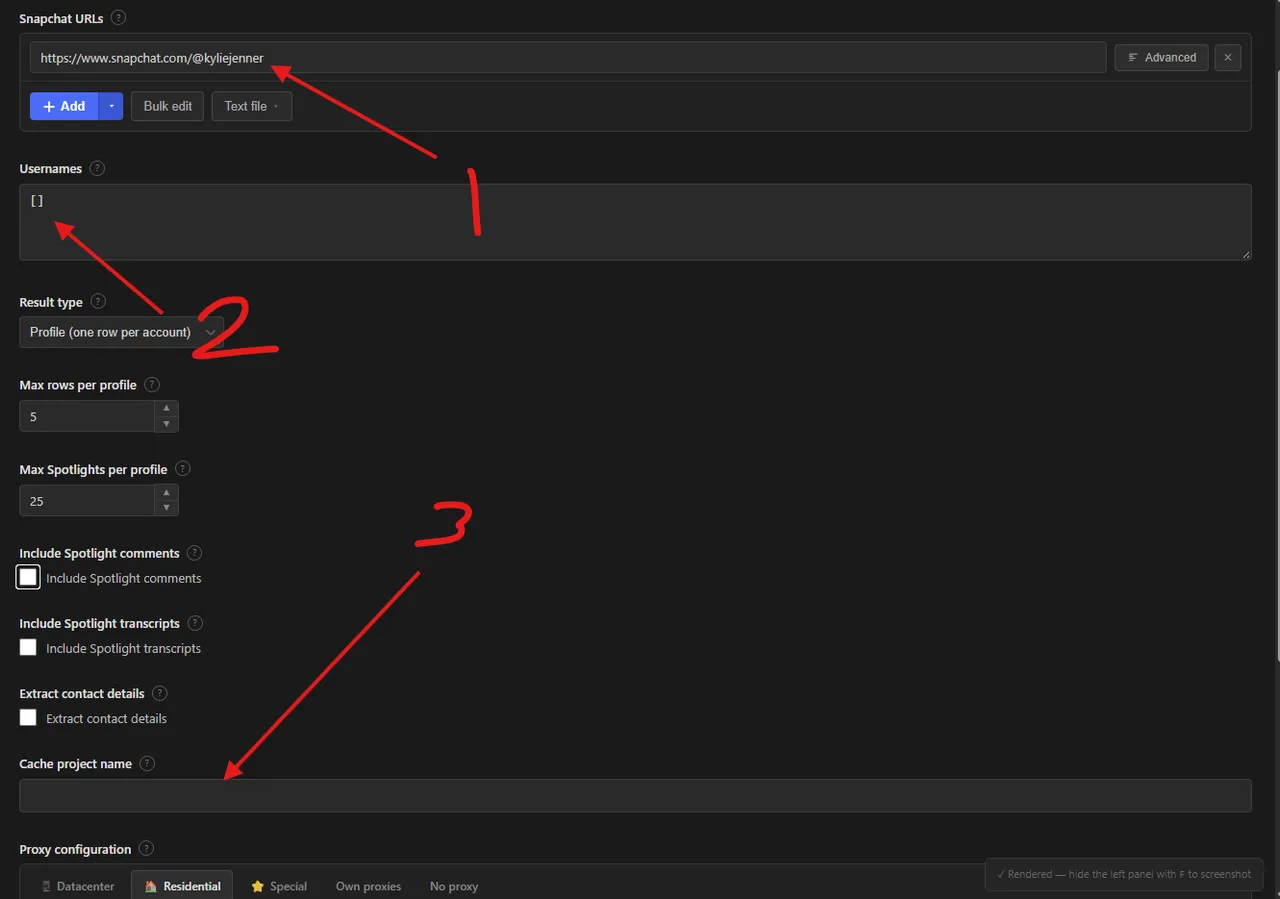
- Snapchat URLs — paste one or more profile links, for example
https://www.snapchat.com/@kyliejenner. Use Add for one at a time, Bulk edit for many, or Text file to load a list. - Usernames — prefer typing names? Enter them here as a list, such as
["kyliejenner", "mrbeast"], with or without the @. They are added to the URLs above, so you can use either field or both. - Cache project name — optional. Enter any name (for example
my-daily-run) and records saved in earlier runs under that name are skipped and not charged, so scheduled runs return only new data. Leave it empty to re-scrape everything with fresh numbers.
You can also run this actor via the Apify API or integrate it directly into your workflows using Zapier, Make, or n8n.
💰 Pricing
This actor uses pay-per-result billing: you pay for each profile saved to the dataset.
- New Apify accounts include $5 of free monthly credit.
- The actor uses plain HTTP requests rather than a browser, so it costs significantly less to run than browser-based scrapers.
- Loading Spotlight comments or transcripts takes one extra page per video and is charged per Spotlight. Records you already have in your cache project are skipped and not charged.
🔧 Input configuration
| Field | Type | Required | Default | Description |
|---|---|---|---|---|
Snapchat URLs (startUrls) | array | — | Kylie Jenner's profile | Profile pages (/@username or /add/username). A Spotlight link containing the creator scrapes that creator's profile. |
Usernames (usernames) | array | — | — | Usernames with or without the @, added to the URLs. |
Max Spotlights per profile (maxSpotlights) | integer | — | 25 | Spotlights included per profile. Snapchat lists up to 25. |
Include Spotlight comments (includeComments) | boolean | — | false | Adds up to 25 top comments per Spotlight. |
Include Spotlight transcripts (includeTranscripts) | boolean | — | false | Adds the spoken text of each Spotlight. |
Extract contact details (extractContacts) | boolean | — | false | Finds emails, phones and social handles. |
Cache project name (cacheProjectName) | string | — | — | Skips records already scraped under this name in earlier runs. |
Proxy configuration (proxyConfiguration) | object | — | No proxy | Optional Apify proxy. |
Supported URL types:
- Profile:
https://www.snapchat.com/@kyliejennerorhttps://www.snapchat.com/add/kyliejenner - Spotlight video with its creator:
https://www.snapchat.com/@kyliejenner/spotlight/<id>(scrapes the creator's profile)
📦 Snapchat profile scraper output data
The output is a dataset with one record per account, all with the same fields (null or an empty list when a value is not available, for example for non-public accounts). Each record contains: username, profileUrl, isPublicProfile, displayName, isVerified, badge, subscribers, bio, websiteUrl, address, category, subcategory, publisherType, primaryColor, profilePictureUrl, heroImageUrl, snapcodeUrl, businessProfileId, createdAt, updatedAt, hasStory, hasHighlights, hasSpotlights, sameAsLinks, relatedAccounts, engagement, liveStory, highlights, spotlights, lenses, scrapedAt and sourceUrl. Each Spotlight has spotlightId, url, creatorName, title, description, embeddedCaption, hashtags, keywords, thumbnailUrl, videoUrl, transcriptUrl, uploadedAt, durationMs, width, height, viewCount, shareCount, soundTitle and soundArtist; each lens has lensName, lensUrl, creatorName, previewImageUrl, previewVideoUrl, iconUrl, unlockUrl, isOfficialSnapLens and updatedAt. With Include Spotlight comments on, Spotlights gain comments and commentCount; with Include Spotlight transcripts on, they gain transcript; with Extract contact details on, profiles gain contacts. The dataset has a Profiles view: a table of photo, name, username, verified badge, subscribers, category, Spotlights, total views and profile link.
Output at a glance:
| Profile | Username | Verified | Subscribers | Category | Spotlights | Total views |
|---|---|---|---|---|---|---|
| Khaby Lame | @khaby00 | No | 0 | People | 5 | 109,573 |
| MrBeast | @mrbeast | Yes | 1,468,200 | — | 4 | 7,710,266 |
| King Kylie 👑 | @kyliejenner | Yes | 29,029,500 | — | 5 | 530,844 |
Sample output (raw JSON):
🐍 How to scrape Snapchat with Python, JavaScript or the API
Run the actor programmatically with the official Apify clients. Replace <YOUR_API_TOKEN> with the token from your Apify Console.
Python (pip install apify-client):
JavaScript (npm install apify-client):
cURL — start a run and wait for the dataset:
💡 What you can use Snapchat profile data for
- Influencer and creator research: audience size, verified status, category and Spotlight performance
- Benchmarking Spotlight views, shares and comments across competitors
- Finding creator contact details and link-in-bio pages for outreach
- Tracking new Spotlights, stories and lenses from brands and public figures over time
- Building datasets of Spotlight captions, hashtags and transcripts for content and trend analysis
Marketing agencies, brand and influencer teams, social media analysts and researchers typically use this data.
⚠️ Limitations & known issues
- Public profiles only — accounts that are not public profiles show only their username, so the row has
isPublicProfile: falseand little else. Personal accounts are mostly like this. - First page of content — Snapchat's public page lists up to 25 Spotlights, plus the highlights and lenses shown on the profile. Older items beyond that are not available.
- Subscribers can be 0 — some public profiles hide or do not report a subscriber count, and Snapchat then shows 0.
- Comments and transcripts — only Spotlights that have their own public page return them, up to 25 top comments each. Some Spotlights have no page and keep their listing data only.
- Snapchat search pages — keyword and hashtag search pages are not supported.
- Cache and fresh numbers — with a cache project name, a record is returned once, so later runs do not refresh its views. Leave the name empty to re-scrape current numbers.
❓ Frequently asked questions
Can I scrape Snapchat legally?
The actor only collects data already publicly visible on snapchat.com — no login, paywall or private content is accessed. Scraping publicly available data is generally considered lawful (see hiQ Labs v. LinkedIn). You are responsible for complying with Snapchat's Terms of Service and applicable laws such as GDPR/CCPA if personal data (for example commenter names or contact details) is involved.
What data does the Snapchat profile scraper return?
For each public profile: name, username, verified badge, subscribers, bio, website, category, images, related accounts, Spotlight videos with views and shares, the live story, highlights and lenses. Optional toggles add Spotlight comments, transcripts and contact details.
How many Spotlights can I scrape from one profile?
Up to 25 per profile, which is how many Snapchat lists on the public page. Use Max Spotlights per profile to lower it.
Do I need a proxy to scrape snapchat.com?
No. Snapchat's public pages worked without a proxy in our tests, and proxies are off by default to keep runs cheap. If you scrape many profiles and see blocks, turn on Apify proxy in the input.
How do I scrape Snapchat with Python?
Use the Apify client as shown in the Python example above, then iterate over the dataset items.
Can I run this Snapchat scraper on a schedule?
Yes. Use Apify Schedules to run it daily. Add the same Cache project name to every scheduled run and each run skips profiles, Spotlights, snaps and lenses it already saved, so you only get and pay for new records.
How do I get Spotlight comments and transcripts?
Switch on Include Spotlight comments and/or Include Spotlight transcripts. The actor loads each video's own page, which adds up to 25 top comments and the spoken text, and is charged per Spotlight.
What output formats are supported?
JSON, CSV, Excel, XML and RSS, either from the Output tab or through the Apify API.
🔗 Other actors you may find useful
| Actor | Description |
|---|---|
| 🎵 Spotify Monthly Listeners Scraper | Scrapes monthly listeners and artist stats from Spotify. |
| 🚗 Copart Auction Lot Scraper | Scrapes Copart auction lots with damage, bids and VIN decoding. |
| 🎟️ Gametime Events Scraper | Collects event, venue and ticket offer records from Gametime. |
| 📈 Nasdaq Short Interest Scraper | Scrapes short interest history for any Nasdaq-listed stock or ETF. |
💬 Support & contact
If you encounter any issues or have questions, please open an issue or reach out via the Apify Community Forum.
You can also find more of our actors on the Actor Flow page.


