
Facebook Ads Library Scraper
Pricing
from $1.00 / 1,000 ad results
Facebook Ads Library Scraper
Search the public Facebook/Meta Ads Library by keyword, advertiser Page, or Ads Library URL. Get normalized ad copy, creative media, CTA, advertiser data, delivery dates, platforms and public transparency ranges. Optional advertiser and landing-page enrichment. No Facebook login needed.
Pricing
from $1.00 / 1,000 ad results
Rating
0.0
(0)
Developer

Delowar Munna
Maintained by CommunityActor stats
0
Bookmarked
32
Total users
22
Monthly active users
20 days ago
Last modified
Categories
Share
Search and scrape the public Facebook/Meta Ads Library by keyword, advertiser Page, or Ads Library URL. Get normalized ad copy, creative media, CTA, advertiser metadata, delivery dates, platforms, countries, and public transparency fields. Optional advertiser and landing-page enrichment are charged separately, and no Facebook login or cookies are required from you.
What this Actor does
Meta publishes every ad running on Facebook, Instagram, Messenger, WhatsApp, Threads and Audience Network in its public Ads Library. This Actor turns that into a dataset.
- Three ways in — keywords, advertiser Pages, or a full Ads Library URL you paste from your browser. Mix them freely in one run.
- One row per unique ad, deduplicated by Meta's own ad archive ID across every keyword, advertiser and country in the run.
- The complete creative — ad copy, headline, description, call-to-action, destination link, every image and video URL, and every carousel card.
- Results stream in as they are found. The dataset fills during the run, not at the end.
- A global result limit that is shared fairly. One broad keyword cannot swallow the whole run before your other inputs have been searched.
- A free count-only mode to size a search before you commit to it.
- No credentials, ever. No login, no cookies, no session ID, no access token, no ad-account access.
1. Search by keyword
Each keyword is searched separately in each country, so this is four searches sharing one limit of 200 ads. Turn on exactPhrase to match the whole phrase rather than loose words — far more precise for brand and product names.
2. Search by advertiser Page
Page URLs, @handles and numeric Page IDs all work. Handles are resolved to the advertiser's Ads Library Page ID automatically.
If an advertiser you know is advertising comes back with zero ads, give the numeric ID instead. Open their Ads Library page in a browser and copy the
view_all_page_id=value out of the URL. Facebook keys its Ads Library on a different Page ID from the one on their public Page, and while this Actor resolves it correctly for nearly every advertiser, the numeric ID always works.
3. Use an Ads Library URL
Build the search you want on facebook.com/ads/library, then paste the URL:
The filters already in the URL win over the settings in the form. If they disagree, the run log says exactly which URL and which filters — your pasted search is never silently changed into a different one. Any parameter this Actor does not support is reported and dropped rather than ignored in silence.
4. Country, status and date filters
| Input | What it does |
|---|---|
countries | ISO country codes. The Ads Library shows the ads running in a country, so each is its own search. |
adStatus | active, inactive, or all. |
dateFrom / dateTo | Bounds on the ad's delivery start date. |
mediaTypes | Image, video, meme, image-and-meme, or text-only. |
adType | Meta's regulated categories — politics/issues, housing, employment, credit. |
publisherPlatforms | Facebook, Instagram, Messenger, WhatsApp, Threads, Audience Network. |
advertiserNameInclude / advertiserNameExclude | Keep or drop by advertiser name. |
Everything except the last two is applied by Facebook itself, so ads that do not match are never fetched and never charged for.
A note on
dateFrom. Facebook's own date filter matches ads delivering in a window, so a long-running ad that started years ago still matches it. This Actor's field says "started on or after" and enforces exactly that, which means it may return fewer ads than the equivalent filter on facebook.com. That is deliberate — a field named "started on or after" that returns ads which started earlier is worse than one that returns fewer.
5. Output schema
One row per unique ad:
Five dataset views
Every run writes one row per unique ad. The five views are projections of that same row — nothing is fetched twice and nothing is charged twice. Pick a view above the results table in the Console, or append ?view=creatives to the dataset API URL.
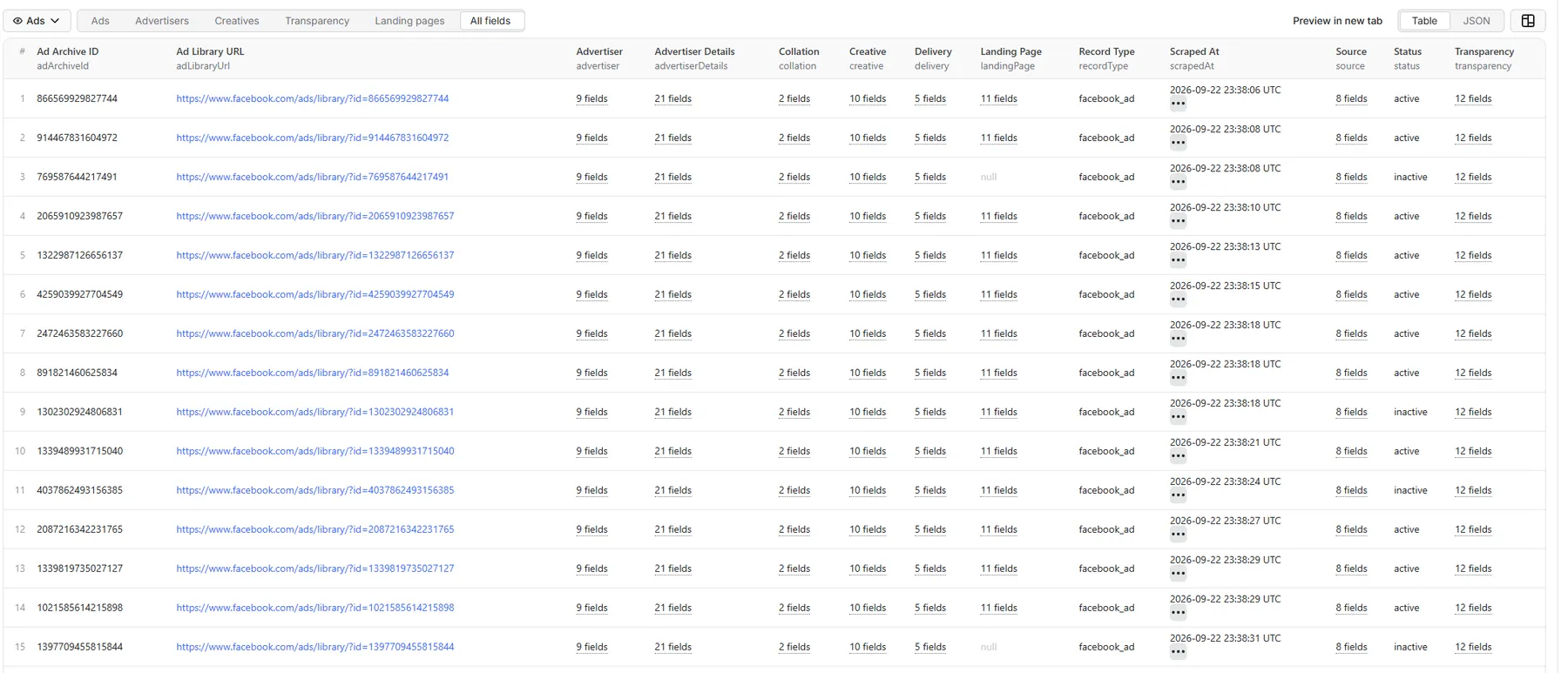
The samples below are real rows from one real run — the keyword running shoes, US, both enrichments on. Four of the five are the same ad (4037862493156385, a New York shoe shop) so you can see exactly what each view keeps and what it drops. Long ad copy and signed media URLs are shortened here with …; the dataset carries them in full.
The table above shows dotted column names like
advertiser.name— that is how the table addresses a nested field. The JSON the API returns keeps the nesting, exactly as printed below.
Ads — ?view=overview
The default. One row per ad: who ran it, when, where it was shown, and the core creative.
Advertisers — ?view=advertisers
The advertiser behind each ad, plus everything advertiser enrichment adds. Without that add-on the advertiserDetails fields are null and the rest still populates.
Creatives — ?view=creatives
The full creative payload — every image and video URL, and for carousel and catalogue ads a creative.cards array with one entry per card. This ad is a single video, so cards is [].
Transparency — ?view=transparency
Meta publishes spend, impressions and reach only for political, issue, housing, employment and credit ads, and only ever as ranges. This sample is therefore a different ad from the same run — on the shoe-shop ad above, every one of these fields is null, which is the correct answer rather than a gap.
Landing pages — ?view=landingPages
Where the ad actually sends people, plus everything landing-page enrichment pulls off that destination.
How to read nulls
| Value | Meaning |
|---|---|
[] | We looked, and this ad publishes none. |
null | Meta does not publish this for this ad. |
Two cases worth knowing about, because both are honest answers rather than gaps:
delivery.countriesis usuallynull. Meta does not publish which countries an ordinary ad runs in. The country you searched is insource.country, where it belongs — writing it intodelivery.countrieswould state as fact something the source never said.transparency.spend,impressionsandreachare usuallynull. Meta publishes these only for political, issue, housing, employment and credit ads, and only ever as ranges —"€50K-€60K",">1M". They are kept exactly as published. This Actor will never convert a range into a fake exact number.
There is also no star rating anywhere in the output. Facebook retired 5-star Page ratings; advertiserDetails.metrics.recommendPercent carries the real signal.
6. Count-only / preflight mode
Returns one row per search with the number of matching ads and charges nothing — no ad-result events at all. One request per search.
Facebook reports this figure as a live estimate and caps it at 50,000. A
totalCountof50001means "50,000 or more" and nothing further; rows carryatProviderCeiling: truewhen that happens. Narrow by country, date or advertiser to get an exact number.
7. Optional enrichment
Both are off by default and each is charged as its own separate event, only when it actually returns data. This is the input that produced every output sample in §5:
Advertiser details
Fetches the advertiser's own Facebook Page for public business data the Ads Library does not carry: email, phone, WhatsApp, website, street address and coordinates, price range, services, service areas, opening status, recommend percentage and review count, plus the verified badge.
Charged once per unique advertiser, never per ad. An advertiser with 200 ads in your results is a single charge.
Expect around 88% coverage, not 100%. Measured on a 52-advertiser run: 46 Pages returned business data and 6 did not, because those Pages are not publicly readable at all — no address, proxy or retry reaches them. A Page that cannot be read is reported as such and is never charged, so the gap costs you nothing but is worth knowing before you plan around it.
Landing-page enrichment
Follows each ad's destination link and extracts the page title, meta description, emails, phone numbers and social links.
Charged once per unique domain, never per ad. Fifty ads pointing at one shop is a single charge. Requests are guarded against private-network access and capped in size and time.
8. Pricing and charging
This Actor is pay-per-event: you pay for results, not for runtime. There is no Actor-start fee, no flat fee and no rental — a run that finds nothing costs you nothing.
This README deliberately quotes no figures at all, not even free-tier credit amounts — every one of them can change, and the Pricing tab is the only place that cannot go stale. Please don't reintroduce numbers here.
| Event | Charged |
|---|---|
ad-result | Once per unique ad returned. |
advertiser-enrichment | Once per unique advertiser Page enriched. Opt-in. |
landing-page-enrichment | Once per unique destination domain enriched. Opt-in. |
You are never charged for:
- an ad you already received in the same run, however many of your keywords or advertisers found it;
- an ad removed by your filters;
- an ad already in your
skipAdIdslist; - a count-only run;
- an enrichment that failed, was blocked, or returned nothing;
- the run summary record.
Full creative details are free. includeAdDetails is on by default and costs nothing — the media, cards and CTA text arrive in the same response as the base ad, so switching it off makes rows narrower rather than cheaper.
Your per-run spending limit is respected: the run stops cleanly when it is reached and tells you so, rather than continuing to produce rows it cannot bill for.
9. Incremental runs
adArchiveId is Meta's own stable identifier, so it is safe to store and feed back. Ads in skipAdIds are dropped before anything is fetched, enriched or charged, and are counted separately from duplicates in the run summary — so a scheduled run that correctly skipped 900 known ads does not look like one that wasted 900 requests.
10. Run summary
Every run writes a RUN_SUMMARY record to the key-value store: inputs, searches planned and run, provider requests, raw/unique/filtered/emitted ad counts, duplicates, skip-list hits, enrichment counts, retries, throttling, bandwidth, stop reason, time to first result, and exactly what was charged.
11. Public data and no login
This Actor reads only the publicly accessible Ads Library and public destination pages. It never asks for and never accepts a Facebook username, password, cookie, session ID, browser profile or access token, and it has no access to private ad-account analytics or authenticated advertiser data.
You remain responsible for lawful use of the data, and for compliance with Meta's terms and any privacy obligations that apply to you.
12. Proxy
Use Apify Residential proxy — it is the default, and it is what this Actor is built for.
Datacenter and no-proxy runs are capped at roughly the first 30 ads per search. Facebook serves page one of every search as ordinary HTML, which any address can read, but rate-limits the request that fetches page two onwards. Measured on the platform: from the Apify datacenter pool that request comes back "Rate limit exceeded" on the very first attempt, so the run finishes successfully having returned only page one. The run warns loudly when this happens rather than reporting a short result as a complete one.
You can still choose datacenter or no proxy — a run that only needs ~30 ads per search, or a count-only preflight, works fine on either and costs less.
You can also use the proxy editor's Custom proxy URLs to route through your own provider account, which is honoured in full:
13. API example
Then read the dataset:
Every input has a default, so a minimal call needs only one of searchTerms, pageUrlsOrIds or startUrls.
14. Limits worth knowing
- The total count is capped at 50,000 by Facebook and is an estimate. See §6.
- A single very broad keyword has a practical depth limit. Adding countries, or narrowing by date, returns more distinct ads than paging deeper into one query.
- Delivery countries and spend are not published for ordinary ads. See §5.
- Advertiser enrichment reaches about 88% of advertisers. The rest have no publicly readable Page. See §7.
- Advertiser enrichment is slow for large brands — some Pages are several megabytes. It is opt-in for that reason.
15. Support
Found an advertiser that resolves wrongly, a field that should be mapped, or a filter that behaves unexpectedly? Open an issue on the Actor page with the input you used and a run ID.


