

Facebook Pages & Business Leads Scraper
Pricing
from $4.00 / 1,000 page results
Facebook Pages & Business Leads Scraper
Find public Facebook Pages by keyword and location, or scrape Page URLs you already have. One lead-ready row per Page: category, description, followers, likes, address, website, public email and phone, social links and price range. Optional website enrichment. No Facebook login or cookies needed.
Pricing
from $4.00 / 1,000 page results
Rating
0.0
(0)
Developer

Delowar Munna
Maintained by CommunityActor stats
0
Bookmarked
46
Total users
9
Monthly active users
40 days
Issues response
6 days ago
Last modified
Categories
Share
Find public Facebook Pages by keyword and location or scrape Page URLs you already have. Get one clean lead-ready record per Page with business category, description, followers, likes, address, website, public email/phone, social links and price range where available. Optional website enrichment is separate, and you never need to provide Facebook login credentials or cookies.
What this Actor does
One Actor for the whole Facebook lead workflow — no stitching three tools together:
- Resolve any Facebook Page URL,
@handleor numeric Page ID you give it. - Discover more Pages from keywords and locations (see Discovery — this needs a search provider key).
- Normalize both paths through the same schema, so a Page found by search and a Page you named look identical in the output.
- Deduplicate on Page ID — the same business is returned once and charged once, however many of your inputs found it.
- Filter by email, phone, website, followers, category, verification, reviews and ad status.
- Enrich each business's own website, optionally.
No Facebook login, cookies, session IDs, browser profiles or access tokens are ever requested from you. Only publicly visible Page data is collected.
Scrape known Page URLs and handles
Paste anything that identifies a Page. All of these work and all resolve to the same record:
Numeric IDs cost one extra request, because Facebook only resolves an ID from the bare Page URL, not from the /about tab.
Personal profiles are not supported. A /profile.php?id=… or /people/… URL is reported as invalid rather than scraped — this Actor is for business Pages. Group, event, post and Marketplace URLs are rejected the same way, with the reason named in the log.
Discovery
Facebook publishes no logged-out Page search. Measured 2026-08-24 against live Facebook:
| Surface | Result |
|---|---|
/search/pages/?q=… | HTTP 404 |
/search/top/?q=… | HTTP 404 |
/pages/category/… | HTTP 404 |
/public?query=… | Login required |
/directory/pages/… | Login required |
/biz/directory/ | Login required |
/places/ | Login required |
So keyword discovery works through a web-search provider instead — searching the open web for indexed Facebook Pages. That involves no Facebook session and no credentials, so the no-login guarantee above is unaffected.
Discovery is configured and working — just supply keywords and, optionally, locations. Each query is combined with each location, and results are round-robined so one broad query cannot use up your whole result limit.
How many Pages one keyword can find
A single broad keyword has a hard ceiling, and it is the search index's, not this Actor's. Measured: "pub" with no location returns about 66 Facebook Pages across 12 provider requests, then genuinely runs out. Asking for maxResults: 100 will not produce 100 from that one word.
Use locations to multiply the pool. Each keyword is paired with each location, and every pair is a fresh search with its own index depth. ["pub"] × ["Boston MA", "Austin TX", "Denver CO"] reaches roughly three times as many Pages as ["pub"] alone — and returns better-qualified leads, because a local query surfaces local businesses rather than the largest brands.
The run log tells you which limit you hit:
| Log line | Meaning |
|---|---|
(no-more-results) | The search index ran out. Add locations or more keywords. |
(wanted-reached) | You got everything you asked for. |
(page-budget-reached) + a warning | This Actor's per-query request budget stopped it. Raise SEARCH_MAX_PAGES_PER_QUERY. |
⚠️ Breadth beats depth, and the difference is large
Raising the result limit on one keyword makes the Actor page deeper into the search index — and deep index entries are mostly Pages that no longer exist. Measured on the same query, same day:
| How the Pages were found | Unavailable |
|---|---|
| First few search pages | 4% |
| Paged to ~7 requests | 37–41% |
| Paged to ~14 requests | 55% |
| Same keyword across 3 cities | 18% |
The three-city run returned more Pages than the deep run, at a third of the failure rate. So when a run comes back short, add locations or keywords rather than raising the result limit — each keyword-and-location pair is a fresh search with its own good first pages, where paging deeper is not.
Pages that cannot be read are never charged, so this costs you nothing but time. By default they are left out of your results entirely, keeping the list clean; the run log, the status message and RUN_SUMMARY all report how many and why, and the RETRY_INPUT record hands back the ones that were merely blocked as an input you can re-run later. Switch on Include unavailable Pages as empty rows if you would rather have them in the file.
Results also include some Facebook groups and posts, which are discarded automatically and never charged. For exhaustive coverage of a known set of businesses, supply Page URLs directly.
Lead filters
All filters live under Advanced — none is on by default.
| Filter | Keeps |
|---|---|
| Minimum followers | Pages at or above a follower count |
| Categories | Pages whose category matches, partially and case-insensitively |
| Verified only | Pages with the verified badge |
| Currently running ads | Pages the transparency tab reports as advertising |
| Minimum recommend % / review count | Pages at or above a review threshold |
Contact filters via the API. hasEmail, hasPhone and hasWebsite are not in the input form — they kept a whole section occupied for options most runs leave off — but they still work when supplied programmatically, in a saved task or an API call:
Each is a boolean, defaulting to false. They behave exactly like the filters above, including the over-fetch note below.
Unknown values are kept, not dropped. A Page whose follower count Facebook does not publish passes a follower filter — an unknown count is not a low count, and dropping those would quietly bias your results toward Pages that happen to publish metrics.
The single exception is "currently running ads", which drops Pages whose ad status could not be read. That filter promises advertisers, and returning Pages that might not be advertising would break the promise its name makes.
The over-fetch note (please read before costing a run)
Facebook does not let anyone search for Pages that have an email. So hasEmail, hasPhone, hasWebsite, minFollowers and every other filter run after each Page has been fetched. A narrow filter over a broad input list means fetching many Pages to keep a few.
You are never charged for a filtered-out Page. Only Pages actually delivered to your dataset are charged. The cost of over-fetching is runtime, not per-result charges.
Output
One row per unique Page. Every sample below is a real record from a live run, not an illustration.
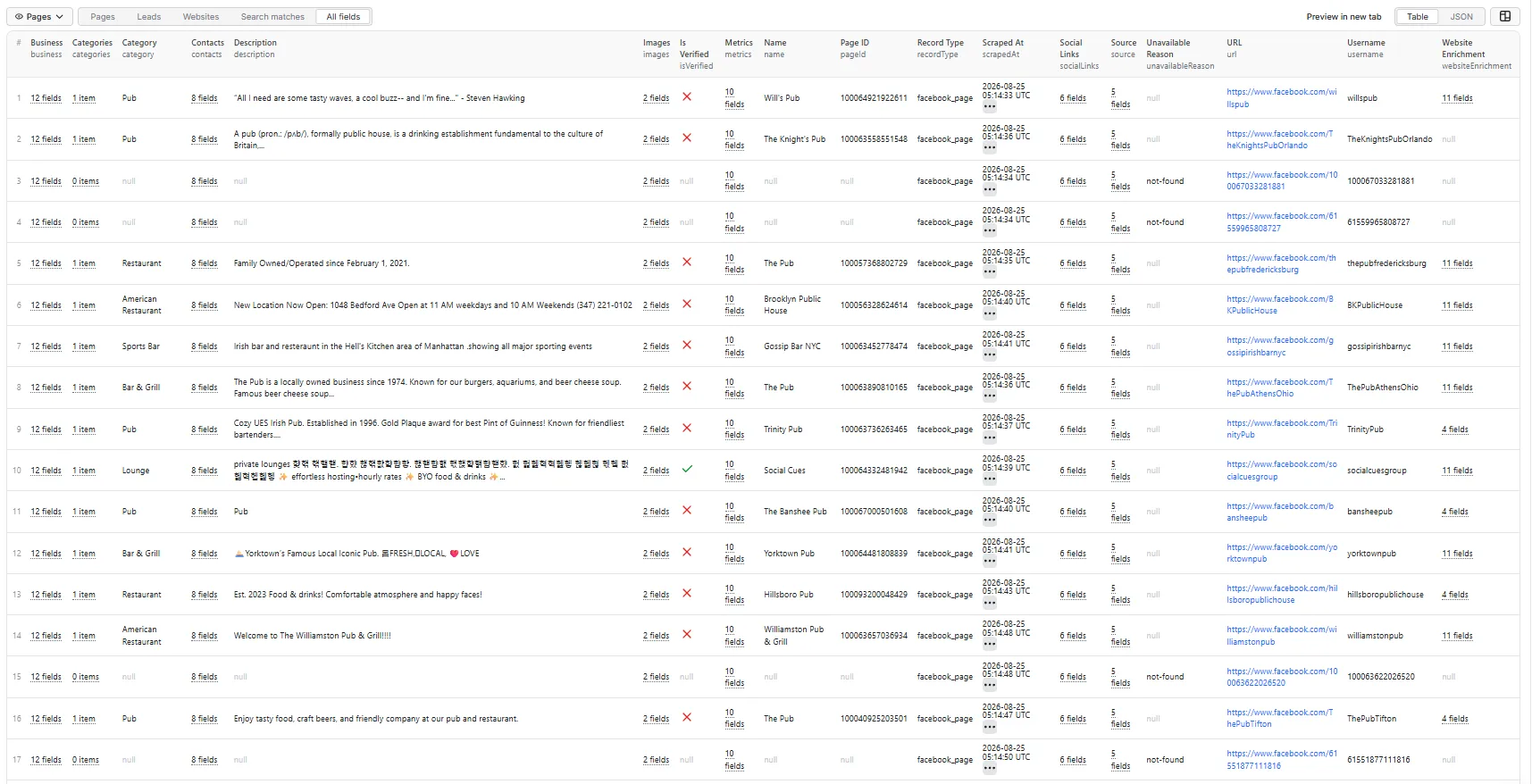
What a real run returns. From the run pictured above — a keyword search with both add-ons on, 18 Pages found, 14 delivered with data:
| Field | Fill rate |
|---|---|
| Phone | 93% |
| Address (incl. coordinates) | 93% |
| Website | 86% |
| Reviews / recommend % | 86% |
| 57% |
The 4 Pages that returned nothing were not charged, and by default are not in the file at all — switch on Include unavailable Pages as empty rows to see them. Fill rates vary by niche and location — trades and restaurants publish contact details far more often than national brands do.
Four dataset views are provided. Pick the tab that matches the job.
Public contact data behaviour
- Empty array means checked and none published.
nullmeans unknown or not checked. That distinction is kept deliberately so you can tell "this business publishes no email" from "we could not look". - Contacts are never fabricated. Every email, phone and address comes from what the Page itself publishes.
metrics.ratingis alwaysnull, and that is Facebook, not a gap here. Facebook retired 5-star Page ratings in favour of a recommend percentage —recommendPercentandreviewCountcarry the real signal. A star rating is not derived from the percentage, because that would be inventing a number no source published.followersApproximate: truemeans Facebook published the follower count only in abbreviated form ("920K"), so the number is rounded.likesis exact.business.hoursis alwaysnull;hoursStatuscarries the open/closed status Facebook does publish on this surface.isRunningAds,adStatus,creationDateandadLibraryIdneed "Add Page transparency details", in the Enrichment section. They come from a separate Facebook tab, so it is one extra request per Page and its own charged event; they staynullunless you switch it on.business.adLibraryIdis NOT the same number aspageId. Facebook's Ad Library uses its own Page ID, so both are returned;adLibraryUrllinks straight to that Page's ads.contacts.address.latitude/longitudeare the business's own coordinates, for plotting leads on a map or filtering by radius. They are returned only when the Page carries exactly one location — an ambiguous page yieldsnullrather than a coordinate that might belong to somewhere else.contacts.whatsappis a separate channel fromcontacts.phones— a business may publish either or both, and for trades the WhatsApp number is often the one that gets answered.business.serviceAreaslists the areas a business will travel to ("Regina Beach, SK, Canada", "Moose Jaw, SK, Canada"), which is distinct fromcontacts.address— where they are based. Common on trades and service businesses.business.adminCountriesis always empty for now. Facebook shows admin countries only on some Pages, and the field we can read on ordinary Pages contains explanatory boilerplate rather than a country list — so it is left empty rather than filled with a heading.contacts.websiteis the business's real site;contacts.websiteslists every link the Page publishes, including social profiles.priceRangecurrency symbols reflect the requesting region, not the business's. Only the NUMBER of symbols is meaningful — usepriceTier(1–4).
Optional website enrichment
Switch on Enrich business websites and each Page that publishes a website has that site's home page plus up to two contact/about pages fetched, returning the resolved final URL, page title and meta description, any additional emails and phones published there, and social links.
- Charged once per unique domain, not per Page. A franchise with fifty Pages sharing one website is one charge.
- Failed or empty enrichment is never charged. A site that is unreachable, blocked or publishes nothing costs you nothing, and the Facebook Page row is returned regardless.
- Fetching is bounded: at most three pages per domain, with size and time caps, and private/internal addresses are refused.
Incremental runs
Supply skipPageIds or skipUrls from a previous run. Skipped Pages are never fetched and never charged. Deduplication also runs within every run, so overlapping queries cost nothing extra.
Pricing and charging
This Actor uses Apify's pay-per-event pricing. This README deliberately quotes no figures — live prices are on the Actor's Pricing tab, and a copy here would go stale.
| Event | Charged | Default |
|---|---|---|
page-result | Once per unique Page returned with business data | always |
page-transparency | Once per Page returned with transparency details (creation date, ad status, Ad Library ID) | off |
website-enrichment | Once per unique website domain successfully enriched | off |
Both add-ons are off by default, so a standard run charges exactly one event per Page.
Never charged:
- duplicate Pages — one business found by two queries, or supplied directly and discovered, is charged once;
- Pages removed by any of your filters;
- Pages on your skip lists;
- Pages that were unavailable, deleted, not public or blocked;
- Pages returned with no data at all — no event ever fires for these. They are withheld from your results by default (see Include unavailable Pages as empty rows), and reported in the log and
RUN_SUMMARYeither way; - failed or empty website enrichment;
- transparency fetches for Pages you never receive. The "currently running ads" filter has to fetch every Page's transparency tab before it can tell which ones qualify, so most of that work is discarded — and discarded work is free. Verified: a run that fetched 6 tabs and delivered 1 Page charged 2 events, not 6.
There is no Actor-start fee and no rental fee. A run that returns nothing charges nothing.
Your spending limit is respected
If you set a maximum charge for the run, this Actor stops when it is reached rather than continuing to work unpaid:
- Pages beyond what your limit can pay for are not fetched further, not enriched, and not returned — the limit is checked before the expensive enrichment stage, not discovered one charge at a time.
- Nothing beyond the limit is ever charged.
- The run finishes successfully, not as a failure.
RUN_SUMMARY.stopReasonreadschargeLimitReached,pagesDroppedByChargeLimittells you how many Pages were left behind, and the status message says so.
Raise the limit and re-run to get the rest. Everything already paid for is in the dataset.
Free plan
Nothing in this Actor is restricted on the Apify Free plan — every feature, including keyword discovery and both add-ons, works exactly the same. Page detail comes from Facebook's own public pages and costs no third-party API credits, so there is no per-row upstream cost that would need gating.
Proxy
🚦 Proxy policy
Use Apify Datacenter proxy (the default) or no proxy. Both work reliably for public Facebook Pages at this Actor's concurrency — the gate on this surface is the request fingerprint, not the IP address.
Apify Residential proxy is not supported. The run will fail at startup if apifyProxyGroups includes RESIDENTIAL, before any request is made and before anything is charged.
Two reasons, and the second is why switching to residential would not help even if it were free:
- Cost. Residential bandwidth is billed to the Actor developer, not to your run. Facebook Page responses are large — about 1.67 GB per 1,000 Pages — which at residential rates costs several times what the results are priced at.
- It buys nothing. Facebook decides what to serve on the coherence of the request fingerprint, not on IP reputation. Residential IPs return the same data as datacenter ones.
If you genuinely need residential routing, supply your own provider through the proxy editor's Custom proxy URLs field. That traffic goes through your provider account, is unaffected by this policy, and is honoured in full:
Availability and limitations
- Only public Page data is collected. Anything Facebook shows exclusively to logged-in users is out of reach by design.
- Some Pages are unavailable, deleted or geo-restricted. Those are never charged, and are withheld from your results unless you switch on Include unavailable Pages as empty rows — the count and reason are always reported.
- Keyword discovery requires a search provider key and reaches only indexed Pages. Direct Page URLs have neither limitation.
- Facebook changes its templates.
RUN_SUMMARYincludessectionSurfaceandparseYield, which compare what was on the page against what was extracted, and the run warns loudly if a field stops parsing rather than letting a column quietly empty.
Run summary
Every run writes a RUN_SUMMARY record to the key-value store: input counts, unique Pages resolved, duplicates collapsed, per-reason filter and unavailability breakdowns, contact-completeness counts, charged-event totals, an estimated bandwidth figure and upstream call accounting.
Input examples
1. Scrape Pages you already have — the simplest run. No keys, no add-ons, one event per Page.
2. Find local businesses by keyword and location — the lead-generation run.
3. Everything on — discovery, both paid add-ons, filters, and an incremental skip list.
4. Contact filters via the API — hasEmail, hasPhone and hasWebsite are not in the input form, but still work when supplied programmatically.
Privacy and platform disclaimer
This Actor collects only publicly accessible Facebook Page/business information and public website information. You are responsible for complying with applicable privacy, anti-spam and data-protection law, and with platform terms, in your use of the results. Public availability does not automatically make every downstream use lawful. This Actor is not an outreach or bulk-messaging tool and must not be marketed or used as one.


