

Facebook Posts Scraper
Pricing
from $2.00 / 1,000 post results
Facebook Posts Scraper
Scrape public Facebook posts from pages and profiles, or discover posts by keyword. One normalized row per post: text, author, timestamp, media, reactions with a per-reaction breakdown, comment and share counts, and outbound links. No Facebook login, cookies or session ID needed.
Pricing
from $2.00 / 1,000 post results
Rating
0.0
(0)
Developer

Delowar Munna
Maintained by CommunityActor stats
0
Bookmarked
52
Total users
24
Monthly active users
3 days ago
Last modified
Categories
Share

Scrape public Facebook posts from pages and profiles, or discover posts by keyword. Get clean post text, author, timestamps, media, reactions with a per-reaction breakdown, comment and share counts, and outbound links. One global result limit keeps multi-source runs predictable, and you never need to provide Facebook login credentials, cookies or a session ID.
💬 Need the comments on these posts? Pass the
postUrlvalues from this Actor's output to Facebook Comments Scraper — every public comment and reply as one row each, also with no login. See Need the comments too?
Quick start
- Put one or more Facebook URLs in Facebook URLs — a post link, or a page/profile whose recent posts you want.
- Set Maximum posts.
- Leave Proxy configuration on Apify Proxy (Datacenter) — it keeps a multi-page run from being blocked. It will not give you deeper timeline history; see Why depth is limited.
- Run.
Every run also writes a RUN_SUMMARY record to the key-value store with counts, stop reason and
diagnostics, and a RETRY_INPUT record you can re-run as-is if anything was blocked.
Two input modes
Post URLs — exact, reliable, one request each
Paste post links directly. Every URL shape Facebook uses is accepted, including the long search-engine form with the post text in the path:
Page and profile URLs — the current post from each
Personal profiles work exactly like pages. Facebook groups do not — see What this Actor cannot do.
Keyword discovery
Put keywords in Search queries to find posts about a topic. Facebook publishes no logged-out search of its own, so discovery searches the open web for indexed Facebook posts. Roughly half of what a keyword returns is Facebook pages rather than individual posts; the run reports how many, and you can paste those into Facebook URLs to pick up the current post from each.
Add Locations to turn one keyword into several searches ("artemis mission" + "Australia").
That returns more than searching one keyword more deeply.
Sample inputs
Three runs that cover the shapes people actually use. All three work in the Console and the API unchanged.
1 — Brand monitoring. The current post from every page you track. This is what the Actor is best at: each page contributes the post Facebook renders on it, so the result count scales with the number of pages, not with how deep you ask.
2 — Post URLs, the volume path. Permalinks are one request each, are never rate-limited, and return the complete post. Use this shape when you want a large, reliable run.
3 — Keyword discovery with filters. Finds indexed posts about a topic, then narrows them. Filtering happens after collection — a filtered-out post is never charged.
For a scheduled job, add skipPostIds or skipUrls from the previous run's RUN_SUMMARY so each
run returns only what is new — see Incremental runs.
⚠️ Why depth is limited without a login
This is the single most important thing to know before you set Maximum posts, and it is a property of Facebook rather than of this Actor.
A logged-out Facebook page renders exactly one post in its HTML. Everything after that comes from the same timeline endpoint the page's own JavaScript uses. That endpoint does answer logged-out requests — but it is rate-limited per IP address, and it refuses Apify's addresses on the first call. Measured across four runs on Apify Proxy spanning eight days: 25 timeline requests, 25 refused — every one on the first call of a fresh session — while every page request from those same addresses returned in full.
So plan on one post per page URL. Everything else about that post is complete — text, author, timestamp, media, reactions with the per-reaction breakdown, comment and share counts, links.
| You want | Do this |
|---|---|
| Volume | Paste post URLs. One request each, never rate-limited, complete data. This is the path to use for a large run. |
| Recent posts across many pages | List many pages. Each contributes the post Facebook renders on it — so 200 pages gives you 200 current posts. |
| Deep history from one page | Not available on Apify's addresses. Your own residential proxy under Custom proxy URLs does get a small allowance; otherwise run on a schedule and use Skip these post IDs to build up over time. |
Every run reports exactly where its posts came from, in the log and in RUN_SUMMARY.economics.feed:
Running without a proxy sends every request from one address, which raises the chance of Facebook blocking the run as a whole. It does not cost you timeline depth — there is none to lose on Apify addresses either way. The run warns when you do this.
Output
One row per unique post. Unknown values are null — never invented, never silently zero.
postType is one of photo, video, reel, link, share or text.
sharedPost is filled in when a post reshares another one. Its engagement stays the sharer's
own — a share with 10,000 reactions is not credited with the original's 640,000.
media[].altText is Facebook's own accessibility caption. On photo-only posts it is often the
only textual description the post carries.
Dataset views
Four tabs over the same rows — pick the one that matches what you are doing, or export the full record above. Every sample below is a real row from a live run.
Posts — the default. Everything you normally want, in reading order.
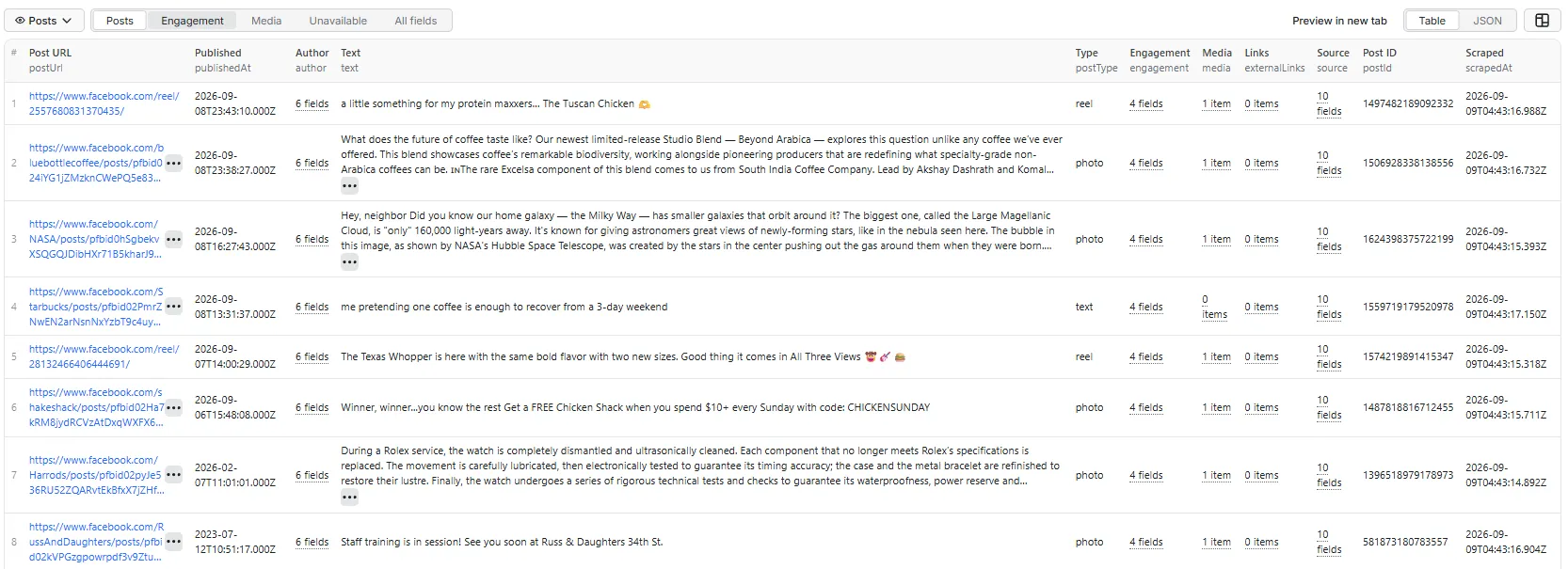
Engagement — spreadsheet-friendly. Drops media and source so the numbers line up in a CSV, and
keeps text so each row is still identifiable.
Media — posts that carry attachments, with the video block alongside. video.views and
video.transcript are always null on this surface; see
What this Actor cannot do.
Unavailable — empty by default. It only fills when you switch on Include unavailable posts as
empty rows; otherwise these are reported in the log, RUN_SUMMARY.notAvailableByReason and
RETRY_INPUT instead of cluttering your dataset. Shape:
unavailableReason is one of login-wall, soft-block, rate-limited, blocked, not-found,
group-not-readable-logged-out, timeout, proxy-error or request-failed. The first four mean
the post exists and a later run usually gets it — those are the ones written into RETRY_INPUT.
not-found means deleted or not public, and re-running will not recover it. Unavailable rows are
never charged, whether or not you display them.
What this Actor cannot do
Stated plainly, because each of these was tested rather than assumed, and a scraper that quietly returns nothing is worse than one that says why.
| Not available | Why |
|---|---|
| Comment text | This Actor returns each post's comment count, not the comments themselves — a post's page carries no comment bodies. Public comments and replies are available without a login from Facebook Comments Scraper; see Need the comments too? |
| Video transcripts / captions | Every video attachment served logged out carries an empty captions list and no captions URL. |
| Video view counts | Not published on this surface. video.views is permanently null rather than guessed from reactions. |
| Facebook groups | A logged-out request for any group returns an empty shell with no posts at all — public groups included. Group URLs are rejected with that reason rather than accepted and silently returning nothing. |
| Pinned-post flag | The timeline Facebook serves logged-out explicitly omits pinned posts, so isPinned is null rather than a guess. |
| Deep history from one page | Facebook's timeline endpoint refuses Apify's addresses outright — measured, 25 of 25 across four runs. See Why depth is limited. |
| Private, friends-only or gated content | Out of scope by design. This Actor never asks for credentials and cannot see anything a logged-out visitor cannot. |
Transcripts and deep history would need a logged-in session. This Actor does not ask for your Facebook account, and will not. Comment text does not need one — it is covered below.
Need the comments too?
Facebook Comments Scraper is the companion
Actor: give it post URLs and it returns every public comment and reply as its own row — text, author,
date, likes and reactions, and the thread relationships (rootCommentId, parentCommentId,
threadingDepth). Like this Actor, it needs no Facebook login or cookies.
Take the postUrl of each row in this Actor's dataset and pass them as that Actor's startUrls,
for example:
You can chain the two automatically with an Apify integration or webhook: when a Posts Scraper run succeeds, start Comments Scraper with the new post URLs.
Filters
All filters run after posts are collected, because Facebook offers no way to search by engagement or media type. A filtered-out post is never charged, so narrowing costs you nothing.
- Minimum reactions / comments / shares — posts where Facebook published no figure are kept. An unknown count is not a low one.
- Media types —
photo,video,reel,link,share,text. A reel also matchesvideo. - Posted on or after / before — both bounds inclusive. A plain date as
dateTocovers the whole of that day. Posts with no timestamp are dropped when a date bound is set, and counted separately asdateUnknownso you can tell that apart from an over-narrow range. - Only / exclude these authors — matched on name, handle or numeric ID. If a post matches both lists it is excluded.
- Only these source types —
page,profile,post.
Incremental runs
For a scheduled job that should only return what is new:
- Skip these post IDs / Skip these post URLs — anything already collected.
- Posted on or after — plus Stop a timeline after N posts older than your start date, which stops paging a page once it has gone past your window instead of fetching history you filtered out.
RUN_SUMMARY gives you the IDs to carry forward; RETRY_INPUT gives you a ready-to-run input
containing only what was blocked or rate-limited — never posts that are simply gone, because
re-running those spends a request every time to confirm what is already known.
Pricing
Pay per result. You are charged once per unique post returned with data, and never for:
- duplicates — a post found by two searches, or supplied directly and read from a timeline, is charged once;
- posts removed by your filters;
- posts on your skip lists;
- posts that were deleted, not public, blocked or rate-limited.
By default, posts that could not be read are left out of the dataset entirely rather than returned
as blank rows. The run log, the run status, RUN_SUMMARY and RETRY_INPUT all report them, and a
CSV full of empty rows imports junk into whatever you load it into. Switch on Include unavailable
posts as empty rows if you want them anyway — they are free either way.
There is no start fee, no subscription and no monthly rental — you pay only for posts you actually receive, so a run that returns nothing costs you nothing.
This README deliberately quotes no figures. Live prices are on the Actor's Pricing tab, which is the only place that cannot go stale.
🚦 Proxy policy
Use Apify Datacenter proxy — it is the default, and it is what keeps a multi-page run from being blocked as a whole. It does NOT unlock timeline depth: Facebook's feed endpoint refuses Apify addresses on the first call, measured. Depth needs a different class of address, which means your own provider under Custom proxy URLs.
Apify Residential proxy is not supported. The run fails at startup if apifyProxyGroups
includes RESIDENTIAL. Two reasons: residential bandwidth is billed to the Actor developer rather
than to your run, at several times what the results are priced at; and it buys nothing here, because
Facebook gates on the request fingerprint rather than the IP, and a per-address call budget is not
raised by a more expensive address.
If you genuinely need residential routing, supply your own provider under Custom proxy URLs — that traffic goes through your account and is honoured in full:
API example
The Console and the API take the same input. maxResults is global and deterministic, and you never
need to understand a provider cursor.
Troubleshooting
"I only got one post per page." That is the expected result on Apify's addresses — Facebook's timeline endpoint refuses them, so each page contributes the single post it renders. Switching Apify Proxy on will not change it. For volume, supply post URLs directly, or list more pages. See Why depth is limited.
"My keyword search returned pages, not posts." Expected — a web search for posts turns up profile pages too. The run reports how many. Put those page URLs in Facebook URLs to collect their timelines.
"Some posts came back unavailable."
Check RUN_SUMMARY.notAvailableByReason. login-wall and soft-block mean Facebook withheld a
post that exists — those are in RETRY_INPUT, and a later run usually gets them. not-found means
the post is deleted or not public, and re-running will not recover it.
"The run failed saying there was nothing to scrape." You supplied only keywords and keyword discovery is not configured on this Actor, or the search found no posts. Supply Facebook URLs directly, or broaden the keywords.
"Reaction counts changed between runs." They are live figures. A popular post can gain thousands of reactions in an hour.
Privacy and platform disclaimer
This Actor processes publicly accessible Facebook data only — what any logged-out visitor can see. It never requests, stores or uses Facebook credentials, cookies, session IDs, access tokens or browser profiles, and it cannot reach private, friends-only, group or otherwise gated content.
You are responsible for complying with applicable law, Meta's terms, and your own privacy and data-protection obligations, including how you store and use any personal data in the results.


