

Google Maps Competitor Finder
Pricing
from $2.40 / 1,000 competitor-results
Google Maps Competitor Finder
Find and export local competitors from Google Maps by keyword and location. Returns clean, flat, CSV-friendly competitor data with ratings, review counts, contact details, address fields, competitor strength score, ranking, and market position hint.
Pricing
from $2.40 / 1,000 competitor-results
Rating
0.0
(0)
Developer

Delowar Munna
Maintained by CommunityActor stats
0
Bookmarked
2
Total users
0
Monthly active users
6 months ago
Last modified
Categories
Share
Find and rank local Google Maps competitors by keyword + location. Returns a clean, flat, CSV-friendly competitor row per result with competitor strength scoring, comparison tags, and a market position hint — built for local SEO, agency research, market analysis, and small-business strategy.
V1 deliberately avoids website crawling, email extraction, full review scraping, photos, menus, and AI enrichment so the run stays fast and cheap. You only pay for unique competitor rows that pass your filters and are successfully written to the dataset.
Why this actor
- Competitor-focused — 30 flat fields tuned for local competitor research (rank, rating, review count, contact details, address parts, strength score, tags, market position hint).
- Transparent strength score — rule-based 0–100, no AI. Explained below.
- Market position hint — short rule-based label like
Strong established competitor,Emerging well-rated competitor,Offline-heavy competitor. - Pay-Per-Event — one charge per saved unique competitor row. Duplicates, filtered rows, and failed pushes are not charged.
- No login, no cookies, no sessions — just keyword + location.
- CSV-friendly output — flat structure, no nested objects, drops cleanly into Sheets/Excel/CRMs.
Quick start — sample inputs
Example 1 — single query
Example 2 — multi-query competitor research
The
searchQueriesfield uses Apify's Key/Value form editor — the Key column is the business keyword (e.g.plumbers), the Value column is the location (e.g.Canberra ACT). Add one row per search.
Input fields
| Field | Type | Required | Default | Purpose |
|---|---|---|---|---|
searchQueries | array | Yes | [] | Keyword + location pairs (one search per row). |
maxResults | integer | No | 100 | Per-query cap (1–500). |
country | string | No | "" | ISO country code (e.g. AU, US). |
language | string | No | en | Google Maps UI language. |
minRating | integer | No | 0 | Drop competitors below this star rating. |
minReviewCount | integer | No | 0 | Drop competitors below this review count. |
websiteFilter | enum | No | any | any / hasWebsite / missingWebsite. |
phoneRequired | boolean | No | false | Keep only competitors with a visible phone. |
categoryFilter | string | No | "" | Case-insensitive contains match against category. |
includeOpeningHours | boolean | No | true | Include opening hours when visible. |
includeCoordinates | boolean | No | true | Include latitude/longitude when available. |
includeCompetitorScore | boolean | No | true | Compute strength score, label, tags, and market position hint. |
deduplicateResults | boolean | No | true | Remove duplicate competitors across queries. |
proxyConfiguration | object | No | Apify Proxy | Apify Datacenter proxy / no proxy / custom proxy URLs. Apify Residential is rejected (see Proxy policy below). |
Output
The dataset has one view: Competitors — a 30-column flat table.
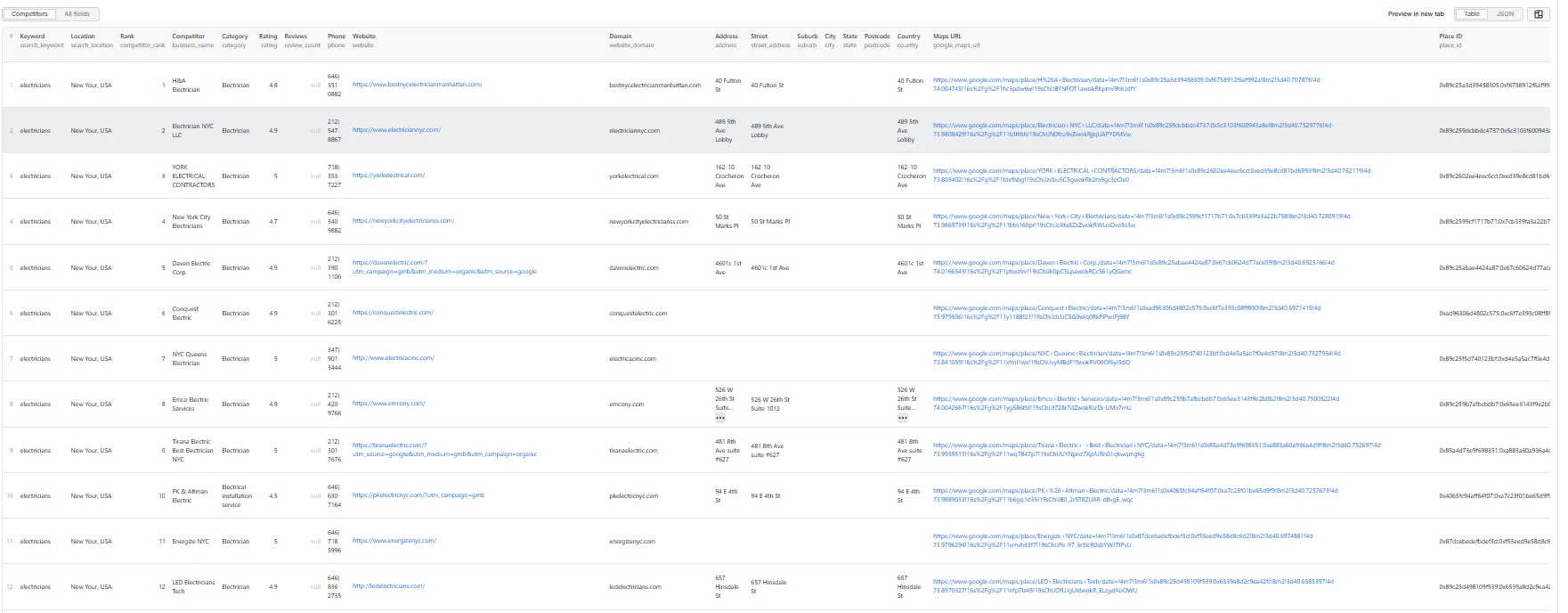
Sample record — Competitors
Output fields (30)
search_keyword, search_location, competitor_rank, business_name, category, rating, review_count, phone, website, website_domain, address, street_address, suburb, city, state, postcode, country, google_maps_url, place_id, latitude, longitude, opening_hours, is_open_now, has_website, has_phone, competitor_strength_score, competitor_strength_label, competitor_tags, market_position_hint, scraped_at.
Competitor strength score
Transparent rule-based score (0–100) computed from visible fields — no AI, no external enrichment.
| Signal | Points |
|---|---|
| Has website | +20 |
| Has phone | +15 |
| Rating ≥ 4.5 | +20 |
| Rating 4.0–4.49 | +10 |
| Review count ≥ 100 | +25 |
| Review count 30–99 | +15 |
| Review count 10–29 | +8 |
| Has full address | +10 |
| Category found | +5 |
| Opening hours found | +5 |
Score is capped at 100.
Labels
| Score | Label |
|---|---|
| 80–100 | Strong Competitor |
| 60–79 | Established Competitor |
| 40–59 | Moderate Competitor |
| 0–39 | Weak Competitor |
Competitor tags explain the score and surface comparison signals:
Market position hint is a short rule-based interpretation of the score and tags. Examples: Strong established competitor, Emerging well-rated competitor, High-visibility but reputation weakness, Offline-heavy competitor, Weak digital competitor.
Pricing
Pay-Per-Event. The actor honors the user-configured per-run spending cap (Apify eventChargeLimitReached) and stops cleanly when reached.
| Event | Fires |
|---|---|
competitor-result | Once per unique competitor row that passed all filters and was successfully pushed to the dataset. |
🚦 Proxy policy
Use Apify Datacenter proxy or no proxy for normal runs — both work reliably for Google Maps search at this actor's conservative concurrency.
Apify Residential proxy is not supported. The actor will fail at startup if apifyProxyGroups includes RESIDENTIAL. Reason: in pay-per-event actors, residential bandwidth (~/GB) is billed to the developer, not the run user, so a single bandwidth-heavy run could exceed the per-result event revenue.
If you genuinely need residential routing, supply your own residential provider via the proxy editor's Custom proxy URLs field — that traffic goes through your provider, not Apify, and is unaffected:
Not charged for competitor-result:
- Duplicates (de-duplicated by
place_id, listing URL, or name+address). - Rows filtered out by
minRating,minReviewCount,websiteFilter,phoneRequired, orcategoryFilter. - Rows missing a
business_name. - Failed dataset pushes.
- Anything after the per-run spending cap is reached.
Run summary
After each run, a RUN_SUMMARY entry is written to the key-value store:
charged_events always equals results_saved.
Filters
| Filter | Effect |
|---|---|
minRating | Drop competitors below this star rating (0 disables). |
minReviewCount | Drop competitors with fewer reviews (0 disables). |
websiteFilter | any / hasWebsite / missingWebsite. |
phoneRequired | If true, keep only competitors with a visible phone. |
categoryFilter | Case-insensitive contains match against the category. |
deduplicateResults | Drop duplicates across queries (recommended ON). |
Filters are applied after extraction and before dataset push or event charge.
Limitations (V1)
- Cards-only extraction: V1 reads each competitor row directly from the search results panel and does not click into individual place detail panels. Phone, website, full opening hours, and
place_idonly appear when Google surfaces them on the card itself; otherwise these fields are empty/null. - No website crawling, email extraction, or social link extraction.
- No full review text or sentiment analysis.
- No photos, menus, prices, or popular times.
- No login/cookie/session-based scraping.
- No true distance/radius calculation against a seed business in V1.
- Address parsing into street/suburb/city/state/postcode is best-effort; the full
addressfield is the source of truth. - Per-query hard cap is 500 results; per-run hard cap is 5,000 results.
Technical notes
- Stack: Node.js 22 · Apify SDK 3 · Crawlee · Puppeteer.
- Concurrency:
min=1,max=3(conservative to reduce blocking). - Memory: 1 GB min · 2 GB default · 4 GB max.
- Proxy: Apify Datacenter proxy by default; custom proxy URLs accepted. Apify Residential is rejected at startup (see Proxy policy above).
- Diagnostics: On the first failed render (no feed, or feed but zero cards), the actor saves the page HTML and URL to the key-value store as
debug-no-feed-html/debug-zero-cards-html.


