

Google Maps Photos Scraper
Pricing
$0.30 / 1,000 photo results
Google Maps Photos Scraper
Scrape public photos from Google Maps places. Extract full-resolution image URLs, thumbnails, photo IDs, dimensions, contributor details, dates, captions, photo coordinates and place metadata from Maps URLs, Place IDs, CIDs, data IDs, business names or coordinates. No Google login or API key.
Pricing
$0.30 / 1,000 photo results
Rating
0.0
(0)
Developer

Delowar Munna
Maintained by CommunityActor stats
0
Bookmarked
4
Total users
2
Monthly active users
10 days ago
Last modified
Categories
Share

Full-Resolution Photos, Contributors & Metadata
Scrape public photos from Google Maps places. Extract full-resolution image URLs, thumbnails, photo IDs, dimensions, contributor details, dates, captions, photo coordinates and place metadata. Process many places in one run and export clean JSON, CSV or Excel.
No Google API key, no Google login and no cookies needed.
✨ What you get
One row per photo:
- 🖼️ Full-resolution image URL at the original pixel size Google stores, plus a thumbnail URL
- 🆔 Photo ID (stable, used for deduplication)
- 📐 Width and height in pixels (from Google — images are never downloaded to measure them)
- 👤 Contributor: name, profile URL and contributor ID
- 📅 Date taken and date uploaded, kept separate
- 📝 Caption, where the contributor wrote one
- 📍 Photo coordinates, kept separate from the place location
- 🏷️ Photo type (
USER,OWNER,STREET_VIEW,UNKNOWN) and format (PHOTO,PANORAMA_360) - 🏢 Place context: Place ID, CID, data ID, name, address, Google Maps URL, latitude / longitude
- 🧾 Free place summary rows with a status and coverage label for every place you asked for
📥 Supported inputs
| Input | Example |
|---|---|
| Google Maps place URL | https://www.google.com/maps/place/Sydney+Opera+House/@-33.85,151.21,17z/data=!… |
| Short share link | https://maps.app.goo.gl/… |
| Place ID | ChIJN1t_tDeuEmsRUsoyG83frY4 |
| CID | 3545450935484072529 |
| Data ID | 0x6b12ae665e892fdd:0x3133f8d75a1ac251 |
| Business name | Sydney Opera House (+ optional Location) |
| Coordinates + radius | { "lat": 38.8960382, "lng": -77.0365611, "radiusMeters": 25, "maxResults": 20 } |
Mix as many as you like. Equivalent places (the same place given as a URL and a Place ID) are scraped once.
If a business name matches several places (e.g. a chain), that input returns AMBIGUOUS_PLACE with the candidates listed instead of a guess. Use a Maps URL or Place ID for those.
⚙️ Input examples
Place ID
Several places, full metadata
Maps URL, recent photos only
Coordinates + radius
Main options
| Field | Default | What it does |
|---|---|---|
maxPhotosPerPlace | 100 | Maximum photos returned per place (up to 5,000). |
photosNewerThan | — | Keep only photos uploaded on or after a date ("30 days", "2026-01-01"). |
includeContributor | true | Contributor name, profile URL and ID (also enables USER / OWNER photo types). |
includeDimensions | true | Width and height. |
includeDate | true | Date taken and date uploaded. |
includeCaption | true | Caption, where one exists. |
includeGeo | true | Photo-specific coordinates. |
emitPlaceSummaries | true | One free summary row per place / point. |
Turning off contributor, dates and caption makes runs several times faster, because those fields need one extra lookup per photo.
📤 Output
The dataset has two views: Photos (one row per photo, with a thumbnail preview) and Places (one free status row per place). Export either view as JSON, CSV, Excel or HTML, or read it through the API.
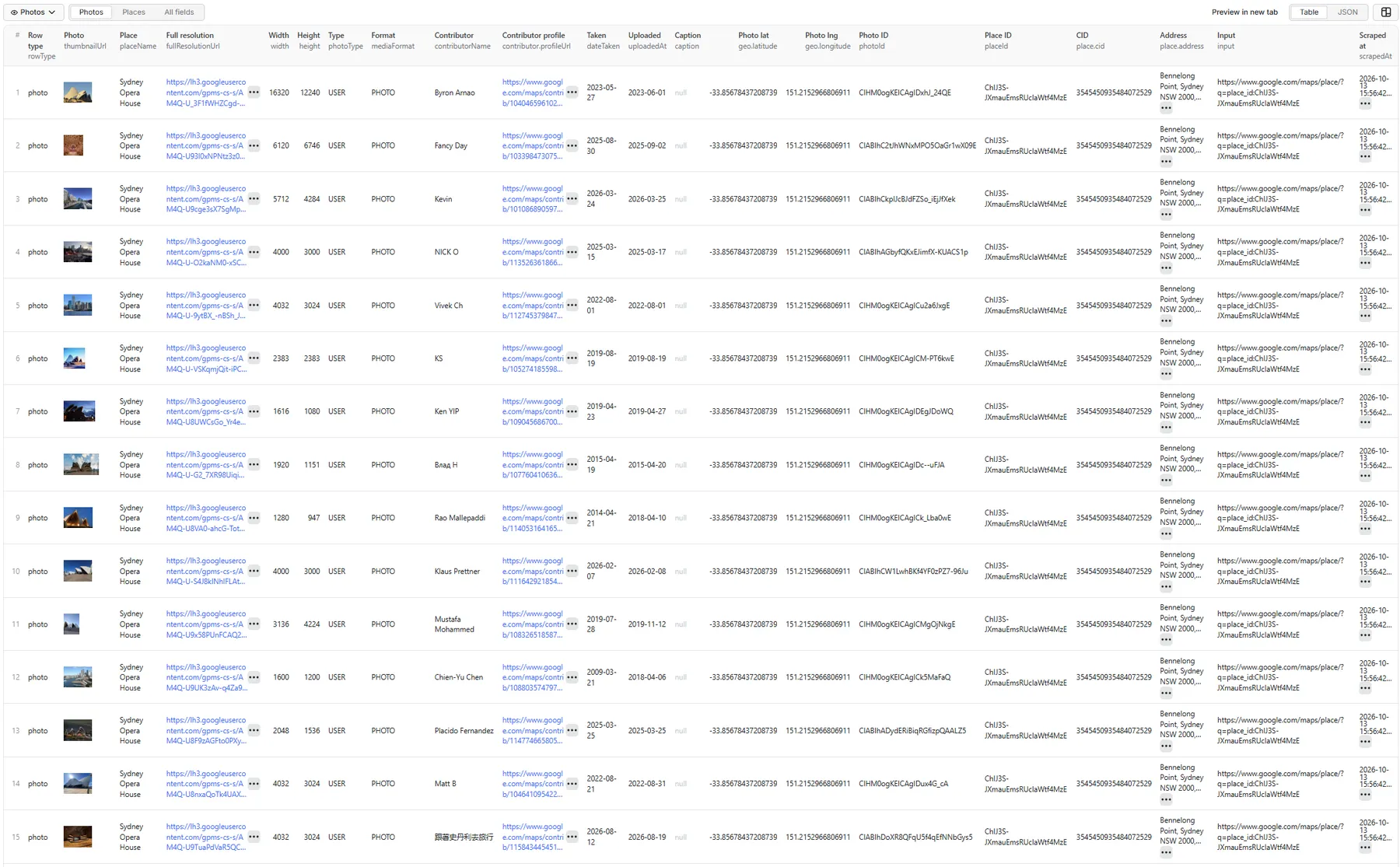
The samples below come from the default run (Sydney Opera House, 100 photos). The contributor's name is replaced with a placeholder.
Photo row (Photos tab)
Unavailable fields are null. Dates are calendar dates: Google doesn't publish a time zone, so no time of day is invented.
Place summary row (Places tab, free)
LIMIT_REACHED means the run stopped at your maxPhotosPerPlace. photosScanned also counts videos (skipped and free) and items read past the limit on the last page, so it can be a little higher than photosReturned.
Partial coverage example
When Google shows a signed-out visitor fewer photos than the place's photo count, the place says so instead of looking complete:
Error / no-photo example
A place with no public photos returns status: "NO_PHOTOS" / coverageStatus: "NO_PHOTOS".
Statuses: SUCCESS, NO_PHOTOS, INVALID_PLACE, PLACE_NOT_FOUND, AMBIGUOUS_PLACE, RATE_LIMITED, BLOCKED, PARTIAL_RESULT, TEMPORARY_GOOGLE_ERROR, PROVIDER_ERROR.
Coverage: FULL_AVAILABLE_SET, LIMIT_REACHED, PARTIAL_PUBLIC, NO_PHOTOS, PLACE_NOT_FOUND, PROVIDER_LIMITED, BLOCKED.
One failed place never fails the whole run. Retryable failures are saved to the RETRY_INPUT record in the key-value store, so you can paste them straight into a new run. Run totals (places, photos, duplicates, videos skipped, field availability, photo types, runtime, requests per 1,000 photos) are in RUN_SUMMARY.
❓ FAQ
Which inputs are supported? Maps place URLs, short share links, Place IDs, CIDs, data IDs, business names (optionally with a location) and coordinates + radius.
Do I need a Google API key? No. No API key and no Maps Platform billing.
Do I need a Google login? No. No login, no cookies, no browser extension.
Can I process multiple places? Yes — as many as you like in one run, in parallel.
Are images full resolution? Yes. fullResolutionUrl requests the exact original dimensions Google reports for the photo (e.g. 4032 × 3024), not a carousel thumbnail.
Are thumbnails included? Yes — thumbnailUrl, a 400-pixel version of the same image.
Are contributor details included? Yes, the public ones: name, profile URL and contributor ID. Contributors are not enriched from outside Google.
Are dates included? Yes — dateTaken and uploadedAt, kept separate, as calendar dates.
Are photo coordinates included? Yes — geo holds the photo's own coordinates; the place's location is in place.latitude / place.longitude.
How many photos can I get per place? Up to 5,000 per run via maxPhotosPerPlace. In practice Google lists roughly 1,000–1,400 photos of a place to signed-out visitors, even when its gallery header advertises far more.
Why might I get fewer photos than Google displays? Google's headline photo count includes photos it doesn't list publicly, and it stops paging a gallery for signed-out visitors after roughly 1,000–1,400 photos. When that happens the place summary says PARTIAL_PUBLIC / PARTIAL_RESULT, with both numbers, instead of pretending the set was complete. Videos in the gallery are skipped and not charged.
Are images downloaded, or only URLs returned? Only URLs and metadata. No image file is downloaded or stored.
How does pricing work? You pay per unique photo delivered — see Pricing below.
Can I use it via API / MCP? Yes. Call it from the Apify API, the JavaScript / Python clients, or any MCP-capable AI agent through the Apify MCP server.
Can I schedule recurring runs? Yes — create an Apify Schedule (for example with photosNewerThan: "7 days") and connect a webhook, Make, Zapier, n8n or Google Sheets integration.
💰 Pricing
Pay per result: you are charged once per unique photo delivered to the dataset. You are not charged for:
- place resolution, pagination or retries,
- duplicates,
- photos removed by
photosNewerThan, - videos,
- failed or ambiguous places,
place_summaryrows.
There is no start fee, so a run that returns no photos costs nothing. See the Pricing tab on this Actor's page for current rates. This README deliberately doesn't quote figures, because live prices are set in the Apify Console. Per-run spending limits you set on Apify are respected: the run stops cleanly when the limit is reached.
🚦 Proxy policy
Use Apify Datacenter proxy (the default) or no proxy — both work for Google Maps photo galleries at this Actor's conservative concurrency.
Apify Residential proxy is not supported. The Actor fails at startup if apifyProxyGroups includes RESIDENTIAL. Reason: in pay-per-event Actors, residential bandwidth is billed to the developer, not the run user, so a single bandwidth-heavy run could exceed the per-photo revenue.
If you genuinely need residential routing, supply your own residential provider via the proxy editor's Custom proxy URLs field. That traffic goes through your provider, not Apify, so this block doesn't apply to it:
🔗 Works well with
- Google Maps Reviews Scraper — the same place identity (
placeId,cid,dataId,googleMapsUrl), so photos and reviews join cleanly. - Coregent Google Maps business / lead Actors — discover places, then pass their Place IDs here.
Typical chain: business / lead scraper → placeId → this Actor → visual research, listing audits or computer-vision pipelines.
⚖️ Compliance and privacy
- This is an unofficial tool and is not affiliated with, endorsed by or sponsored by Google.
- It returns public Google Maps photo URLs and metadata only.
- Contributor profiles can contain personal information. You are responsible for lawful processing of what you collect (e.g. GDPR / CCPA) and for respecting Google's terms.
- Image copyright stays with the owners and uploaders. You are responsible for lawful downstream use.
- Photos can be removed or changed by Google or their contributors at any time, so URLs may stop working.
- The Actor does not upload photos, access private media, collect credentials, de-anonymize contributors or infer sensitive attributes.
🛠️ Limitations
- Google lists roughly 1,000–1,400 photos per place to signed-out visitors; deeper gallery history isn't reachable. Places affected are labelled
PARTIAL_PUBLIC. - Captions are rare on Google Maps, so
captionis usuallynull. photoTypecomes from metadata only, never from image content:OWNERwhen the contributor is the business profile,STREET_VIEWfor Google's own Street View imagery,USERotherwise,UNKNOWNwhen contributor details are turned off.- Gallery order is Google's own (not chronological), so
photosNewerThanscans the listed gallery rather than stopping early. - Coordinates mode samples points around the centre and returns the nearest public user photos Google finds within the radius; Google's own Street View panoramas are not included. It's a nearby-photo finder, not an exhaustive area crawl.
- Videos are skipped.


