

Google Maps Service Area Business (SAB) Finder
Pricing
from $3.60 / 1,000 business-results
Google Maps Service Area Business (SAB) Finder
Find Google Maps Service Area Businesses (SABs) — contractors, cleaners, plumbers, and other home-service providers that serve named regions instead of operating from a public storefront. Returns a flat 11-field row per SAB, including the named service-area list.
Pricing
from $3.60 / 1,000 business-results
Rating
0.0
(0)
Developer

Delowar Munna
Maintained by CommunityActor stats
0
Bookmarked
15
Total users
4
Monthly active users
5 months ago
Last modified
Categories
Share

Find mobile and home-service businesses on Google Maps — the "service area" leads other scrapers miss. This actor specifically isolates Service Area Businesses (SABs): contractors, cleaners, plumbers, electricians, and other providers that don't have a public storefront but instead serve named regions (neighborhoods, suburbs, cities). Returns a clean, flat 11-field row per SAB, including the named service-area list.
Built for lead-generation agencies, home-service marketplaces (Angi/Thumbtack-style), and local SEO auditors that need the contractor leads standard Google Maps scrapers skip.
✨ Why this scraper
- SAB-focused — filters out brick-and-mortar storefronts by default; keeps only businesses with hidden street addresses (the "Service area" / "Online business" Maps signal).
- Named service areas — extracts the list of neighborhoods, suburbs, or cities each business serves.
- Pay-Per-Event — one flat event per saved row. Filtered-out storefronts and duplicate placeIds are not charged.
- Maps-only, no website visits — V1 stays fast and cheap by skipping external website crawling.
- CSV-friendly output — flat structure, no nested objects, drops cleanly into Sheets / Excel / CRMs.
🚀 Quick start — sample inputs
Example 1 — minimal (PRD example)
Example 2 — broader run with location bias and custom proxy
The actor blocks Apify Residential proxy. If you need residential routing, supply your own provider via
proxyConfiguration.proxyUrlsas shown — see 🚦 Proxy policy below.
📦 Output
The dataset has one view: Service area businesses — a flat 11-column table.
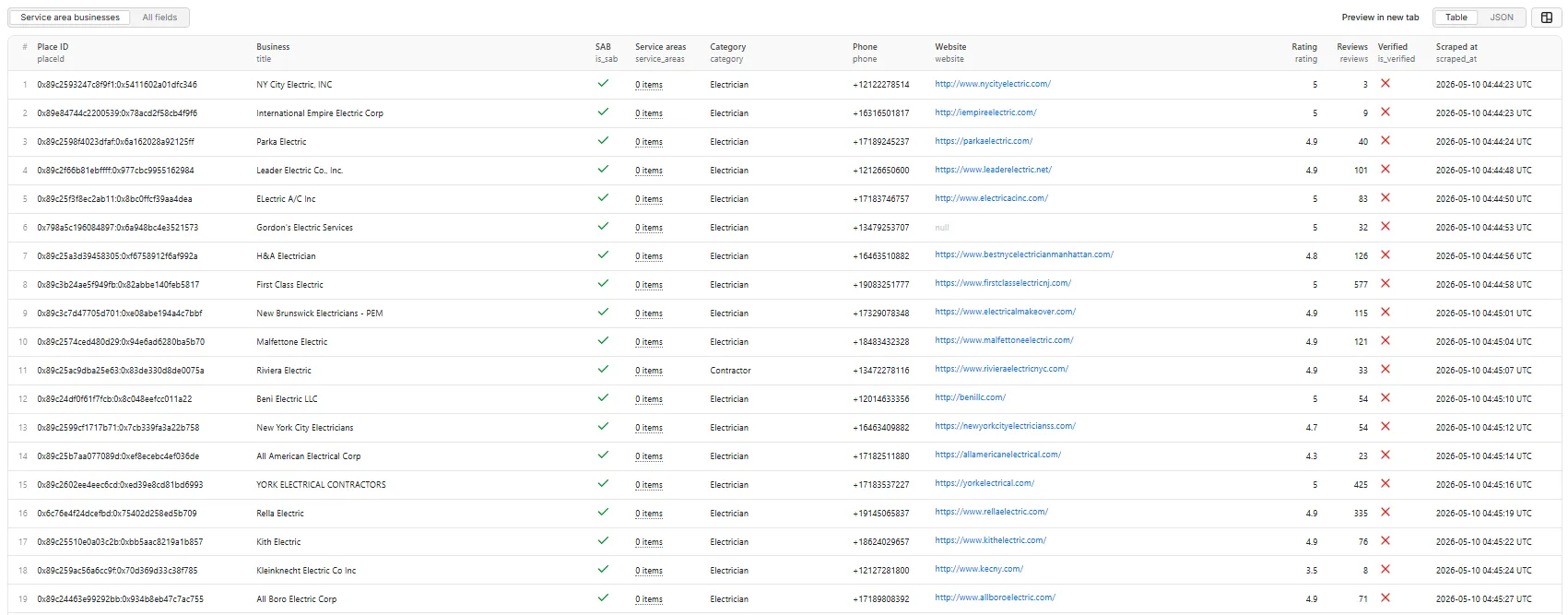
Service area businesses — table view.
Output fields (11)
placeId, title, is_sab, service_areas, category, phone, website, rating, reviews, is_verified, scraped_at.
Sample record — Service area businesses
Why is
service_areasan empty array here? Many businesses are tagged as service-area on Maps but don't publicly list their served regions, or list them in a non-standard way the parser doesn't catch. Theis_sabflag is still set correctly. See the FAQ entry below for details.
⚙️ Inputs
| Field | Type | Default | Purpose |
|---|---|---|---|
queries | array | required | Search terms (e.g. "Plumbers in Austin"). One row per search. |
maxResults | integer | 10 | Total business rows pushed to the dataset across all queries (hard cap 5000). |
onlySABs | boolean | true | Drop physical-storefront listings; keep only Service Area Businesses. |
minRating | number | 0 | Drop businesses below this Google rating. |
locationBias | string | "" | lat,lng (e.g. "39.7392,-104.9903") or city name to bias every search. |
proxyConfiguration | object | { "useApifyProxy": true } | Standard Apify proxy editor. Apify Residential is rejected — see below. |
💰 Pricing
Pay-Per-Event. One flat event per saved row — final per-event price is configured on the Apify console:
| Event | Charged when |
|---|---|
business-result | Once per unique business row that passed all filters and was successfully written to the dataset (per placeId). |
Not charged:
- Duplicates (same
placeIdacross queries — Crawlee dedupes the request queue). - Rows filtered out by
onlySABs(physical storefronts whenonlySABsis on). - Rows filtered out by
minRating. - Rows where the detail panel never loaded.
- Anything after the user-configured per-run spending cap is reached.
The actor honors the user-configured per-run spending cap (Apify eventChargeLimitReached) and stops cleanly when reached.
🚦 Proxy policy
Use Apify Datacenter proxy (the default) or no proxy for normal runs — both work reliably for Google Maps search and place detail panels at this actor's concurrency (max=5).
Apify Residential proxy is not supported. The actor will fail at startup if proxyConfiguration.apifyProxyGroups includes RESIDENTIAL. Reason: in pay-per-event actors, residential bandwidth (~$/GB) is billed to the developer, not the run user, so a single bandwidth-heavy run could exceed the per-result event revenue.
If you genuinely need residential routing, supply your own residential provider via the proxy editor's Custom proxy URLs field — that traffic goes through your provider, not Apify, and is unaffected:
📊 Run summary
After each run, a RUN_SUMMARY entry is written to the key-value store:
total_scanned— place detail panels successfully opened.sabs_found— of those, how many were SABs (hidden address).filtered_out— rows dropped byonlySABsorminRating.charged_events— rows pushed to the dataset (= billable events).
⚙️ Filters
| Filter | Stage | Effect |
|---|---|---|
onlySABs | Pre-charge | Drop physical-storefront listings (default ON). |
minRating | Post-extraction | Drop rows with rating < minRating. |
Filters are applied before dataset push or event charges. Duplicate placeIds are deduped by Crawlee's request queue (each placeId is fetched at most once).
🚧 Limitations (V1)
- No external website visits — emails, social profiles, and on-site contact data are out of scope for V1 (see PRD §18 "Future Features").
- No service-area polygon coordinates — only the named area list (neighborhoods/cities). Polygon extraction is deferred to V2.
- SAB / verified detection is heuristic — Google Maps DOM evolves; we use stable
data-item-idattributes and aria-label patterns where possible. Edge cases will exist. - Per-run hard cap is 5,000 rows to bound runtime and cost.
❓ FAQ
What's a "Service Area Business" (SAB)? A business that doesn't operate from a public physical storefront — instead, on Google Maps, it shows a "Service area" label and a list of regions (neighborhoods, suburbs, cities) it serves. Plumbers, mobile cleaners, electricians, locksmiths, and most home-service contractors fall into this category.
Why is service_areas empty on some SABs?
Some businesses are tagged as service-area on Maps but don't list their served regions, or list them in a non-standard way the heuristic doesn't catch. The is_sab flag is still set; only the service_areas array may be [].
Can I use Apify Residential proxy? No — the actor rejects Apify Residential at startup. Apify Datacenter, no proxy, and user-supplied custom proxy URLs all work fine. See 🚦 Proxy policy above.
How am I billed for runs that produce few results?
Only for rows actually written to the dataset. A run that finds 100 candidates but filters 90 of them out (storefronts dropped by onlySABs) charges only 10 events.
Can I export to CSV?
Yes — every field is flat (the service_areas array exports as a JSON-encoded string in CSV). Use Apify's CSV / Excel export from the dataset page, or call the dataset API with format=csv.
🛠️ Technical notes
- Stack: Node.js 18+ · Apify SDK 3 · Crawlee · Puppeteer (headless Chrome).
- Pipeline: single PuppeteerCrawler with two route handlers (search → place detail).
- Concurrency:
min=1,max=5. - Memory: 2 GB min · 4 GB default · 8 GB max (more memory ⇒ more Apify CPU shares ⇒ faster JS execution per page).
- Navigation:
waitUntil: 'domcontentloaded'; navigation timeout 30 s; per-handler timeout 120 s. - Resource blocking: aborts
image,media,fontresource types plus heavy URL fragments (/maps/vt/,lh3-6.googleusercontent.com,googletagmanager,fonts.gstatic.com, etc.) at the network layer to cut per-page CPU and bandwidth. - Anti-blocking: explicit desktop Chrome User-Agent, synthetic mouse-wheel scroll on the search feed (real wheel events trigger Maps' lazy-load more reliably than programmatic scrollTop),
--disable-blink-features=AutomationControlledChrome flag. - Diagnostics: On the first failed Maps render (no feed, no panel, or zero cards), the actor saves the page HTML + URL to the key-value store as
debug-no-feed-html/debug-no-panel-html/debug-zero-cards-html.


