

Instagram Mentions Tagged Brand Monitor
Pricing
from $3.60 / 1,000 matched posts
Instagram Mentions Tagged Brand Monitor
Track Instagram posts where a brand or account is tagged or mentioned. Export flat, analytics-ready data for brand monitoring, UGC discovery, influencer campaign tracking, and competitor research.
Pricing
from $3.60 / 1,000 matched posts
Rating
0.0
(0)
Developer

Delowar Munna
Maintained by CommunityActor stats
0
Bookmarked
4
Total users
0
Monthly active users
6 months ago
Last modified
Categories
Share
Instagram Mentions / Tagged Brand Monitor
Track Instagram posts where a brand or account is tagged or mentioned. Export flat, analytics-ready data for brand monitoring, UGC discovery, influencer campaign tracking, and competitor research.
What does this actor do?
Instagram Mentions / Tagged Brand Monitor is an Apify Actor built for brand monitoring workflows — not generic scraping. Point it at one or more Instagram handles, and it returns one flat row per matched post that tags or mentions the target, ready for CSVs, Google Sheets, SQL tables, and BI tools.
Unlike raw Instagram scrapers that dump every post of a profile, this actor is monitoring-first. It is designed to answer: "Where does my brand / client / creator show up on Instagram, and what do those posts look like?"
Each matched-post row includes:
- Monitoring context —
monitorTarget,matchedType(tag / mention / both),matchSource,isTagMatch,isMentionMatch,discoveryTimestamp,runId - Post identity —
postId,postShortcode,postUrl,postType,postCaption,postTimestamp,postDate - Author —
authorUsername,authorFullName,authorProfileUrl,authorIsVerified, optional follower/following/posts counts, category - Engagement —
likesCount,commentsCount,viewsCount,videoDurationSeconds - Content analysis —
hashtags,mentions,locationName,isSponsoredHint,isPotentialUGC,hasBrandKeywordHint,brandKeywordMatches - Media —
mediaCount,imageUrl,videoUrl,thumbnailUrl - Attribution —
coauthorUsernames,taggedUsernames,mentionedUsernames,sponsorLabel - Reporting convenience —
engagementTotal,engagementRateApprox,authorFollowerBucket,postAgeDays
Who this is for
- Agencies monitoring client mentions and campaign content
- Brands / ecommerce teams surfacing customer and influencer content featuring their account
- Influencer campaign managers verifying required tags and mentions
- UGC sourcing teams identifying posts worth repurposing or reviewing
- Competitor analysts tracking where competitor brands are referenced
- Automation builders sending mention events into Slack, Airtable, Sheets, Notion, or CRMs
How it works
- Input — One or more Instagram usernames to monitor (no
@) plus your Instagramsessionidcookie. - Authentication — The actor installs your
sessionCookieon the browser session so Instagram's tagged-feed endpoints stop login-walling requests (see Authenticating below). - Resolution — Each target is resolved to a userId and public profile.
- Discovery — The actor calls Instagram's tagged-feed endpoint, pages through the results, and falls back to DOM scrolling if needed.
- Classification — Each post is checked for tagged relationships, coauthor credits, and caption
@mentionsof the target. - Filtering — Date window, post type, ownership, and dedupe filters are applied.
- Output — One flat row per matched post, billed as
matched-post.
Availability of fields like
viewsCount, exact follower counts, and some media URLs depends on Instagram's public visibility at run time.
Authenticating
Instagram requires an authenticated session to serve tagged-feed data reliably — both the REST endpoint (/api/v1/feed/usertags/...) and the SPA at /<user>/tagged/ login-wall guest traffic, even from residential IPs. So the actor needs your own sessionid cookie to retrieve data. Runs without a sessionCookie will be rejected at input validation.
How to copy your sessionid cookie (30 seconds)
- In your web browser, go to instagram.com and sign in with the account you want to monitor with.
- Open DevTools:
- Chrome/Edge:
F12orCtrl+Shift+I(macOS:⌘⌥I) - Firefox:
F12orCtrl+Shift+I
- Chrome/Edge:
- Go to the Application tab (Chrome/Edge) or Storage tab (Firefox).
- In the left sidebar, expand Cookies and select
https://www.instagram.com. - Find the row named
sessionidand copy its Value. - Paste the value into the Instagram sessionid Cookie input of this actor.
- Leave the browser tab open — signing out or closing all Instagram tabs can rotate the sessionid and invalidate the one you just pasted.
Security
The cookie is used only for the current run. It is not logged, not written to the dataset, and not persisted between runs. Treat it like a password — anyone with it can act as you on Instagram.
Tips for a healthy session
- Use a secondary Instagram account rather than your main one.
- Avoid very high-volume scraping; the actor paces itself, but keep runs within realistic monitoring volumes.
Troubleshooting
| Log message | What it means | Fix |
|---|---|---|
Missing Instagram sessionid cookie. | The sessionCookie input was empty. | Paste a non-empty sessionid value and rerun. |
sessionid is likely expired or invalid | Instagram served a login wall despite the cookie — usually because the sessionid was rotated or expired. | Log into instagram.com in a fresh browser session and paste a new sessionid. |
No csrftoken cookie | The initial instagram.com page didn't set a csrftoken, often an IP-level rate limit. | Wait 10 minutes and rerun. If it persists, switch Instagram accounts. |
sessionid=NO in cookie log | The page.setCookie call didn't install the value (empty or malformed). | Verify you copied the full sessionid value — it's typically 40+ characters and URL-encoded (%3A, etc.). |
Sample input
Example 1 — Monitor one brand handle
Example 2 — UGC discovery, exclude brand's own posts
Example 3 — Scheduled campaign verification
Input reference
| Field | Type | Default | Description |
|---|---|---|---|
targets | string[] | — | Instagram usernames to monitor (required, no leading @) |
sessionCookie | string | — | Required. Your Instagram sessionid cookie — tagged-feed endpoints are login-walled. See Authenticating above. |
resultsLimit | integer | 200 | Max matched posts per target |
maxTargets | integer | 25 | Max targets processed in a single run |
includeTagged | boolean | true | Include posts where the target is tagged |
includeMentioned | boolean | true | Include posts that mention the target in the caption |
startDate | string | — | Optional lower date bound (ISO 8601) |
endDate | string | — | Optional upper date bound (ISO 8601) |
postTypes | string[] | ["all"] | all, post, reel, video, carousel |
sortOrder | string | platform_default | platform_default, newest, oldest |
includeAuthorDetails | boolean | true | Include author verified / follower / category fields |
includeCaption | boolean | true | Include the post caption |
includeRecentCommentsPreview | boolean | false | Best-effort preview of recent comments |
brandKeywords | string[] | [] | Additional brand-related keywords to tag |
dedupeByPostId | boolean | true | Return each post once across targets |
excludeOwnPosts | boolean | false | Skip posts authored by the target |
requestTimeoutSecs | integer | 300 | Per-target handler timeout |
maxConcurrency | integer | 1 | Max targets processed in parallel |
debugMode | boolean | false | Verbose logging |
Output
The run produces a flat dataset of matched-post rows. Every row carries the full schema; the Apify Console exposes three pre-built views that each project a tailored column set on top of the same underlying rows. Filter or sort by the flag columns (isPotentialUGC, isSponsoredHint, hasBrandKeywordHint) inside each view to narrow further.
- Matched Posts — broad column set with match classification, author, engagement, and heuristic flags
- Potential UGC — trimmed column set focused on author, engagement, and UGC signals
- Sponsored / Paid Partnership — trimmed column set focused on author, engagement, and sponsorship signals
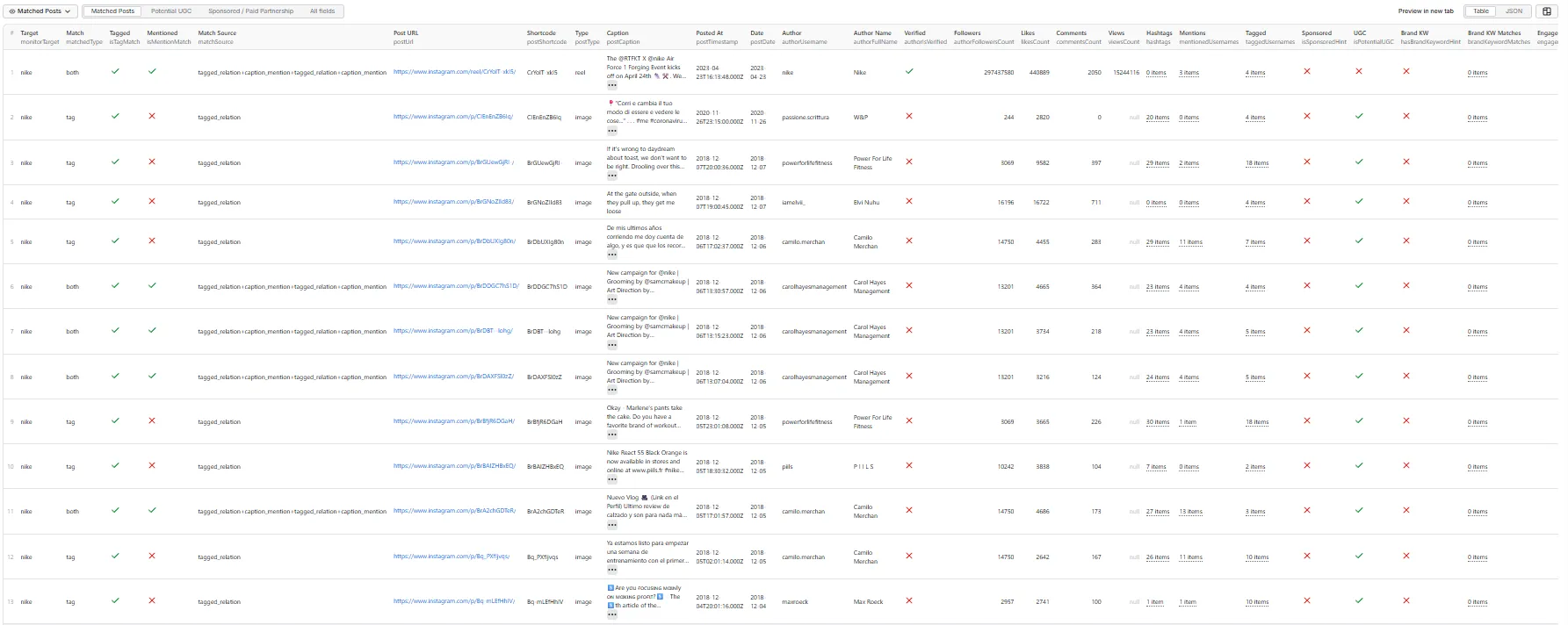
The JSON examples below are real rows from a live
targets: ["nike"]run (147 matched posts returned). Long caption text is preserved verbatim.
View 1 — Matched Posts
View 2 — Potential UGC
Third-party creator tagged Nike in a post they authored (isPotentialUGC: true):
View 3 — Sponsored / Paid Partnership
The 147-row live Nike run produced zero rows where the sponsored heuristic fired, so
isSponsoredHintisfalsefor every record in that dataset. The example below is an illustrative row showing what the Sponsored view columns look like when a match does include paid-partnership signals (e.g.#ad,#paidpartnership, branded-content labels):
Full record (all fields)
Every row in the dataset also contains these fields that are hidden from the trimmed views: runId, postId, postDate, authorProfileUrl, authorFollowingCount, authorPostsCount, authorCategoryName, videoDurationSeconds, mentions, locationName, mediaCount, imageUrl, videoUrl, thumbnailUrl, coauthorUsernames, engagementRateApprox. Here's the full Nike reel record (same row as View 1, with media URLs truncated for readability):
Match logic
For each target handle the actor classifies every captured post:
| Field | Meaning |
|---|---|
isTagMatch | Target appears in usertags, tagged_users, or coauthor producers |
isMentionMatch | Target appears as @target in the caption |
matchedType | tag, mention, both, or none |
matchSource | tagged_relation, caption_mention, coauthor, or a +-joined combination |
Heuristic flags
isSponsoredHint—#ad,#sponsored,#paidpartnership, paid partnership labels, gifting languageisPotentialUGC— target is tagged/mentioned but is not the authorhasBrandKeywordHint/brandKeywordMatches— optionalbrandKeywordsappear in the caption/hashtags
These are documented as hints, not guaranteed truth.
Pricing
Pay-per-event pricing:
matched-post— one event per matched post row returned
The actor respects user spending limits and stops gracefully when the limit is reached.
Tips for best results
- Start small — test with
resultsLimit: 25to verify output quality. - Narrow the date window — recurring runs with
startDatekeep results relevant and billing predictable. - Enable
excludeOwnPosts— for UGC-only monitoring. - Use
brandKeywords— to surface mentions that don't use an@handleform.
Local development


