

Tiktok Comment Scraper
Pricing
$1.00 / 1,000 result scrapeds
Tiktok Comment Scraper
TikTok Comment Scraper extracts comments from TikTok videos, including text, author details, likes, reply counts, mentions, hashtags, and timestamps. Ideal for audience research, sentiment analysis, moderation, trend tracking, and AI-powered comment insights.
Pricing
$1.00 / 1,000 result scrapeds
Rating
0.0
(0)
Developer

Delowar Munna
Maintained by CommunityActor stats
0
Bookmarked
112
Total users
18
Monthly active users
a month ago
Last modified
Categories
Share
TikTok Comment Scraper — Comments, Replies & Analytics
Not just comments — comment intelligence.
Most TikTok comment scrapers hand you raw API fields to clean up yourself. This one gives you comments, replies, author profiles, video context, and built-in text analytics (language, emoji, hashtags, mentions) in clean, flat, spreadsheet-ready rows — with separate Unified, Overview, Authors, and Replies views. ~41 structured fields per record. Export in JSON, CSV, or Excel.
Key Features
- ~41 Structured Fields per record — comments, replies, authors, analytics
- Reply Threads — full reply chains linked to parent comments via
parentCommentId - Replies After Parent — each comment's replies appear right after it, numbered via
threadPosition(comment,reply #1,reply #2, …) - Author Metadata — username, nickname, verified status, private account flag, avatar (always included)
- Comment Analytics — language detection, word/emoji counts, hashtag/mention extraction
- Video Context — video caption, views, likes, shares, duration, music info on every record (always included)
- Sorting — top comments or newest first
- Filters — minimum likes, date range, exclude pinned, scrape-all
- Profile Input — scrape comments across a creator's recent videos from just their @handle
- Unified Fields — shared
id/parentId/text/likes/createdAt/author*columns on both comments and replies, so a single table has no empty cells - 4 Dataset Views — Unified, Overview, Authors, Replies on Apify
- Bare IDs, URLs, or Profiles — accepts full video URLs, bare numeric video IDs, or creator handles
- Error Rows — failed/blocked videos emit a visible error row instead of vanishing silently
- No Proxy Needed — data is fetched through TikHub's hosted API (signing + routing handled server-side)
- Pay-Per-Event — only pay for results you get
Best for: Sentiment analysis, brand monitoring, content research, AI training data, moderation analysis
At a Glance
| Feature | Details |
|---|---|
| Output Fields | ~41 structured fields per record |
| Dataset Views | 4 tabs (Unified, Overview, Authors, Replies) |
| Input | TikTok video URLs, bare video IDs, or creator profiles |
| Max Comments | Up to 10,000 per video |
| Reply Threads | Enabled by default, linked via parentCommentId / replyId |
| Data source | TikHub hosted API (no proxy setup required) |
How It Works
- Provide inputs — one or more TikTok video URLs, bare numeric video IDs, or creator profiles (
@handle) - Fetch browserlessly via TikHub — comments, reply threads, and video metadata are pulled through TikHub's hosted API with cursor-based pagination (no browser, no proxy). Creator profiles are expanded to their recent videos first.
- Normalize — each comment and reply becomes a flat row with unified + type-specific fields, plus built-in text analytics
- Filter & cap — apply
minLikes, date range, andexcludePinned; stop atmaxCommentsper video /maxItemsoverall - Export — push to the dataset (4 views) — each comment followed by its replies
If TikHub can't serve a particular video, the actor automatically falls back to a headful browser path for that video, so a single hard-to-reach video doesn't fail the run.
Output
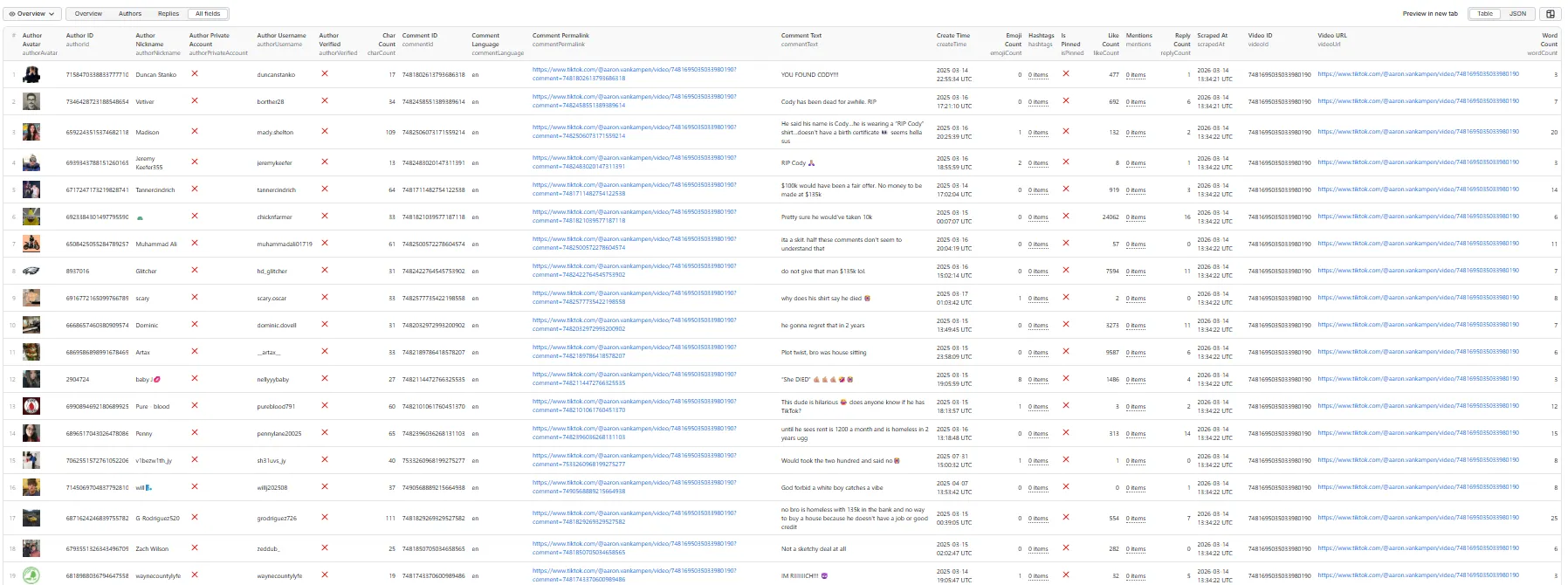
Comment Record
A single dataset row for a comment \u2014 every field an actual record contains (unified + comment + analytics + author + video):
Reply Record (appears right after its parent comment)
Replies carry the same unified, analytics, and always-on video* fields as comments (omitted below for brevity), plus reply-specific fields:
Output Schema
Unified Fields (8) — present on every comment and reply row
Comments and replies use different field names (commentId/replyId, commentText/replyText, …), so in a single flat table the "other" type's columns show as blank. These unified fields solve that — they're populated on both row types (in addition to the type-specific fields), so you can build a clean, empty-free table from just these columns. The Unified dataset view uses exactly these.
| Field | Type | Description |
|---|---|---|
| recordType | String | comment, reply, or error |
| id | String | The row's own ID — commentId for comments, replyId for replies |
| parentId | String | Parent comment's ID for replies; null for top-level comments |
| threadPosition | String | comment for a top-level comment; reply #1, reply #2, … for its replies in order |
| text | String | Comment or reply text |
| likes | Integer | Like count (comment or reply) |
| createdAt | String | ISO 8601 creation timestamp |
| author* | — | Shared authorId, authorUsername, authorNickname, authorVerified, authorProfileUrl on both types |
Rows are pushed in reading order — each comment, then its replies (reply #1, reply #2, …), then the next comment — so threadPosition lets you see the thread structure at a glance.
To join replies to comments:
reply.parentId(=reply.parentCommentId) equals the parent'sid(=commentId).
Core Comment (12 fields)
| Field | Type | Description |
|---|---|---|
| recordType | String | Row type: comment, reply, or error |
| commentId | String | Unique comment ID |
| videoId | String | Video identifier |
| videoUrl | String | Canonical TikTok video URL |
| inputUrl | String | The original URL or ID you supplied for this row |
| commentText | String | Full comment text |
| createTime | String | ISO 8601 timestamp |
| likeCount | Integer | Number of likes |
| replyCount | Integer | Number of replies |
| isPinned | Boolean | Pinned by creator |
| commentPermalink | String | Direct link to comment |
| scrapedAt | String | Scraping timestamp |
Comment Analytics (6 fields)
| Field | Type | Description |
|---|---|---|
| commentLanguage | String | Detected language code (e.g. en, zh, ja) |
| wordCount | Integer | Word count |
| charCount | Integer | Character count |
| emojiCount | Integer | Number of emojis |
| hashtags | Array | Extracted #hashtags |
| mentions | Array | Extracted @mentions |
Author Metadata (7 fields)
Always included on every comment/reply record.
| Field | Type | Description |
|---|---|---|
| authorId | String | Author's TikTok user ID |
| authorUsername | String | Author's @username |
| authorNickname | String | Display name |
| authorVerified | Boolean | Verified badge |
| authorPrivateAccount | Boolean | Private account |
| authorProfileUrl | String | Link to the author's TikTok profile |
| authorAvatar | String | Profile image URL |
Reply Fields (10 fields)
Included when Include Replies is enabled (default: on). Each reply is a separate dataset row linked to its parent via parentCommentId.
| Field | Type | Description |
|---|---|---|
| parentCommentId | String | Parent comment's ID |
| replyId | String | Reply's unique ID |
| replyText | String | Reply text |
| replyLikeCount | Integer | Reply likes |
| replyCreateTime | String | ISO 8601 timestamp |
| replyAuthorId | String | Reply author's user ID |
| replyAuthorUsername | String | Reply author's username |
| replyAuthorVerified | Boolean | Reply author verified |
| replyAuthorNickname | String | Reply author's display name |
| replyAuthorAvatar | String | Reply author's avatar URL |
Reply records also include the unified fields (recordType: "reply", id, parentId, text, likes, createdAt, plus author* mirrors), inputUrl, authorProfileUrl (reply author's profile), the analytics fields (commentLanguage, wordCount, charCount, emojiCount, hashtags, mentions) computed on the reply text, videoId, videoUrl, scrapedAt, and the same always-on video metadata (10 fields) as comments.
Video Metadata (10 fields)
Always included on every comment/reply record. Fetched browserlessly via TikHub — same fast path as comments, so it adds no browser launch and negligible time.
| Field | Type | Description |
|---|---|---|
| videoDescription | String | Video caption |
| videoCreateTime | String | Publish timestamp |
| videoLikeCount | Integer | Video likes |
| videoCommentCount | Integer | Video comment count |
| videoShareCount | Integer | Video shares |
| videoViewCount | Integer | Video views |
| videoDuration | Integer | Duration in seconds |
| videoRegion | String | Region code |
| musicTitle | String | Background music title |
| musicAuthor | String | Music creator |
Error Rows
When a video can't be scraped (comments disabled, private/deleted, soft-blocked IP, or an invalid input), the actor emits a visible error row instead of silently returning nothing — so failures are easy to spot and retry. Error rows are not charged.
| Field | Type | Description |
|---|---|---|
| recordType | String | Always error |
| error | String | Human-readable failure reason |
| errorCode | String | INVALID_URL, NO_COMMENTS, EXTRACTION_FAILED, REQUEST_FAILED, PROFILE_NO_VIDEOS, BROWSER_FALLBACK_SKIPPED, RUN_BUDGET_REACHED, or TIKHUB_402 / TIKHUB_401 |
| videoUrl | String | The video URL that failed |
| inputUrl | String | The original URL or ID you supplied |
| scrapedAt | String | Timestamp of the failure |
Input Parameters
Provide at least one of videoUrls or profileUrls.
| Parameter | Type | Default | Required | Description |
|---|---|---|---|---|
| videoUrls | Array | — | * | TikTok video URLs or bare video IDs to scrape |
| profileUrls | Array | — | * | Creator profiles (@handle, profile URL, or bare handle) — scrapes their recent videos |
| maxVideosPerProfile | Integer | 10 | No | Recent videos to scrape per profile (1–500) |
| maxComments | Integer | 100 | No | Max comments per video (1–10,000) |
| maxItems | Integer | — | No | Global cap on total results (comments + replies) across all videos. Empty = no cap |
| scrapeAllComments | Boolean | false | No | Ignore maxComments and fetch every comment (global maxItems still applies) |
| minLikes | Integer | — | No | Keep only comments/replies with at least this many likes |
| commentDateFrom | String | — | No | Keep only comments/replies created on/after this date (ISO, e.g. 2025-01-01) |
| commentDateTo | String | — | No | Keep only comments/replies created on/before this date |
| excludePinned | Boolean | false | No | Skip creator-pinned comments (and their replies) |
| includeReplies | Boolean | true | No | Include reply threads |
| maxRepliesPerComment | Integer | 50 | No | Max replies per comment (1–500) |
| sort | String | "top" | No | Sort order: top or new |
Quick Start
Example 1: Single video with replies
Example 2: Creator profiles + filters
Scrape recent videos from two creators, keep only comments with ≥10 likes from 2025.
Example 3: Bare video IDs with a global cap, no pinned comments
Example 4: Multiple videos, comments only
Example 5: Every comment on a video, newest first
Dataset Views
The output is organized into 4 focused tabs on the Apify platform:
Unified
Comments and replies in one table with no empty columns — uses the shared unified fields.
Overview
Shows comments and replies together with key fields.
Authors
Focused view on commenter profiles.
Replies
Focused view on reply threads with parent-child linking.
Use Cases
Sentiment Analysis
Export comments for sentiment scoring and reaction analysis. Use commentLanguage, wordCount, and emojiCount for NLP preprocessing.
Brand Monitoring
Track public feedback on brand campaigns. Filter by video URL and analyze comment engagement patterns.
Content Research
Study audience reactions to viral content. Compare top comments vs. newest to understand engagement dynamics.
AI Training Data
Collect structured comment datasets for training text classification, sentiment, or moderation models.
Moderation Analysis
Identify patterns in toxic comments, spam, or abuse. Use author metadata to detect bot-like accounts.
Performance
| Metric | Value |
|---|---|
| Concurrency | 1 request at a time |
| Request timeout | 120 seconds |
| Navigation timeout | 60 seconds |
| Retries | Up to 4 per request (exponential backoff) |
| Session pooling | 5 sessions, 20 uses each |
Data Export
Supported formats via Apify platform:
- JSON
- CSV
- Excel
- HTML
Tips
- No proxy setup needed — data is fetched through TikHub's hosted API.
- Replies appear after their parent in the dataset output — look for
parentCommentIdto match them. - Each reply is its own row with a flat structure, making it easy to filter comments vs. replies.
commentPermalinklinks directly to the comment on TikTok.- Language detection uses Unicode script analysis — returns
nullfor ambiguous text.
Pricing
This actor uses Apify's Pay-Per-Event model.
| Event | Trigger | What it covers |
|---|---|---|
result-scraped | Each comment or reply returned | Charged once per record pushed to the dataset |
There is no start fee and no subscription — you pay only for results. A run that returns nothing costs nothing.
What is never charged: error rows for failed, private, deleted or comment-disabled videos; comments dropped by your minLikes, date-range or excludePinned filters; and the run summary.
Live prices are on this actor's Pricing tab in the Apify Console — that is the only authoritative source. This README deliberately quotes no figures: prices change, and a copy here would go stale and mislead. Platform compute is billed separately to your Apify account. No proxy is required — data is fetched through TikHub's hosted API.
Free plan limitations
"Include Replies" requires a paid Apify plan. On the Free plan the option is skipped, and you are not charged for reply rows.
| Free plan | Any paid plan | |
|---|---|---|
| Top-level comments | ✅ Full, unrestricted — no row cap | ✅ Full |
| Author info, video context, like counts | ✅ Included | ✅ Included |
| Filters, sorting, pinned-comment exclusion | ✅ Included | ✅ Included |
Reply threads (includeReplies) | ❌ Skipped, and not charged | ✅ Included |
Why: replies cost one upstream API call per parent comment that has any, so a comment with a single reply costs a full call for one row — while comment fetching averages ~14 rows per call. Restricting that one option keeps the Actor sustainable without capping how many results you get. If a run is affected you'll see it in the log and in the run's status message, never as a failure.
How data is fetched
This actor uses TikHub's hosted API for fast, reliable, browserless access — no proxy configuration required. TikHub handles request signing and routing server-side, which is what makes runs fast and consistent. It powers:
- Comment & reply extraction — the primary, browserless data path
- Video metadata — the 10 video-context fields on every record, fetched browserlessly (no page load)
- Profile input (
profileUrls) — resolving a creator's recent videos
The TikHub key is configured once by the actor operator (as the Apify secret tikhub_api_key, wired in actor.json as @tikhub_api_key) — run users never need to provide anything. TikHub usage is billed to the operator's TikHub account, separate from Apify's result-scraped charge.
Compliance
- Collects only publicly available TikTok comment data
- Does not bypass CAPTCHAs or access gated content
- Does not collect private account data
- Intended for legitimate research, analytics, and business intelligence
- Users are responsible for compliance with applicable laws in their jurisdiction
Support
- Issues: Report via GitHub or Apify support
- Feature requests: Open an issue with your use case
Built by Coregent Digital Studio — Production-ready TikTok comment extraction


