
LinkedIn Keyword Posts Monitor
Pricing
from $2.40 / 1,000 post-results
LinkedIn Keyword Posts Monitor
Monitor LinkedIn posts by keyword, hashtag, brand, or topic. Extract matching public posts with text, author, URL, date, engagement counts, matched keywords, and a monitoring score. Built for B2B content research, social listening, competitor tracking, and market intelligence.
Pricing
from $2.40 / 1,000 post-results
Rating
0.0
(0)
Developer

Delowar Munna
Maintained by CommunityActor stats
0
Bookmarked
30
Total users
6
Monthly active users
5 months ago
Last modified
Categories
Share
Monitor LinkedIn posts by keyword, hashtag, brand, or topic and export matching public posts as clean, flat, CSV-ready rows — with author, engagement counts, matched-keyword context, and a lightweight monitoring score. Built for B2B marketers, sales intelligence teams, content researchers, agencies, and competitor monitoring.
No LinkedIn login, no cookies, no session IDs. Discovery runs through Google (site:linkedin.com/posts "<keyword>" via Apify's apify/google-search-scraper); each LinkedIn post URL is then fetched as a public page. You pay one flat event per saved unique post row.
✨ Why this scraper
- Keyword-and-hashtag first, monitoring focused — not a generic LinkedIn scraper. Each row carries the keyword that found it, every keyword that matched it (
matched_keywords), and amonitoring_scoreso you can rank what to read. - Hashtag inputs in the same field —
#fintechandAI agentsmix freely in one run. - 30 flat fields — post identity, author, company (when visible), engagement counts, match context, derived signals. CSV/Sheets/CRM friendly.
- Pay-Per-Event — one flat
post-resultevent per saved unique post. Duplicates and filtered rows are never charged. - No login / cookies / session IDs — uses public surfaces only.
- Transparent monitoring score — rule-based (no AI), explained below.
🚀 Quick start — sample inputs
Example 1 — multi-keyword + hashtag, fresh + high-engagement
Example 2 — company-scoped monitoring
Discovery delegates to
apify/google-search-scraperviaActor.call(...). Local runs needAPIFY_TOKENset (orapify loginonce); platform runs use the run user's token automatically.
📦 Output
One dataset view: LinkedIn posts — a 30-column flat table.
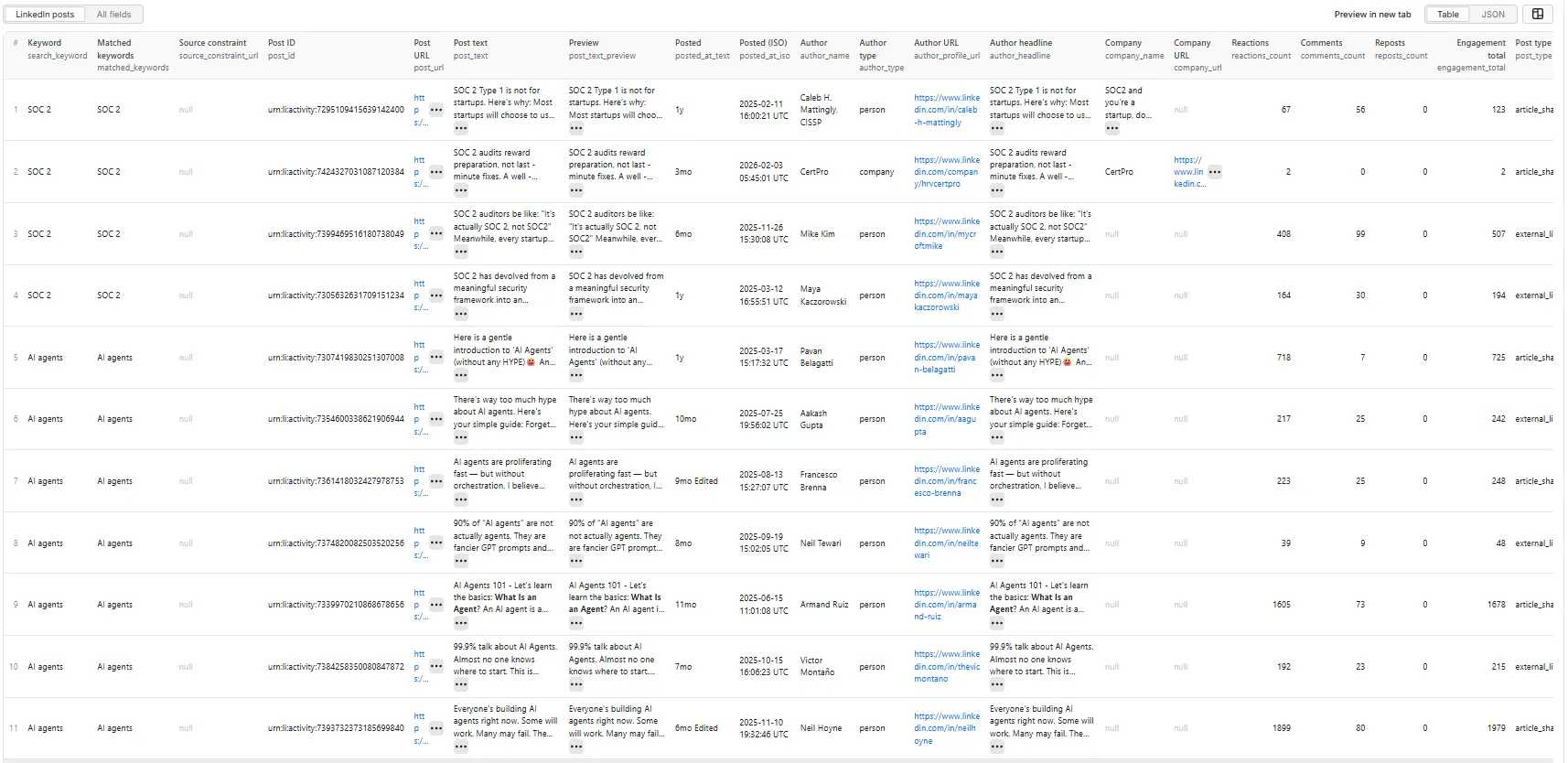
Output fields (30)
search_keyword, matched_keywords, source_constraint_url, post_id, post_url, post_text, post_text_preview, posted_at_text, posted_at_iso, author_name, author_type, author_profile_url, author_headline, company_name, company_url, reactions_count, comments_count, reposts_count, engagement_total, post_type, contains_external_link, external_link_domain, keyword_match_in_text, keyword_match_location, monitoring_score, monitoring_label, reason_tags, scrape_status, source_url, scraped_at.
Sample record — person-authored post
(Real run output; post_text truncated for readability.)
Sample record — company-authored post
🎯 Monitoring score
Transparent rule-based score (0–100). No AI, no external enrichment.
| Signal | Points |
|---|---|
Keyword found directly in post_text | +25 |
| Keyword found in a hashtag | +15 |
engagement_total >= 100 | +20 |
engagement_total >= 25 (and < 100) | +15 |
comments_count >= 5 | +10 |
| Author is a company / page | +10 |
Post falls inside the selected dateFilter window | +10 |
| Post includes an external link | +5 |
Score capped at 100.
Labels: High (80–100) · Medium (50–79) · Low (0–49).
reason_tags is a comma-separated list explaining the score — e.g. keyword_in_text, keyword_in_hashtag, high_engagement, moderate_engagement, has_comments, company_author, recent_post, external_link, repost.
💰 Pricing
Pay-Per-Event. One flat event per saved row (per-event price configured on the Apify console):
| Event | Charged when |
|---|---|
post-result | Once per unique post row that passed all filters and was successfully written to the dataset. |
So your bill is simply results_saved × price_per_event. The actor honours the user-configured per-run spending cap (Apify eventChargeLimitReached): it caps how many results it discovers up-front to what the limit can pay for, and stops cleanly the moment the cap is reached during charging.
Not charged:
- Duplicates (deduped by
post_id, canonicalpost_url, and author+text keys; see PRD §9). - Rows filtered out by author / engagement / repost / date filters.
- Failed or authwalled requests.
- Rows missing a
post_url,post_id, and(post_text + author_name).
🚦 Proxy policy
Use Apify Datacenter proxy or no proxy for normal runs — both work reliably for the public LinkedIn post pages at this actor's conservative concurrency.
Apify Residential proxy is not supported. The actor will fail at startup if proxyConfiguration.apifyProxyGroups includes RESIDENTIAL. Reason: in pay-per-event actors, residential bandwidth (~/GB) is billed to the developer, not the run user, so a single bandwidth-heavy run could exceed the per-result event revenue.
If you genuinely need residential routing, supply your own provider via the proxy editor's Custom proxy URLs field — that traffic goes through your provider, not Apify, and is unaffected:
📊 Run summary
After each run, a RUN_SUMMARY entry is written to the key-value store:
charged_events equals the number of successfully saved unique rows.
⚙️ Filters
| Filter | Stage | Effect |
|---|---|---|
authorType | Pre-extraction | any / person / company. Rows with a detected type the opposite of the filter are dropped. unknown is kept (we do not guess by filtering). |
minReactions | Post-extraction | Drop rows with reactions_count < minReactions (missing counts as 0). |
minComments | Post-extraction | Drop rows with comments_count < minComments (missing counts as 0). |
includeReposts | Post-extraction | When false, drop post_type = repost. |
dateFilter | Post-extraction | any / past24h / pastWeek / pastMonth. Rows with unparseable dates are kept but marked scrape_status = partial. |
dedupe | Per-keyword merge | When true (default), duplicate posts found by more than one keyword are saved once with merged matched_keywords. |
companyOrProfileUrls | Discovery scope | Optional list of LinkedIn company/profile URLs. Discovery candidates are kept only if the post URL slug matches one. Empty list = no constraint. |
Filters are applied before any dataset push or event charge.
🚧 Limitations (V1)
- Public surfaces only. No login, cookies, or member-only content. LinkedIn does not expose a no-auth post-search endpoint, so discovery runs through Google (
site:linkedin.com/posts "<keyword>") via theapify/google-search-scraperactor. Coverage depends on Google's index forlinkedin.com/posts. - Page authwall. Some LinkedIn post pages, when fetched without cookies, return an authwall HTML even for previously-indexed posts. Those rows are counted as
blocked_requestsand retried; persistent failures are skipped, not fatal. - Best-effort fields. Author identity is parsed from JSON-LD when present, then from
og:title/ page slug /og:imagehints. When LinkedIn returns only minimal authwall metadata,author_typemay remainunknownandcompany_name/company_urlmay benull. - No comment or reaction-user scraping. V1 returns post-level rows only.
- No media download.
maxResultscaps saved unique rows across the whole run (not per keyword).- No
recentordering at the LinkedIn level.sortByinfluences Google's ranking, not LinkedIn's, so true recency depends on Google's index freshness.
❓ FAQ
Do I need a LinkedIn account or cookies?
No. Discovery uses Google (site:linkedin.com/posts "<keyword>"); extraction reads each LinkedIn post page over public HTTP.
How does discovery work technically?
For each keyword the actor builds a Google query and calls Apify's apify/google-search-scraper actor once per run. Result URLs are filtered to public LinkedIn post URLs, canonicalised, and deduped across keywords. Then each URL is fetched with Crawlee CheerioCrawler and parsed.
Why are some author_type values unknown?
LinkedIn's no-cookie response sometimes contains only minimal Open Graph metadata. When neither JSON-LD, the post URL slug, nor the og:image give a confident person-vs-company signal, author_type is left unknown rather than guessed.
Why is company_name sometimes null even when the author works at a known company?
For person-authored posts we only populate company_name when the company is clearly visible in the author headline (e.g. "VP Sales at Acme"). We never visit the author's profile page to enrich it in V1.
Can I scope a run to specific companies or people?
Yes — list their LinkedIn URLs in companyOrProfileUrls. Discovery candidates whose post URL slug matches one of those handles are kept; everything else is skipped. The matched constraint URL is stamped on every kept row as source_constraint_url.
Can I export to CSV?
Yes — every field is flat. Use Apify's CSV / Excel export, or call the dataset API with format=csv.
Will I get blocked?
Concurrency is min=1 / max=5 with retries, session rotation, and randomised user agents. Apify Datacenter Proxy is sufficient for typical runs. For large runs, split keywords across runs or supply your own proxy provider via Custom proxy URLs.
Hashtag vs keyword — same input?
Yes. Drop them into the same keywords list. Hashtags keep their # (e.g. "#fintech"); the actor quotes them inside the Google query so they match as literal tokens.
🛠️ Technical notes
- Stack: Node.js 22 · Apify SDK 3 · Crawlee
CheerioCrawler· Cheerio + native fetch. No browser. - Discovery:
apify/google-search-scraperviaActor.call(...). RequiresAPIFY_TOKENfor local runs. - Extraction: each LinkedIn post URL is fetched directly. Parsing is layered: JSON-LD (
SocialMediaPosting/Article) → Open Graph meta tags → visible markup fallback. - Concurrency:
min=1,max=5(conservative, LinkedIn is blocking-sensitive). - Memory: 1 GB min · 2 GB default · 4 GB max.
- Proxy: Apify Proxy enabled by default; custom configs accepted; Apify Residential rejected at startup.
Local run


![LinkedIn Posts Scraper - Keyword & Hashtag [NO COOKIES] ✅ avatar](https://images.apifyusercontent.com/lm3D8sWH7kDwZlj2xMmsok9U5yz3qJt21mCq7viMVq0/rs:fill:76:76/cb:1/aHR0cHM6Ly9hcGlmeS1pbWFnZS11cGxvYWRzLXByb2QuczMudXMtZWFzdC0xLmFtYXpvbmF3cy5jb20vc0NDU2R3bm1LTUoxUTJzVG4tYWN0b3ItTkRqOGZmQ2N0WGNqS2xyQmQtNkl3Q2Zsdm1KeS1wbmctY2xpcGFydC1jb21wdXRlci1pY29ucy1saW5rZWRpbi1sb2dvLWF0cmlvLXN5c3RlbXMtaW5jLWxpbmtl.webp)


