

TikTok Creator Growth Tracker
Pricing
from $2.50 / 1,000 creator snapshots
TikTok Creator Growth Tracker
Track TikTok creators over time. Monitor follower gains, total likes, following, video-count changes, posting activity, engagement trends, milestones, and growth acceleration.
Pricing
from $2.50 / 1,000 creator snapshots
Rating
0.0
(0)
Developer

Delowar Munna
Maintained by CommunityActor stats
0
Bookmarked
2
Total users
1
Monthly active users
a day ago
Last modified
Categories
Share
Track TikTok creators over time. Monitor follower gains, total likes, following, video-count changes, posting activity, engagement trends, milestones, and growth acceleration — from scheduled runs that remember every previous observation.
What does this Actor do?
TikTok Creator Growth Tracker stores a snapshot of each creator's public profile every time it runs and compares it with that creator's history. One output row = one creator × one observation, with:
- Current counters — followers, following, friends, total likes, video count, verified/private status
- Deltas & growth % since the previous snapshot — followers, following, friends, likes, videos
- Velocity — followers per day / week / 30 days, likes per day, videos per week, normalized for uneven schedules
- Period comparisons — 24 hours, 7 days, 30 days, 90 days, each matched to the nearest stored snapshot
- Trend & acceleration —
SURGING/GROWING/STABLE/DECLINING/SHARP_DECLINE, andACCELERATING/STEADY/DECELERATING - Milestones —
CROSSED_10K,CROSSED_100K,CROSSED_1M, … the run a creator crosses them - Signals & alerts — follower surges/drops, like surges, posting and engagement shifts, username and profile changes, with your own alert thresholds
- Optional recent-video performance — average and median views, likes, comments, shares, saves, engagement rate, posting frequency
How is this different from a TikTok Profile Scraper?
A profile scraper answers "how many followers does this creator have now?" This Actor answers "how is this creator changing over time?" It keeps persistent per-project history, so each run returns growth analytics — not just today's numbers.
Who is it for?
- Influencer marketing teams & agencies — weekly growth reports for client creators
- Talent managers — monitor a roster's momentum and milestones
- Brands — vet creators before a partnership; evaluate growth around a campaign
- Competitor & market researchers — benchmark creators in a niche over time
- Data teams — feed clean, flat growth rows into Sheets, BI tools, or AI workflows
Quick start
- Add creators — usernames,
@handles, profile URLs, user IDs, or secUids. - Pick a
trackerKey(e.g.creator-watchlist) — keep it the same on every run. - Run once to create baselines, then schedule the Actor (daily is recommended).
Minimal input
The first run creates baselines. Growth appears from the second run.
Daily creator watchlist
Creator & brand watchlist with alerts (20 creators)
The input behind the sample output below — creators and brands mixed, entered as @handles, bare usernames and profile URLs:
Lightweight large-scale tracking (profile counters only)
Breakout alerts
Input
| Parameter | Type | Default | Description |
|---|---|---|---|
creators | string[] | ["@tiktok"] | Username, @handle, profile URL, user ID, or secUid. Up to 1,000 per run (required) |
mode | string | TRACK | TRACK (previous + selected periods), COMPARE (all periods), SNAPSHOT (record counters only) |
trackerKey | string | default | History namespace — independent projects use different keys |
comparisonPeriods | string[] | PREVIOUS, 7_DAYS, 30_DAYS | Also 24_HOURS, 90_DAYS |
includeRecentVideoMetrics | boolean | true | Recent-video performance sample (billed separately, only when videos are returned) |
videosForPerformance | integer | 10 | Sample size; TikTok caps one public page at about 10 |
includePostingMetrics | boolean | true | Videos in last 7/30 days, posts per week, days since last video |
includeProfileMetadata | boolean | true | Bio, bio link, avatar, business flags, language, created date + change tracking |
saveHistory | boolean | true | Store this observation for future comparisons |
maxHistoryDays | integer | 365 | Snapshot retention for period comparisons |
minimumSnapshotIntervalMinutes | integer | 30 | Re-runs inside this window with no counter change don't write duplicate history |
growthAlertThresholdPct | number | — | Alert when follower growth in any compared period ≥ this % |
growthAlertThresholdAbsolute | integer | — | Alert when followers gained in any compared period ≥ this number |
dropAlertThresholdPct | number | — | Alert when follower growth in any compared period ≤ this % (e.g. -3) |
Output
Each row has flat core fields (spreadsheet- and CSV-friendly) plus nested detail objects. Dataset views: Growth Overview, 24h / 7d / 30d / 90d, Signals & Alerts, Content Performance, Full Data. A run summary (creators succeeded, baselines, trend counts, signals, TikHub call accounting) is saved to the run's key-value store as SUMMARY.
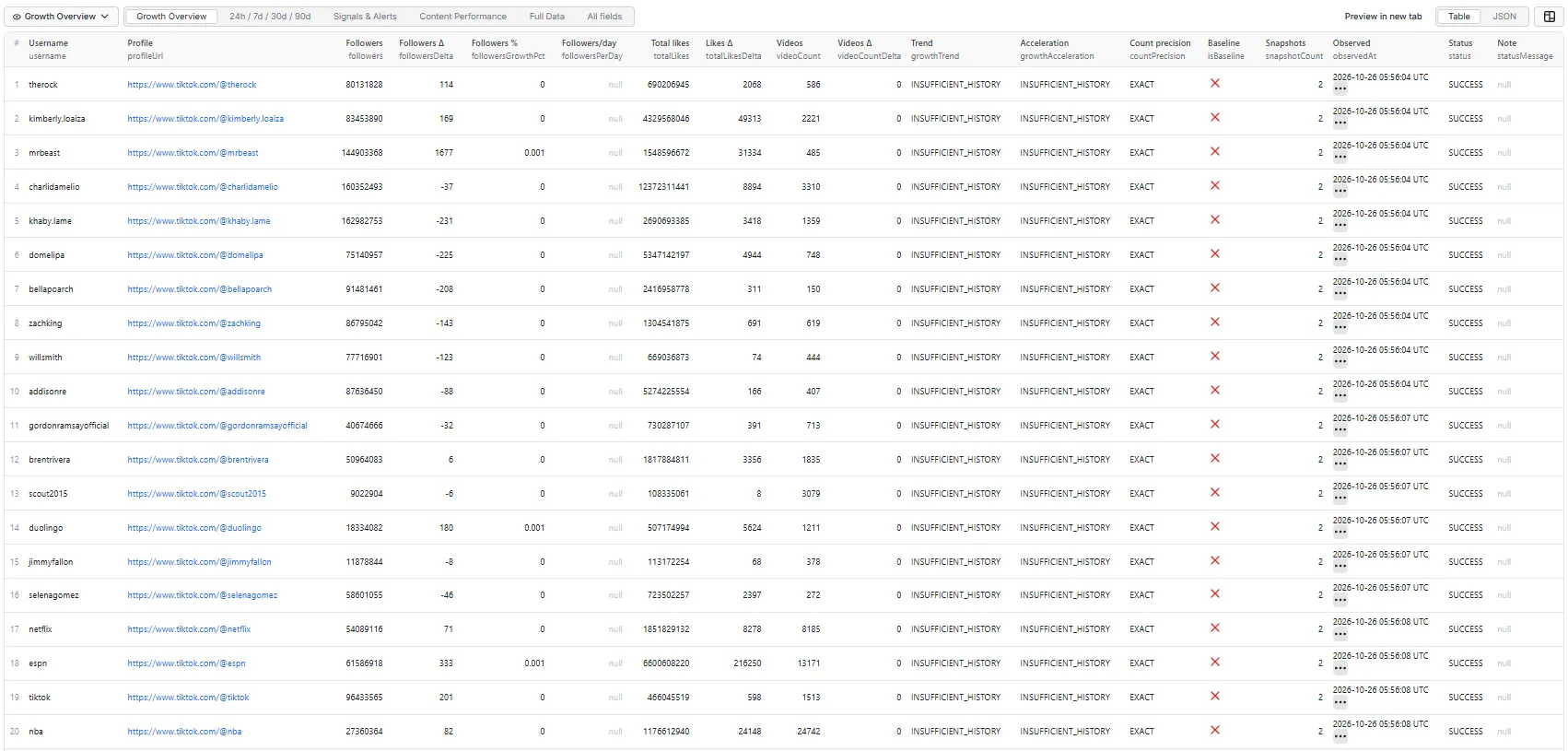
The samples below are real rows from the 20-creator watchlist input above, on its second run, 47 minutes after the baselines. Deltas are already filled; followersPerDay (needs ≥ 1 hour between snapshots), growthTrend (needs ≥ 12 hours, or a 7-day comparison) and the 24h / 7d / 30d periods stay null until enough time has passed — schedule the Actor daily and they fill in.
Growth Overview
Content Performance
Nested detail (Full Data)
growthPeriods.previous for @mrbeast, plus contentPerformance and one of recentVideos for @netflix:
Netflix's postingSampleSaturated: true means all 10 sampled videos fall within the last 30 days — it posts so often that the true cadence may be higher than the sample shows.
Statuses
SUCCESS, BASELINE_CREATED, PROFILE_PRIVATE, VIDEOS_UNAVAILABLE (profile tracked, video sample failed), PROFILE_NOT_FOUND, PROFILE_UNAVAILABLE, PARTIAL_PROFILE, USERNAME_CHANGED_UNKNOWN, RATE_LIMITED, PROVIDER_ERROR, STATE_READ_ERROR, STATE_WRITE_ERROR, INVALID_INPUT, DUPLICATE_INPUT, SKIPPED_TOO_MANY_FAILURES (the run stopped looking up creators after most inputs returned no profile — check for misspelled or deleted accounts). One failed creator never fails the run.
FAQ
What happens on the first run?
Each creator gets a baseline: current counters are stored, isBaseline is true, all deltas are null, and trend/acceleration are INSUFFICIENT_HISTORY. The Actor never reports "0 growth" when it has nothing to compare against, and it cannot show growth from before the first observation.
Which profile counters are tracked? Followers, following, friends, total likes, and video count — plus verified, private, and (with metadata on) bio, bio link, business category and similar fields for change tracking.
Are counts exact or rounded?
Every row has countPrecision: EXACT when TikTok's unrounded counters are available (the usual case), ROUNDED when only display-rounded values are (e.g. 1.2M), UNKNOWN otherwise. A delta smaller than the rounding step is flagged (followersDeltaBelowPrecision) and does not count as growth.
How is follower growth calculated?
followersDelta = current − previous; followersGrowthPct = delta ÷ previous × 100 (null if the previous value is missing or zero).
How does uneven scheduling affect velocity?
It doesn't distort it: velocity divides by the real elapsed time (followersPerDay = delta ÷ elapsed days), so a run 36 hours after the last one is comparable to a 24-hour one. Rates are withheld for gaps under an hour.
Can I compare 7, 30 and 90-day growth?
Yes. Each period uses the stored snapshot closest to that age within a tolerance — 24h ±6h, 7d ±24h, 30d ±3d, 90d ±7d. A period returns null until that much history exists. Use COMPARE mode for all periods at once.
What does SURGING mean?
Follower growth normalized to a 7-day rate: SURGING ≥ 5%/week, GROWING ≥ 0.5%, STABLE between −0.5% and 0.5%, DECLINING down to −3%, SHARP_DECLINE below that. It uses the 7-day comparison when available, otherwise the previous snapshot (if at least 12 hours old). These classifications are Coregent-derived, not TikTok metrics.
What is growth acceleration?
Recent follower velocity compared with the previous equivalent period — the last 7 days vs the 7 days before when history allows, otherwise the last two intervals between snapshots. A change of more than 20% is ACCELERATING or DECELERATING; otherwise STEADY.
What happens if a username changes?
History follows the creator, not the handle. State is keyed by TikTok's stable user ID, and the creator is looked up by their stable secUid, so a renamed creator still resolves. The row shows usernameChanged: true with previousUsername and currentUsername, plus a USERNAME_CHANGED signal.
Can I track multiple independent projects?
Yes — use a different trackerKey for each. The same creator under two keys has two independent histories.
Can I track private creators?
Public counters are tracked and the row is marked PROFILE_PRIVATE. Recent-video metrics are unavailable for private accounts. The Actor never bypasses privacy.
Does it include recent-video metrics?
Yes, optionally (includeRecentVideoMetrics, on by default). It analyzes the creator's latest public videos: one page, currently about 10 videos.
How are average and median views calculated?
Over the video sample. Both are returned because TikTok is highly skewed — one viral video can make the average misleading. engagementRate = (avg likes + avg comments + avg shares) ÷ followers × 100; it's a Coregent-derived ratio, not an official TikTok metric. If every sampled video falls within the last 30 days, postingSampleSaturated is true — the creator may have posted more than the sample shows.
Does it require TikTok login or cookies? No. Only publicly available data is used, and no login, cookies or session IDs are needed.
Does it use TikHub? Yes. Profiles and videos are fetched through the TikHub API — browserless, with no proxy setup on your side.
How often should I schedule it? Daily for most watchlists; every 12 hours for fast-growing creators. Hourly is rarely useful. Create an Apify Task with your input and attach a Schedule.
Can it trigger webhooks?
Yes. Every row has alertTriggered and alertReasons (e.g. FOLLOWER_SURGE, FOLLOWER_DROP, CROSSED_100K, CROSSED_1M, ACCELERATING_GROWTH, BECAME_VERIFIED, BIO_LINK_CHANGED, USERNAME_CHANGED). Add an Apify webhook on run success, or connect the dataset to Slack, email, Google Sheets, Make, Zapier or n8n and filter on alertTriggered.
Can I use it via API or MCP? Yes — run it via the Apify API, the Apify client libraries, or as a tool through the Apify MCP server. Example:
How does pricing work? Pay-per-event, with no start fee:
- Creator snapshot — each creator successfully observed (first-run baselines included, because they cost the same to fetch).
- Video analytics — each creator whose recent-video sample was actually delivered (only when
includeRecentVideoMetricsis on).
Not-found, invalid, duplicate, and failed creators are free, and the run summary is free. See the Pricing tab for current rates. This README deliberately doesn't quote figures, because they can change. The Actor respects your maximum cost per run: when it is reached, remaining creators are skipped.
Where is history stored?
In your own Apify account, in storages the Actor creates on its first run:
- key-value store
tiktok-creator-growth-state— latest state and compact history pertrackerKey+ creator - dataset
tiktok-creator-growth-history— append-only log, one row per saved observation, for exports
Deleting those storages resets all tracking history.
Limitations & interpretation
- Unofficial product; not affiliated with TikTok or ByteDance. Uses only publicly accessible data.
- Growth metrics are discrete observations taken when the Actor runs. Tracking begins at the first baseline.
- Public counters can change between observations; some TikTok surfaces expose rounded rather than exact counts.
- Private profiles have limited data; recent-video analytics depend on public video availability.
- Trend, acceleration, signals and engagement rate are Coregent-derived.
- The Actor does not provide official TikTok analytics, follower demographics, organic vs paid growth, exact follower-acquisition times, reach, impressions, watch time, audience retention, or growth from before the first observation.
Related Actors
Pairs with TikTok Profile Scraper (one-off profile data), TikTok Influencer Finder (find creators worth tracking), and TikTok Video Scraper (raw content metrics).


