

Work Email Finder — Person & Company
Pricing
from $20.00 / 1,000 company contact emails
Work Email Finder — Person & Company
Find a verified work email from a name plus company domain, or a public LinkedIn handle — or discover the contacts at a whole company by domain or company name. Filter by department, seniority and decision-maker status. Bulk and CSV ready. No LinkedIn login, API key or proxy setup.
Pricing
from $20.00 / 1,000 company contact emails
Rating
0.0
(0)
Developer

Delowar Munna
Maintained by CommunityActor stats
0
Bookmarked
114
Total users
46
Monthly active users
10 days ago
Last modified
Categories
Share
Find one person's work email, or the right contacts at an entire company.
Give it a name plus a company domain, a public LinkedIn profile URL, or just a company — and get back verified professional email addresses with job titles, departments, seniority and decision-maker flags.
No LinkedIn login. No cookies or session tokens. No API key of your own. No proxy setup.
TL;DR
| You have | You get |
|---|---|
| A person's name + company domain | Their work email, verified |
| A person's name + company name | Their work email, verified |
| A public LinkedIn profile URL | Their work email, verified |
| A company domain or website | Many work emails at that company, filtered how you like |
| A company name | The same, after the company is resolved to its domain |
Person lookups and company searches can run in the same run. Every row is tagged
sourceMode: person or sourceMode: company.
Two ways to use it
1. Person lookup
Put entries in People. Each one produces exactly one row — found or not.
One person per line. To carry your own CRM key through to the output, use People with your
own IDs instead — same lookup, plus an externalId on every row:
Rules:
- A LinkedIn handle on its own is enough.
- Otherwise you need a name plus a domain or a company name.
- If you give both a domain and a company name, the domain is used — it is unambiguous.
externalIdis your key. It is carried through to the output untouched.
2. Company contact search
Put entries in Companies. Each one can produce many rows.
Domains, full URLs and plain company names all work. A company name is resolved to its domain first, and only searched when the match is confident.
Quick start
- Paste a few people, a few companies, or both.
- Leave the defaults alone for your first run — they are the conservative ones.
- Run it. Open the Overview tab.
- If you are going to send mail, use the Verified emails tab.
What "verified" means here — read this once
This is the part most email finders are vague about, and it is the part that decides whether your first campaign bounces.
| Status | What it means | Safe to send? |
|---|---|---|
valid | The provider tested the mailbox and it exists. | Yes |
accept_all | The company's mail server accepts every address, so nobody can test any address there. | No — see below |
webmail | It is a consumer mailbox, not a company one. | Judgement call |
unknown | The check could not complete. | No |
invalid | Tested, and the mailbox does not exist. | Never — we never return these |
Only valid is treated as verified. Not a high confidence score — a score is a
prediction, not a test.
You get everything, labelled — nothing is hidden from you
Every address found is returned, whatever its status. There is no setting that filters results before you see them, because there does not need to be: the status is on the row and you can sort, filter and export on it however you like.
That matters most at accept-all domains. Those mail servers accept every address you ask them about, so nobody — us, the provider, anyone — can confirm that a particular mailbox there is real. Ask such a domain about a person who does not exist and you get back a perfectly well-formed address anyway.
So before you send to anything not marked valid, check two columns:
emailSourceType—generatedmeans the address was derived from the company's email pattern, not observed anywhere.sourceCount— how many web pages the address was actually seen on. Zero sources plusgeneratedis a guess with good manners.
A valid address with several sources is a different thing entirely from a generated
address at an accept-all domain, and the columns tell you which you are holding.
Use the Risky / unconfirmed dataset tab to see exactly these columns together.
Double-checking an address
By default, each address arrives with the verification result the provider recorded when it indexed the address. That costs nothing extra.
Turn on Double-check every email to re-verify each address live instead. It adds SMTP-level detail — MX records, SMTP check, catch-all, disposable, gibberish — and a fresh per-address score, and it is charged as its own event, once per address checked. Worth it before sending to a list that has been sitting for a while.
On an accept-all domain it cannot change the verdict, and you are still charged. Those
mail servers accept every address, so no live check can confirm one mailbox: the status
stays accept_all and isVerified stays false no matter how high the score comes back.
It is not wasted there — you still get the SMTP detail, and the fresh score varies per
address where the indexed confidence score often does not, which makes it the only signal
available for ranking contacts at such a domain. But if you turned it on expecting to
confirm those addresses, it cannot do that, and companyAcceptAll on any row tells you in
advance which domains are affected.
Company filters
All of these are sent to the provider before results come back, not applied afterwards. That matters: narrowing your search reduces what you are charged, rather than making you pay for rows that are then thrown away.
It is also why there is no job-title filter. The provider has no such parameter, so a title filter could only be applied after the rows had been returned and billed — raising your cost instead of lowering it. The Job title column is on every row, and filtering it in the dataset costs nothing.
| Filter | Values |
|---|---|
| Departments | executive, it, finance, management, sales, legal, support, hr, marketing, communication, education, design, health, operations, product, research, consulting, administrative, procurement |
| Seniority | junior, senior, executive |
| Decision makers only | Yes / no |
| Email types | Personal work addresses (default), generic inboxes (info@, sales@) |
These apply to company searches only. A person lookup needs no filters — you already named the person.
Adding generic inboxes returns more rows, and more rows are charged, so turn it on when a shared inbox is genuinely useful to you rather than by default.
Output
One flat schema across both modes. Every row has every column, with null where a field
does not apply — so it opens cleanly in a spreadsheet and loads into a warehouse without
special-casing.
Lineage — sourceMode, inputIndex, inputValue, externalId, inputType,
processedAt
Company — companyName, companyInput, companyDomain, companyPattern,
companyAcceptAll, companyDisposable, companyWebmail, linkedDomains
Person — firstName, lastName, fullName, jobTitle, jobTitleRaw, seniority,
department, decisionMaker, linkedinUrl, twitterHandle, phoneNumber
Email — emailFound, email, emailType, emailDomain, confidenceScore,
emailSourceType, sourceCount, sources
Verification — isVerified, verificationStatus, verificationDate,
verificationMode, verificationFresh, deliverability, verificationScore,
regexpValid, gibberish, mxFound, smtpServerReachable, smtpCheck, isCatchAll,
isDisposable, isWebmail, verificationBlocked
Result — resultStatus, isPartial, errorType, errorMessage, retryable,
providerAttempts, processingTimeMs
Fresh-verification-only fields stay null when fresh verification was not run. They are
never filled with plausible defaults, because a value nobody measured is worse than a blank.
Sample output
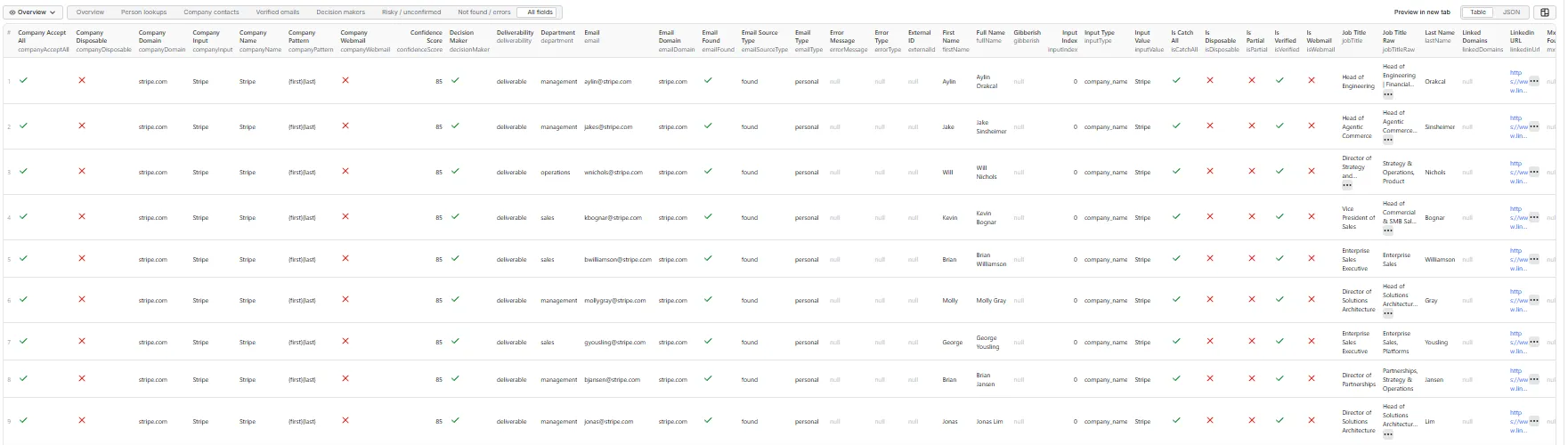
Real output from a real run. Names, addresses and LinkedIn URLs have been replaced — this listing does not publish anyone's contact details. Every other value, including the verification fields, source evidence and timings, is exactly as returned.
Company contact — a company-name input resolved to its domain, one contact row. Appears in Overview, Company contacts, Verified emails and Decision makers.
Worth reading closely: companyAcceptAll and isCatchAll are both true, yet
verificationStatus is valid and isVerified is true. Those are not in conflict. The
domain accepts mail for any address, so it cannot prove an address — but the provider had
independently tested this one and recorded it as valid. A catch-all domain does not make
every address there unconfirmed; it only means the domain itself cannot confirm one.
Person lookup, risky — an address at an accept-all domain with nothing to corroborate it.
Appears in Overview, Person lookups and Risky / unconfirmed. Fields not shown are
null.
This is the row to understand before you send anything. emailSourceType: "generated"
with sourceCount: 0 means the address was derived from the company's naming pattern and has
never been observed anywhere — and the domain accepts every address, so nothing can disprove
it. A confidence score of 81 is a prediction, not a test. It is delivered and charged because
the provider bills us for finding it either way, and the five columns above are how you tell
it apart from the verified row.
Not found — a person the provider has no address for. Appears in Overview, Person lookups and Not found / errors. This row is free.
Every person you submit gets exactly one row like this, found or not, so you can always tell which of your inputs failed and re-run only those.
Dataset tabs
Overview · Person lookups · Company contacts · Verified emails · Decision makers · Risky / unconfirmed · Not found / errors
Each tab is a column preset. To isolate the rows themselves, filter on the column named in
the tab description — sourceMode, isVerified, decisionMaker, resultStatus.
Result statuses
success · email_not_found · email_risky_only · company_not_resolved ·
no_company_emails_found · invalid_input · unsupported_input ·
free_mail_domain_rejected · privacy_request_blocked · provider_rate_limited ·
provider_quota_exhausted · provider_error · timeout · stopped_by_result_cap ·
stopped_by_spend_limit · internal_error
What is charged, and what is not
Pay per event. Three events: a person result, a company contact result, and an optional fresh verification.
Person and company results are priced differently because they cost us differently — a person lookup is one provider credit, while a company search shares one credit across a block of up to ten contacts. One shared price would overcharge for one of them.
This README deliberately quotes no figures. Live prices are on the Actor's Pricing tab, which is the only place that cannot go stale.
Never charged:
- A person lookup that finds nothing.
- A company that could not be resolved.
- A company search that returns no matching contacts — you still get an audit row.
- An address the provider tested and found dead — it is never returned, so it is never billed.
- Contacts removed by your filters.
- Duplicate people and duplicate domains — looked up once, charged once, and every submitted row is still returned.
- Duplicate addresses across companies.
- Invalid inputs and free-mail domains.
- Anyone whose data the provider refuses to process.
- Every error or audit row.
- The run summary.
You pay when an address is actually in your dataset. That is the whole rule.
Including addresses that could not be confirmed. An accept_all or unknown address
is charged the same as a valid one, because it costs the same to find — the provider bills
on the search, not on the verdict. What you get in exchange is the verdict itself, on the
row, along with the source evidence, so you can decide what to do with it. If only
confirmed addresses are useful to you, filter on isVerified = true and treat the rest as a
free bonus you did not have to run a second tool to get.
No-result behaviour
Every person you submit gets exactly one row. Every company that returns nothing gets exactly one audit row. Nothing silently disappears — which is what lets you re-run only the gaps.
Limits and cost controls
| Setting | Default | What it bounds |
|---|---|---|
| Maximum emails per company | 25 | Rows per company |
| Maximum total results | 1000 | Rows containing an address, across both modes |
There is no unlimited setting. Every run has a finite cost, on purpose.
Maximum total results is the one number that bounds what a run can cost you. It is checked before each provider call, not after, so inputs beyond the ceiling are never paid for — the run stops and the entries it did not reach come back as rows saying so.
Your people and company lists are never truncated. Everything you enter is processed, up to that ceiling.
Lowering maximum emails per company genuinely costs less — the provider is asked for exactly that many, rather than a full page that then gets trimmed.
The Actor also honours the per-run spending limit you set on the run. When it is
reached, remaining lookups stop, nothing further is charged, and the rows that were not
attempted say stopped_by_spend_limit.
Bulk input: CSV and external IDs
Each section has its own CSV box, so a row's type is settled by where you paste it —
nothing is inferred and there is no row_type column to get wrong.
People CSV, in section 1. Columns: full_name, first_name, last_name, company,
domain, linkedin_url, external_id.
Companies CSV, in section 2. Columns: company, domain, external_id.
Every row in the People CSV needs a name plus a company or domain, or a LinkedIn URL on its own; every row in the Companies CSV needs a domain or a company name. A row that has neither comes back as a row explaining why — it is never silently dropped, so your output always accounts for every line you submitted. Unrecognised columns are ignored rather than guessed at.
For companies with your own keys, Company records takes objects instead:
API, n8n, Make, Zapier
Standard Apify Actor — call it from the API, or from any of the no-code integrations. The
run summary is written to the key-value store under SUMMARY, never mixed into the
dataset, so a downstream step that treats one dataset row as one contact stays correct.
Privacy and compliance
Work emails come from Hunter.io's business-data index and verification system. This Actor is not affiliated with Hunter beyond using it as an upstream provider.
- An address being discoverable does not mean the person consented to be contacted. You remain responsible for GDPR, CAN-SPAM, CASL and every other rule that applies to you.
- When the provider reports that someone has asked for their information not to be processed, that refusal is final. No retry, no alternative route, no address in the output, and no charge.
- Do not use this Actor for harassment, spam, or targeting people by sensitive characteristics.
On LinkedIn: a LinkedIn profile URL is used only as an identifier passed to the email provider. This Actor never opens the profile page, never needs a login, cookie or session, and does not scrape LinkedIn.
Troubleshooting
"No confident domain match was found for that company name." The company name was ambiguous. Supply the website or domain instead — a weak match would have searched the wrong company and charged you for it.
Lots of email_risky_only rows. The domain is accept-all, so no address there can be
confirmed by anyone. The addresses are still returned — check emailSourceType and
sourceCount to see which are real finds and which were derived from the company's email
pattern, and filter on isVerified = true if you only want confirmed ones.
no_company_emails_found on a company you know is big. Your filters were probably too
narrow — try removing the department or seniority filter. The error message on the row
distinguishes "nothing indexed" from "filtered everything out".
Fewer results than maximum emails per company. The provider returns what it has
indexed for that domain. It is not a complete employee roster and this Actor does not
pretend otherwise.
provider_quota_exhausted. The Actor's own provider account is out of credits. Nothing
further was charged. Please report it.
FAQ
Do I need a Hunter account or API key? No. Access is included.
Do I need LinkedIn credentials? No — and there is nowhere to put them.
Will this give me every employee at a company? No, and be suspicious of anything that claims it does. You get the contacts the provider has indexed for that domain, filtered how you asked.
Why is one person's result priced differently from a company contact? They cost us different amounts upstream. Pricing them the same would mean overcharging for one of them.
Can I run people and companies together? Yes. Use sourceMode to tell the rows apart.
Is a duplicate charged twice? No. It is looked up once, charged once, and every row you
submitted still comes back with its own externalId.
What this Actor is not
- Not a LinkedIn scraper. It never opens a LinkedIn page.
- Not an employee-roster tool. It cannot guarantee everyone at a company.
- Not an email sender. It finds addresses; what you do with them is yours.
- Not a personal-email harvester. It is built for work addresses.
- Not a pattern guesser. If the provider does not return an address, you get an honest "not found" instead of an invented one.
Changelog
1.0 — First release. Person lookup by name + domain, name + company, or LinkedIn handle. Company contact search by domain or company name. Upstream filtering by department, seniority, decision maker and email type — every filter applied by the provider before results are returned, so narrowing your search lowers your cost. Optional live re-verification. A CSV box for each section. External IDs on both workflows. Seven dataset views. Per-run spending limit support.
Every address found is returned with its verification status attached, rather than being filtered before you see it — the status, the source count and how the address was obtained are all columns you can filter on yourself.


