

LinkedIn Job Scraper
Pricing
from $1.00 / 1,000 scraped job listings
LinkedIn Job Scraper
Scrape job listings from LinkedIn.com including title, company, location, and posting details. Fast, reliable LinkedIn jobs data scraper for hiring, research, and analytics.
Pricing
from $1.00 / 1,000 scraped job listings
Rating
4.8
(13)
Developer

Crawlworks
Maintained by CommunityActor stats
34
Bookmarked
3.1K
Total users
253
Monthly active users
9.5 days
Issues response
2 months ago
Last modified
Categories
Share
💼 What is LinkedIn Job Scraper?
LinkedIn Job Scraper lets you extract job listings from linkedIn jobs, helping you find opportunities, analyze market trends, and streamline recruitment with just a few clicks.
- Generate qualified leads: extract job titles, company names, locations, and descriptions to build targeted job lists for your job search or recruitment efforts
- Track competitors across regions: monitor where companies are hiring, what positions they're posting, and how frequently they recruit in different markets
- Perform market analysis: analyze job market saturation, identify skill gaps, or benchmark salary trends by location, industry, and seniority level
- Support recruitment workflows: discover high-volume hiring companies or trending job categories for strategic outreach and talent acquisition
- Automate research workflows: replace manual job search tasks with repeatable workflows that keep job datasets fresh and consistent
The scraper automates LinkedIn job data extraction, enabling you to efficiently scrape up to 1,000 jobs per search with lightning-fast results, intelligent proxy rotation, and zero-configuration simplicity.
What data does LinkedIn Job Scraper extract?
| 💼 Job title | 🏢 Company name, logo, and LinkedIn profile URL |
|---|---|
| 📍 Location | 🌐 Company website URL |
| 📝 Full job description | 🏷️ Industry classification |
| 🎯 Required skills and qualifications | 💰 Salary range (if available) |
| 📅 Posted date and time | ⏰ Application deadline (valid through date) |
| 🔗 Direct job posting URL | 📋 Application URL and type (Easy Apply or External) |
| 👔 Employment type (Full-time, Part-time, Contract, etc.) | 📊 Seniority level, plus a level inferred from the years of experience in the job description |
| 🔍 Source search URL | 📌 Posted time ago (e.g., "2 weeks ago") |
| 👥 Applicant count and competition level | 🎓 Experience required, read from the job description |
For maximum usefulness, LinkedIn Job Scraper has the following abilities:
- Extract comprehensive job data: job titles, company information, locations, descriptions, skills, salary ranges, and application details
- Enrich company profiles: optionally fetch company description, employee count, headquarters, slogan, website, industry, type, specialities, and office locations from each employer's LinkedIn profile page
- Flexible search: scrape using job titles, keywords, locations, or direct LinkedIn search result URLs
- Advanced filtering: filter by employment type, seniority level, industry, and more
- Flexible output format: export data into almost any format, with multiple views available
- Integrate with other tools: use webhooks or Apify's MCP server to set up workflows with other Actors or third-party tools like n8n, make or zapier
- Real-time results: get up-to-date job postings with posting dates and application deadlines
🎯 How to scrape LinkedIn jobs with LinkedIn Job Scraper?
LinkedIn Job Scraper is user-friendly, offering a smooth start even for those who have never extracted data from LinkedIn before. Here's how to scrape LinkedIn jobs with LinkedIn Job Scraper in 5 steps:
- Create a free Apify account using your email.
- Open LinkedIn Job Scraper.
- Add the job titles, locations, or LinkedIn search URLs that you want to scrape.
- Click the "Start" button and wait for the data to be extracted.
- Download your data in JSON, XML, CSV, Excel, or HTML.
For more information, watch our short video tutorial.
⬇️ Input
The input for LinkedIn Job Scraper should be either a LinkedIn search results URL or a job title in combination with a location. You can also apply various filters such as employment type, experience level, work type, and time posted range. You can set up the input programmatically or use the fields in the scraper's interface.
🔍 Search queries and locations
You can search for jobs using a combination of job title (query) and location. The scraper will fetch jobs matching your criteria from LinkedIn's job search results.
Query examples:
Python DeveloperSoftware EngineerData ScientistMarketing ManagerProduct Designer
Location examples:
Berlin, GermanyNew York, NYLondon, United KingdomSan Francisco Bay AreaRemote
Using specific job titles and locations will help you get more targeted results. You can combine multiple search terms in your query, but LinkedIn's search algorithm will handle the matching automatically.
🔗 Direct LinkedIn Search URLs
The easiest way to scrape jobs is by using direct LinkedIn search result URLs.
If you provide LinkedIn search URLs, the scraper will fetch jobs directly from those URLs, bypassing the need to configure filters manually. This is particularly useful when you've already filtered jobs on LinkedIn's website and want to scrape those exact results.
You can provide up to 3 search URLs per run. Each URL will fetch the number of jobs specified in the "Total Jobs to Fetch" parameter.
Example LinkedIn search URLs:
How to get a LinkedIn search URL:
- Go to LinkedIn Jobs Search
- Enter your search criteria (job title, location, filters)
- Apply any filters you want (employment type, experience level, date posted, etc.)
- Copy the URL from your browser's address bar
- Paste it into the "LinkedIn Search URLs" field
When using search URLs, the scraper will ignore the query and location fields and use the filters already applied in the URL.
Job filters
❗ Important — August 2026 update
The Job Types, Experience Level and Work Type filters have stopped working after LinkedIn's AI-powered job search update. For more details, see LinkedIn's help article.
Use the Query field as an alternative to these filters — for example, search
Remote Software Engineer jobsorEntry Level Sales In Healthcare Posted Last Week In NY, and LinkedIn will respond with relevant results using an AI search at their end.Keep in mind that the matching is done by LinkedIn's AI, not by a strict filter, so results won't be 100% accurate — some jobs may not match every condition in your query.
You can filter jobs using three main categories:
Job Types: Full-time, Part-time, Contract, Temporary, Volunteer, Internship
Experience Level: Internship, Entry Level, Associate, Mid-Senior Level, Director, Executive
Work Type: On-Site, Remote, Hybrid
You can select multiple filters within each category to broaden or narrow your search results.
Two additional toggles are available:
Easy Apply: only return jobs that can be applied to with LinkedIn Easy Apply.
Under 10 Applicants: only return jobs with fewer than 10 applicants.
Time posted range
Filter jobs by when they were posted: Any time (default), Past 24 hours, Past 3 days, Past 7 days, Past 30 days. You can also set custom time ranges programmatically using the LinkedIn Job Scraper API.
Number of jobs to fetch
Specify how many jobs you want to scrape per search. Maximum is 1,000 jobs per search URL. If you provide multiple search URLs, each URL will fetch the number of jobs you specify.
Note: LinkedIn currently supports scraping up to 1,000 jobs per search. If you request more than 1,000 jobs, the scraper will fetch the maximum available (up to 1,000).
🏢 Company enrichment
Enable the Enrich Company Details toggle to fetch additional company information from each employer's LinkedIn profile page. When enabled, the scraper makes one extra request per unique company and appends the following fields to every job record:
| Field | Description |
|---|---|
companyDescription | Full company description |
companyEmployeeCount | Total number of employees |
companyHeadquarters | Primary office location (city, region, country) |
companySlogan | Company tagline |
companyWebsite | External company website URL |
companyIndustry | Industry classification |
companyType | Organisation type (e.g. Privately Held, Public Company) |
companySpecialities | Comma-separated list of specialities |
companyLocations | All office locations, each with a tag (Primary / Others), full address, and a Bing Maps directions URL |
Note: Each unique company is only fetched once per run, regardless of how many jobs share that employer — so the overhead scales with the number of distinct companies, not total jobs.
Tip: To scrape company details in depth, check out our LinkedIn Company Scraper — it extracts full company profiles from LinkedIn, including description, employee count, headquarters, industry, specialities, office locations, and more.
Here's an example of a job record with company enrichment enabled:
⬆️ Output
Your results appear in an Apify dataset which you can find in the Output or Storage tab.
Download as JSON, CSV, Excel, HTML or view as a table. Choose which fields to include before export.
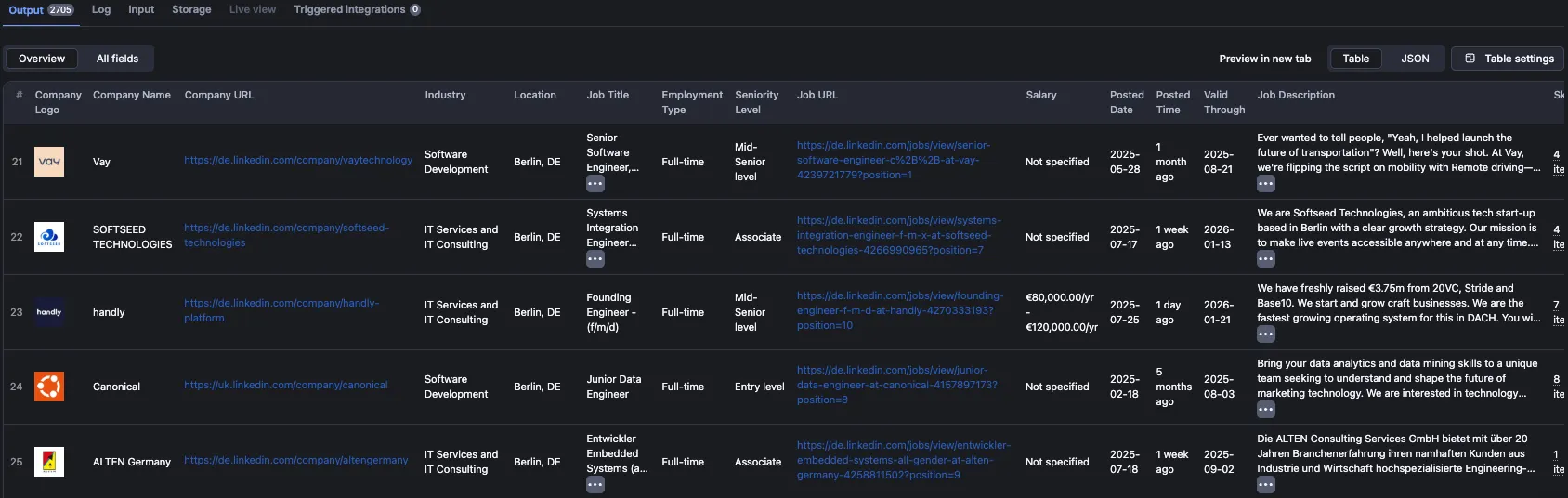
Table view
The default table view displays all scraped jobs in a spreadsheet-like format, with each job as a row and data fields as columns. This view is perfect for quick analysis and filtering directly in the Apify Console.
JSON
Here's the data you would get for a single linkedin job search listing (this one 💼 so you can compare):
Note on seniority: seniorityLevel is the value LinkedIn reports, which the job poster picks
from a dropdown and often leaves on "Entry level" regardless of what the role actually asks for.
inferredSeniorityLevel and experienceYears are instead inferred from the years of experience
stated in the job description, and seniorityLevelSource tells you which of the two a given row
came from. Under 2 years maps to Entry level, 2–4 years to Associate, and 5 years or more to
Mid-Senior level. To filter for fresher / 0–2 year roles, use inferredSeniorityLevel or
experienceYears.min rather than seniorityLevel.
❓ FAQ
How does LinkedIn Job Scraper work?
LinkedIn Job Scraper uses direct HTTP calls to extract job listings from LinkedIn's job search pages, making it significantly faster than traditional browser-based scraping methods. By leveraging optimized API-like requests, the scraper can process up to 1,000 jobs in under 1 minute. It extracts structured data from each job posting and stores it in a clean, organized format. The scraper includes inbuilt proxy rotation that automatically handles IP management, ensuring reliable and uninterrupted data extraction at scale.
Can I scrape jobs from multiple locations?
Yes. You can scrape LinkedIn job listings from multiple locations by providing multiple search URLs (up to 3 per run) or by running separate searches with different location parameters. Each search URL will fetch the number of jobs you specify, allowing you to collect job data from various geographic regions in a single run.
How can I increase the speed of the scraper?
The scraper is already optimized for speed, but you can further improve performance by:
- Using direct LinkedIn search URLs instead of building searches with filters—this bypasses manual filter configuration and speeds up processing
- Limiting the number of jobs to fetch if you don't need the full 1,000 jobs per search
- Leveraging the built-in proxy pool for optimal performance and reliability
- Running multiple searches in parallel using the Apify API to process multiple locations or queries simultaneously
Can I use LinkedIn Job Scraper to extract specific job details?
Yes. LinkedIn Job Scraper extracts comprehensive job details including job titles, company information, locations, full job descriptions, required skills, salary ranges (when available), employment types, seniority levels, posting dates, and application URLs. All this data is available in structured formats like JSON, CSV, or Excel.
Can I integrate LinkedIn Job Scraper with other apps?
Yes. LinkedIn Job Scraper can be connected with almost any cloud service or web app thanks to integrations on the Apify platform. You can integrate your LinkedIn job data with Zapier, Slack, Make, Airbyte, GitHub, Google Sheets, Asana, LangChain and more.
You can also use webhooks to carry out an action whenever an event occurs, for example, get a notification whenever LinkedIn Job Scraper successfully finishes a run.
Can I use LinkedIn Job Scraper as its own API?
Yes, you can use this LinkedIn Job Scraper tool to extract structured job data programmatically via Apify API. You can manage, schedule, and run Apify actors, access datasets, monitor performance, get results, create and update actor versions, and more.
To access the API using Node.js, you can use the apify-client NPM package. To access the API using Python, you can use the apify-client PyPI package.
For detailed information and code examples, see the API tab or refer to the Apify API documentation.
Can I use this LinkedIn Job Scraper API in Python?
Yes, you can use the Apify API with Python. To access the LinkedIn Job Scraper API with Python, use the apify-client PyPI package. You can find more details about the client in our Python Client documentation.
Is it legal to scrape LinkedIn jobs data?
Web scraping is legal if you are extracting publicly available data, which includes most LinkedIn job listings. However, you should respect boundaries such as personal data and intellectual property regulations. You should only scrape personal data if you have a legitimate reason to do so, and you should also factor in LinkedIn's Terms of Use.
💬 Support
We're always working on improving our Actors' performance. If you have any technical feedback for LinkedIn Jobs Scraper or simply found a bug, please create an issue on the Actor's Issues tab in Apify Console.
For anything else, reach out at hello@crawlworks.io or visit crawlworks.io.


![🚀 Indeed jobs scraper [PPR] avatar](https://images.apifyusercontent.com/PEDOk9MmTf1yHtczA1A4wQEoGyAKCe5Aft1HzkhwROk/rs:fill:76:76/cb:1/aHR0cHM6Ly9hcGlmeS1pbWFnZS11cGxvYWRzLXByb2QuczMudXMtZWFzdC0xLmFtYXpvbmF3cy5jb20vTVhMcG5nbVZwRThXVEVTUXIvQjFrZ3BRS1p5dzJvVEpJUmctTG9nby1IZXJvLVN0YXRpYy1lemdpZi5jb20td2VicC10by1qcGctY29udmVydGVyLmpwZw.webp)


