

⚡️Rapid Linkedin Jobs Scraper
Pricing
from $0.10 / 1,000 job results
⚡️Rapid Linkedin Jobs Scraper
🔥$0.10/1K jobs. Advanced filters, 23 data fields, JSON/CSV/Excel export, cron schedules, webhooks and MCP for AI agents. Scrape Linkedin job postings without login cookies. Cost Effective Linkedin Jobs API for recruiting, job boards, lead generation and AI agents.
Pricing
from $0.10 / 1,000 job results
Rating
4.0
(30)
Developer

Umesh Patidar
Maintained by CommunityActor stats
153
Bookmarked
16K
Total users
572
Monthly active users
3.4 hours
Issues response
6 hours ago
Last modified
Categories
Share



Rapid LinkedIn Jobs Scraper is an Apify LinkedIn jobs scraper and API that turns public LinkedIn job listings into structured data: title, company, location, posting date, salary, full description, seniority and more. Search by job title, location, city, company or a pasted LinkedIn search URL, then download JSON, CSV or Excel or fetch the results through the API. No LinkedIn account, login or cookies needed.
Starting at $0.10 per 1,000 jobs. Full job details are billed as an extra, so see Pricing. Try it on Apify's Free plan, no credit card.
Built for recruiters, job boards, B2B sales teams, analysts, automation builders and AI agents (use cases).

Sample data · API and integrations · Pricing · FAQ
| Search by | Job titles and keywords, location, cities and radius, companies, posting time, Easy Apply, early applicants, LinkedIn search URLs, company and geolocation IDs |
| Data | 23 fields per job, including salary, applicants, full description (text and HTML), seniority, employment type and industries |
| Export | JSON, CSV, Excel, XML, HTML table, RSS, JSONL |
| Run it from | Apify Console, REST API, Python and JavaScript clients, schedules, webhooks, Apify integrations and MCP |
| You need | A free Apify account |
Sample LinkedIn job data
Each job is one record. This one was collected with Include Full Job Details on (placeholder values). Fields LinkedIn does not show for a job come back as null.
Who uses LinkedIn job data
Public listings show who is hiring, for which roles, where, and how fast. Find your use case and start from the suggested setup.
| If you are... | You can... | Suggested setup |
|---|---|---|
| A recruiter or staffing agency | Track new openings at target clients and spot companies growing a team, using is_actively_hiring and is_early_applicant. | Company Names, Past 24 hours, daily schedule |
| A job board, newsletter or aggregator | Fill your site with fresh, de-duplicated listings and load only the new ones, with job_id as the key. | Titles and location, Past 24 hours, daily schedule, Exclude Job IDs |
| A B2B sales or lead-generation team | Use hiring as a buying signal: companies hiring for roles that match your product. Key fields: company_name, company_url, job_title, posted_date, industries. | Titles that match your ideal customer, Past 24 hours, webhook to your CRM (workflow) |
| An analyst or market researcher | Measure skill demand, compare cities, follow competitors' hiring and benchmark published salaries. | Several titles and Cities, Past Month, weekly schedule |
| A developer or automation builder | Feed jobs into a database, dashboard, Make, Zapier or n8n flow. | The API or an integration |
| An AI developer or agent builder | Give an agent live job data instead of stale training data. | MCP or the API |
| A job seeker or career coach | Build a daily alert of fresh roles that match your skills. | Your titles and location, Past 24 hours, optionally Easy Apply Only |
Included with the Actor and Apify: searching, filtering, de-duplication, dataset export, API access, schedules, webhooks and MCP access. You set up: sending data to Google Sheets, Slack or a CRM (through Apify's integrations, Make, Zapier or n8n), keyword filtering inside descriptions, finding decision-makers, drafting outreach and any AI analysis.
Why choose Rapid LinkedIn Jobs Scraper
- No account at risk. It reads what LinkedIn shows to visitors who are not logged in, so there are no credentials or cookies to manage and your own LinkedIn account is never involved.
- Filters that cut noise before you pay for it. Combine several titles (merged and de-duplicated), locations or cities with a radius, companies by name or ID, a posting window, Easy Apply and early applicants, or paste a LinkedIn search URL. Fewer irrelevant jobs means less cleanup and a smaller bill.
- Only new jobs on repeat runs. Pass the last run's job IDs to Exclude Job IDs. They are not returned or charged, so a daily monitor delivers just what is new.
- Structured, consistent output. 23 named fields per job, the same on every run, with the description as text and raw HTML. It loads straight into a database, spreadsheet or LLM prompt.
- API-first. Every run and dataset is available through the Apify API, Python and JavaScript clients, schedules and webhooks.
- Lightweight. It reads LinkedIn's public pages over plain HTTP with no headless browser, and adds each job to your dataset as soon as it is collected. Switch off Include Full Job Details for the quickest run.
- Predictable spend. Pay per result, with a maximum cost per run that stops the run and keeps what was collected.
- Actively maintained. Recent releases added Search URLs, ID-based searches, Distance and Exclude Job IDs. Report problems in the Issues tab.
| Approach | LinkedIn login | What you get | Setup |
|---|---|---|---|
| Copy and paste by hand | No | A few jobs at a time | Hours of repetitive work |
| Login-based scrapers and extensions | Your account or cookies | What your own session can see | Install, sign in, keep the session alive |
| LinkedIn's official job APIs | Approved partner access | The Job Posting API publishes jobs; it does not export listings | Application and approval |
| Rapid LinkedIn Jobs Scraper | No | Public listings as structured data | Fill in a form, or call the API |
How to scrape LinkedIn jobs
- Open the Actor and click Try for free. Create a free Apify account if you do not have one.
- Add one or more Job Titles / Keywords, such as
Software Engineer. Each is searched separately and the results are merged. - Set a Location such as
United States,EuropeorSan Francisco, CA, or list Cities. - Add optional filters: posting time, Easy Apply, early applicants, companies or a radius.
- Choose how many jobs you want (10 to 100,000) and whether to Include Full Job Details.
- Click Start. Jobs appear in the dataset while the run is still going.
- Download the data from the Output tab as JSON, CSV, Excel, XML, HTML, RSS or JSONL, or read it through the API.
Example inputs
Python jobs from the past week
New jobs at specific companies, from the last 24 hours
Data analyst jobs across several UK cities
Hiring signals for a sales team, listing data only (fast and low cost)
A search copied from your browser
Input
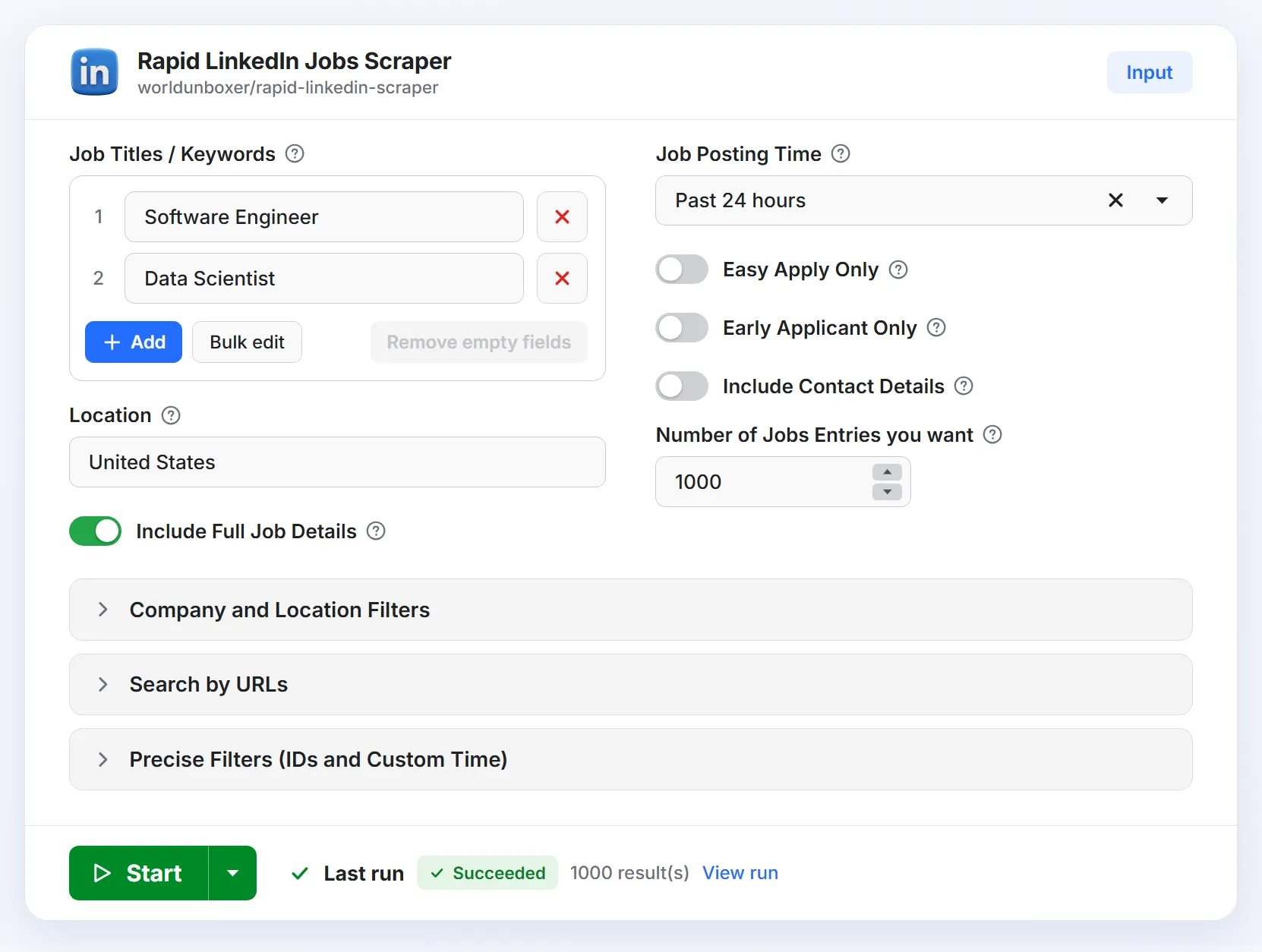
Open the Input tab to configure a run. Every field is optional, so you can start with just a job title and a location.
Search filters
| Field | Type | What it does |
|---|---|---|
Job Titles / Keywords jobs_titles | List of strings | Titles or keywords to search. Each is a separate search and the results are merged. NOT, AND, OR and quoted phrases work, for example Software Engineer NOT Senior (a leading - does not exclude). |
Location location | String | A broad location such as Worldwide, Europe or Canada, or a full string such as San Francisco, CA. |
Cities cities | List of strings | Each city is searched on its own, without Location. If places share a name, add the state or country, for example "Birmingham, Alabama". |
Distance (miles) distance | Integer | Radius around Location, Cities or Location IDs, for example 5 or 100. Empty uses LinkedIn's default (25 miles). |
Company Names company_names | List of strings | Only jobs from these companies, named as on LinkedIn. With no Location, company searches cover all regions. |
Job Posting Time posted_within | Select | Any Time, Past 24 hours, Past Week or Past Month. Takes priority over Custom Job Post Time. |
Easy Apply Only easy_apply | Boolean | Only jobs that offer LinkedIn's "Easy Apply". |
Early Applicant Only early_applicant_only | Boolean | Only jobs LinkedIn marks "Be an early applicant". |
Output and limits
| Field | Type | What it does |
|---|---|---|
Include Full Job Details include_job_details | Boolean | Opens each job's page to add the description, seniority, employment type, industries, applicants, salary, Easy Apply and company ID. Turn it off for a faster, cheaper run with listing data only. Billed separately, see Pricing. |
Include Contact Details include_contact_details | Boolean | Off by default. Needs Include Full Job Details. Also returns the email address the poster wrote in the description. It is personal data, so read Legal and compliance first. |
Number of Jobs Entries jobs_entries | Integer | How many unique jobs you want. 10 to 100,000, default 1,000. |
Advanced: URLs, IDs and exclusions
| Field | Type | What it does |
|---|---|---|
Search URLs search_urls | List of strings | LinkedIn job search URLs copied from your browser. Each runs as its own search and the other search fields are ignored. Filters LinkedIn's public search does not support are skipped with a warning. |
Jobs per URL jobs_per_url | Integer | With Search URLs: the most unique jobs to take from each URL (minimum 10). Number of Jobs Entries still caps the run. |
Location IDs geo_ids | List of numbers or strings | LinkedIn location IDs to search directly, for example 101389470. An ID can be a city, region or country, and is combined with Cities. It is the number after geoId= in a LinkedIn jobs search address. |
Company IDs company_ids | List of numbers or strings | LinkedIn company IDs to search directly, for example 1337, combined with Company Names. It is the number after f_C= in a LinkedIn jobs search address, and the same as the company_id output field. |
Exclude Job IDs exclude_job_ids | List of numbers or strings | Job IDs to leave out. They are not returned, not charged and not counted toward Number of Jobs Entries. Pass a previous run's IDs to receive only new jobs. |
Custom Job Post Time job_post_time | String | A posting window in seconds, for example 86400 for one day. Used only when Job Posting Time is not set. |
Compatibility: existing integrations keep working. The older field name job_title is still accepted, scrape_mode: "quick" is read as include_job_details: false, and the removed experience, employment_type and work_arrangement fields (and their older names experience_level, job_type and work_schedule) are accepted and ignored.
Output
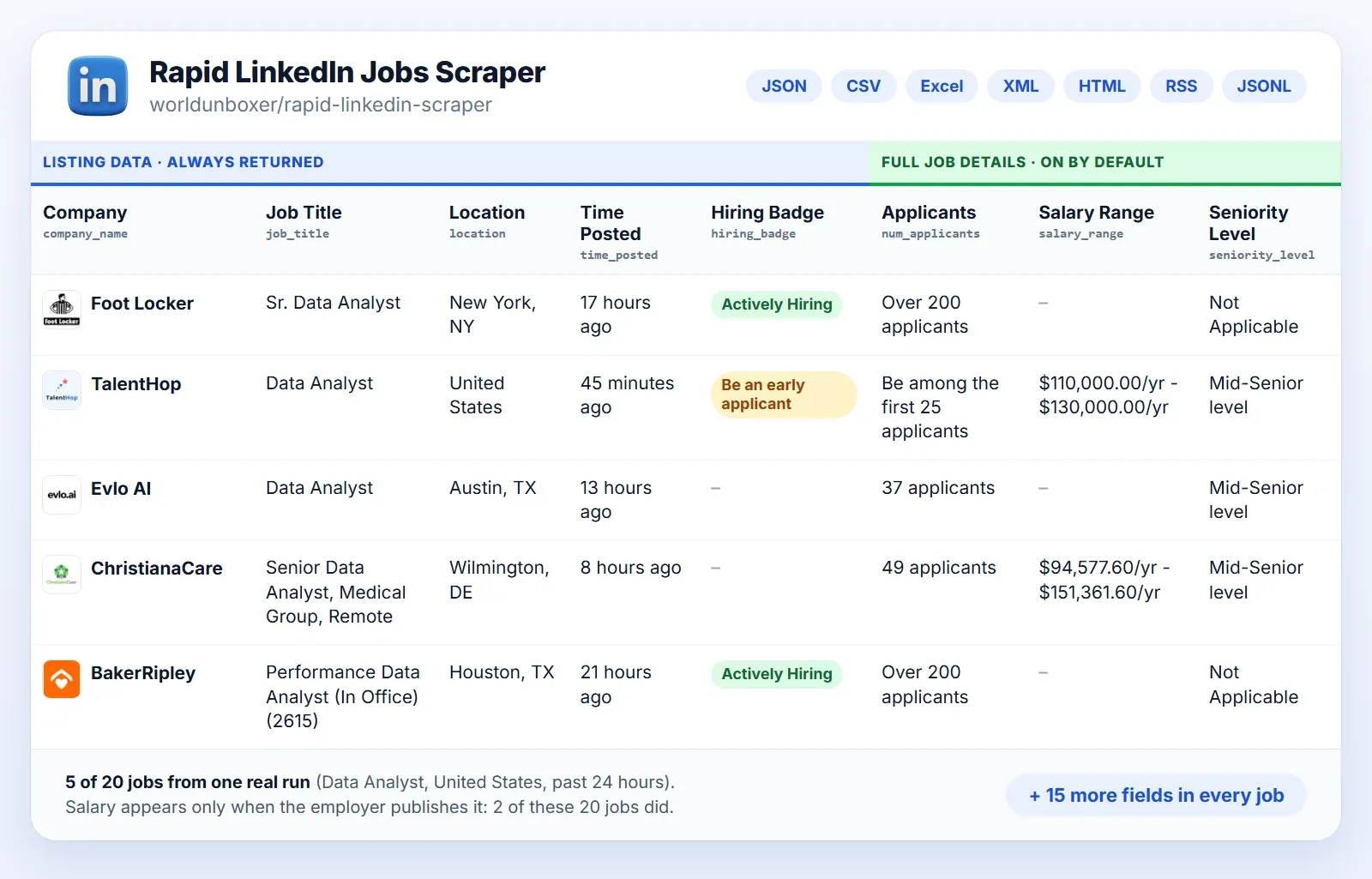
Results are stored in an Apify dataset. Download it as JSON, CSV, Excel, XML, HTML, RSS or JSONL, preview it as a table in the Output tab, or read it through the API. Jobs are added while the run is in progress.
📤 Output Fields
Fields LinkedIn does not show for a job are null. Full details fields are returned when Include Full Job Details is on, which is the default.
| Field | Type | Returned | Description |
|---|---|---|---|
job_id | String | Always | Unique LinkedIn job identifier. |
job_url | String | Always | Direct link to the job on LinkedIn. |
search_keyword | String | Always | The title from your list whose search found the job. |
job_title | String | Always | Title of the position. |
company_name | String | Always | Hiring company. |
company_url | String | Always | The company's LinkedIn page, when available. |
company_logo_url | String | Always | Company logo image URL. |
location | String | Always | Where the job is located. |
time_posted | String | Always | Relative posting time, for example "2 days ago". |
posted_date | String | Always | Posting date (ISO, date only), for example 2026-09-24. |
hiring_badge | String | Always | LinkedIn's badge, such as "Actively Hiring" or "Be an early applicant". |
is_actively_hiring | Boolean | Always | true with the "Actively Hiring" badge. |
is_early_applicant | Boolean | Always | true with the "Be an early applicant" badge. |
company_id | String | Full details | Numeric LinkedIn company ID, accepted by Company IDs. |
num_applicants | String | Full details | Applicants so far, as LinkedIn shows it. |
salary_range | String | Full details | Compensation, when the employer publishes it. |
job_description | String | Full details | The full description as plain text. |
job_description_raw_html | String | Full details | The full description as raw HTML. |
seniority_level | String | Full details | The seniority level LinkedIn lists. |
employment_type | String | Full details | Full-time, part-time, contract and so on. |
industries | String | Full details | Industries related to the job. |
easy_apply | Boolean | Full details | Whether LinkedIn Easy Apply is available. |
contact_email | String | Full details | A valid email found in the description. Not returned unless Include Contact Details is on. |
LinkedIn jobs API, integrations and AI agents
Runs, datasets, schedules and webhooks are available through the Apify platform, so you can use the scraper as a LinkedIn jobs API without running any infrastructure. Everything below is an Apify feature or integration that you configure. The Actor does not send data to third-party apps on its own.
Run it through the API
Authenticate with your Apify API token (replace YOUR_APIFY_API_TOKEN). The API tab has ready-made code in more languages and the full reference.
Node.js
Python
cURL
The synchronous endpoint waits up to 300 seconds and then returns status 408, so use it for small runs. For larger runs, start the run and read the dataset when it finishes, as in the client examples.
Schedules, webhooks and integrations
- Schedules. Run the Actor on any cron timing with Apify schedules, with no server of your own.
- Webhooks. Webhooks call your URL when a run finishes, to notify your team or start the next step.
- Integrations. Apify provides Make, Zapier, n8n, Airtable, Slack and Google Drive integrations, among others. Google Sheets is reachable through Zapier, Make or n8n, or by downloading the dataset as CSV or Excel.
Example workflow: new jobs to your CRM or Slack
| Step | What happens | Provided by |
|---|---|---|
| 1. Collect | A daily run searches your titles with Past 24 hours | This Actor and an Apify schedule |
| 2. Trigger | The finished run starts the next step | An Apify webhook, or a Make, Zapier or n8n trigger |
| 3. Filter | Keep jobs that match your ideal customer, for example by location, industries or keywords in job_description | Make, Zapier, n8n or your own code |
| 4. Enrich and draft (optional) | Find the decision-maker and draft an opening line that mentions the role | Your enrichment tool and an LLM |
| 5. Deliver | New prospects or alerts land in Google Sheets, Slack, your CRM or a sales tool | Your integration |
Use LinkedIn job data with AI agents (MCP)
Connect the scraper to your AI assistant through the Apify MCP server and it can search LinkedIn jobs on demand with live data. Apify documents setup for Claude Desktop, Claude Code, ChatGPT, Cursor, GitHub Copilot, Codex and VS Code, and other MCP-compatible clients can connect too.

- Open the configurator above and choose your AI client.
- Connect it to your Apify account by following the instructions for that client.
- Ask in plain language. Mention
worldunboxer/rapid-linkedin-scraperso the assistant picks this Actor.
Runs started by your assistant are billed to your Apify account at the same pay-per-result prices as any other run.
Example prompts
Pricing and free usage
Rapid LinkedIn Jobs Scraper uses pay-per-result pricing. You pay for results delivered to your dataset. Apify platform usage and proxies are included, so there is no separate compute or proxy bill. Prices per 1,000 results:
| Free | Starter | Scale | Business | |
|---|---|---|---|---|
| Job listing: title, company, location, posted date, hiring badge, links | $0.10 | $0.10 | $0.10 | $0.10 |
| Job Enrichment (Include Additional Job Details): description, seniority, employment type, industries, applicants, salary, Easy Apply, company ID | $0.25 | $0.24 | $0.22 | $0.20 |
Include Full Job Details is on by default, so a default run is billed at the total row. Turn it off to collect listing data only, at the base rate.
- Free usage. Apify's Free plan includes $5 of usage every month and needs no credit card. That covers about 50,000 job listings or about 14,000 jobs with full details each month.
- Example. 5,000 jobs with full details on the Free plan cost 5 × $0.35 = $1.75. The same 5,000 as listing data only cost $0.50.
- Spending cap. Set a maximum cost per run. The run stops as soon as the limit is reached and keeps everything collected so far.
- Not charged. Jobs you exclude with Exclude Job IDs, and jobs that could not be delivered, are not charged.
Current prices are also on the Pricing tab.
Limits and good practice
- Public listings only. The Actor returns what LinkedIn shows without a login. Fields a listing does not provide, such as salary or applicant count, come back as
null. - Some LinkedIn filters are not available. Public results ignore experience level, job type, remote or on-site and salary. Narrow with keyword operators instead (see the FAQ). A pasted search URL that contains those filters still runs, and the run log names the skipped ones.
- Volume depends on what LinkedIn lists. One LinkedIn search returns at most about 1,000 jobs. For larger runs the Actor also searches narrower variants of your query (shorter time windows, Easy Apply) that stay within your criteria. A very narrow search simply has fewer jobs. To collect more, add related titles, cities or companies, or widen the time window or location.
- Match location to your goal. Use Cities for city-by-city coverage, or a country or region such as
Europein Location for wide coverage. Use exact company names, or Company IDs to skip name matching. - LinkedIn can change its public pages. The Actor is maintained to follow those changes. If a run does not behave as expected, open the Issues tab.
Frequently asked questions
Do I need a LinkedIn account or cookies to scrape LinkedIn jobs?
No. Rapid LinkedIn Jobs Scraper collects only the job information LinkedIn shows publicly to visitors who are not logged in. You never enter credentials or cookies, so your own LinkedIn account is never involved.
Is it legal to scrape LinkedIn jobs?
Collecting publicly available information is generally allowed in many jurisdictions, but the rules depend on your country, how you use the data and LinkedIn's Terms of Service. Job listings can also contain personal data, which laws such as the GDPR regulate. This is not legal advice. See Legal and compliance and consult a lawyer if you are unsure.
How much does it cost, and can I scrape LinkedIn jobs for free?
Pricing starts at $0.10 per 1,000 jobs, paid per result, and you can start on Apify's Free plan with no credit card. See Pricing and free usage for the full table and how many jobs the free monthly credit covers.
Is there a LinkedIn jobs API, and what about the LinkedIn Job Posting API?
LinkedIn's official Job Posting API lets developers that LinkedIn approves, such as applicant tracking systems and job distributors, publish jobs on behalf of their customers. It is not meant for searching or exporting public listings. Rapid LinkedIn Jobs Scraper works the other way round: it reads public job listings and returns them as structured data through the Apify API, with no partner approval and no LinkedIn account.
What data does the LinkedIn jobs scraper extract?
Up to 23 fields per job: job ID and URL, title, company name, ID, page and logo, location, posting date, hiring badges, salary range, applicants, the full description as text and HTML, seniority level, employment type, industries and Easy Apply status. Salary appears only when the employer publishes it. See Output Fields.
How many jobs can I scrape in one run?
Set Number of Jobs Entries (up to 100,000) and the Actor collects up to that many unique jobs. The exact number depends on how many public listings LinkedIn shows for your search, so a narrow search returns fewer than a broad one. If you get fewer jobs than you asked for, broaden the filters, add job titles or cities, or use a longer posting window. See Limits and good practice.
Can I search by company, city or location ID?
Yes. Use Company Names or Company IDs for jobs from specific companies, Cities or Location IDs for exact places, and Location for a broad region such as Europe. Each is searched on its own, and the results are merged and de-duplicated.
Can I filter by experience level, job type, remote work or salary?
Not directly. LinkedIn's public job search does not apply those filters. Put what you need in the keyword instead, with operators such as NOT, AND, OR and quoted phrases, for example "Data Analyst" AND SQL or Software Engineer NOT Senior.
Does it extract recruiter or contact details?
Only if you turn on Include Contact Details. The Actor then returns the email address the poster wrote in the job description, when there is one. It does not access private profiles or messages. This is personal data, so see Legal and compliance first.
How can I monitor new LinkedIn jobs, competitors or hiring signals automatically?
Set Job Posting Time to Past 24 hours and run the Actor on a daily Apify schedule. To receive only jobs you have not seen, pass the previous run's job IDs to Exclude Job IDs. For a competitor, add it to Company Names. For sales leads, search the titles that signal a need for your product and build a prospect list from company_name, company_url, job_title and posted_date. Send the results to Slack, a spreadsheet, your CRM or your database with a webhook or integration. See the example workflow.
How do I export LinkedIn jobs to Excel, CSV, JSON or Google Sheets?
Download the dataset from the Output tab as Excel, CSV, JSON, XML, HTML, RSS or JSONL, or read it through the API. For Google Sheets, open the CSV or Excel file there, or send each run's results automatically through Zapier, Make or n8n.
Can I use it with Python, Node.js, Make, Zapier, n8n, ChatGPT or Claude?
Yes. Use the Apify clients for Python or JavaScript to start a run and read the dataset. Apify's Make, Zapier and n8n integrations let you start the Actor or react when a run finishes. For AI assistants, connect through the Apify MCP server, as described in Use LinkedIn job data with AI agents. These integrations need a little setup on your side.
Can I build a job board with LinkedIn job data?
Technically yes. Run the Actor daily with Past 24 hours and load the results into your database, using job_id to avoid duplicates. Check LinkedIn's Terms of Service and the laws that apply to you before republishing job data, as described in Legal and compliance.

Legal and compliance
This Actor collects only what LinkedIn shows publicly to visitors who are not logged in. It does not access private profiles, messages or account data. You are responsible for how you use the data.
- Personal data. Results can contain personal data, including contact details that posters write in job descriptions. Public does not mean free to use. Contact details are off by default; turn them on only if you have a lawful basis under the laws that apply to you (for example the GDPR in the EU and UK) and can meet your duties to the people concerned, such as informing them and honoring access, objection and deletion requests.
- No unsolicited outreach. Do not use contact details for unsolicited bulk or cold messages. Rules differ by country, so follow those that apply to you.
- LinkedIn's Terms of Service. They restrict automated data collection. Make sure your use complies with them.
This is not legal advice. If unsure, consult a lawyer.
Rapid LinkedIn Jobs Scraper is an independent tool and is not affiliated with, endorsed by or sponsored by LinkedIn. LinkedIn is a trademark of its respective owner.
More job scrapers
Need job data from other sources? Try these Actors:
| Actor | What it does |
|---|---|
| Rapid Indeed Jobs Scraper | Extract Indeed job listings from dozens of countries, with salaries, company profiles, descriptions and apply links. |
| Dice Jobs Scraper | Extract job listings, company details, salaries and full job descriptions from Dice.com. |
Support and feedback
Rapid LinkedIn Jobs Scraper is built and maintained by Umesh Patidar. If you like it, a review helps others find it. For bugs, ideas or custom requirements:
- Issues tab: report problems or request features directly on this Actor's page.
- Feedback form: https://forms.gle/HQyJGukRrCKmf2qF8
- Email: umeshpatidar.dev@gmail.com
- LinkedIn: Umesh Patidar


![🚀 Indeed jobs scraper [PPR] avatar](https://images.apifyusercontent.com/PEDOk9MmTf1yHtczA1A4wQEoGyAKCe5Aft1HzkhwROk/rs:fill:76:76/cb:1/aHR0cHM6Ly9hcGlmeS1pbWFnZS11cGxvYWRzLXByb2QuczMudXMtZWFzdC0xLmFtYXpvbmF3cy5jb20vTVhMcG5nbVZwRThXVEVTUXIvQjFrZ3BRS1p5dzJvVEpJUmctTG9nby1IZXJvLVN0YXRpYy1lemdpZi5jb20td2VicC10by1qcGctY29udmVydGVyLmpwZw.webp)


