
LinkedIn Bulk Email Finder
Pricing
Pay per usage
LinkedIn Bulk Email Finder
Find verified business emails from LinkedIn profiles in bulk using Findymail, Anymail Finder, or Apollo. Process 1,000+ profiles per run with your own API keys. Free to use, with pay-as-you-go provider and Apify compute costs.
Pricing
Pay per usage
Rating
0.0
(0)
Developer

Harsh Vardhan
Maintained by CommunityActor stats
0
Bookmarked
1
Total users
0
Monthly active users
12 hours ago
Last modified
Categories
Share
LinkedIn Bulk Email Finder
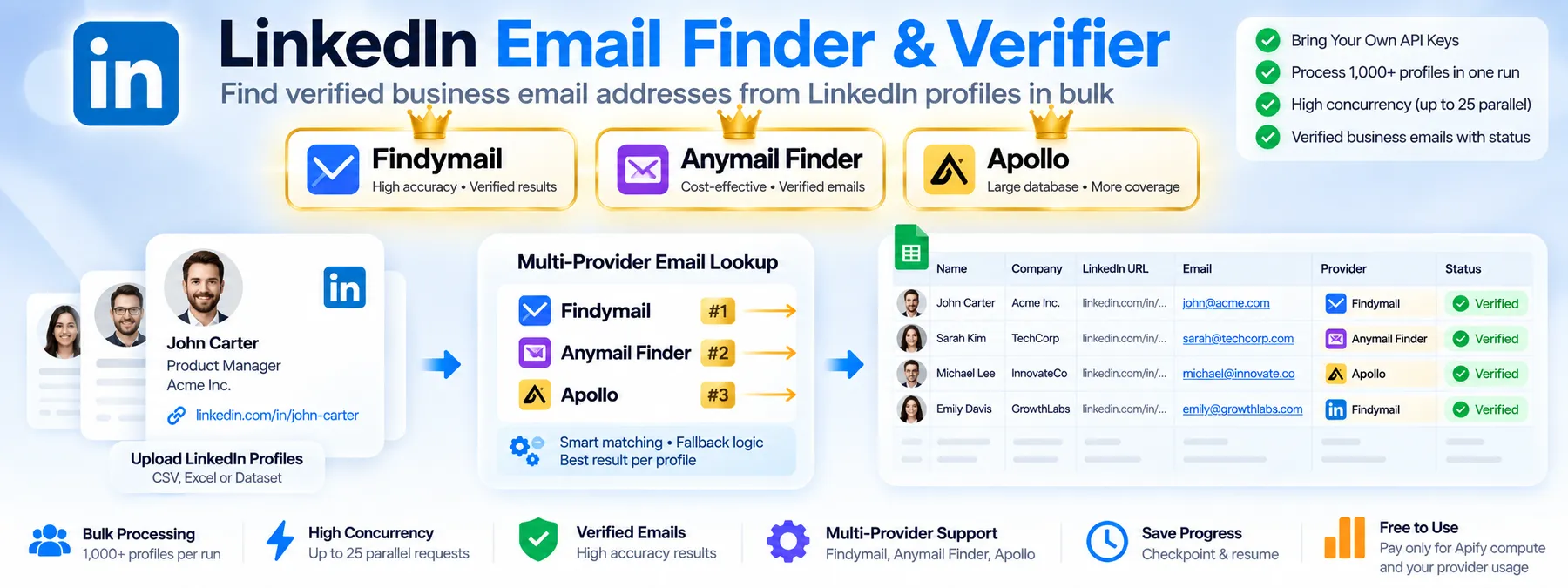
Turn a spreadsheet of LinkedIn profile URLs into work emails. Pick Findymail, Apollo or Anymail Finder, paste your own API key, upload your file, and get the same sheet back with an email next to each profile.
The actor itself is free. Lookups are charged to your own account with the provider you choose, so you stay in control of the cost.
Use cases
- Sales outreach: enrich a list of prospects exported from LinkedIn, Sales Navigator or a CRM.
- Recruiting: find contact emails for candidates you sourced on LinkedIn.
- Lead list cleanup: add emails to a lead list that only has profile links.
- Provider comparison: run the same file through two providers and compare hit rates.
- Pair with a profile finder: feed it the LinkedIn URLs found by another actor, saved as a
.csvor.xlsx.
How it works
- You pick an email provider and paste your API key for it.
- You upload an
.xlsxor.csvfile. The first sheet is used, the first non-empty row is the header, and the column holding LinkedIn links is detected automatically. Hyperlinked Excel cells are supported. - The actor cleans each URL (country subdomains, tracking parameters, trailing slashes, a missing
https://) and looks up each unique profile once. - Lookups run in parallel and slow down automatically if the provider rate limits you.
- You get back one row per input row, in the same order as your file, with all your original columns kept.
Input
| Field | Required | Description |
|---|---|---|
| Email provider | Yes | Findymail, Apollo or Anymail Finder |
| API key | Yes | The key for the provider you selected. Stored encrypted and never written to logs or output. |
| Spreadsheet upload | Yes | An .xlsx or .csv file, or a public link to one. Old .xls files must be saved as .xlsx first. |
Where to get your key:
| Provider | Where to find the key | Notes |
|---|---|---|
| Findymail | app.findymail.com/api | Only found emails are charged. |
| Apollo | Apollo > Settings > Integrations > API | Needs a master API key on a paid plan with API access. Returns only emails with status verified. |
| Anymail Finder | app.anymailfinder.com/settings/api | Returns only valid emails. Risky emails are not returned or charged. |
Example input:
Output
One dataset row per input row, in your original order. Your own columns are kept as they are. If one of them clashes with an output column name (for example email), it is renamed with an input_ prefix.
| Column | Description |
|---|---|
row_number | Row number in the uploaded file |
| (your columns) | Everything from the uploaded sheet |
linkedin_url_normalized | The cleaned URL that was looked up |
email | The email, if one was found |
full_name | Name returned by the provider |
domain | Company domain returned by the provider |
status | found, not_found, invalid_url, duplicate, error or not_processed |
error | Plain-English reason when the status is not found |
Example row:
What each status means:
| Status | Meaning |
|---|---|
found | A verified email was returned |
not_found | The provider has no verified email for this profile |
invalid_url | Not a person profile (Sales Navigator link, company or school page, empty cell, not LinkedIn) |
duplicate | Same profile as an earlier row. It is looked up once and the result is copied |
error | The lookup failed after retries. The error column says why |
not_processed | The run stopped early, for example because credits ran out. Re-run with only these rows |
Download the results as Excel, CSV or JSON from the Storage tab. A RUN_SUMMARY record in the key-value store holds the totals: rows, valid and duplicate URLs, emails found, hit rate and credits used. Apollo has no balance endpoint, so credits used is not reported for it.
Tips and limits
- Test with a small file first (10 to 20 rows) to check that your key works and the right column is detected.
- The column with LinkedIn links is picked automatically. If your file has several such columns, keep only the one you want to look up.
- If you run out of credits, the actor stops cleanly, keeps everything found so far and marks the rest
not_processed. - If a run is restarted, it resumes from its last checkpoint and does not pay twice for emails already found.
- Parallel lookups are set automatically: 10 for Findymail and Anymail Finder, 5 for Apollo.
- Very large Excel files use more memory. Set the run memory to 1 GB for files with many thousands of rows, or use
.csv. - The default run timeout is 4 hours. Raise it in the run options for very large files.
Legal and ethical considerations
You are responsible for using the data lawfully, including GDPR and similar privacy laws, anti-spam rules and the terms of your email provider. Only contact people you have a legitimate reason to contact, and respect opt-out requests. This actor does not scrape LinkedIn. It sends the profile links you provide to the provider you choose, and it keeps no data beyond your own run storage.
Support
Found a bug or need another provider? Open an issue on the GitHub repository or message the actor owner on Apify.


