

Greenhouse, Lever & Ashby Jobs Scraper | ATS Job Alerts
Pricing
$2.00 / 1,000 job results
Greenhouse, Lever & Ashby Jobs Scraper | ATS Job Alerts
ATS jobs scraper for Greenhouse, Lever, Ashby, Workable and Recruitee career pages, in one format. Type a company name or paste its careers URL. New-only mode returns just the jobs posted since your last run and reports the ones that closed. Free hiring-signals summary per company.
Pricing
$2.00 / 1,000 job results
Rating
0.0
(0)
Developer

Kendall Sorenson
Maintained by CommunityActor stats
0
Bookmarked
2
Total users
1
Monthly active users
14 days ago
Last modified
Categories
Features
Share
Greenhouse, Lever & Ashby Jobs Scraper, with new-job alerts
Get every open job from a company's careers page in one clean format. Works with Greenhouse, Lever, Ashby, Workable and Recruitee, the systems behind most tech and startup careers pages.
Type a company's short name (stripe) or paste its careers URL. You don't need to know which system the company uses: with a short name, all five are checked for you.
New jobs only mode is built for schedules. It remembers what it saw last time and returns just the jobs posted since, so a daily run on 200 companies costs you only the handful of jobs that are actually new. It also tells you which jobs closed.
Try it: the form is filled with three companies. Add "maxJobsPerCompany": 10 for a quick first look: 30 jobs, about $0.06.
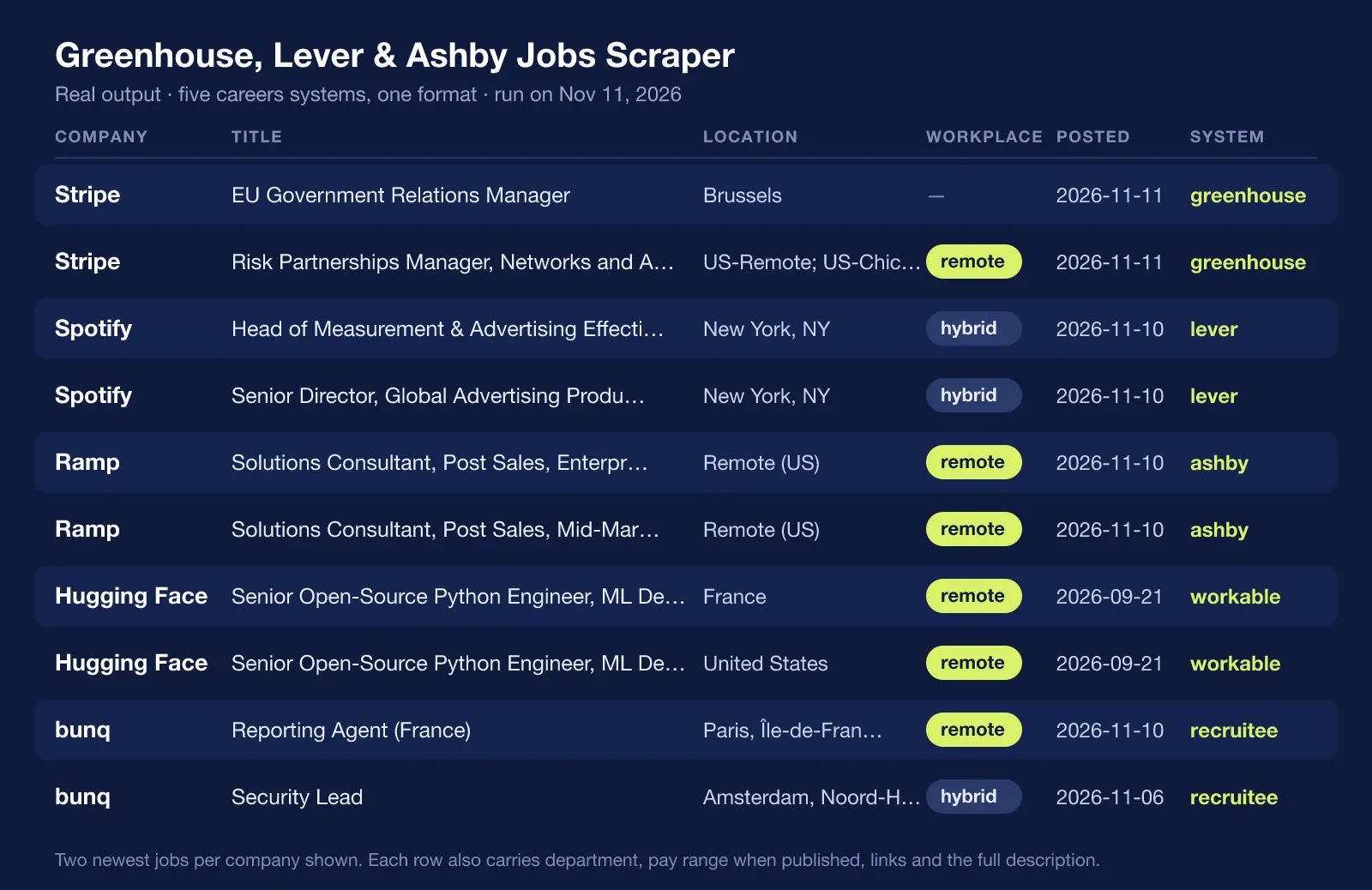
Real jobs from a run on November 11, 2026.
What you get for each job
- Company, title, department and team
- Location, all listed locations, country, and whether it is remote, hybrid or on-site
- Posted date
- Published pay range, when the employer shares one (minimum, maximum, currency and the employer's own wording)
- Employment type
- Link to the posting and to the application form
- The full job description as plain text (optional)
Every system's data is mapped to the same field names, so a Greenhouse job and a Lever job look identical in your sheet or database.
A hiring summary for each company
Each company also gets one free summary row: how many roles are open, how many were posted in the last 30 days, how many are remote, and the departments and locations with the most openings. In New jobs only mode it adds how many jobs are new and how many closed since your last run. Sales and research teams use this as a hiring signal without reading individual postings.
How to add companies
| You enter | What happens |
|---|---|
https://boards.greenhouse.io/stripe | Reads Stripe's Greenhouse board |
https://jobs.lever.co/spotify | Reads Spotify's Lever board |
https://jobs.ashbyhq.com/ramp | Reads Ramp's Ashby board |
https://apply.workable.com/huggingface | Reads Hugging Face's Workable board |
https://bunq.recruitee.com | Reads bunq's Recruitee board |
stripe | Checks all five systems and uses the board with the most jobs |
lever:spotify | Forces one system |
The short name is the last part of the company's careers URL. If a company isn't found, you get a not-found row and a log message, and nothing is charged for it.
Filters
- Job title contains any of your keywords, or does not contain others (for example exclude
intern) - Location or country contains, for example
London,GermanyorRemote - Department or team contains, for example
Engineering - Remote jobs only
- Posted within the last N days
New jobs only: how it works
- The first run saves a starting point. By default it also returns every matching job. Turn on Skip results on the first run to save the starting point without returning or paying for them.
- Every later run returns only jobs it has not seen before, marked
isNew: true. - Jobs that disappeared since the last run come back as
closed-jobrows, free of charge.
If you set a maximum number of jobs per company, jobs over the limit are held for the next run, not dropped.
Memory is kept separately for each watchlist name and each set of filters, so an "engineering in Berlin" watchlist and an "all sales roles" watchlist don't interfere.
Output
A real job row from a run on November 11, 2026:
A real company summary from the same day (lists shortened):
The dataset has two ready-made table views, Jobs and Hiring summary, and exports to JSON, CSV or Excel.
How much does it cost to scrape Greenhouse, Lever and Ashby jobs?
You pay per job returned, with no monthly fee:
| Event | Price |
|---|---|
| Job result | $0.002 |
| Company summary | Free |
| Closed-job note | Free |
| Company not found, or failed to load | Free |
Worked examples on the Free plan:
- One company with 85 open jobs: $0.17
- 50 companies, about 2,000 jobs in total: $4.00
- The same 50 companies checked daily in New jobs only mode, about 40 new jobs a day: $0.08 a day
Run it every day
Save your company list as a task, set What to return to New jobs only, and schedule it daily. Connect the dataset to Slack, Google Sheets, Make, Zapier or n8n and each morning you get the new roles and nothing else.
Use it from AI agents (MCP)
The Actor works as a tool for AI assistants through Apify's MCP server:
The only field an agent has to set is companies. A company with no public board returns a not-found row instead of an error, so an agent can tell "this company isn't on these systems" apart from "something broke".
Code example
FAQ
Where does the data come from?
From each careers system's own public job-board API, the same feed that powers the company's careers page. No login, cookies or browser automation are involved, which is why runs are fast and reliable.
Which companies can I track?
Any company whose careers page runs on Greenhouse, Lever, Ashby, Workable or Recruitee. Companies on other systems, such as Workday, are not covered.
Why is the pay range empty for most jobs?
The Actor reports a pay range only when the employer publishes one in a structured field. Many employers don't, or put it inside the description text. It is never guessed.
Why does the company name sometimes look like the short name?
Lever and Ashby don't include a company name in their feeds, so the Actor shows a readable form of the short name, for example Ramp for ramp.
Is it legal to scrape job postings?
These are public job advertisements that employers publish to be found, read through APIs the careers systems provide for that purpose. The data describes jobs, not people. You are responsible for how you use the results and for following the terms that apply to you. If you are unsure, ask a lawyer.
Related tools
- Google Trends Scraper: interest over time, rising queries and trending searches for any keyword.
- Google Ads Transparency Center Scraper: a company's Google ads, with new and stopped ad alerts.
- AI Visibility Tracker: whether ChatGPT, Gemini and Perplexity recommend a brand.
Found a problem or want another careers system added? Open an Issue on this Actor's page.


