

AI Visibility Tracker: ChatGPT, Gemini & Perplexity Mentions
Pricing
from $28.00 / 1,000 ai answer analyzeds
AI Visibility Tracker: ChatGPT, Gemini & Perplexity Mentions
AI search visibility tracker for ChatGPT brand mentions, Gemini and Perplexity: visibility rate, rank vs competitors, share of voice, sentiment and cited sources per question. LLM brand monitoring for GEO / AEO at $0.0375 per answer; failed answers are free. Free snapshot: aivisibilitychecker.app
Pricing
from $28.00 / 1,000 ai answer analyzeds
Rating
0.0
(0)
Developer

Kendall Sorenson
Maintained by CommunityActor stats
1
Bookmarked
2
Total users
1
Monthly active users
6 days ago
Last modified
Features
Share
AI Visibility Tracker — ChatGPT brand mentions & LLM brand monitoring (by crunchy_galaxy_qcr)
AI Visibility Tracker is an AI search visibility actor from crunchy_galaxy_qcr that measures ChatGPT brand mentions and LLM brand monitoring across ChatGPT (web search + knowledge), Gemini knowledge, and Perplexity web search. It reports visibility rate, rank, share of voice versus competitors, cited sources, gap prompts, and a short action list, with a shareable HTML report — pay per answer, no monthly seat. Companion free checker: aivisibilitychecker.app.
More buyers now ask AI assistants instead of Google. If ChatGPT names three competitors and not you, that's a lost lead you never see in your analytics. This Actor measures it.
Try it: the form is prefilled with Notion, 2 buyer questions and 2 engines (4 answers, $0.15). On the Apify Free plan each run returns up to 3 answers as a trial, so that first run returns 3 answers and costs $0.11. Paid Apify plans have no trial limit.
Try it free first: want a quick one-off check before you run anything? Use the free AI Visibility Checker (one category, ChatGPT only, no sign-up). Then come back here to track it weekly across ChatGPT, Gemini and Perplexity.
Business Hub, and what this Actor adds
Business Hub shows your own ChatGPT totals — aggregate mentions, website clicks, and discovery topics for the past 28 days, once you claim and verify your business. It does not show individual prompts, competitor share, or other engines.
This Actor shows which questions, which competitors, and which engines: ChatGPT (web search and model knowledge), Gemini model knowledge, and Perplexity with web search. Claim your business in ChatGPT.
New: a to-do list and trends, not just numbers
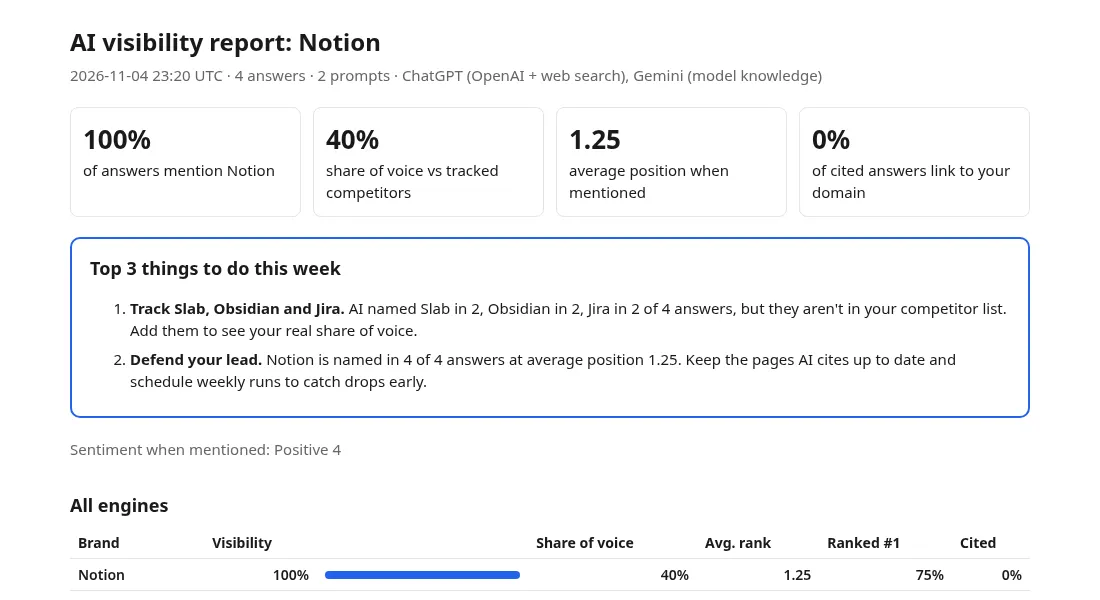
Top 3 things to do this week. Every report opens with plain-English actions built from that run's answers, for example: "Get Notion featured on reddit.com and g2.com: ChatGPT and Perplexity cited reddit.com in 3 of 4 answers with sources", "Close the gap with Obsidian: named in 4 of 4 answers vs 2 for Notion. Prompts where Obsidian beats you: …", or "Perplexity names you but ChatGPT mostly doesn't". Recommendations only quote counts from your run, so they never claim something the data doesn't show. They're also saved as RECOMMENDATIONS (JSON) in the run's key-value store.
History and trends. Each run saves a small summary to a key-value store called ai-visibility-history-v2 in your own Apify account. Run again with the same brand and category and the report shows "visibility 20% → 45% since Mar 3", a trend chart, the change vs last run for you and each competitor, per-engine movement and newly cited sources. No extra charge. Set projectName to keep separate trend lines, or saveHistory: false to turn it off.
Real example: three brands
From the free AI Visibility Checker's ChatGPT check (3 buyer-style questions about each brand's category, asked to ChatGPT with web search), checked late October to November 1, 2026. Notion and Linear were checked for "project management":
| Brand | ChatGPT answers mentioning it | Visibility score (0–100) |
|---|---|---|
| HubSpot | 3 of 3 | 95 |
| Notion | 1 of 3 | 28 |
| Linear | 0 of 3 | 0 |
A one-off snapshot, not a benchmark. For Linear, ChatGPT recommended monday.com, Asana, ClickUp, Smartsheet, Trello, Jira and Wrike instead. And engines disagree: for a wiki/docs question, Gemini ranked Notion #1 while ChatGPT ranked Confluence #1. That's why this Actor tracks each engine separately, on a schedule.
What the report looks like
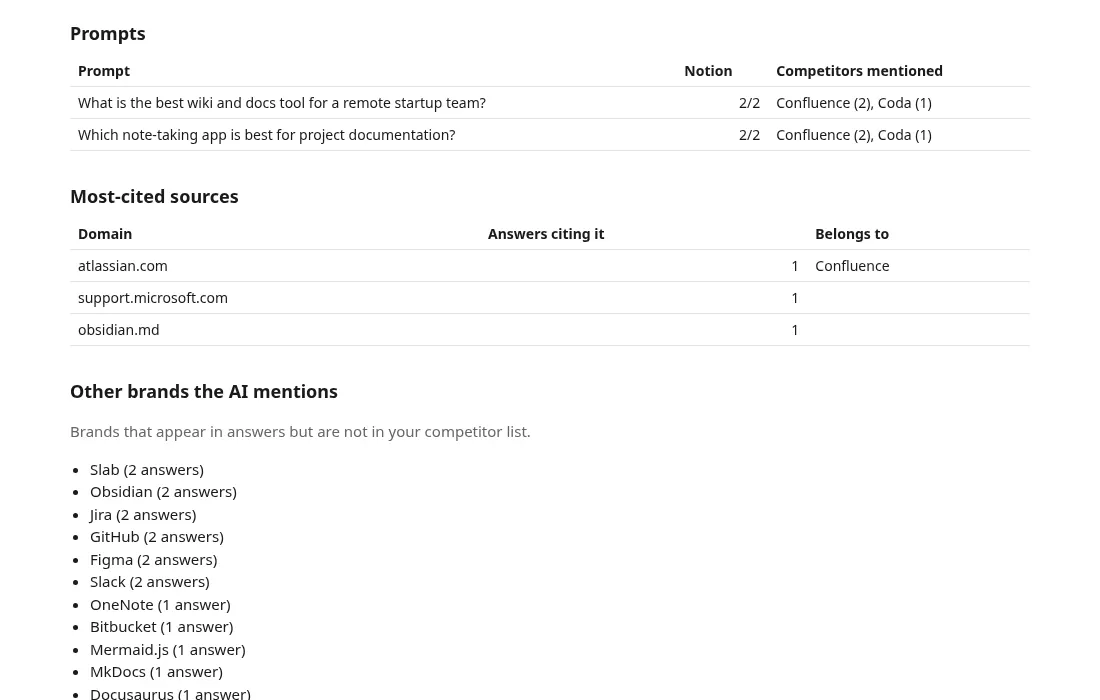
Screenshots of the HTML report from a real run (prompts × engines kept small to keep it cheap):
What you get
- Visibility rate: % of AI answers that mention your brand.
- Share of voice: your mentions vs your competitors'.
- Rank: where you appear in the answer (1 = named first), among tracked brands and among all brands the AI names.
- Sentiment: positive / neutral / negative / mixed, plus a one-line summary of how the AI describes you.
- Citations: which domains ChatGPT and Perplexity cite, and whether your own site is one of them.
- Gap prompts: questions where competitors are mentioned and you are not. These are your content priorities.
- Discovered competitors: brands the AI recommends that you didn't list.
- Top 3 things to do this week: prioritized, plain-English actions from the run's data.
- Trend tracking: history is saved automatically; the report shows the change since your last and first run, with a chart.
- HTML report ready to share with your team or client, plus every answer as a dataset row (JSON, CSV, Excel).
How to use it
- Enter your brand, optionally with your website:
Notion | notion.com | notion.so. - Add competitors, one per line:
Confluence | atlassian.com. - Add the questions your buyers ask (without your brand name), or just describe your category and the Actor writes the questions for you.
- Run. Open the REPORT in the key-value store, or download the dataset.
To track over time, set Tracking name (e.g. notion-weekly) and add an Apify schedule.
Example input
Larger example: the JSON below generates 10 prompts and requests 3 engines × 2 samples: up to 60 analyzed answers, $2.25 at the Free-plan $0.0375/answer list price. This is not the small prefilled 4-answer ($0.15) example above. Discounts may apply.
Example output (one dataset row per answer)
The run also saves SUMMARY (JSON with all metrics, per engine and per prompt) and REPORT (HTML) to the key-value store.
Engines
| Engine | What it measures |
|---|---|
| ChatGPT with web search | Answers from OpenAI's API with live web search, the closest equivalent of what ChatGPT says when it searches. Includes the sources it cites. |
| ChatGPT model knowledge | What OpenAI's model says without searching: how it perceives your brand from training data. |
| Gemini model knowledge | The same for Google's Gemini. |
| Perplexity with web search | Answers from Perplexity's official API with live web search, including the pages it cites. Optional: add "perplexity-search" to engines. |
Answers come from the official APIs, so runs are reliable and never blocked. API answers closely track the consumer apps but are not identical, because the apps add personalization, memory and their own system prompts. Treat results as a consistent benchmark you can compare over time and against competitors.
Run it every week
AI answers drift, so one run is a snapshot and a weekly run is a trend line.
Save the input as a task, then schedule that task weekly, for example Monday at 8:00 AM in your chosen schedule time zone (cron 0 8 * * 1). Check the schedule time zone before enabling it. Keep the brand, prompts, engines and projectName consistent between runs. The first run is a baseline; later runs add trend points.
If you want the report somewhere else, the task's Integrations tab can call a webhook or send results to Slack, email, Google Sheets, Zapier, Make or n8n when a run finishes.
Pricing
You pay per AI answer analyzed. Sentiment, brand extraction, prompt generation and the report are included. Failed answers are not charged.
| Run | Answers | Cost at $0.0375 per answer |
|---|---|---|
| 10 prompts × 1 engine | 10 | $0.375 |
| 10 prompts × 2 engines | 20 | $0.75 |
| 25 prompts × 2 engines × 2 samples | 100 | $3.75 |
| Weekly tracking of the above for a month | 400 | $15.00 |
Set a spending limit on the run and the Actor stops before exceeding it.
Compared with subscriptions: 10 prompts × 2 engines × 3 samples = 60 answers = $2.25 per run, so weekly tracking is about $9 a month. Subscription AI visibility tools start at around $29–$99 a month (Otterly.AI from $29/mo, Peec AI from $95/mo, Semrush AI Visibility Toolkit $99/mo per domain, per RankControl's 2026 comparison). No subscription here: you only pay when a run happens.
Other AI visibility actors on the Apify Store (list prices on Nov 12, 2026): zaiq/ai-answer-tracker $0.06 per answer, chazee/ai-visibility-monitor $0.05 per answer, khadinakbar/ai-search-visibility-tracker $0.09 per keyword check, doesaiknow/ai-brand-visibility-tracker $0.30 per query.
Apify Free plan: 3 answers per run
Every answer costs real money to produce, because each one is a live call to an AI provider. Accounts on the Apify Free plan are therefore limited to 3 answers per run as a trial. Runs on any paid Apify plan have no trial limit. If a run is cut short by this limit, the log says so, and you are charged only for the answers you received.
Tips
- Write prompts like a buyer: "best X for Y", "alternatives to [category]", "which X is cheapest for…". Don't put your brand in the prompt.
- Use 2–3 samples per prompt. AI answers vary between runs; more samples give steadier numbers.
- List every domain you use in the brand field (e.g.
Notion | notion.com | notion.so) so the Actor can tell when AI cites your site. - Names that are common words (Monday, Notion, Linear) can match ordinary text. Add the domain as an alias:
Monday | monday.com.
FAQ
How do I track brand mentions in ChatGPT and Perplexity? Enter your brand, your competitors and the questions buyers ask. The Actor asks ChatGPT (with web search and from model knowledge), Gemini and, if you select it, Perplexity, then measures whether, where and how you're mentioned.
Which AI engines are supported? ChatGPT with web search, ChatGPT model knowledge, Gemini model knowledge and Perplexity with web search, through the official APIs. Every engine costs the same per answer. You can override the OpenAI and Gemini models in the Advanced section. Claude and Google AI Overviews are not included yet.
Why no Gemini web search? Google's terms for Gemini answers grounded in Google Search restrict storing and analyzing them, so this Actor uses Gemini's model knowledge only.
Do I need my own OpenAI, Gemini or Perplexity API key? No. API costs are included in the per-answer price.
What does a run cost? $0.0375 per AI answer analyzed; failed answers are free. A quick 2-prompt × 2-engine check is 4 answers ($0.15). Set a spending limit on the run and the Actor stops at it.
Why doesn't this match what I see in ChatGPT? ChatGPT personalizes answers and changes them between sessions. This Actor asks the same way every time, which makes it a fair benchmark for trends and competitor comparison.
Why do results change between runs? AI answers vary. Set Samples per prompt to 2–3 for more stable numbers, and use a Tracking name to follow trends.
Is this GEO / AEO (generative engine optimization)? Yes. Use the gap prompts and cited domains to decide which content to create and where to get mentioned.
Can I use it for LLM brand monitoring? Yes. It asks ChatGPT, Gemini and Perplexity the questions your buyers ask, records whether your brand comes up, where it ranks against competitors and which sources get cited, and saves each run so you can follow it week to week.
Can I call it from code, Make, Zapier or n8n? Yes, like any Apify Actor: via the API, the official integrations, or as an MCP tool for AI agents (see below).
Is my data shared? Your brand, competitors and prompts are sent to the AI providers' APIs to generate answers, and stored in your own Apify storage.
Something broke? Open an issue on the Issues tab. We monitor it daily.
Use it from AI agents (MCP)
This Actor works with the Apify MCP server. Ask your agent, for example: "Check how often ChatGPT, Gemini and Perplexity recommend Notion vs Confluence for team-wiki questions." The agent can find this Actor, read its input schema and run it, with a spending cap set through maxTotalChargeUsd.
Code examples
A ready-to-run Python script for this tracker is on GitHub: python/ai_visibility.py.
Related
- ChatGPT Search Answers: the raw answers to any list of questions, with every page cited and every search run, through OpenAI's official API.
- AI Citation Tracker: see which websites ChatGPT, Perplexity and Google AI Overviews / AI Mode cite for your buyers' questions, and where competitors are cited but you aren't.
- Google Ads Transparency Center Scraper: see every Google ad your competitors run.
- Microsoft Ads Library Scraper: your competitors' Bing ads, with copy, landing pages, impressions and targeting.
If this tracker saved you time, a quick review on the Store helps other people find it. If something broke, open an Issue and I'll fix it fast.


