
Google Trends Scraper & API: Rising Queries & Trending Now
Pricing
from $3.00 / 1,000 keyword results
Google Trends Scraper & API: Rising Queries & Trending Now
Google Trends scraper and API alternative for any keyword: interest over time, a rising or falling verdict, interest by region, related and breakout queries, plus today's trending searches (trending now). Keywords with no data are never charged.
Pricing
from $3.00 / 1,000 keyword results
Rating
0.0
(0)
Developer

Kendall Sorenson
Maintained by CommunityActor stats
0
Bookmarked
2
Total users
1
Monthly active users
9 days ago
Last modified
Categories
Features
Share
Google Trends Scraper: interest over time, rising queries and trending now
Get Google Trends data for any list of keywords, with a plain verdict on each one: rising, falling or stable. Each keyword comes back with its interest over time, the regions where it is strongest, related and breakout queries, and a link to the same view on Google Trends. You can also pull today's trending searches for any country.
There is no public Google Trends API to sign up for. This Actor reads the same public data the Trends website shows. No Google account, login or API key is needed.
Try it: the form is filled with standing desk and nike, adidas for the US. That is 3 keyword results, about $0.009.
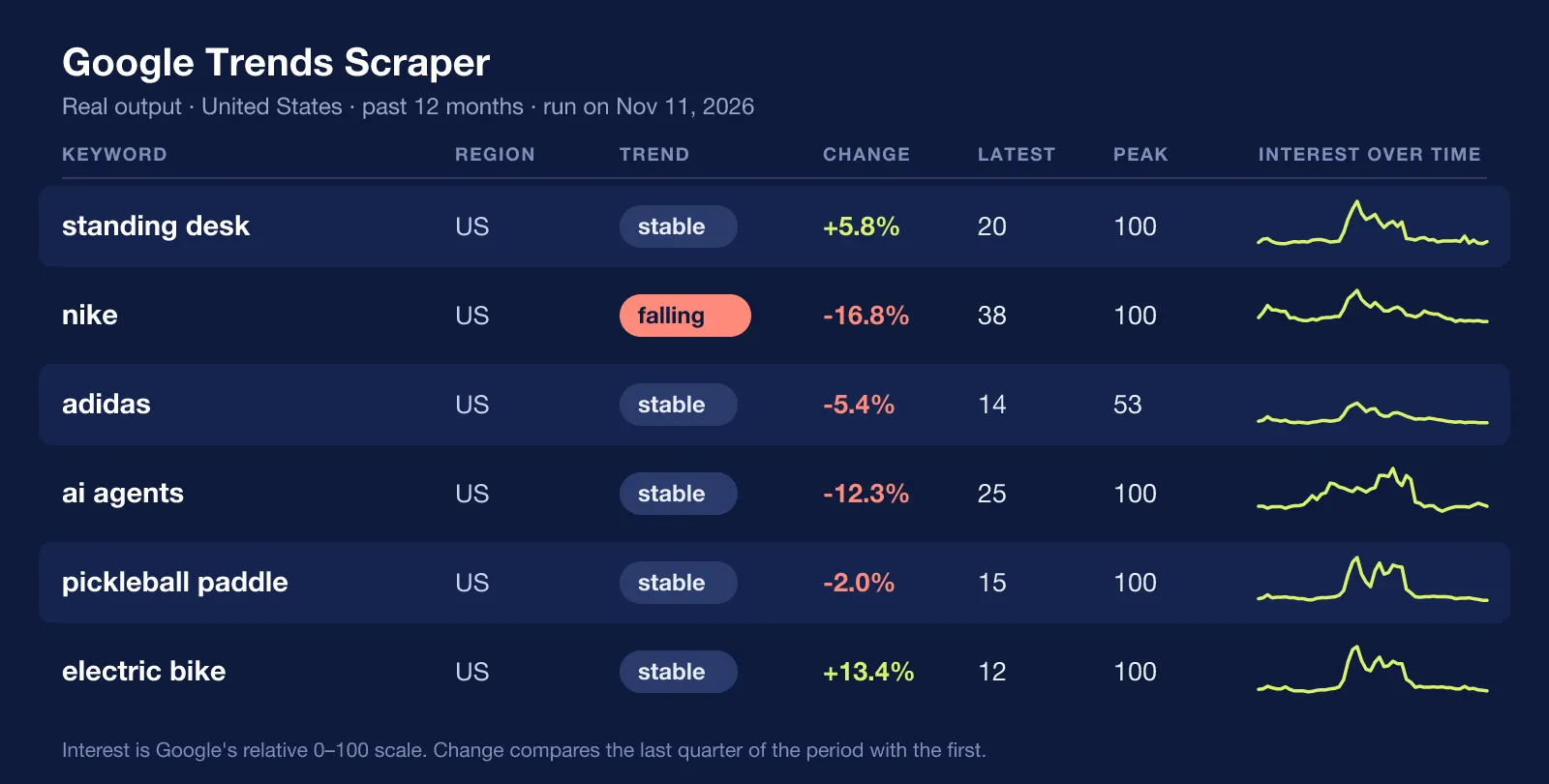
Real results from a run on November 11, 2026.
Keywords with no data are never charged. If Google has nothing for a keyword, you still get a row saying so, and it costs nothing.
What you get for each keyword
- Trend verdict:
rising,fallingorstable, from comparing the last quarter of the period with the first, plus the percent change. Keywords with too few data points are markedinsufficient-datainstead of being given a made-up direction. - Interest over time: every point on the 0-100 scale, with partial (still filling) points flagged.
- Latest, average and peak interest, and the date of the peak.
- Interest by region: countries, states or regions ranked 0-100.
- Related queries: top and rising, with Google's growth label (
+350%) and anisBreakoutflag for queries growing more than 5,000%. - Related topics, when Google provides them for the keyword.
- A link that opens the same keyword, region and period on Google Trends.
Compare keywords on one scale
Google Trends scores are relative. A keyword on its own line is scored against itself. To compare keywords against each other, put up to five on one line separated by commas:
Each keyword still gets its own row, and comparedWith lists the others that share its scale.
Trending now
Add country codes under Trending now: countries to get today's trending searches: the search, its rank, Google's approximate search count, when it started trending, and the news articles behind it. This works on its own, with no search terms.
Input
| Field | What it does |
|---|---|
| Search terms | One keyword per line, or up to five on a line separated by commas to compare them |
| Country or region | US, GB, DE, or a region such as US-CA. Empty means worldwide |
| Time range | Past hour through 2004 to present, or a custom start and end date |
| Search type | Web, Image, News, YouTube or Google Shopping search |
| Category ID | Google Trends category number; 0 is all categories |
| Interest by region | On by default |
| Related queries | On by default |
| Related topics | Off by default |
| Trending now: countries | Country codes for today's trending searches |
| Proxy | Optional. Off by default |
Example input:
Output
One row per keyword. This is a real row from a run on November 11, 2026, with the lists shortened:
Trending-now rows look like this:
The dataset has two ready-made table views, Keywords and Trending now, and exports to JSON, CSV or Excel.
How much does it cost to scrape Google Trends?
You pay per result, with no monthly fee:
| Event | Price |
|---|---|
| Keyword result (timeline, verdict, regions and related queries included) | $0.003 |
| Trending-now search | $0.001 |
| Keyword with no data | Free |
Worked examples on the Free plan:
- 100 keywords: $0.30
- 1,000 keywords: $3.00
- Today's trending searches for 5 countries (about 10 each): $0.05
Regions and related queries are part of the keyword result. They are not charged separately.
Run it every week
Trends data matters most when you watch it move. Save your keyword list as a task and schedule it weekly. Each run's direction and changePercent tell you which keywords turned, and the rising queries show what people started searching for since last time.
Use it from AI agents (MCP)
The Actor works as a tool for AI assistants through Apify's MCP server:
The only field an agent has to set is searchTerms. Every output field has a description, and a keyword with no data returns hasData: false instead of an error, so an agent can tell "nothing found" apart from "something broke".
Code example
FAQ
Is there an official Google Trends API?
Google announced an alpha Trends API in 2025, open by application only. There is no public API you can switch on today. This Actor reads the public Trends website instead.
What do the 0-100 numbers mean?
They are relative, not search counts. 100 is the point of highest interest for that keyword, region and period, and every other value is scaled against it. Use this Actor to compare periods, regions and keywords, not to estimate search volume.
Why does a keyword say insufficient-data?
Google had data on only a handful of points in the period. Calling that rising or falling would be a guess, so the Actor does not. Try a longer time range or a wider region.
Why are the numbers slightly different from what I saw on the website?
Google Trends works from a sample of searches, so the same query can return slightly different values on different days. The most recent point is also partial until its period ends, which is why it is flagged isPartial and left out of the verdict.
Do I need a proxy?
Usually not. The Actor runs without one by default and retries with a pause if Google asks it to slow down. For runs of several hundred keywords, turning on a proxy in the input makes rate limits less likely.
Is it legal to scrape Google Trends?
Google Trends is public, aggregated data with no personal information. As with any automated collection, you are responsible for how you use the results and for following the terms that apply to you. If you are unsure, ask a lawyer.
Related tools
- Google Ads Transparency Center Scraper: your competitors' Google Search, YouTube and Display ads, with new and stopped ad alerts.
- Microsoft Ads Library Scraper: the same competitors' Bing ads in the EU.
- AI Visibility Tracker: whether ChatGPT, Gemini and Perplexity recommend your brand.
- AI Citation Tracker: which websites AI answers cite in your market.
Found a problem or want a field added? Open an Issue on this Actor's page.


