

Add Subtitles to Videos
Pricing
from $500.00 / 1,000 results
Add Subtitles to Videos
Burn karaoke-style word-highlighted subtitles into videos. Upload a clip or paste a URL, choose font, size, and highlight color, and download a captioned MP4.
Pricing
from $500.00 / 1,000 results
Rating
0.0
(0)
Developer

Marco Rodrigues
Maintained by CommunityActor stats
0
Bookmarked
2
Total users
1
Monthly active users
2 months ago
Last modified
Categories
Share
🎬 Add Subtitles to Videos
Turn a talking video into a captioned MP4 with word highlighting.
The input is the video. Upload a file or paste a direct URL, pick a font and colors, and download the subtitled clip plus an SRT and a word-level transcript. Each video can be at most 3 minutes and 50 MB.
A transcript JSON file is optional. Most runs only need the video — speech is transcribed automatically. If you already have a transcript (for example you fixed a few words in a previous output), attach that file and it replaces automatic transcription. Captions are burned from your JSON instead.
💡 Perfect for
- 📣 Influencers and creators: Caption TikToks, Reels, and Shorts so the hook still lands on mute.
- 🎥 UGC content: Subtitle product demos, testimonials, and creator ads before they go to brands or ad accounts.
- 🛍️ Ecommerce and brands: Caption unboxings, how-tos, and shoppable clips for paid social.
- 🧑💼 Agencies: Caption client videos through the Apify API instead of editing by hand.
- 🎙️ Podcasts and YouTube: Burn captions onto clips, trailers, and audiograms.
- 🎓 Courses and explainers: Make lessons readable without the sound on.
- 🤖 Avatar and talking-head videos: Overlay karaoke-style subtitles on generated spokespeople.
- 🔗 Automations: Call the Actor from Make, Zapier, n8n, or the Apify API.
✨ What you get
For the input video the Actor:
- Gets word-level captions — either by transcribing the audio, or by using your optional transcript file.
- Burns captions into the video, highlighting the word being spoken.
- Saves a captioned MP4, an SRT, a JSON transcript, and a dataset row with download links.
The output keeps the source frame rate. Clips larger than 1080p on the long side are scaled down so rendering stays fast. Captions are drawn on top.
📄 Optional transcript file
Leave transcriptJson empty unless you want to control the wording.
| Input | What happens |
|---|---|
| Video only | Audio is transcribed, then captions are burned in. |
| Video + transcript JSON | Transcription is skipped. Your JSON is burned in as captions. |
Use the transcript file when you want to perfect the output: download transcript-1.json from a previous result, change only the wrong word values, and pass that file with the same video. Leave start and end unchanged so highlighting still matches the audio. Segment text is rebuilt from the words.
You can upload the file in transcriptJson, or paste the same JSON into transcriptJsonContent.
🔤 Font family
Choose one of these 20 typefaces with fontFamily:
| Value | Preview |
|---|---|
montserrat |  |
poppins |  |
oswald |  |
inter |  |
roboto |  |
rubik |  |
nunito | 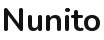 |
anton |  |
bebas_neue |  |
archivo_black |  |
raleway | 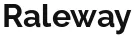 |
lato |  |
work_sans |  |
dm_sans |  |
outfit |  |
kanit |  |
teko |  |
russo_one |  |
righteous |  |
barlow_condensed |  |
🎨 Colors
textColor, highlightColor, and outlineColor accept:
- Hex:
#FFFor#FFFFFF - Names:
white,black,red,orange,yellow,green,blue,purple,pink,cyan,magenta,gray,navy,teal,gold,brown, and similar CSS color names
highlightColor is the background overlay on the word currently being spoken.
🚀 How to use
- Add a video to
video— upload a file or paste a direct URL. - Optionally add a transcript JSON if you want to skip transcription and use your own wording.
- Set font family, size, and colors.
- Start the Actor and download
subtitled-video-1.mp4from the key-value store.
One video per run, at most 3 minutes and 50 MB. Start another run for each extra clip.
📥 Input example
With an optional transcript file:
📤 Output example
The first captioned file is also stored as subtitled-video-1.mp4 in the default key-value store.
⚙️ Parameters
| Parameter | Type | Required | Description |
|---|---|---|---|
video | file or URL | Yes | Video to caption. Upload a file or paste a direct link. One per run, 3 minutes and 50 MB max. |
transcriptJson | JSON file or URL | No | Optional transcript file. When set, replaces automatic transcription. |
transcriptJsonContent | JSON object | No | Optional. Paste the same transcript JSON in the console. |
fontFamily | string | No | Caption typeface. One of the 20 fonts listed above. |
fontSize | integer | No | Caption size in pixels (16–120). Default 40. |
textColor | hex or name | No | Color of idle words. Default white. |
highlightColor | hex or name | No | Overlay color for the spoken word. Default #003399. |
outlineColor | hex or name | No | Caption stroke color. Default black. |
uppercase | boolean | No | Force uppercase captions. Default true. |
position | string | No | bottom, center, or top. |
maxWordsPerCaption | integer | No | Words shown together on screen. Default 5. |
language | string | No | Spoken language for transcription. Default en. |
mistralApiKey | secret | No | Optional Mistral key override. |


