

Yandex Search Engine Scraper - SERP Results by Region
Pricing
from $3.25 / 1,000 search results
Yandex Search Engine Scraper - SERP Results by Region
Yandex SERP scraper: search results by keyword or URL, ranked for the region you pick with Yandex's lr code. Each row has the rank, organic rank, title, URL, domain, snippet, sitelinks and whether it is organic, an ad or a featured block. $3.40 per 1,000 results. Парсер выдачи Яндекса.
Pricing
from $3.25 / 1,000 search results
Rating
0.0
(0)
Developer

Dami's Studio
Maintained by CommunityActor stats
0
Bookmarked
129
Total users
67
Monthly active users
16 hours ago
Last modified
Categories
Security
Limited permissionsShare
Yandex search results scraper by keyword and region, one row per result slot: rank, title, link, the domain Yandex shows, the snippet, sitelinks, and whether the slot is organic, a Direct ad or a featured block.
The same query put to Yandex from Moscow and from Istanbul does not come back as the same page. Yandex ranks by region, the region is a code in the URL. The honest part: Yandex does not answer every query, and one it will not serve comes back as an uncharged diagnostic row instead of results, so a run can end with far fewer rows than you asked for. There is also no total-result count on a modern Yandex page, so nothing here can report one.
| Input | Keywords, or full Yandex search URLs, with optional date, language and family filters |
| Output | One row per result slot: rank, title, link, displayed domain, snippet, slot type, the query Yandex really searched |
| Ceiling | 20,000 results per run, up to 40 pages per query |
| Account needed | None, and no API key |
| Price | $3.40 per 1,000 results on the Free plan, a little less on paid plans. The free plan's $5 a month covers about 1,400 |
| Using an AI agent? | |
|---|---|
| Actor | dami_studio/yandex-search-engine-scraper |
| Set one field | queries, labelled "Search queries" in the Console |
| Cap the bill | maxTotalChargeUsd on the run, for example 0.10: it never charges past that |
| MCP, one link | https://mcp.apify.com/?tools=fetch-actor-details,dami_studio/yandex-search-engine-scraper |
| How often | Daily or weekly, to track where a site ranks |
🔍 What Yandex Search Engine Scraper does
Give it keywords and a region code and it pages through the results, writing a row for every slot on the page in the order Yandex put them.
The region code is the point. lr=213 is Moscow, 225 is Russia, 11508 is Istanbul, 163 is
Astana. Set one and you get that region's ranking. Leave it empty
and Yandex picks, which is fine for a look and wrong for a comparison.
Three kinds of slot come back, and all three take up a rank position: organic listings, Yandex
Direct ads, and featured blocks like video carousels and image strips. Each
row carries position for the slot's place on the page and organicPosition for its place among the
organic rows only, which is the one rank trackers want.
You can also narrow a search the way Yandex's own tools do: by date, newest first, by page language, with the family filter, or to the exact spelling you typed.
📋 What data you get from each Yandex search result
| What you get | Field |
|---|---|
| The slot's rank across the run, on its page, and among organic rows only | position, positionOnPage, organicPosition |
| Organic, ad or featured, and which kind of featured block | type, featureType, isAd |
| The listing as Yandex renders it | title, url, snippet |
| The breadcrumb Yandex prints, the real domain behind it, and the brand | displayedUrl, displayedDomain, brandName |
| The extra links under a listing | sitelinks |
| The region Yandex served and the one you asked for | region, regionRequested |
| The front end that answered and the one you picked | domain, domainRequested |
| The query, its page, and the exact search address | searchQuery, page, searchUrl |
| What Yandex really searched, when it corrected your spelling | correctedQuery |
| When Yandex says the page was published, as a date and as printed | date, dateText |
| The result's picture and the short facts under it, where Yandex shows them | thumbnail, richSnippet |
| Related searches, as a list (optional row) | relatedSearches |
| The knowledge card beside the results (optional row) | title, snippet, entityFacts, entitySources |
▶️ How to scrape Yandex search results
- Open Yandex Search Engine Scraper and click Try for free.
- Put your keywords into Search queries, replacing the example.
- Pick the market you care about in Region (pick by name), or type any code into Region (Yandex lr code). This is the setting that changes the answer.
- Set Max results in total low for the first run, then click Start.
- Download the dataset as JSON, CSV or Excel, or read it from the Apify API.
Run it with no queries and no URLs and you get one labelled sample row, not charged.
💰 How much does it cost to scrape Yandex search results?
$3.40 per 1,000 results on the Free plan. Paid plans pay a little less: $3.35 on Starter, $3.30 on Scale and $3.25 on Business. On the free plan, the $5 Apify gives you each month covers about 1,400 results. A run of 100 results costs about $0.34 on the Free plan.
Every row with a rank counts, ads and featured blocks included, because they take up a rank slot. If
you only want organic listings, turn includeAds and includeFeatured off and you stop paying for
them. With adsOnly you pay for the ads alone. The optional related-searches and knowledge-card rows
cost one result each.
Sample rows, notice rows and diagnostic rows are not charged, and a query Yandex will not serve costs you nothing.
📥 What you give it
| Field | Default | What it is |
|---|---|---|
queries | none, the box holds купить пластиковые окна | Keywords, in any language Yandex handles. Russian, Turkish, English, Kazakh. |
startUrls | empty | Full Yandex search URLs instead. The query, region and start page are read out of the address. To carry on a deep search where it stopped, add &p= to the address: Yandex counts pages from 0, so &p=4 starts on page 5. |
domain | yandex.com.tr | Which Yandex front end to ask. They share one index. yandex.com.tr is the default because it honours the region code. yandex.uz ignores the region code and always ranks for Uzbekistan. |
regionPreset | empty, the box holds Moscow (213) | The region picked by name from the 28 verified codes. |
region | empty | Any lr code, typed as a number. It wins over regionPreset. Verified ones include 225 Russia, 213 Moscow, 2 Saint Petersburg, 43 Kazan, 187 Ukraine, 143 Kyiv, 149 Belarus, 159 Kazakhstan, 10393 Almaty, 983 Turkey, 11508 Istanbul, 171 Uzbekistan, 168 Azerbaijan, 169 Georgia, 84 USA, 102 Germany, 95 United Kingdom. |
timeRange | any | day, twoWeeks or month: only pages Yandex dates within that window. |
sortByDate | off | Newest first instead of by relevance. Ranks then mean freshness. |
resultsLanguage | empty | Only pages in these languages: ru, en, tr, uk, be, kk, tt, de, fr, id. |
safeSearch | off | Yandex's strict family filter. |
noAutocorrect | off | Search exactly what you typed, even when Yandex thinks it is a typo. |
maxItemsPerQuery | 20 | Results per query, up to 2,000. Yandex serves about 10 to 20 a page. |
maxItems | 100 | Hard cap across every query. Every returned result counts, so this is your budget cap. |
maxPagesPerQuery | 15 | How deep to page for one query, up to 40. |
includeAds | on | Include Direct ad slots, typed ad. |
includeFeatured | on | Include carousels and image strips, typed featured. Turn it off for the ten blue links only. |
adsOnly | off | Only the ad slots. Everything else is dropped before it is charged. Each ad slot is its own row, so an advertiser holding three slots on the page fills three rows, each charged. |
includeRelatedSearches | off | One extra row per query with Yandex's related searches in relatedSearches. |
includeEntityCard | off | One extra row per query with the knowledge card, when Yandex shows one. |
failIfEmpty | off | End the run as failed when no result came back, so a schedule or webhook watching run status notices. |
proxyConfiguration | leave it alone | Optional. Not needed for a normal run. |
📤 What you get back
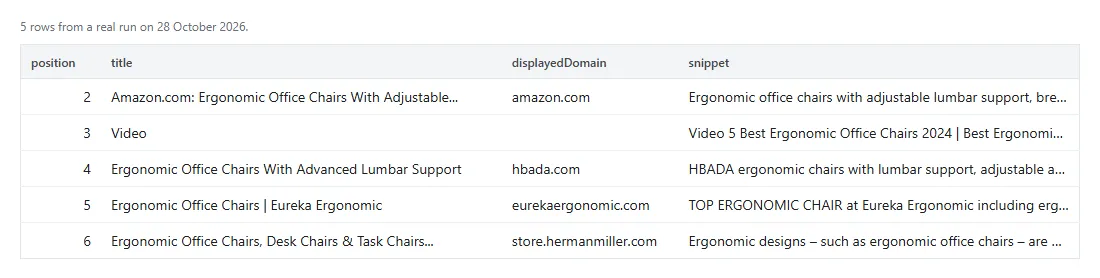
A real organic row from a run on 17 October 2026 for Moscow, with a typo in the query, which is why
correctedQuery is filled:
| Field | How to read it |
|---|---|
position, organicPosition | position counts every slot, organicPosition only the organic ones. They differ when an ad or a featured block sits above. |
url | The listing's link. On an ad it is Yandex's click tracker, and the advertiser is in displayedDomain. |
region, regionRequested | What Yandex actually served, and what you asked for. Compare them before trusting a ranking. |
sitelinks | The extra links under a listing, as {title, url}. Empty on most rows. |
snippet | On a featured row, the start of the block's text. |
date, dateText | dateText is Yandex's own label, in Turkish on yandex.com.tr; date is that label as a calendar day. Empty when Yandex prints no date. |
correctedQuery | Empty unless Yandex fixed your spelling and searched its own version. Turn on noAutocorrect to stop that. |
🧾 Reading the output
Three kinds of row can land in your dataset.
| Row | How to spot it |
|---|---|
| A result | It has a position and a type |
| A related-searches or knowledge-card row | type is featured, featureType is related or entity-card, and position is empty because it sits outside the ranked list |
| The sample row | Written only when there were no queries and no URLs |
| A notice or diagnostic | It carries an errorCode |
Diagnostic and notice rows are never charged. Each run also saves a summary as the OUTPUT record in
its key-value store: results by type, pages read, empty or unserved queries, and why it stopped.
| Code | What it means |
|---|---|
BAD_URL | That entry is not a Yandex search URL. The other jobs carry on. |
BAD_INPUT | A search option holds a value that is not on its list. Nothing was searched. |
DOMAIN_FAILOVER | The host you picked would not serve that query, so it was asked on yandex.com.tr at the same region instead. The domain field on the rows says who answered. |
NOT_SERVED | Yandex did not serve that query on this run. Re-run it later. Until 12 October 2026 this code was called CAPTCHA, so update any filter that used the old name. |
FETCH_FAILED | Yandex was unreachable or answered badly. |
NO_RESULTS | The query returned nothing usable. Under a date, language or family filter, or with adsOnly, that can simply mean nothing matched. |
ABORTED | Three queries in a row came back dead, so the rest were skipped rather than burned through. |
TIME_LIMIT | The run was close to its time limit, so it stopped and kept everything it had already delivered. Give it more time, or ask for fewer results, to get the rest. If nothing had come back by then, the run still ends as succeeded, with an amber status message. |
PROXY_GROUP_IGNORED | A setting in proxyConfiguration could not be used, so the run carried on without it. |
UNEXPECTED_ERROR | The run stopped early on an unexpected error. The results before this row are kept. |
💡 What people use it for
- Tracking where a site ranks in Moscow, Almaty or Istanbul, where a Google-only view says nothing.
- Watching which advertisers are buying a keyword, through
displayedDomainon the ad rows. - Pulling the snippet Yandex writes for your pages, which is not always the meta description.
- Comparing the same keyword across regions by running it once per
lrcode. - Checking whether featured blocks are pushing the organic results down a market you care about.
- Following a topic over the last day, newest first.
🚧 What it does not do
- No total result count. Yandex does not print one any more, so nothing can report it.
- Leave
regionempty and each query keeps its own. Every query pins to whatever region its first page came back with, so two queries in one run can be ranked for different places. Setregionwhenever you are comparing anything. yandex.uzignores the region code and always ranks for Uzbekistan.- No row for Yandex's AI answer box. It's left out and never charged, and the rows under it keep
their real
position. - Some queries will not be served. You get an uncharged row saying so, and a run can end with very few results.
- No
site:searches in practice. Yandex did not serve those queries in our tests. - Dates only where Yandex prints them, mostly on fresh pages.
- About 20 pages is the realistic depth for one query, whatever the page cap allows.
- Web results only. No images, video, maps or news verticals.
- A ranking is a snapshot, and Yandex still moves daily.
- It is not an official Yandex tool. Dami's Studio is independent and is not affiliated with or endorsed by Yandex, or by any other company named on this page.
🧭 Which Yandex scraper do you need?
| If you want | Use |
|---|---|
| Businesses on Yandex Maps, with hours and coordinates | Yandex Maps Scraper |
| Reviews for a place on Yandex Maps | Yandex Maps Reviews Scraper |
| Yandex search results by keyword and region | This one |
| Products and prices on Yandex Market | Yandex Market Scraper |
| The same job on Google, with People Also Ask | Google Search Results Scraper |
| What a search box suggests as people type | Keyword Autocomplete Scraper |
❓ Questions people ask
Do I need a Yandex account or an API key to scrape Yandex?
No. Nothing to apply for and no quota to watch.
Which region code should I use?
The one for the market you sell in. 213 for Moscow, 225 for Russia as a whole, 11508 for
Istanbul, 163 for Astana. The list in the input has the verified ones.
Why don't the rankings match what I see on Yandex?
Usually the region. Your browser gets your own city's ranking; the run gets the lr code you set,
or one Yandex picks. To compare like with like, open a private browser window and put the same lr
in the search address.
Why did I get fewer rows than I asked for?
Either the query ran out of pages, or Yandex would not serve it. The diagnostic row tells you which, and neither costs you anything.
Can I call it from code or connect it to an AI assistant?
The API tab has code for Python, JavaScript
and the CLI. MCP clients like Claude and ChatGPT use
https://mcp.apify.com/?tools=fetch-actor-details,dami_studio/yandex-search-engine-scraper; coding assistants can
load our skill
file. All three
bill your Apify account at the same price.
Is scraping Yandex search results legal?
They are public pages. Apify's write-up on the legality of web scraping is a good starting point, and we are not lawyers.
🆘 If something breaks
Open the Issues tab on the actor page. Send the query, the region code and the run ID. The
errorCode on the diagnostic row usually names the problem on its own.


