
Yandex Maps Scraper - Places & Ratings | Парсер Яндекс Карт
Pricing
from $0.38 / 1,000 places
Yandex Maps Scraper - Places & Ratings | Парсер Яндекс Карт
Yandex Maps scraper for business listings in Russia, Kazakhstan, Turkey and the CIS. Search by term and city, around a point within a radius, or paste URLs. Each place has name, address, GPS coordinates, rating, review count, phones, website and opening hours. $0.40 per 1,000 places.
Pricing
from $0.38 / 1,000 places
Rating
5.0
(2)
Developer

Dami's Studio
Maintained by CommunityActor stats
1
Bookmarked
209
Total users
97
Monthly active users
4 hours ago
Last modified
Categories
Security
Limited permissionsShare
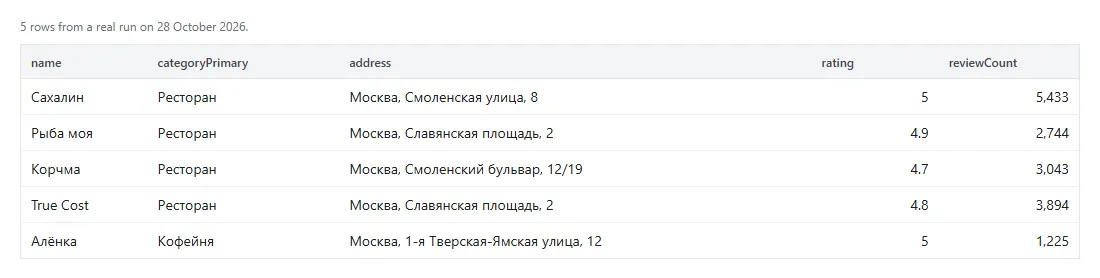
Yandex Maps scraper for a search and a city, one row per business: name, category, full address, coordinates, rating, review count, phone, website, social links, opening hours, the facts on its card, the average bill, popular dishes, how busy it gets and its photo links. Paste organisation links, ids or search URLs instead if you already have them.
The directory behind Yandex Maps is strongest where Yandex is strongest: Russia, Kazakhstan, Belarus, Turkey and the rest of the CIS. It is a Russian product, so Russian-language search terms return more places than English ones, and some fields come back in Russian whatever response language you pick.
| Input | Search terms plus one or more cities or a map point, or Yandex Maps URLs and organisation ids |
| Output | One row per place: name, category, address, coordinates, rating, phones, website, hours, amenities, popular times, photo links |
| Ceiling | 5,000 places per run |
| Account needed | None, and no API key |
| Price | $0.40 per 1,000 places on the Free plan, a little less on paid plans. The free plan's $5 a month covers about 12,500 |
| Using an AI agent? | |
|---|---|
| Actor | dami_studio/yandex-maps-scraper |
| Set one field | searchQueries, labelled "Search terms" in the Console |
| Cap the bill | maxTotalChargeUsd on the run, for example 0.10: it never charges past that |
| MCP, one link | https://mcp.apify.com/?tools=fetch-actor-details,dami_studio/yandex-maps-scraper |
| How often | Weekly or monthly; places change slowly |
🔍 What Yandex Maps Scraper does
Two ways in, and they work together in one run.
Search. A term and a city, like кафе in Moscow, and it pages through the results until it
reaches your limit or the list stops producing new places. List more cities and every term runs in
each. Give it coordinates instead and it searches around that point. Add radiusKm and only the
places that close to the point come back.
Filters. Yandex applies rating, price, category, award, opening hours, amenities, cuisine and chain to the search itself. Minimum reviews, website, phone and average bill are checked as each place is read; failures are free.
URLs and ids. Paste a search page, an organisation page, a short share link or an id. A skip list leaves out places you already have.
The same business found by two of your searches is written once and counted once. Duplicates are
removed before your maxItems cap is applied, so you get the number you asked for.
📋 What data you get from each Yandex Maps place
| What you get | Field |
|---|---|
| Yandex's organisation id, the key to join on | placeId |
| Name, short name and chain | name, nameShort, chainName |
| Main category and every category | categoryPrimary, categories |
| Full address and its parts | address, addressDetail, country, city, street, postalCode |
| Coordinates, and the distance from your point when you set a radius | latitude, longitude, distanceKm |
| Phones, websites with tracking parameters stripped, and social profiles | phone, phones, website, websites, socialProfiles |
| Rating, how many ratings it rests on, and how many reviews have text | rating, ratingCount, reviewCount |
| Opening hours, normalised and as Yandex wrote them, and whether it is open now | openingHoursText, openingHoursRaw, openingHours, isOpenNow |
| Price band and the nearest metro station | priceRange, nearestMetro |
| Whether the owner claimed the listing, and whether the place is open, closed or moved | verifiedOwner, status |
| The organisation page, the search and city that found it, and its place in the results | url, searchQuery, searchCity, position |
| Category ids, for the category filter | categoryIds |
| House number, Yandex's region id and area id | house, regionId, geoId |
| Facts from the card: Wi-Fi, parking, payment, cuisine, average bill and the rest | amenities |
| How busy it gets, hour by hour, each day of the week | popularTimes |
| Photo count, up to 11 photo links and the logo link | photoCount, photoUrls, logoUrl |
| Every nearby metro station and stop, with distances | metroStations, transitStops |
| Chain id, the "open until" line, Good Place award year, online booking | chainId, openStatusText, goodPlaceYear, hasOnlineBooking |
| On promoted listings, the company on Yandex's ad label and its tax number | advertiser |
| Average bill, as the card prints it | averageBill |
| Yandex's awards and the year of each | awards |
| The building on the map: its box, its entrances and the street panorama | bounds, entrances, panorama |
| Local time zone, in minutes from UTC | utcOffsetMinutes |
| Video links and how many events the place lists | videos, eventsCount |
| Yandex's own booking page | bookingLinks |
| Yandex Maps collections the place appears in | collections |
| Popular dishes or goods, with price and photo link | popularItems |
| Review topics: how many reviews mention each, and how many are positive, neutral or negative | reviewTopics |
| Optional: the reviews shown on an organisation's own page | cardReviews |
▶️ How to scrape Yandex Maps
- Open Yandex Maps Scraper and click Try for free.
- Put your searches into Search terms. Russian terms find more than English ones, even in Turkey and Kazakhstan.
- Type the City, spelled however you like.
- Set Maximum places low for the first run, then click Start.
- Download the dataset as JSON, CSV or Excel, or read it from the Apify API.
Run it with everything empty and you get one labelled sample row, not charged.
💰 How much does it cost to scrape Yandex Maps?
$0.40 per 1,000 places on the Free plan. Paid plans pay a little less: $0.395 on Starter, $0.39 on Scale and $0.385 on Business. On the free plan, the $5 Apify gives you each month covers about 12,500 places.
One row is one place. A business that turns up under two of your searches is charged once. The sample row, every diagnostic row, a search that finds nothing, places under your minimum rating, places outside your radius and places your filters leave out are not charged.
📥 What you give it
| Field | Default | What it is |
|---|---|---|
searchQueries | none, the box holds кафе | One search per line. Local-language terms return more places than English ones. |
city | none, the box holds Moscow | English, Russian or local spelling all work: Moscow, Москва, Almaty, Istanbul. A Yandex region id such as 213 works too. A name Yandex does not know as a place stops the run before any search. |
cities | empty | More cities, spelled the same way. Every search term runs in each. All of them are looked up before any search, and one Yandex cannot place stops the run. |
startUrls | empty | Yandex Maps search pages, organisation pages, short share links (https://yandex.com/maps/-/...), or organisation ids on their own, such as 1769547913. |
maxItems | 50 | Unique places across every search, up to 5,000. You are charged per place returned. |
maxItemsPerSearch | empty | A cap for each search on its own: each term in each city, and each pasted search link. |
minRating | any rating | 3.0, 3.5, 4.0, 4.5, 4.7 or 4.9. Only places Yandex rates at least that high. Places with no rating are left out. Applies to searches, not to single organisation pages. |
priceCategories | any price | price_cheap, price_reasonable, price_expensive, price_very_expensive. Yandex's own bands, given mostly to cafes, restaurants and bars. |
categoryIds | any category | Yandex category ids, such as 184106394 for restaurants or 184106132 for dental clinics. The categoryIds column of any run lists them. |
goodPlaceOnly | false | Only places holding Yandex's Good Place award. |
minReviews | empty | Only places with at least this many written reviews. |
onlyWithWebsite, onlyWithPhone | false | Only places whose listing has a website, or a phone. |
includeCardReviews | false | Adds the reviews an organisation's own page shows, usually three, for links and ids you paste. Searches bring none. |
openNow, open24h | false | Only places open when the run reads them, or open round the clock every day. |
amenities | none | Any of wi_fi, food_delivery, takeaway, coffee_to_go, breakfast, business_lunch, summer_terrace, car_park, payment_by_credit_card, wheelchair_accessability, toilet_for_disabled, nursery, halal, has_booking_link, michelin. A place has to have all of them. Yandex offers each only where it fits: Wi-Fi for cafes, not for dentists. |
cuisines | any cuisine | From the list in the form, such as italian_cuisine or georgian_cuisine. A place serving any one of them counts. |
chainIds | any chain | Yandex chain ids, such as 6002084. The chainId column lists them. Fill in search terms and a city too. |
wholeCountry | false | One chain's branches all over Russia. Set chainIds and one search term, the chain's name, and the run searches 183 Russian towns in turn, from Moscow down to towns of about 80,000 people, plus any city you typed. Each branch comes once. A town that is not on the list is searched only when you add it to cities. Raise maxItems to cover the chain. |
customFilters | empty | Any other Yandex filter, written as a Yandex Maps link writes it after filter=: for_children:1, has_url:1. Yandex answers a value it does not know with no places, so copy them exactly. |
averageBillMin, averageBillMax | empty | The average bill range, in the local currency. Places with no average bill on their card are left out while either is set. |
excludePlaceIds | empty | Ids or organisation links to skip. They are not returned, not charged and do not count toward maxItems. |
latitude, longitude | empty | Search around a point instead of a city. Both are needed. |
radiusKm | empty | 0.1 to 50. With latitude and longitude, only places within that many km of the point, measured from each place's own coordinates. Yandex tops up a thin area with places from just outside it, and those are left out uncharged, so a small radius can return fewer places than maxItems. Applies to search terms, not to pasted search links. |
zoom | 13 | Has no effect on which places come back. Yandex searches around the point at any zoom. Use radiusKm to set an edge. |
language | automatic | ru_RU, en_US, tr_TR, uk_UA, kk_KZ, uz_UZ or az_AZ. Russian is the most complete. |
proxyConfiguration | leave it alone | Optional. Only needed if you want requests to come from your own servers. |
📤 What you get back
A real place row from a run on 17 October 2026, with lists cut short and the hours, popular times and photo links left out:
| Field | How to read it |
|---|---|
placeId | Yandex's organisation id. It is the dedupe key here and the key to join on between runs. |
phone, phones | The numbers as Yandex holds them. Many listings have none. |
openingHoursText | Normalised to Monday through Sunday. openingHoursRaw keeps Yandex's own wording, and openingHours the raw arrays. |
priceRange | Yandex's own band, with the number and currency pulled out where it prints them. |
rating, ratingCount, reviewCount | The score, how many ratings it came from, and how many wrote text. |
distanceKm | Only with radiusKm: how far the place is from your point, in km. |
amenities | Only the facts Yandex shows as its own or the owner's. Values Yandex credits to another directory are left out, so a fact on the card can be missing here, even on a place an amenity or cuisine filter found. |
averageBill | from and to in the local currency, with Yandex's own wording in text. Mostly cafes, restaurants and bars have one. |
popularItems | Up to 20 dishes or goods the card shows as popular, with Yandex's price. Not the full menu. |
reviewTopics | Counts only, no review text. Yandex sends them on most cafe cards, but on some days on none. |
popularTimes | Yandex's own busyness curve: 24 values per weekday, hour 0 to 23. Higher is busier. |
advertiser | Only on promoted listings, and only when Yandex's ad label names a company with a 10-digit tax number. Usually the business's own company, sometimes an agency. A sole trader's label is left out whole. |
cardReviews | Only when you turn it on. null for places a search found, and when Yandex sent the organisation's page without its reviews. Phone numbers and e-mail addresses inside a review are hidden. |
How often each column was filled on two runs of 17 October 2026:
| Column | 120 Moscow cafes | 23 Kazan dental clinics |
|---|---|---|
phone | 120 | 23 |
website | 116 | 22 |
socialProfiles | 100 | 23 |
priceRange | 119 | 0 |
amenities | 120 | 23 |
popularTimes | 119 | 0 |
photoUrls | 120 | 23 |
goodPlaceYear | 86 | 19 |
chainId | 44 | 10 |
advertiser | 61 | 15 |
hasOnlineBooking true | 32 | 3 |
🧾 Reading the output
Three kinds of row can land in your dataset.
| Row | How to spot it |
|---|---|
| A place | It has a placeId and a name |
| The sample row | Written only when the input was empty |
| A diagnostic | It carries an errorCode |
Diagnostic rows are never charged.
| Code | What it means |
|---|---|
CITY_NOT_FOUND | Yandex could not place that city, knows several places by that name, or does not know the region id. The run stops before searching, so nothing is spent on the wrong place. |
BAD_INPUT | A filter value Yandex does not offer, a number out of range, or radiusKm with no point to measure from or with pasted search links. The run stops before searching. |
FILTER_NOT_APPLIED | Yandex did not confirm one of its filters on a page, so the rest of that search was skipped and not charged. It also comes up when Yandex does not offer that filter for what you searched. |
FILTER_TOO_RARE | Once a search has read 50 places, it stops if fewer than 1 in 5 pass minReviews, onlyWithWebsite, onlyWithPhone and the average bill. The places that passed are in your dataset. |
BAD_URL | That entry is not a Yandex Maps address. The other jobs carry on. |
NOT_FOUND, API_ERROR | That organisation page is gone, merged, or would not answer. |
NO_RESULTS, NO_RESULTS_BLOCK | The search came back with nothing new. |
NOT_SERVED | This place was not served this run. Re-run it later. Until 12 October 2026 this code was called CAPTCHA. |
HTTP_ERROR, NO_STATE | Yandex was unreachable, or the page did not carry the data it normally does. |
COST_LIMIT | The maximum cost you set for the run was used up before any place was charged. Raise it and start again. The run still ends as succeeded. |
TIME_LIMIT | The run's time limit stopped it before any place came back. Give it a longer timeout, or fewer searches. The run still ends as succeeded. |
UNEXPECTED_ERROR | The run stopped early on an unexpected error. The results before this row are kept. |
💡 What people use it for
- Building a local business directory with phone numbers and websites already on the row.
- Mapping how many branches a chain has in a city, or across Russia with
wholeCountry, with coordinates ready to plot. - Checking rating and review counts across a category before choosing a location.
- Finding which listings have no claimed owner, through
verifiedOwner.
From a category to its complaints, in three steps:
- Search
стоматологияinMoscowhere withminRatingat4.5, and copy theurlcolumn. - Paste those links into Yandex Maps Reviews Scraper's
startUrls, withmaxRatingat 2 andonlyWithTexton. - Group the reviews by
organizationNameto see which well-rated clinics still have unhappy patients.
🚧 What it does not do
- No review history and no photo files. Photos come as links, and reviews only as the few an organisation's page shows; the reviews actor below has the rest.
- No email addresses. Yandex does not publish them on a listing.
- One search stops at what Yandex lists for it: 664 cafes in Moscow and 477 dental clinics in Kazan in October 2026. Add terms or cities for more.
- Beyond Russia and the CIS, only first pages were checked.
cafein Berlin and London andkafein Istanbul each gave 25 rated places, most with a phone (October 2026). - Filters set inside a pasted Yandex link are not carried over. Use the filter fields, or
customFilters. - No sort by distance. Yandex ignored it when we tried. With
radiusKm, sort ondistanceKmyourself. - Some fields stay in Russian whatever
languageyou pick. Category names especially. - Result totals are Yandex's estimate, not a count you can trust.
- Paging stops when the results do. Yandex keeps serving pages past the end of a list, so the run stops after two pages with nothing new rather than collecting repeats.
- A search Yandex will not answer ends that job with an uncharged row. Re-running is worth one try.
- Phone and website are only there when the listing has them, which for small businesses is often not the case.
- It is not an official Yandex tool. Dami's Studio is independent and is not affiliated with or endorsed by Yandex, or by any other company named on this page.
🧭 Which Yandex scraper do you need?
| If you want | Use |
|---|---|
| Businesses on Yandex Maps, with phones, hours and coordinates | This one |
| Reviews for a place on Yandex Maps | Yandex Maps Reviews Scraper |
| Yandex search results by keyword and region | Yandex Search Engine Scraper |
| Products and prices on Yandex Market | Yandex Market Scraper |
| The same kind of listing from 2GIS, with phones | 2GIS Scraper |
| The same job on Google Maps | Google Maps Scraper |
❓ Questions people ask
Do I need a Yandex account or an API key to scrape Yandex Maps?
No. Nothing to apply for and no quota.
Should I search in Russian or English?
Russian, wherever you can. Yandex indexes Russian names most completely, and that holds in Almaty and Istanbul too.
Can I search a neighbourhood instead of a city?
Yes. Put in latitude and longitude, and radiusKm for how far out to go. Without a radius there
is no edge: around the Kremlin, 14 of the first 24 cafes were within 1 km and the farthest was 2.5 km
out. With radiusKm at 1, every row is inside 1 km.
Can I call it from code or connect it to an AI assistant?
The API tab has code for Python, JavaScript and the
CLI. MCP clients like Claude and ChatGPT use
https://mcp.apify.com/?tools=fetch-actor-details,dami_studio/yandex-maps-scraper; coding assistants can load our
skill file.
All three bill your Apify account at the same price.
Is scraping Yandex Maps legal?
These are public business listings, read the way a signed-out visitor sees them, with no account and
nothing private. Some of it is personal data: a sole trader's phone number, and reviewers' names if
you turn on cardReviews. GDPR, PIPEDA and similar laws cover that, so keep only what you need.
Anti-spam laws (CASL, the EU e-privacy rules, CAN-SPAM) decide how you may contact anyone, and Yandex's
own terms still apply to what you do with the data. Apify's write-up on
the legality of web scraping is a good starting
point, and we are not lawyers.
🆘 If something breaks
Open the Issues tab on the actor page. Send the search term, the city and the run ID. The
errorCode on the diagnostic row usually names the problem on its own.


