

2gis Places Scraper
Pricing
from $2.00 / 1,000 results
2gis Places Scraper
Извлекайте данные из тысяч мест и предприятий на 2ГИС, включая номера телефонов, соцсети, сайты. отзывы, фотографии и многое другое. Экспортируйте данные, запускайте через API, планируйте и отслеживайте запуски или интегрируйте с другими инструментами.
Pricing
from $2.00 / 1,000 results
Rating
4.8
(14)
Developer

Mikhail Mamaev
Maintained by CommunityActor stats
20
Bookmarked
1.4K
Total users
127
Monthly active users
2.2 days
Issues response
a month ago
Last modified
Categories
Share
Extract business and place data from 2GIS in minutes. Use it to build lead lists, research local markets, compare competitors, or collect places inside a specific area.
What this Actor gives you
- Business names, addresses, coordinates, categories, working hours, ratings, and 2GIS links
- Optional contacts such as phone numbers, emails, websites, and social links
- Optional reviews, photos, and videos for each place
- An export-ready dataset plus an interactive HTML map
Why people use it
- Build local lead lists for sales and outreach
- Track competitors by city, district, or custom search area
- Research markets and spot gaps in local coverage
- Create or enrich business directories
- Monitor newly opened places with filters and sorting
How to use it
- Enter one or more search terms such as
restaurant,dentist, orcar wash. - Add a location like
Moscow, or use a custom GeoJSON area if you want precise boundaries. - Choose how many places you want per search and run the Actor.
You can also search by 2GIS categories, apply built-in filters, sort results, and enrich places with contacts, reviews, or media.
Input examples
Quick start
Enriched results
Configuration
🔎 Basic search
| Input | What it does |
|---|---|
query | Your search terms. Using a few different terms can broaden coverage. |
locationQuery | A city, district, street, metro station, or any other place name. |
maxItems | How many places to save for each search term. Use 0 for no limit. |
domain | Choose from 19 country-specific 2GIS domains, or leave it on Auto. |
language | Select from 13 supported languages. |
📞 Contact details
| Input | What it does |
|---|---|
includeContacts | Add phones, emails, websites, and social links for each place. |
⭐ Reviews
| Input | What it does |
|---|---|
maxReviewsPerPlace | Add reviews for each place. Use 0 to skip reviews. |
reviewSortBy | Choose how reviews are sorted: trust or friends (newest). |
reviewRatings | Collect all rated reviews, or only negative or positive ones. |
includeUnratedReviews | Add unrated reviews when reviewRatings is set to all. |
includeReviewerData | Include public reviewer profile data when it is available. |
🖼️ Photos and videos
| Input | What it does |
|---|---|
maxMediaPerPlace | Add extra photos and videos. Use 0 to skip media. |
includePhotoAuthors | Include photo author information when 2GIS provides it. |
🧭 Filters and categories
| Input | What it does |
|---|---|
rubricIds | Search inside more than 1,700 built-in 2GIS categories. |
filterHasGoods, filterHasSite, filterHasPhotos | Keep only places with prices, a website, or photos. |
filterHomeDelivery, filterTakeaway, filterPaymentCard, filterWifi | Filter by delivery, takeaway, card payment, and Wi-Fi. |
filterAvgPriceMin / filterAvgPriceMax | Restrict results by average price range. |
filterCreatedRecently, filterRating | Focus on newly added places or only places above a chosen rating threshold. |
🔃 Sorting
| Input | What it does |
|---|---|
sortBy | Sort by rating, newest, alphabetically, or keep the original 2GIS order. |
🛰️ Custom search area
| Input | What it does |
|---|---|
customGeolocation | Use a GeoJSON area instead of a plain text location when you need precise search boundaries. |
⚙️ Advanced
| Input | What it does |
|---|---|
enableGlobalDataset | Keep a deduplicated dataset across multiple runs. |
What you get in output
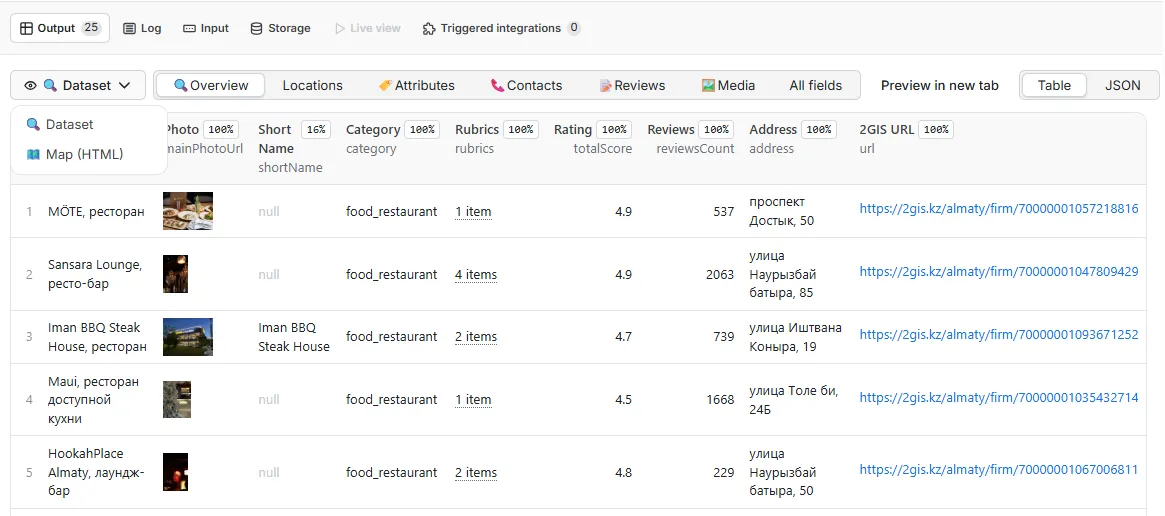
The Actor saves results to the dataset, where you can preview them in Apify, open the built-in map, or export them to JSON, CSV, Excel, XML, or HTML.
- Dataset: the main output with one item per place
- Useful views: overview, locations, attributes, contacts, reviews, and media
- Interactive map: saved as
results-mapin the key-value store and linked from the Output tab
Tables
The table view can be adjusted in different ways. There is a general overview, and you can also focus on contacts, location data, reviews, media, or other fields depending on what you need to export or inspect.
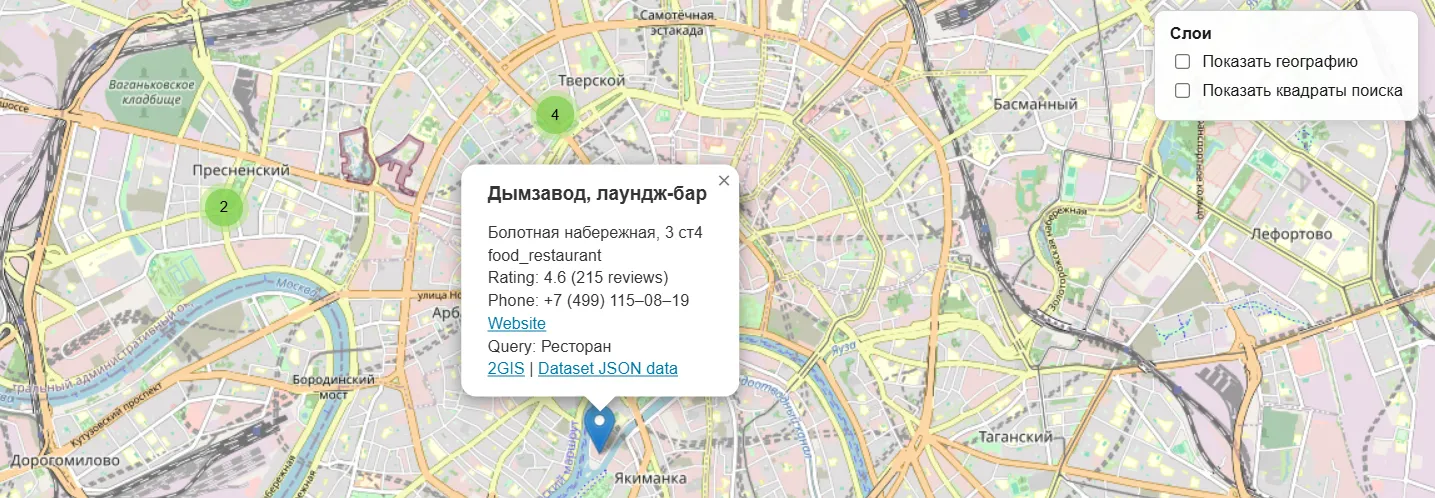
Map view
Results are also shown on an interactive map:
- in the
Live Viewtab - in the
results-map.htmlfile in the Key-Value Store
Output example
Adding contact information
Adding reviews
Adding images and videos
If you enable extra enrichment, each place can also include fields such as phoneText, phoneValue, email, website, socials, detailsType, reviewsMeta, reviews, mediaMeta, and media.
Tips for better results
- Use different search terms that do not overlap too much. For example,
restaurant,bar, andcoffee shopusually work better than several near-identical phrases. - You can search without a separate location field by putting the location directly into the query, for example
restaurants in Moscow. - Contacts, reviews, and media make the output richer, but they also make the run slower.
- If you want exact boundaries, use
customGeolocationinstead of a broad text location.
Custom search area
If your location is not found, or if you want to search inside a very specific area, you can use customGeolocation.
2GIS Places Scraper supports several geometry types for custom search areas: Polygon, MultiPolygon, and Point. For Point, the Actor treats it as a circle, with a default radius of 5 km unless you set radiusKm yourself.
Important: in GeoJSON, coordinates are always stored in this order: longitude first, latitude second.
If you want an easy way to draw and validate shapes, use Geojson.io.
Polygon
The most common option is a polygon, which is simply a set of points describing the area you want to scan. The first and last coordinate pair must be the same so the polygon is properly closed.
This example covers a large part of Moscow:
MultiPolygon
A MultiPolygon lets you combine several separate areas in one input. This is useful when you want to search multiple disconnected zones at once.
Circle
For a circular area, use a Point and add radiusKm. This is often the simplest option when you want to search around a single location.
| Also useful • Tools for adjacent workflows | |
Apify Actor Yandex Maps Places Scraper
A good alternative if your workflow is centered around Yandex Maps. |
Chrome Extension Yandex Maps Scraper
Browser-based scraping with real-time manual control. |


