
Trustpilot Reviews Scraper
Pricing
$0.25 / 1,000 results
Trustpilot Reviews Scraper
🧲 ONLY $0.25/1000 reviews: Scrape Trustpilot reviews at scale. Extract review text, ratings, verified badges, sentiment & company replies, plus full company data (contact email, phone, address, rankings). Filter by star, language (60+) & date. Multi-company, auto-pagination, no code.
Pricing
$0.25 / 1,000 results
Rating
5.0
(1)
Developer

Data Xplorer
Maintained by CommunityActor stats
1
Bookmarked
12
Total users
2
Monthly active users
12 days ago
Last modified
Categories
Security
Limited permissionsShare
Trustpilot Reviews Scraper – Scrape Trustpilot Reviews & Company Data
The Trustpilot Scraper is a fast, no-code tool to scrape Trustpilot reviews and company data at scale, without the official Trustpilot API. Extract full review text, star ratings, verified status, reviewer location, company replies, and detailed business metadata from any Trustpilot profile, in any language and on any Trustpilot domain (.com, .fr, .co.uk, .de, and more).
Whether you're monitoring brand reputation, running competitor research, or analyzing customer feedback for market intelligence, this Trustpilot review scraper delivers clean, structured JSON, CSV, or Excel output in seconds.

What is the Trustpilot Scraper? 🤔
The Trustpilot Scraper is an Apify Actor that turns any Trustpilot company page into a structured dataset. Just paste one or more Trustpilot review URLs, set how many reviews you want per company, apply optional filters, and hit Start. The Trustpilot scraper handles multilingual content, pagination, and multiple Trustpilot domains automatically, then returns ready-to-use data you can download or push straight into your own systems via the Apify API.
No login and no code required. This Trustpilot data scraper does the heavy lifting for you.
What can the Trustpilot Scraper do? ✨
- ✅ Scrape Trustpilot reviews in bulk: full review title, text, star rating, and sentiment.
- ✅ Extract complete company metadata: claimed status, paid subscription, official contact details (email, phone, full postal address).
- ✅ Get business rankings: the company's position in every category (e.g. "N°1 of 12 in Bank").
- ✅ Capture company replies: full business responses with precise timestamps.
- ✅ Identify solicited vs organic reviews: know whether a review was invited (via Shopify, Google, API…) or written spontaneously (
isOrganic). - ✅ Powerful filters: filter by star rating, language, date range, verified reviews, or reviews with a company reply.
- ✅ Multilingual and multi-domain: works with Trustpilot
.com,.fr,.co.uk,.de,.es,.it, and more, with automatic language detection (60+ languages). - ✅ Standardized ISO 8601 dates: all dates (review, experience, reply) normalized to ISO 8601, ready for sorting and analysis.
- ✅ Verified reviews and reviewer data: verified status, verification level, reviewer name, profile URL, country, and total review count.
- ✅ Structured output: export to JSON, CSV, Excel, or HTML, or pull it programmatically through the Apify API.
What data can the Trustpilot Scraper extract? 📊
The Trustpilot Scraper extracts both review-level data and a nested company object attached to every review.
Review fields
| Field | Description |
|---|---|
reviewId | Unique Trustpilot review ID |
reviewUrl | Direct deep-link to the review |
rating | Individual review rating (1 to 5 scale) |
sentiment | Review sentiment (positive / neutral / negative) |
title | Title of the review |
text | Full review content (cleaned, single-line) |
language | Auto-detected language of the review (ISO code) |
source | Origin channel: Organic, Shopify, Google, API… |
isOrganic | true if the review is spontaneous, false if solicited via an integration |
likes | Number of "useful" votes on the review |
isVerified | Whether the review is verified |
verificationLevel | verified, not-verified, verified-purchase… |
publishedDate | Publication date (ISO 8601) |
experiencedDate | Date of the experience (ISO 8601) |
updatedDate | Last edit date, if any (ISO 8601) |
reviewer | Reviewer object: name, id, profileUrl, countryCode, reviewCount, isVerified, imageUrl |
reply | Company response: author, message, publishedDate |
company | Full company object (see below) |
scrapedAt | Timestamp of when the data was scraped (ISO 8601) |
Company object (company)
| Field | Description |
|---|---|
name | Company display name |
identifyingName | Trustpilot slug (e.g. www.amazon.com) |
businessUnitId | Internal Trustpilot business unit ID |
trustpilotUrl | Company Trustpilot profile URL |
websiteUrl | Company website |
logoUrl | Company logo image URL |
trustScore | Overall TrustScore (1 to 5 scale) |
stars | Star equivalent of the TrustScore |
totalReviews | Total number of reviews |
isClaimed | true if the company has claimed its profile |
hasPaidSubscription | true if the company has a paid Trustpilot plan |
country | Company country code |
contact | email, phone, address, street, city, region, zipCode, countryCode, countryName |
categories | Company categories |
ratingDistribution | Review count per star (five, four, three, two, one) |
rankings | Category rankings (category, categoryId, rank, totalCompanies) |
How to scrape Trustpilot reviews (step by step) 🚀
Scraping Trustpilot with this Actor takes less than a minute:
- Open the Trustpilot Scraper on Apify and click Try for free.
- Paste your Trustpilot review URLs, e.g.
https://www.trustpilot.com/review/www.amazon.com(up to 5 companies per run). - Set
maxReviewsto choose how many reviews to collect per company. - (Optional) Apply filters such as star rating, language, date range, verified-only, or replies-only.
- Click Start and let the Trustpilot scraper run.
- Download your data in JSON, CSV, Excel, or HTML, or fetch it through the Apify API.
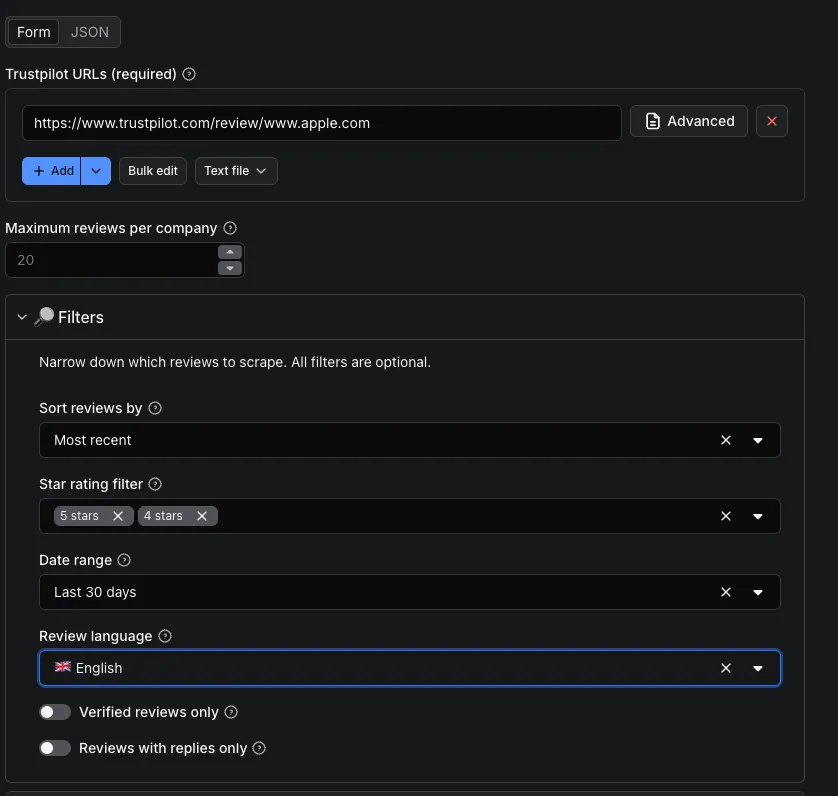
Input parameters
| Parameter | Type | Default | Description |
|---|---|---|---|
urls | array | required | List of Trustpilot review URLs (max 5) |
maxReviews | integer | 20 | Number of reviews to collect per company |
sort | string | recency | Sort order: recency (most recent) or relevancy (most relevant) |
starRatings | array | [] | Keep only reviews with these star ratings ("1" to "5"). Empty means all |
dateRange | string | all | all, last30days, last3months, last6months, last12months |
language | string | all | Filter by language (ISO code, 60+ supported). all means every language |
verifiedOnly | boolean | false | Keep only verified reviews |
repliesOnly | boolean | false | Keep only reviews that received a company reply |
proxyConfiguration | object | { "useApifyProxy": false } | Proxy settings (Residential recommended) |
Input example
Output example
How much does it cost to scrape Trustpilot? 💰
The Trustpilot Scraper uses a simple pay-per-result pricing model: you only pay for the reviews you actually collect, at $0.25 per 1,000 reviews. There are no monthly fees and no surprises. If a run returns nothing, you pay nothing.
New to Apify? You can try the Trustpilot Scraper for free with the free plan's monthly platform credits, which is more than enough to test it on a few companies before scaling up. Because pricing is per result, it's easy to estimate your cost upfront: 10,000 Trustpilot reviews simply costs 10 times the price of 1,000.
Why run the Trustpilot Scraper on Apify? 🧩
This Trustpilot review scraper isn't just a script. It's powered by the full Apify platform:
- ⏰ Scheduling: automatically scrape Trustpilot reviews daily, weekly, or hourly to monitor reputation over time.
- 🔌 API access: trigger runs and pull Trustpilot data programmatically with the Apify API and official JavaScript and Python clients.
- 🔗 Integrations: push Trustpilot data to Google Sheets, Slack, Zapier, Make, n8n, or any webhook.
- 🌐 Proxy rotation: reliable, geo-aware requests handled automatically.
- 📈 Monitoring and storage: every run is logged, versioned, and your datasets are stored and downloadable anytime.
Is it legal to scrape Trustpilot? ⚖️
Scraping publicly available data from Trustpilot is generally legal, and this Trustpilot Scraper only collects publicly visible reviews and company information, with no login and no private data. That said, you are responsible for how you use the extracted data, and you should comply with Trustpilot's terms, GDPR, and any applicable regulations, especially regarding personal data. If in doubt, consult a legal professional. Learn more in Apify's guide on the legality of web scraping.
Frequently asked questions (FAQ) ❓
Can I scrape Trustpilot reviews in any language?
Yes. The Trustpilot Scraper supports 60+ languages and works across all Trustpilot domains (.com, .fr, .co.uk, .de, .es, .it, and more) with automatic language detection. You can also filter results to a single language.
How many companies can I scrape at once?
You can scrape up to 5 Trustpilot companies per run, each with its own review limit via maxReviews.
Can I tell if a review was invited or organic?
Yes. Each review exposes a source field (Organic, Shopify, Google, API…) and a convenient isOrganic boolean, so you can easily separate spontaneous reviews from solicited ones.
Does the Trustpilot Scraper capture company replies?
Yes. Every business response is captured with the replying company name, message, and a precise ISO 8601 timestamp.
In what format is the Trustpilot data delivered?
You can export the scraped Trustpilot data as JSON, CSV, Excel, or HTML, or fetch it directly via the Apify API.
Do I need coding skills to use this Trustpilot scraper?
No. The Trustpilot Scraper is fully no-code. Just paste URLs and click Start. Developers can also automate everything through the API.
Reliability and performance 🔒
- Concurrent processing of multiple Trustpilot companies
- Smart, per-domain rate limiting
- Efficient resource management for lower cost per result
- Robust error handling and consistent data format across all companies
Support and feedback 🤝
Need help or have a feature request? Open an issue on the Actor's page or contact us directly. We actively maintain the Trustpilot Scraper and ship improvements regularly.
Related scrapers you might like 👇
- ⭐ Google News Scraper: This tool extracts complete structured data: high-resolution visuals, full, titles, sources, dates, and direct URLs
- 🛒 Google Trends Scraper: This Google Trends Scraper turns Google Trends into a clean, structured API
- 💼 TikTok Trends Scraper: Unlock TikTok's trending insights with our Creative Center Trends scrape
(Explore all our data extraction tools on our Apify Store profile.)


