

Jora Speed Actor — Instant Australian Jobs API
Pricing
$0.10 / 1,000 job delivereds
Jora Speed Actor — Instant Australian Jobs API
Retrieve already-collected Australian Jora jobs in seconds. Full descriptions and salary filters for ChatGPT, recruitment and analytics. US$0.10 per 1,000 jobs.
Pricing
$0.10 / 1,000 job delivereds
Rating
0.0
(0)
Developer

shadab ali
Maintained by CommunityActor stats
0
Bookmarked
2
Total users
1
Monthly active users
16 days ago
Last modified
Categories
Security
Limited permissionsShare
Job data on demand. Collection already done. Get Australian Jora job records without waiting for a new scrape. Search already-collected jobs by title, location, employer, salary, employment type and work arrangement. Receive structured records with full description text, source links and capture timestamps where available.
US$0.10 per 1,000 jobs delivered · No start fee · No Jora login or proxy setup
This Actor searches Dataarc's saved Australian Jora collection. Collection runs separately from your request. “Instant access” means the records are ready to query; Apify startup, filtering and exporting results still take time. A run does not perform a fresh Jora scrape or confirm that every saved vacancy remains open.
Why use this Jora jobs API?
- Start with ready-collected data. Retrieve matching records directly instead of launching a browser crawl for each request.
- Pay for delivered jobs. One returned dataset row costs US$0.0001. There is no per-run charge and an empty search produces no result charge.
- Get useful job detail. Full descriptions, displayed salary ranges, employment information and captured Jora metadata are returned where available.
- Filter before export. Combine title, location, employer, pay-period, posting-date and work-arrangement filters in one request.
- Check the evidence. Original job URLs, collection timestamps and source/provenance fields help you assess freshness and missing information.
- Use structured output. Read JSON from the API or download the Apify dataset for your own application, spreadsheet or workflow.
Industry use cases
This Actor supplies structured Australian job data to the tools that analyse it or deliver it to users.
Collected jobs → Actor filters and dataset → AI assistant, automation or application → useful output
| Customer / industry | Practical workflow | Useful output |
|---|---|---|
| Recruitment agencies | Retrieve a role and region, group the jobs by employer, and review descriptions and published contact information where present. | A source-linked employer hiring brief for a consultant to review. |
| HR and compensation teams | Compare advertised salary ranges within the same pay period and location. Keep missing salaries out of pay calculations. | Salary-range summaries with sample size and source evidence. |
| Career coaches and job seekers | Give selected descriptions to an AI assistant alongside a skills profile supplied by the user. | A shortlist, requirements summary and skill-gap explanation. |
| Job boards and HR software | Import filtered records, retain source URLs and timestamps, and upsert stable job identities. | A searchable feed or an enriched job-search feature. |
| Education and training providers | Analyse recurring skills, certifications and software named in descriptions for a chosen occupation. | Curriculum and course-planning research based on the retrieved sample. |
| Labour-market and business analysts | Group saved records by employer, role, region and observed date, tracking the collection over time. | A hiring-activity dashboard with collection-coverage caveats. |
| AI product developers | Provide an assistant with job records as retrieval context and require links for factual claims. | A job-research copilot grounded in captured advertisements. |
For research, keep the collection's limits visible: it is a sample of saved advertisements, not a census of hiring demand. Source URLs and job timestamps help users check the evidence behind a conclusion.
Use with ChatGPT and other tools
The examples below are workflow recipes you can configure. The Actor delivers job data; the connected tool performs the analysis, reporting or notification. AI, workflow and destination-service fees are separate from the Actor's job price.
ChatGPT: turn job descriptions into a useful brief
For a simple workflow, run the Actor, download its dataset as JSON or CSV, and provide that file to ChatGPT in a session that supports file analysis. Ask for a skills summary, salary comparison or shortlist using only the supplied records.
For a connected workflow, add Apify's MCP server to a compatible ChatGPT account and authorise your own Apify account. Select this Actor together with run-status and dataset-reading tools. Follow the current OpenAI custom MCP guide and Apify connection guide; availability depends on your account and workspace settings.
Example prompt after connecting Apify:
Use Apify Actor dataarc/jora-au-job-data-api to retrieve up to 20 saved Analyst jobs in Melbourne, using keyword Analyst, location Melbourne and maxResults 20. Set a run spending limit of US$0.01. Read the resulting dataset. Show title, company, location, advertised salary, last-seen date and the original job link. Summarise recurring skills from the descriptions. Keep missing fields empty and cite the job links. These are collected records, not a new live scrape.
A connector configuration can expose this Actor plus get-actor-run and get-dataset-items. Actor inputs contain the documented filters; spending limits belong in the run options, not extra input fields. A finished run produces a dataset that the assistant must read before summarising. Apify's tool reference explains these operations.
Make: a filtered jobs report in Google Sheets
- Add an Apify Run an Actor module and select
dataarc/jora-au-job-data-api. - Supply occupation, location,
maxResultsand any optional filters. - Wait for completion, then use Get Dataset Items.
- Map identity, title, employer, salary, URL and observation time into Google Sheets or Airtable.
- Upsert by job identity rather than adding the same job on every run.
Use an asynchronous completion workflow for runs that could exceed the destination's synchronous timeout. Follow Apify's Make guide.
n8n: an incremental feed with an optional AI summary
Create a workflow with a manual or schedule trigger, an Apify run step, a completion check, dataset retrieval and an upsert step in your own database or sheet. Pass your previous checkpoint as seenSince. Add an AI analysis step if you want a requirements summary, then send the reviewed output to your chosen destination. Use a small checkpoint overlap and deduplicate repeated observations. See the n8n integration guide.
Zapier: deliver a selected jobs digest
Use an Apify Actor/task completion trigger, fetch dataset items, filter the fields you want and format a digest for Google Sheets, Slack, email or a CRM. This is a workflow you configure in Zapier; this Actor does not send messages by itself. For larger exports, prefer completion-triggered retrieval to a short synchronous action. See Apify's Zapier guide.
Custom apps, analytics and AI retrieval
Call the API example below from your backend, then keep job identities, original URLs and timestamps when importing the records. You can feed descriptions to your own AI system, search index or BI dashboard. Separate observed facts from an AI's interpretation, and measure trends within the retrieved sample. When combining SEEK and Jora feeds, keep platform identity and apply your own cross-source duplicate checks.
1,000 jobs: scraping time versus retrieval time
We do the collection before you ask. Workers collect and refresh jobs in the background; your Actor run queries that collection and exports matching records. You avoid waiting for another browser crawl.
| Platform | Our production collection window: 1,000 distinct job URLs with descriptions | Actor retrieval: 1,000 unique saved jobs with descriptions | Observed time ratio |
|---|---|---|---|
| SEEK | 47 minutes 31 seconds | 63.4 seconds | About 45 times shorter |
| Jora | 10 minutes 43 seconds | 41.8 seconds | About 15 times shorter |
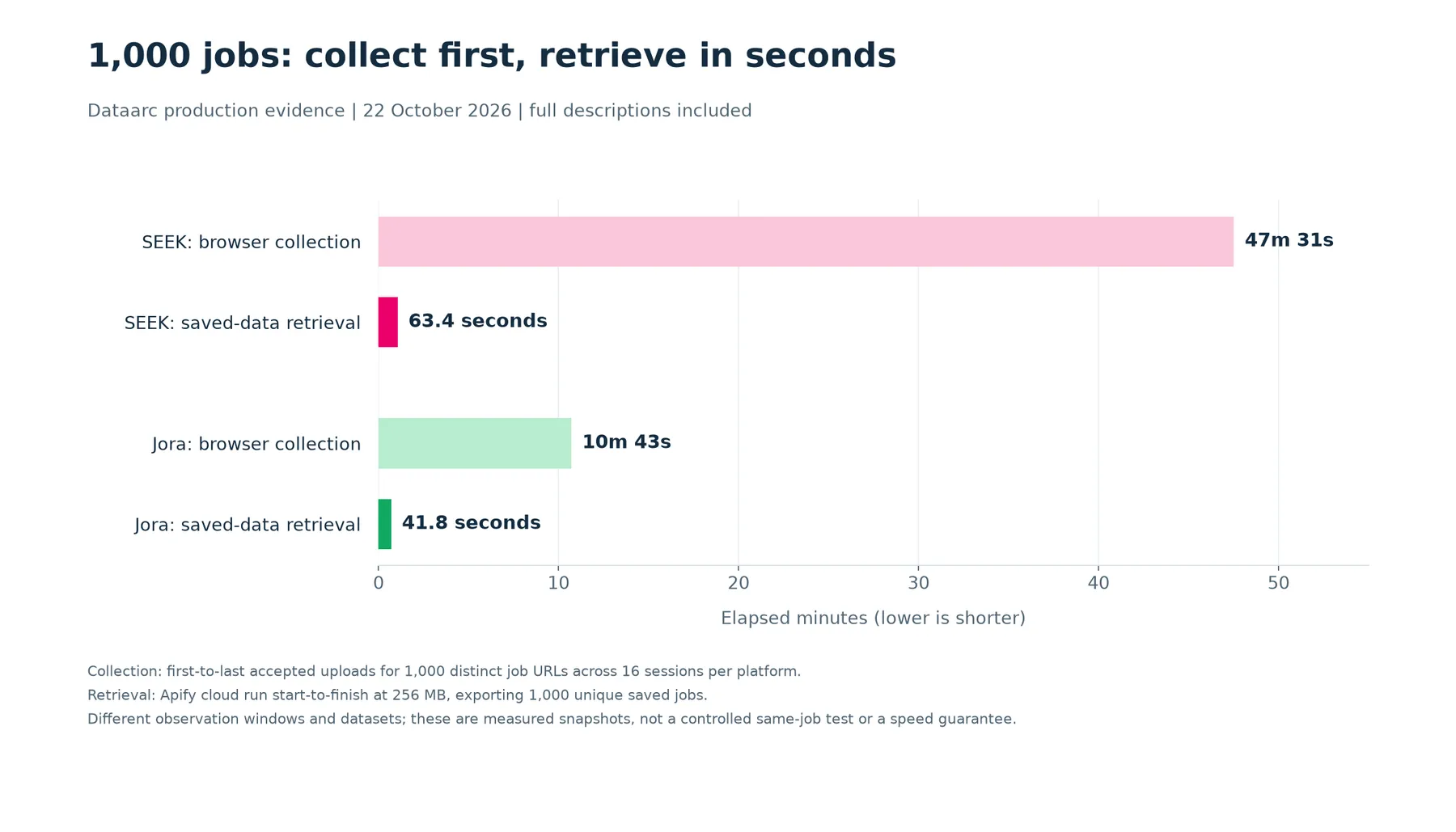
How we measured it, 22 October 2026: the collection figures come from controller-accepted upload timestamps correlated with read-only worker payloads. Each collection sample contains 1,000 distinct source URLs with description text across 16 concurrent sessions per platform, measured from its first to last accepted upload. Jora needed 1,016 accepted observations to reach 1,000 distinct URLs; SEEK needed 1,000. These are observations, not a count of newly inserted vacancies.
Retrieval figures are complete Apify run times, from cloud run start to finish at 256 MB, for 1,000 unique saved records with descriptions. They include Actor startup and dataset writing, rather than timing only a database query. The collection and retrieval samples use different observation windows and records; this is an operational comparison, not a controlled same-job experiment. It does not measure the extra time taken by ChatGPT, an automation workflow or a later dataset download.
For smaller queries, separate 20-job runs completed in 6.2 seconds for SEEK and 6.6 seconds for Jora. The 1,000-job benchmark is not a 15-second claim. Runtime changes with record size, filters and service availability; these dated measurements are not a response-time guarantee.
Continuously collected, with per-job freshness
The collection keeps running independently of customer requests. Recent observations can therefore already be available when you run this Actor. Review last_seen_at, scraped_date and capture metadata for each record. Continuous collection does not mean every job was just rechecked, that every current vacancy is covered, or that a saved active status is a live vacancy check.
Get your first results
- Click Try for free to open the Actor in Apify Console.
- Start with a broad query and a small result limit, such as the example below.
- Click Start. The Actor searches saved records matching all supplied filters.
- Open the Dataset to inspect the jobs. The OUTPUT record contains the retrieval summary.
- Download the dataset or use the Apify API to read the records.
You need an Apify account or API token to run the Actor. You do not need a Jora account, residential proxy, upstream data-service key or database connection. The upstream connection is managed by Dataarc.
Pricing: US$0.10 per 1,000 delivered jobs
| Jobs delivered in a run | Result charge |
|---|---|
| 0 | US$0.0000 |
| 20 | US$0.0020 |
| 100 | US$0.0100 |
| 500 | US$0.0500 |
| 1,000 | US$0.1000 |
Apify automatically charges US$0.0001 for each job written to the run's default dataset. There is no start event, custom duplicate charge or separate standard-run compute charge event. Downloads and storage retention outside the run can incur separate Apify account charges.
Set the run's maximum cost in Apify Console or through the API. The Actor reduces its result limit to fit that budget; for example, a US$0.05 budget allows at most 500 jobs. Apify also enforces the spending cap. If a later page fails, jobs already delivered remain in the dataset and those delivered rows remain chargeable.
A job returned again in a later run is another delivered result. Use incremental filters and upsert records in your own system to manage repeated observations.
Published Jora Actor comparisons
| Actor | Advertised base result price per 1,000 |
|---|---|
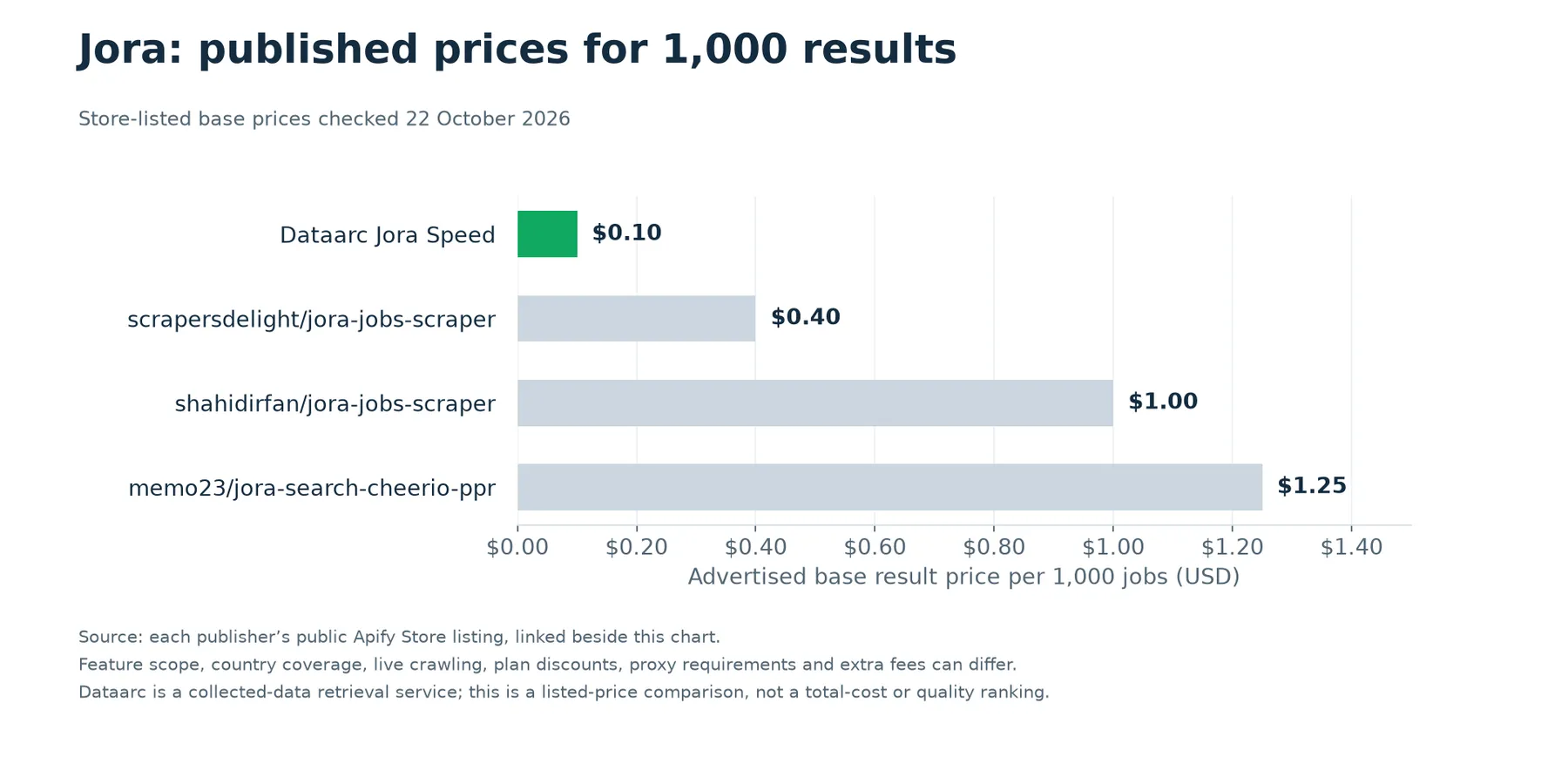
| Dataarc Jora Speed | US$0.10 |
| Scrapers Delight Jora | US$0.40 |
| Shahid Irfan Jora | From US$1.00 |
| memo23 Jora | From US$1.25 |
Public listing prices checked 22 October 2026. Countries, live-crawl options, plan discounts, proxies and optional features can differ. This compares advertised base result rates, not total account cost or data quality.
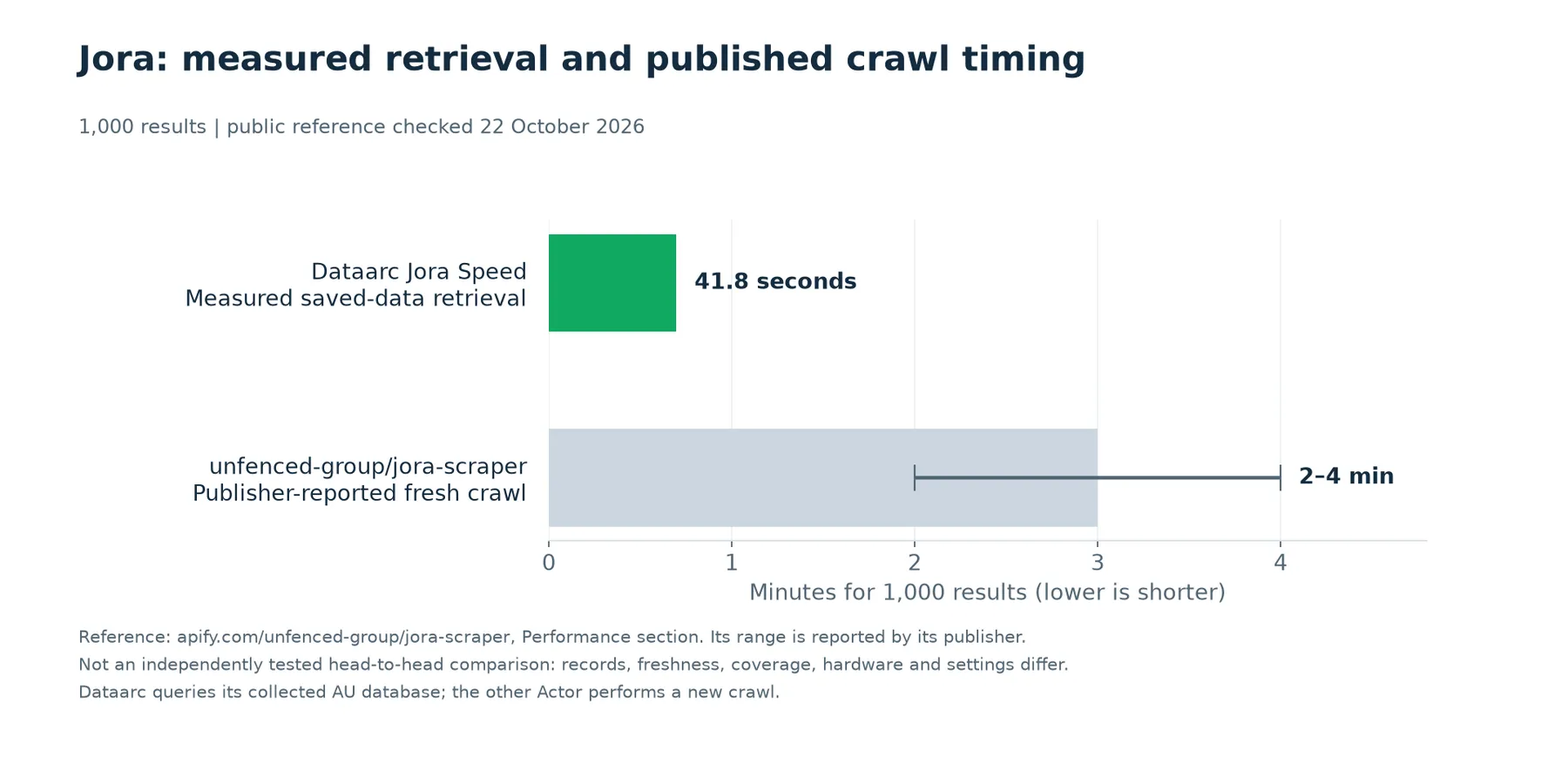
For 1,000 results, unfenced-group/jora-scraper publishes a 2–4 minute crawl range in its Performance section. Our measured saved-data export took 41.8 seconds. The other figure is its publisher's claim, not our test: these are different services, records and operating conditions. We do not claim that all other Actors take three minutes.
Input parameters
All inputs are optional. With no filters, the Actor returns up to 20 saved jobs marked active, ordered by descending saved-record ID. Filters are combined with AND.
| Parameter | Type / default | What it does |
|---|---|---|
keyword | String; empty | Case-insensitive text match against the saved job title. It does not search the description or interpret Boolean search operators. Maximum 200 characters. |
location | String; empty | Case-insensitive text match against the saved location. Use text such as Melbourne or Sydney; this is not a distance/radius search. Maximum 200 characters. |
company | String; empty | Case-insensitive employer-name text match. Maximum 200 characters. |
maxResults | Integer; 20 | Maximum jobs to deliver, from 1 to 1000. The actual count can be lower when fewer saved records match or the spending cap is reached. |
pageSize | Integer; 100 | Internal retrieval batch size, from 1 to 100. It is not the total result limit. Keep the default for normal runs. |
salaryMin | Number; unset | Lower bound for an overlapping displayed salary range. Requires payPeriod. |
salaryMax | Number; unset | Upper bound for an overlapping displayed salary range. Requires payPeriod; must be at least salaryMin when both are set. |
payPeriod | String; unset | hour, day, week, month or year. Required with salary bounds. Values are not converted between periods; unknown periods are excluded. |
jobType | String; unset | full-time, part-time, contract-temp or casual-vacation. Matches the saved employment-type text; missing values do not match. |
workType | String; unset | on-site, hybrid or remote. Matches the captured work-arrangement metadata where available. |
postedWithinDays | Integer; unset | Stored posting date within the last 1 to 365 days. Relative posting dates can be estimates. A larger value does not restore archived records. |
seenSince | String; unset | Last-observed timestamp on or after the supplied ISO timestamp. Include a timezone, for example 2026-10-21T00:00:00Z. Existing jobs observed again can also match. |
includeInactive | Boolean; false | Include records still stored but marked inactive. Archived records are not restored by this option. |
includeHtml | Boolean; false | Include saved original HTML where available. Full description text is returned independently of this option. |
Employment-type matching depends on the saved label format. If it unexpectedly removes results, omit that filter and inspect the returned employment_type values.
Salary bounds must be finite, non-negative numbers. Supply at least one salary bound when using payPeriod. Empty optional enumeration fields can be omitted. Unknown input fields are rejected, including startUrls, proxy settings and country overrides.
Salary matching example
A saved annual range of $90,000–$110,000 overlaps a requested annual range of $100,000–$120,000, so it can match. An hourly salary is not converted into annual pay. An advertisement with no displayed salary is excluded by a salary-bound filter.
Request examples
1. Search an occupation and location
2. Filter annual salary and employment type
3. Retrieve recently posted hybrid roles
4. Update an existing collection
Replace the timestamp with your own previous retrieval checkpoint. This retrieves jobs observed since that time, including updates to existing jobs.
5. Include original description HTML
Examples show supported inputs; they do not guarantee that matching records exist at the time you run them. If a query is empty, remove the most restrictive filter first.
What data does each job contain?
Each dataset item represents one saved Jora job. Fields can be empty, null or unavailable when the advertisement did not publish the information or it was not captured.
| Field | Meaning |
|---|---|
id | Dataarc's saved-record ID, used for retrieval ordering. It is different from the Jora identifier. |
external_id | Captured Jora job identifier. |
title, company, location | Saved job title, employer and advertised location. |
url | Original job URL for checking the advertisement. |
long_description | Saved full job-description text when captured. |
salary | Displayed salary text, where available. |
salary_min, salary_max | Parsed salary bounds. These can be serialized as numeric strings or null. |
salary_currency | Currency code where established. Check the nested salary metadata for its basis. |
employment_type | Saved employment-type text, which can contain more than one type. |
job_type | Compatibility alias for employment_type. |
source_family | jora for this Actor. |
country, market | Collection country/market, currently AU and au. |
posted_date | Stored posting date. Check job_details.posted to see whether it was estimated. |
scraped_date, first_seen_at, last_seen_at | Saved collection timestamps for reviewing capture and observation history. |
expires_at, is_active | Stored lifecycle fields; they are not a live check of whether the vacancy is still open. |
salary_value_source, employment_type_source | Provenance indicators for captured values. |
request_filter_fallback_applied | false: search criteria are not substituted for missing advertised salary or employment facts. |
job_details | Captured Jora-specific information, described below. |
data_delivery | Retrieval timestamp, platform, saved-data mode and HTML-inclusion status. |
Rich Jora metadata
These details vary by advertisement and capture. A field's presence in the schema does not guarantee that every job contains a value.
| Metadata path | Detail |
|---|---|
job_details.salary | Raw pay text, minimum/maximum, period, currency, display status and provenance such as currency_basis. |
job_details.employment_types | Captured employment-type values. |
job_details.workplace_types | Captured on-site, hybrid or remote values. |
job_details.apply | Captured application URL and link status where available. |
job_details.origin_site | Publisher or originating site displayed by Jora; this does not mean the Actor visited that employer's site. |
job_details.company_rating, job_details.review_count | Displayed company rating/review information where captured. |
job_details.listing_bullets, job_details.listing_badges, job_details.sponsored | Captured listing highlights, badges and sponsorship indicator. |
job_details.contacts, job_details.description_links | Contact details and links captured from the advertisement where present. |
job_details.employer_questions | Screening questions where available in the captured content. |
job_details.posted | Raw posting-age text, parsed date, parsing basis and estimated-date flag. |
job_details.capture_status, job_details.description_status, job_details.captured_at | Capture status and timing. |
job_details.search_filters, job_details.listing_page_url, job_details.listing_page_number | Original collection-search context. These describe how the record was collected, not necessarily the filters used in your current API request. |
Example JSON output
This is a shortened, illustrative record, not a live vacancy or a promise that every optional field is populated. Example identifiers, employer and URL are placeholders. Actual records can contain additional fields and the saved full description.
Call the API from your application
Send the same JSON input used in the Console to Apify's synchronous dataset endpoint. APIFY_TOKEN below means your own Apify token, supplied through an environment variable. No Dataarc or Jora credential is required from you.
For scheduled or longer workflows, start an asynchronous run through the Actor's API tab and read its dataset after it finishes. The same job pricing applies. See Apify's API instructions for authentication and synchronous-run behavior.
Export, schedule and integrate
Use the run's Apify dataset to download JSON or CSV. CSV is useful for flat columns; JSON preserves the nested job_details object. Apify also provides other export formats through its dataset interface.
You can connect the Actor to an Apify schedule, webhook or your existing workflow tools. These use Apify's platform features; this Actor does not create a schedule, send email alerts or configure a CRM by itself.
For repeated imports, upsert by source_family + market + external_id. seenSince filters the last observation time, so a re-observed existing job can appear again. Choose a small overlap between checkpoints if your workflow needs to tolerate timing differences, then deduplicate in your own storage.
Coverage, freshness and result ordering
- Country: Australian Jora records only. There is no country override or direct Jora search-URL input.
- Coverage: Results come from the saved collection, which may not contain every job currently shown on Jora. A missing result does not prove no such job exists.
- Freshness: Collection happens independently of Actor runs. Review
last_seen_at,scraped_date,posted_dateand the captured metadata instead of assuming a fixed refresh interval. - Active status: Active records are returned by default. Inactive records may be archived and unavailable even with
includeInactive: true. - Ordering: Records use descending saved-record IDs, not a relevance ranking or a guaranteed newest-posted order.
- Consistency: A run keeps a maximum-ID snapshot and rejects duplicate IDs during pagination. Saved record content can still be refreshed while a run is in progress.
Frequently asked questions
Does this scrape Jora when I click Start?
No. It queries already-collected Jora records. This is the basis of the fast-access product: your request does not wait for a new browser crawl.
Is access really instant?
The records are already collected and ready to query. Apify container startup, the provider's response time and the number of exported records determine the total run time. There is no guaranteed sub-second response or availability SLA.
Can I paste a Jora search URL or choose New Zealand, Singapore or another country?
The current Actor accepts the documented filters and Australian records only. It does not support startUrls, country selection, source-site radius filters or live search pagination controls.
Why did I receive fewer jobs than requested?
Fewer saved records may match all filters, a field may be unavailable, the spending cap may reduce the limit, or the data service may be unavailable. The OUTPUT summary shows delivered rows, pages, effective limits and any reported delivery failure.
Why are salary or work-arrangement values missing?
Not every advertisement publishes them, and not every field is captured. Missing values are not filled from the search criteria. For salary interpretation, inspect the period and provenance in job_details.salary.
Is the salary range annualized?
No. Salary filters require an explicit pay period and compare ranges within that period. Hourly and annual salaries are not mixed.
Are repeated results free across different runs?
No. Pricing counts jobs delivered in each run. Use seenSince and stable identity keys to maintain your own incremental collection.
What happens if a later page fails?
Previously delivered rows remain in the dataset. The run reports the failure and retains its summary where possible. Those delivered rows remain chargeable; failed pages that produce no rows create no result events.
Do I need proxies or an upstream API key?
No. Your own Apify credentials are sufficient. Dataarc manages access to its collection service. That service must be online, and the upstream limit is shared across the SEEK and Jora Actors at 60 requests per minute. Use normal sequential runs and the default batch size.
How can I report a problem?
Use this Actor's Issues tab and include the run URL, the non-secret input and the expected behavior. Do not include an API token. A run link helps identify its dataset and retrieval summary.
Related Dataarc job data
Also explore the SEEK Speed Actor for already-collected Australian SEEK records. It is a separate Actor with its own source-specific output.
This is an independently maintained data service and is not an official Jora API or an endorsement by Jora.


