

AI Image Upscaler: 4x Real-ESRGAN, No GPU
Pricing
from $10.00 / 1,000 image upscaleds
AI Image Upscaler: 4x Real-ESRGAN, No GPU
Upscale and sharpen photos, product images, illustrations and screenshots 2x or 4x with Real-ESRGAN AI. Bulk image URLs, PNG/JPEG/WebP output, transparency kept. Pay per image, a cheap Topaz and Let's Enhance alternative.
Pricing
from $10.00 / 1,000 image upscaleds
Rating
0.0
(0)
Developer

Digitální produkty pro život
Maintained by CommunityActor stats
0
Bookmarked
2
Total users
1
Monthly active users
22 days ago
Last modified
Categories
Share
Make small, blurry or compressed images 2x or 4x bigger and sharper with Real-ESRGAN, one of the best-known open-source AI super-resolution models. Upscale product photos, old pictures, illustrations, thumbnails, screenshots and AI-generated images in bulk. Just paste image links.
Pay per image. No subscription, no GPU, no software to install. A cheap alternative to Topaz Gigapixel, Let's Enhance or Upscayl in the cloud, and easy to call from Make, Zapier, n8n or your own code.
Before and after
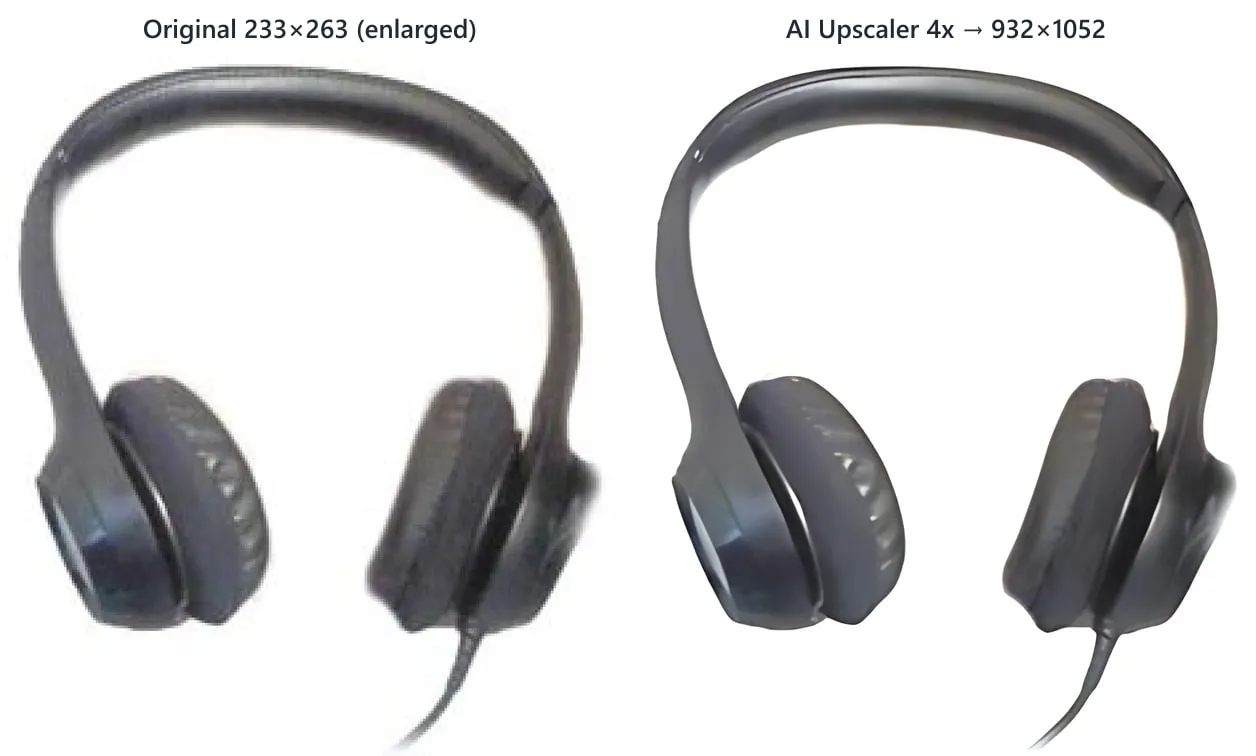
A real 233×263 px product photo, upscaled 4x by this Actor in 1.6 seconds (left: the same photo simply enlarged):
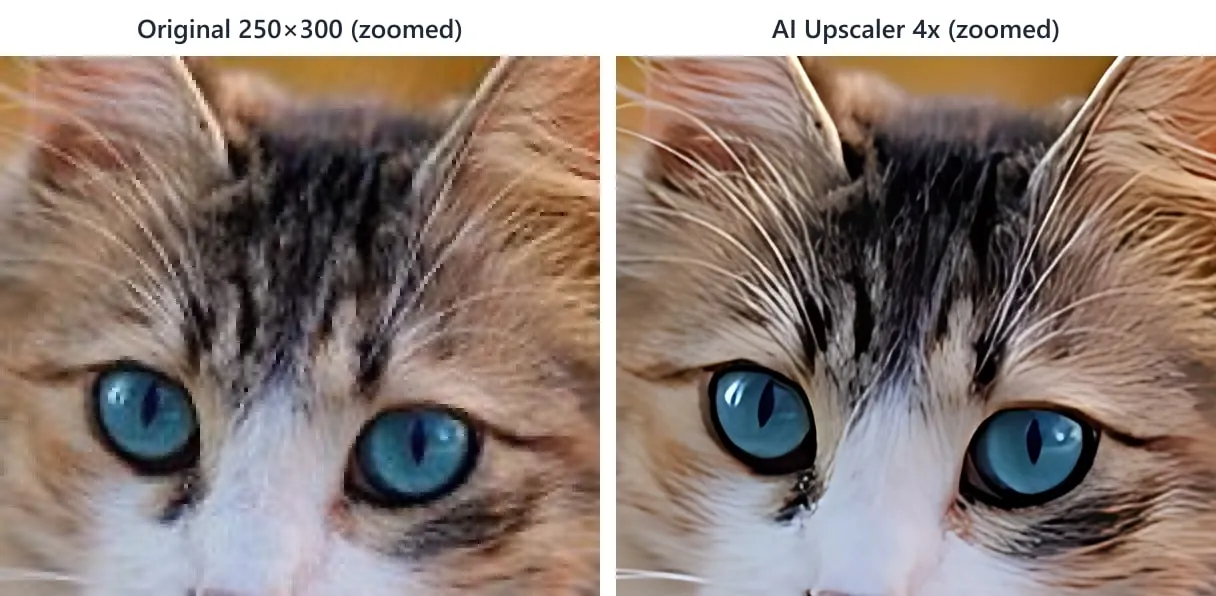
Zoomed detail of a 250×300 px photo: fur, whiskers and eyes are restored instead of blocky pixels.
Features
- 4x or 2x AI upscaling (the 2x mode runs the 4x model on a half-size copy, which looks sharper than simply resizing).
- Removes JPEG artefacts and noise while restoring edges and texture.
- Bulk: any number of image URLs in one run.
- PNG, JPEG or WebP output. Transparency is kept for PNG and WebP.
- Phone photos are rotated correctly (EXIF orientation).
- Size guard: the output is capped at a megapixel limit you choose (default 16 MP), and bigger inputs are reduced first.
Output
Each upscaled image is saved to the run's key-value store, and the dataset gets a direct link:
Pricing
You pay per upscaled image for outputs up to 4 megapixels (e.g. 2048×2048). Bigger outputs count as one image per started 4 MP. Failed downloads and unsupported files are never charged.
Use cases
- E-commerce: enlarge supplier product photos to meet marketplace size requirements.
- Print: upscale images for posters, flyers and merch.
- AI art: upscale Midjourney, Stable Diffusion or DALL·E outputs.
- Archives: improve old, low-resolution photos and scans.
- Automation: add an upscaling step to your image pipeline via API.
Notes
- The AI adds plausible detail. It cannot recover information that is not in the image (e.g. unreadable text).
- Faces are upscaled like the rest of the image. There is no separate face-restoration model.
- Model: Real-ESRGAN
realesr-general-x4v3by Xintao Wang et al., BSD-3-Clause license. - Only upload images you have the rights to use.
Questions or ideas?
Open an issue on the Issues tab. Feature requests (background removal, face restoration…) are welcome.
Chain it after any product scraper
Already scraping products on Apify (Shopify, Amazon, WooCommerce, Google Shopping, marketplaces…)? Upscale the product images straight from the scraper's results, with no copying of URLs:
- Open your scraper's Integrations tab and add Run Actor, then choose this Actor.
- Use this input:
- Every result row keeps
itemUrl,itemId,itemTitleanddatasetItemIndexfrom the source item, so you can join the new images back to your products.
You can also pick any existing dataset in the Images from a dataset field in the Console. Leave Image field in dataset empty and common fields (imageUrl, image, images, thumbnail, …) are detected automatically. Dot paths such as product.images.0.src and protocol-relative Shopify CDN links (//cdn.shopify.com/...) work too.
How to use it via API
You can run the Actor from the Apify Console, on a schedule, or from your own code. Get your API token in Apify Console → Settings → Integrations.
Python
JavaScript / Node.js
Integrations and AI agents
- Export results as JSON, CSV, Excel, XML or HTML, or open them directly in Google Sheets.
- Connect to Make, Zapier, n8n, Slack, Google Drive, Airbyte or any webhook to get AI-upscaled images into your workflow automatically.
- Use it from AI agents and LLM apps (Claude, ChatGPT, Cursor, LangChain…) through the Apify MCP server: the agent can call this Actor as a tool.
- Schedule runs (hourly, daily, weekly) to keep data fresh without any code.
FAQ
How much does it cost? $0.01 per output image up to 4 megapixels (larger outputs count per started 4 MP). 1,000 product photos cost about $10.
Do I need a GPU or software? No. Real-ESRGAN runs in the cloud on CPU. Just provide image URLs.
Are my images stored? Only in your own Apify storage for the run, under your account's data retention settings.
More tools from the same developer
All tools with code examples: github.com/Phenixik/apify-actors
- remove.bg API Alternative: drop-in replacement for the remove.bg API, change one URL
- AI Background Remover: bulk transparent PNGs, white backgrounds and masks
- Product Photo Prep: white-background, square photos for Shopify, Amazon and Etsy
- App Icon & Screenshot Generator: every iOS, Android and PWA icon size from one image
- Website Screenshot: full-page, mobile and PDF screenshots
- Sitemap URL Extractor: every URL from a website's sitemaps
- Broken Link Checker: find 404s and dead links on your site
- PageSpeed & Lighthouse Audit: bulk Core Web Vitals and SEO scores
- Domain WHOIS & DNS Lookup: expiry, DNS, SPF/DMARC and SSL for many domains
- PDF Text Extractor: text, Markdown and RAG chunks from PDFs
- E-book Converter: Word, Google Docs or Markdown to PDF and EPUB
- RSS Feed Reader & Monitor: only-new-items feed monitoring
- Career Site Jobs API: search 400,000+ jobs from 11,000+ company career sites
- App Store Reviews: iOS reviews from 50+ countries
Need a custom tool? I build custom Apify Actors, scrapers, data feeds and automations, and adapt existing Actors to your workflow. Write to digitalniproduktyprozivot@email.cz or open an issue on the Issues tab.


