

AI Background Remover: Transparent PNG, No GPU
Pricing
from $5.00 / 1,000 background removeds
AI Background Remover: Transparent PNG, No GPU
Remove the background from product photos, portraits and logos with ISNet AI. Bulk image URLs, transparent PNG/WebP or any background color, masks and auto-crop to the subject. Pay per image, a cheap remove.bg alternative.
Pricing
from $5.00 / 1,000 background removeds
Rating
0.0
(0)
Developer

Digitální produkty pro život
Maintained by CommunityActor stats
0
Bookmarked
3
Total users
2
Monthly active users
20 days ago
Last modified
Categories
Share
Remove the background from product photos, portraits, logos and any other images in bulk. Get a transparent PNG/WebP cut-out, the subject on any solid color (e.g. white for Amazon or Shopify listings), or just the mask. Optionally crop to the subject with padding.
Powered by ISNet (DIS, Dichotomous Image Segmentation), an open-source high-accuracy segmentation model (Apache-2.0), running on CPU in the cloud. About 3–4 seconds per image. No GPU, no software, no subscription. Pay per image, failed images are never charged.
Examples
Real results from this Actor (the checkerboard shows the transparent area):
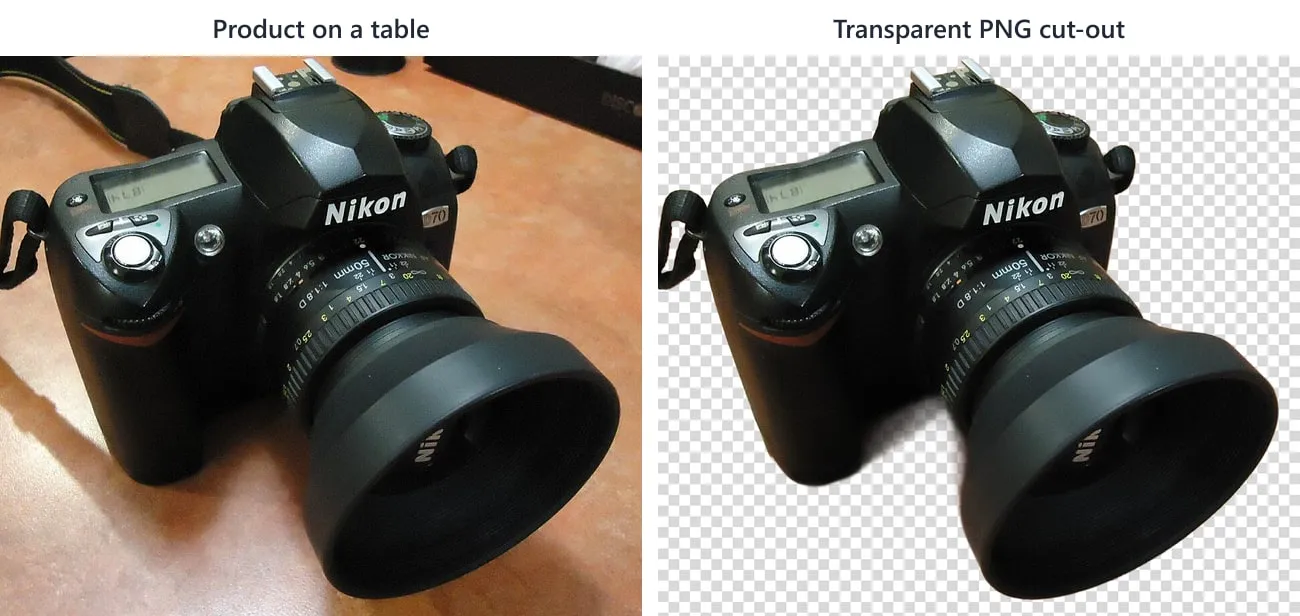
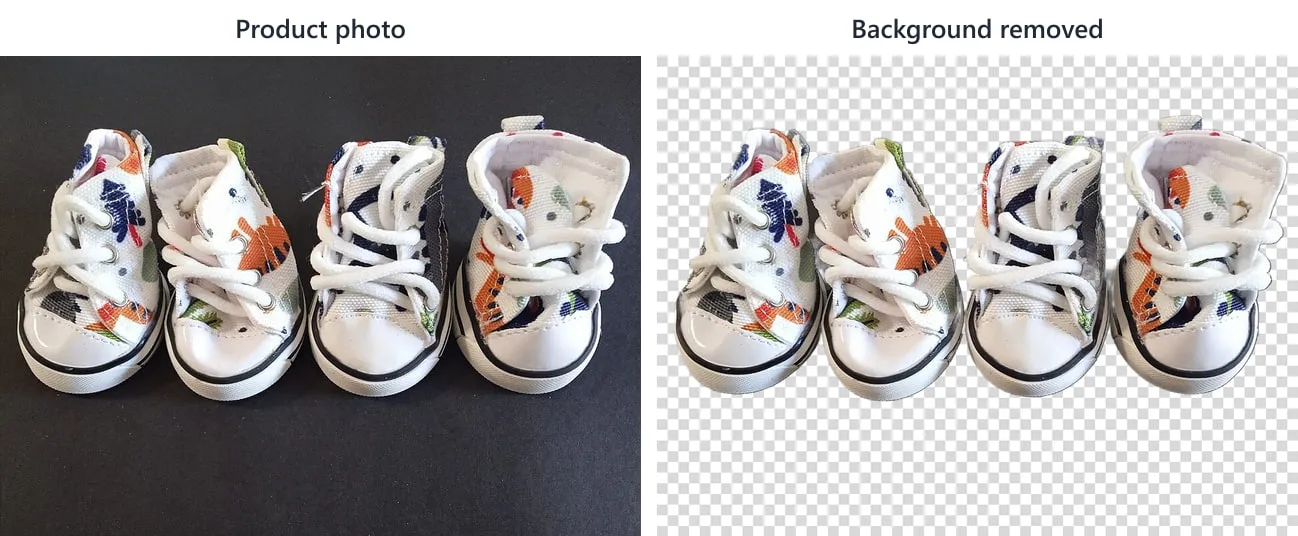
Works best when the subject clearly stands out from the background, which is typical for product, catalogue and object photos. Harder cases: a dark product on a dark background (e.g. a black strap on a black stand) or a strongly blurred background in similar colours can leave parts of the subject missing or semi-transparent. Test a few of your own images first. The run costs only $0.005 per image.
Features
- Bulk processing: paste any number of image URLs (JPEG, PNG, WebP, GIF, TIFF, AVIF).
- Three outputs: transparent cut-out, cut-out on a solid color, or black-and-white mask.
- Crop to subject with adjustable padding, which is great for consistent product thumbnails.
- Full resolution: the result has the same size as your original (up to 100 MP).
- Fine edges: hair, fur and product edges are kept as soft alpha, not jagged.
- Phone photos are auto-rotated (EXIF), and existing transparency is preserved.
Output
Each image becomes one dataset row, and the result file is stored in the run's key-value store with a public link:
Use cases
- E-commerce: white-background product photos for Amazon, eBay, Shopify, Etsy and Google Shopping.
- Marketing: cut-outs for banners, social posts and ads.
- Catalogs: consistent, cropped product thumbnails for thousands of SKUs.
- Profile photos and ID-style portraits on a solid color.
- Design pipelines: masks for compositing or further AI editing.
Combine it with our AI Image Upscaler to first sharpen small supplier photos and then cut them out.
Pricing
$0.005 per processed image, any resolution. 1,000 product photos cost $5. Images that fail to download or process are not charged.
Switching from the remove.bg API?
remove.bg has announced that starting December 1, 2026, its background removal moves to Leonardo.Ai (part of Canva). If you have scripts, Zapier/Make/n8n scenarios or apps calling the remove.bg API, this Actor is a pay-per-image replacement with full-resolution output included (no separate "HD" credits) and no monthly plan.
| remove.bg API parameter | This Actor |
|---|---|
image_url | imageUrls (a list, so you can send many images in one run) |
bg_color=ffffff | output: "color", backgroundColor: "#ffffff" |
channels=alpha (mask only) | output: "mask" |
crop=true, crop_margin | cropToSubject: true, paddingPercent |
format=png / jpg / webp | outputFormat: "png" / "jpeg" / "webp" |
size=full | always full resolution (up to 100 MP) |
Want to keep your code unchanged? Use the sister Actor remove.bg API Alternative: the same /v1.0/removebg endpoint, form fields, file uploads and response headers. You only change the base URL and the auth header. This Actor is better for bulk jobs from URL lists or datasets.
Not supported (yet): image_file uploads (host the file and pass a URL), bg_image_url, shadows and the type hint. Need one of them? Open an issue and tell us.
Chain it after any product scraper
Already scraping products on Apify (Shopify, Amazon, WooCommerce, Google Shopping, marketplaces…)? Remove the backgrounds of the product images straight from the scraper's results, with no copying of URLs:
- Open your scraper's Integrations tab and add Run Actor, then choose this Actor.
- Use this input:
- Every result row keeps
itemUrl,itemId,itemTitleanddatasetItemIndexfrom the source item, so you can join the new images back to your products.
You can also pick any existing dataset in the Images from a dataset field in the Console. Leave Image field in dataset empty and common fields (imageUrl, image, images, thumbnail, …) are detected automatically. Dot paths such as product.images.0.src and protocol-relative Shopify CDN links (//cdn.shopify.com/...) work too.
How to use it via API
Python
JavaScript / Node.js
Integrations and AI agents
- Export results as JSON, CSV or Excel, or send them to Google Drive, Dropbox, Make, Zapier, n8n or any webhook.
- Use it from AI agents (Claude, ChatGPT, Cursor…) via the Apify MCP server: "remove the background from these product photos".
- Schedule runs to process new product images automatically.
FAQ
How much does it cost? $0.005 per image. 1,000 images cost $5, roughly 20–40× cheaper than per-image pricing of popular web apps.
Do I need a GPU or any software? No. Everything runs in the cloud; just provide image URLs.
What image sizes are supported? Up to 100 megapixels and 30 MB per file by default (configurable). The output keeps the original resolution.
Can I get a white background instead of transparent? Yes. Set Output to "Solid background color" and choose any hex color, or pick JPEG output, which uses white automatically.
How fast is it? About 3–4 seconds per image after a short start-up, so 1,000 images take roughly an hour in one run. Split very large batches into several parallel runs to go faster.
Which model is used? ISNet general-use from the DIS project (Xuebin Qin et al., Apache-2.0), in the ONNX export from the rembg project. It handles products, people, animals and objects; very thin hair or transparent glass may be less precise than with paid GPU services.
Are my images stored? Only in your own Apify storage for the run, under your account's data retention settings.
More tools from the same developer
All tools with code examples: github.com/Phenixik/apify-actors
- remove.bg API Alternative: drop-in replacement for the remove.bg API, change one URL
- Product Photo Prep: white-background, square photos for Shopify, Amazon and Etsy
- AI Image Upscaler: 2x / 4x Real-ESRGAN upscaling, no GPU
- App Icon & Screenshot Generator: every iOS, Android and PWA icon size from one image
- Website Screenshot: full-page, mobile and PDF screenshots
- Sitemap URL Extractor: every URL from a website's sitemaps
- Broken Link Checker: find 404s and dead links on your site
- PageSpeed & Lighthouse Audit: bulk Core Web Vitals and SEO scores
- Domain WHOIS & DNS Lookup: expiry, DNS, SPF/DMARC and SSL for many domains
- PDF Text Extractor: text, Markdown and RAG chunks from PDFs
- E-book Converter: Word, Google Docs or Markdown to PDF and EPUB
- RSS Feed Reader & Monitor: only-new-items feed monitoring
- Career Site Jobs API: search 400,000+ jobs from 11,000+ company career sites
- App Store Reviews: iOS reviews from 50+ countries
Need a custom tool? I build custom Apify Actors, scrapers, data feeds and automations, and adapt existing Actors to your workflow. Write to digitalniproduktyprozivot@email.cz or open an issue on the Issues tab.
Credits
ISNet / DIS: Copyright (c) Xuebin Qin, licensed under Apache-2.0 (https://github.com/xuebinqin/DIS). ONNX export by the rembg project (MIT).
Questions or ideas?
Open an issue on the Issues tab. I usually reply and fix things within a day.


