

Ad Library Export - Meta & Microsoft Official APIs
Pricing
from $0.80 / 1,000 ad exporteds
Ad Library Export - Meta & Microsoft Official APIs
Export Microsoft (Bing) Ad Library ads with no token: advertiser, ad text, landing page, served dates, EU impression ranges by country. Meta Ad Library too, with your own Meta token (no Meta proof run on our side yet). Official APIs only. $0.0008 per ad + $0.02 per run.
Pricing
from $0.80 / 1,000 ad exporteds
Rating
0.0
(0)
Developer

DigiVibeTech
Maintained by CommunityActor stats
0
Bookmarked
2
Total users
1
Monthly active users
2 days ago
Last modified
Categories
Features
Share
Export ads from Microsoft's official Ad Library API (Bing ads shown in the EU/EEA) with no token and no login: advertiser, ad title and text, landing page, first and last served dates, EU impression range and impression share per country. The same actor can also query the official Meta Ad Library API, but only with your own Meta access token (see below).
Try it free, no token: press Start. The prefilled input searches the Microsoft Ad Library for real ads (20 ads cost about $0.036). Apify's free plan includes monthly platform credit, and you can set a maximum cost per run.
- Microsoft Ad Library, ready now: real ads from Microsoft's public transparency API, one clean row per ad, JSON / CSV / Excel.
- Official APIs only: no scraping of ad pages, no proxies, no cookies, no anti-bot workarounds.
- Fair billing: one charge per unique ad plus a small start fee. Duplicate ads and failed queries are not charged.
What is Ad Library Export?
A small, official-API exporter for ad transparency libraries. It turns Microsoft's Ad Library (and Meta's, if you bring a token) into one clean table with the same columns plus a platform field, so you can compare advertisers, landing pages and how long ads have run, without opening each ad by hand.
🎯 Use cases
- See which advertisers bid on your brand or product keywords on Bing in the EU/EEA, and where they send traffic.
- Check how long a competitor's ads have been running (first and last served dates) and in which countries.
- Build a dated archive of ads for a keyword by scheduling the actor.
📸 Real run: Microsoft Ad Library (22 Nov 2026)
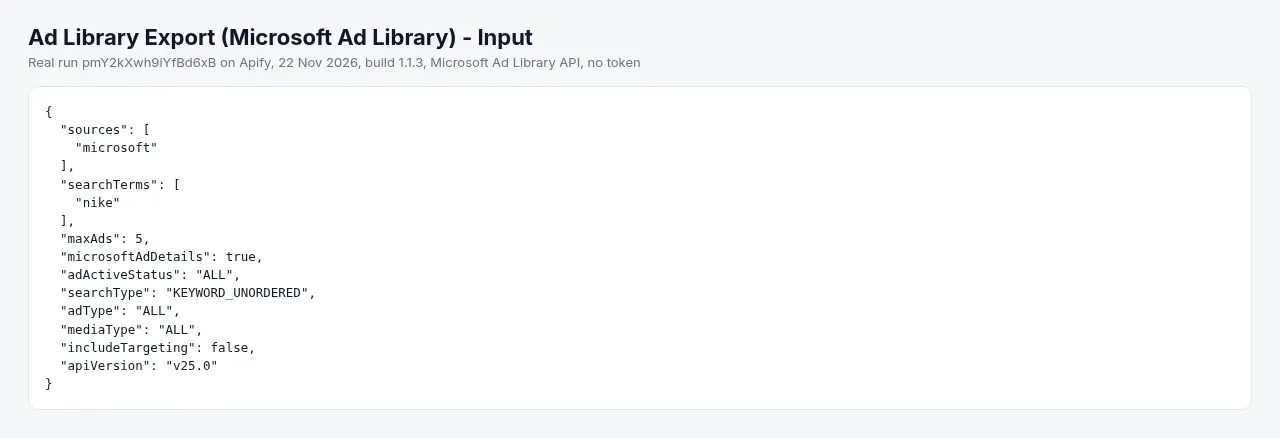
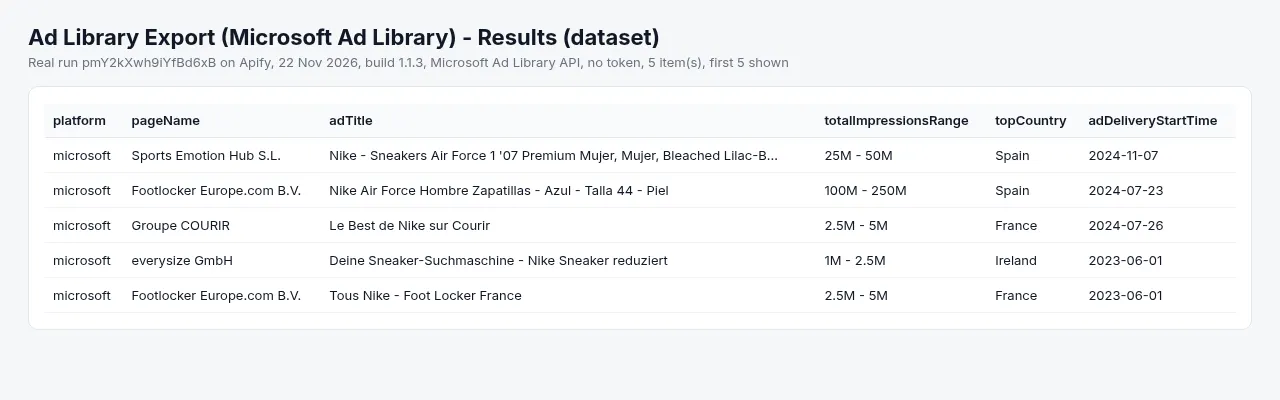
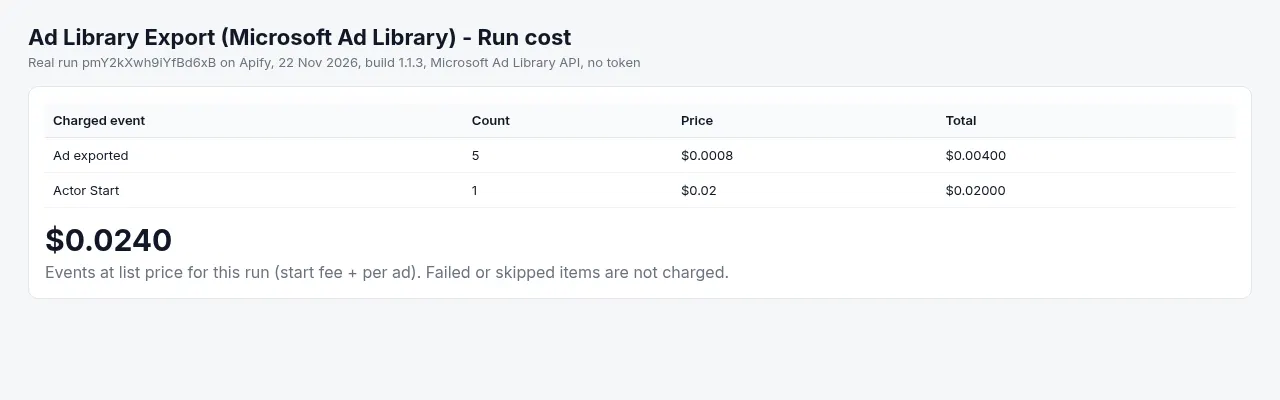
Real Apify run pmY2kXwh9iYfBd6xB (build 1.1.3): sources: ["microsoft"], search term nike, maxAds 5, no token. Images are rendered from the run's own input, dataset and charged events.
▶️ How to use (Microsoft, no token)
- Keep
microsoftinsources(the default ismeta+microsoft; with no Meta token the Meta part is skipped and nothing is charged for it). - Enter
searchTerms(for example a brand or product) ormicrosoftAdvertiserIds, optionally EU/EEAadReachedCountriessuch asNLorDEand delivery dates. SetmaxAdsto control the cost. - Press Start. Open the Microsoft (Bing) ads view in the Output tab, or download JSON, CSV or Excel.
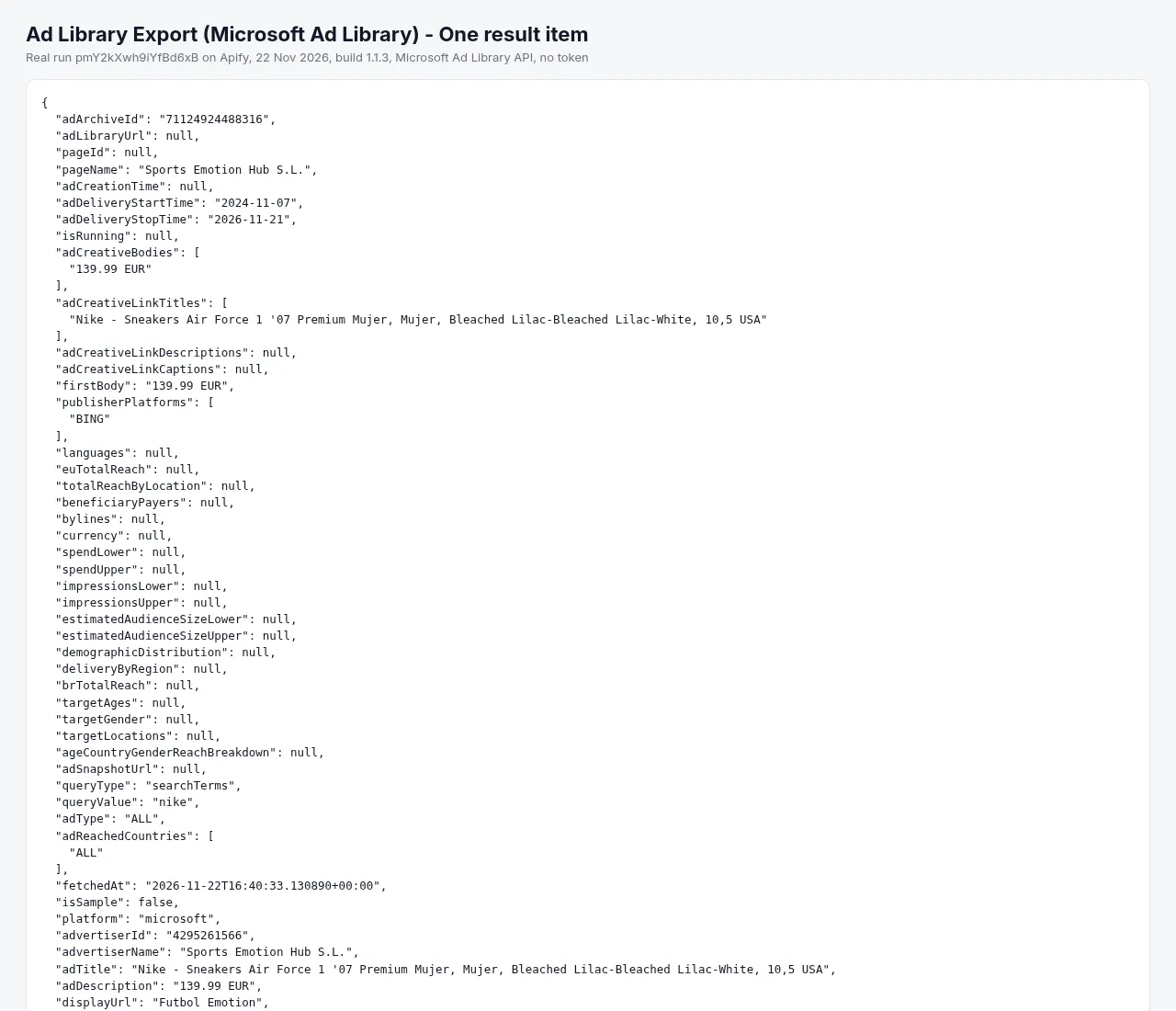
Output example (Microsoft row from the run above, shortened)
⬇️ What data you get
Microsoft rows fill adArchiveId, pageName / advertiserName, advertiserId, adTitle, adDescription, firstBody, displayUrl, destinationUrl, adDeliveryStartTime / adDeliveryStopTime (first and last served), publisherPlatforms: ["BING"], paidForBy, totalImpressionsRange, impressionsByCountry, topCountry, targetTypes, restrictionReason and adApiUrl. Meta-only columns (spend, demographics, snapshot link) stay null on Microsoft rows.
⚙️ Input
Main fields: sources (microsoft, meta or both), searchTerms, microsoftAdvertiserIds, adReachedCountries, deliveryDateMin / deliveryDateMax, maxAds, microsoftAdDetails, and for Meta the secret accessToken.
🟪 Meta Ad Library (needs your own Meta access token)
The Meta part calls Meta's official Ad Library API (Graph API ads_archive) with your own access token, put in the secret accessToken field. Without a token the Meta part does not run.
Honest status: we have not yet made a real Meta run on our side, so this page shows no Meta results and makes no claim about them. The Meta code path validates your token first: a wrong, expired or unapproved token stops the run before any ad is charged (only the $0.02 start fee applies).
Getting a token (Meta's process, can take a day or more):
- Confirm your identity and location at facebook.com/ID.
- Accept the Ad Library API terms at facebook.com/ads/library/api and create an app at developers.facebook.com.
- Generate a user access token in the Graph API Explorer (or a long-lived token) and paste it into
accessToken.
Meta's own coverage rule: the API returns ads that reached at least one EU country, plus ads about social issues, elections or politics elsewhere. It does not contain all ads worldwide. With sources: ["meta"] and no token, the actor returns 3 clearly marked illustrative sample rows (isSample: true, not live data) so you can see the columns; no ad events are charged (only the $0.02 start fee).
💵 Price
$0.0008 per unique ad exported (ad-exported) + $0.02 per run (Actor start). 5 ads = $0.024; 100 ads = $0.10; 1,000 ads = $0.82; 10,000 ads (over 10 runs) = $8.20. Same price for Microsoft and Meta ads. You can set a maximum cost per run.
⚠️ Limits
- Microsoft: EU/EEA ads only (that is what Microsoft publishes), at most 1,000 results per query. Details (dates, impressions) cost one extra API request per ad; turn
microsoftAdDetailsoff for faster runs. The public Ad Library page link and creative images are not filled for Microsoft rows yet. - Meta: needs your own approved token; spend and impressions are ranges and only for political and issue ads; Meta rate limits apply (the actor pauses, then stops and keeps what it exported).
maxAdsis shared by both libraries; Meta is searched first when a token is given.- No images or videos are downloaded.
🛡️ Data source and responsible use
Both ad libraries are public transparency archives run by Microsoft and Meta. The actor only requests the documented public ad fields, nothing about the people who saw the ads. Your Meta token is a secret input, sent only to Meta's API, removed from returned links and never written to the dataset or logs. Follow each library's API terms and the data-protection law that applies to you.
🔌 API
Works from n8n, Make, Zapier, webhooks and the Apify MCP server.
❓ FAQ
Can I try it for free?
Yes. Press Start with the prefilled input: it runs a small real Microsoft Ad Library job with no token. Apify's free plan includes monthly platform credit, which covers a first test.
Do I need a token?
Not for Microsoft. For Meta you need your own Meta access token; without it the Meta part is skipped.
Have you tested the Meta part?
Not with a real token yet. The listing shows only Microsoft proof until we have a real Meta run.
Is it legal to use Ad Library Export?
It only calls the official, public ad-transparency APIs published by Microsoft and Meta, under their terms, and requests no data about the people who saw the ads. Use the results lawfully (source terms, GDPR where it applies). This is not legal advice.
Can I use it through the API or an MCP server?
Yes, through the Apify API, the official client libraries, and the Apify MCP server.
📝 Changelog
- 22 Nov 2026: listing rewritten Microsoft-first with a dated real run at the current price. No code change.
- 1.1 (21 Nov 2026): Microsoft Ad Library leg (official public API, no token), new
sources,microsoftAdvertiserIds,microsoftAdDetailsinputs and aplatformcolumn. - 1.0 (10 Nov 2026): Meta Ad Library API export.
Questions or a field you need: digivibetech.com/support.


