
Bulk Lighthouse & Core Web Vitals Audit - PageSpeed + SEO
Pricing
from $8.00 / 1,000 page auditeds
Bulk Lighthouse & Core Web Vitals Audit - PageSpeed + SEO
🥈 Top 5 tested: equal scores (tested 22 Nov 2026). Audit every page of a site with Google Lighthouse via the official PageSpeed Insights API: 4 scores, lab metrics, real-user Core Web Vitals (CrUX), on-page SEO, duplicate titles, broken links and one ranked fix list. $0.008/page + $0.02/run.
Pricing
from $8.00 / 1,000 page auditeds
Rating
0.0
(0)
Developer

DigiVibeTech
Maintained by CommunityActor stats
0
Bookmarked
2
Total users
1
Monthly active users
2 days ago
Last modified
Categories
Features
Share
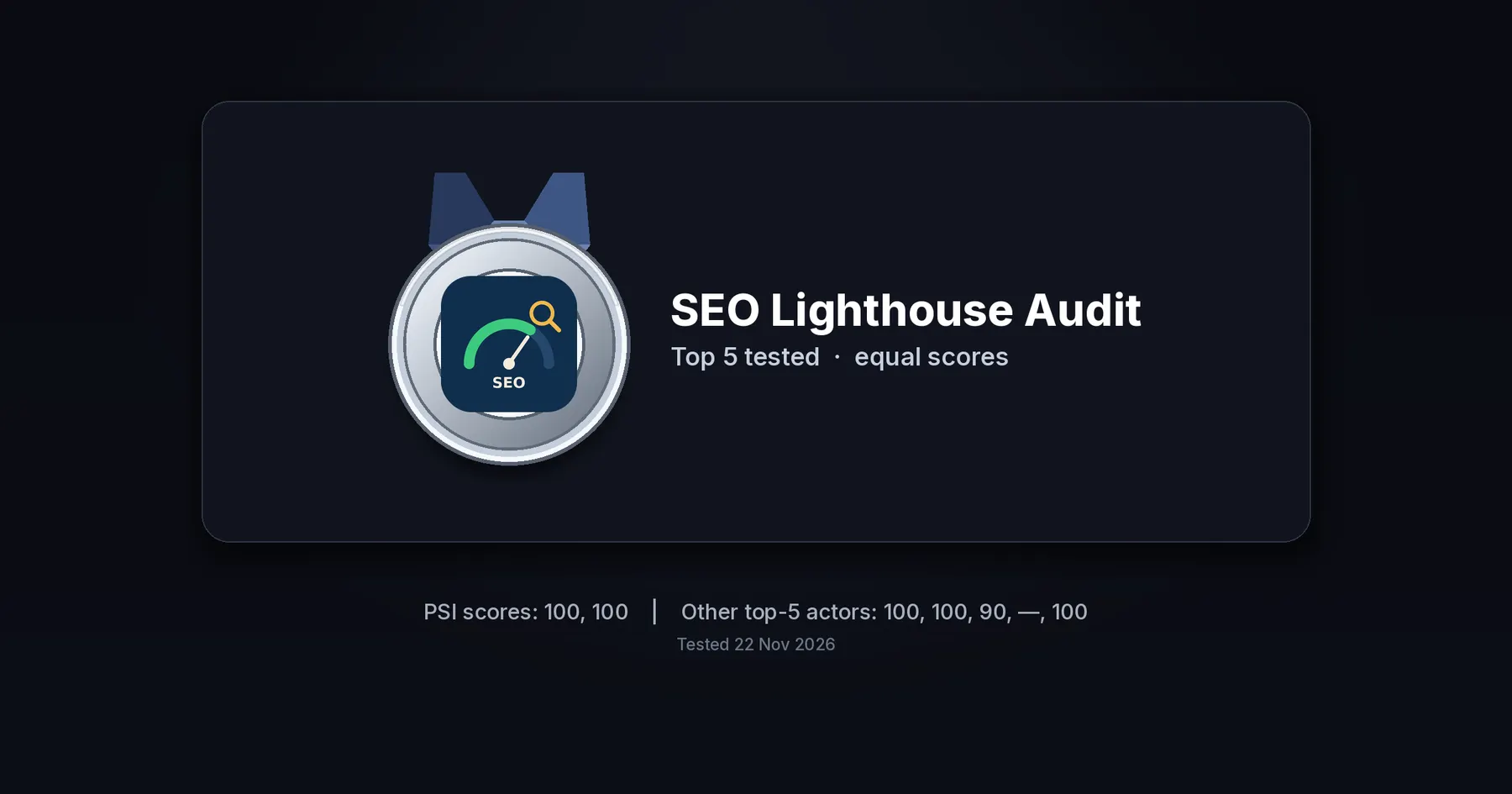
🥈 Top 5 tested: equal scores
Tested 22 Nov 2026 against the top 5 most-used Apify actors for this job, same input.
Bulk Lighthouse & Core Web Vitals Audit runs Google Lighthouse on every page of a site through the official Google PageSpeed Insights API, adds real-user Core Web Vitals from the Chrome UX Report when Google has them, checks on-page SEO, and gives you one ranked fix list for the whole site.
Try it: press Start. The prefilled input audits 3 real pages (3 × $0.008 + $0.02 start = $0.044). Set Max cost per run to cap any run.
- What you get per page: 4 Lighthouse scores, lab LCP/CLS/TBT/FCP/Speed Index, real-user LCP/INP/CLS p75 with Google's FAST/AVERAGE/SLOW rating, failed audits, on-page SEO issues
- For the whole site:
REPORT.htmlto send to a client,SITE-REPORTJSON,PAGES.csv - Who it's for: SEO and web-performance freelancers, agencies and shop owners
- Price: $0.008 per audited page plus $0.02 per run. Failed, blocked and error pages are free
What is it?
You give one or more site URLs. The actor finds pages through sitemap.xml and internal links (up to maxPages, max 500), then for each page:
- fetches the HTML itself (robots.txt respected, max one request per second per site) and runs on-page SEO checks;
- asks Google PageSpeed Insights to run Lighthouse on Google's own servers (mobile or desktop);
- reads the Chrome UX Report field data that PageSpeed Insights returns for the page, or for the whole origin when the page has too little traffic.
Because Lighthouse runs at Google, no browser runs inside the actor. Audits run 4 at a time by default, a run uses 512 MB, and a single slow page cannot freeze the run: it is retried, then skipped and not charged.
✅ Why this one
- Lab + field in one row. This one adds real-user LCP, INP and CLS (p75) and a "Core Web Vitals passed" flag when Google has the data.
- A site audit, not just a list of scores. On-page SEO checks per page and site-wide checks (duplicate titles and descriptions, internal links to 404 pages) end up in one ranked fix list.
- A report you can send.
REPORT.htmlshows average scores, real-user Core Web Vitals, "fix first" and the slowest pages. - Fair billing. One charge per page that got both the SEO checks and a Lighthouse result. robots.txt-blocked pages, error pages, non-HTML files and failed audits cost nothing.
- Fast. Real run on 22 Nov 2026: 5 pages in 22 seconds of run time, $0.0004 of platform compute.
How pages are found
Start URLs are always audited first. With crawling on, the actor reads sitemap.xml (and child sitemaps) and follows links on the same host until maxPages is reached. With several sites in one run, pages are shared fairly between them. Use includePattern and excludePattern to focus, for example, on /products/ only.
📸 Real run
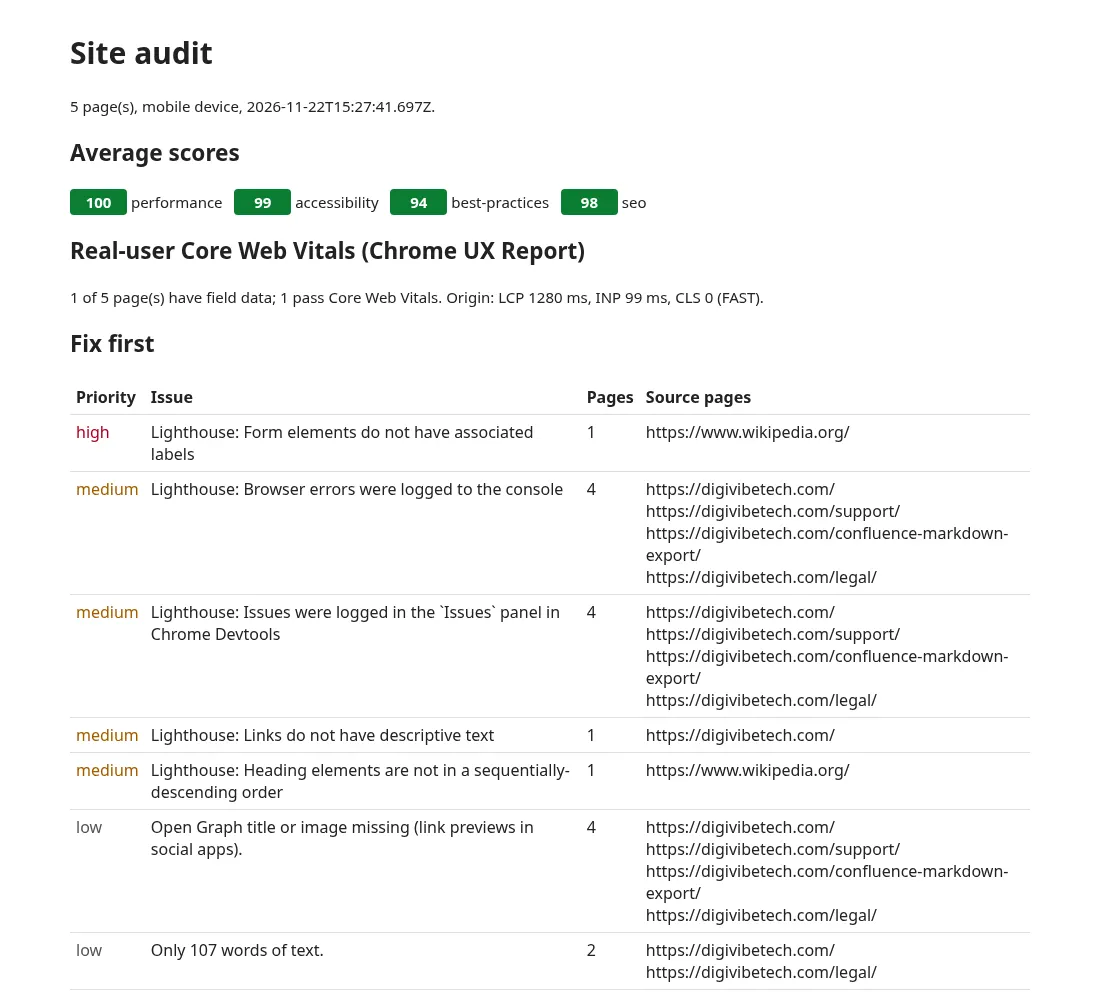
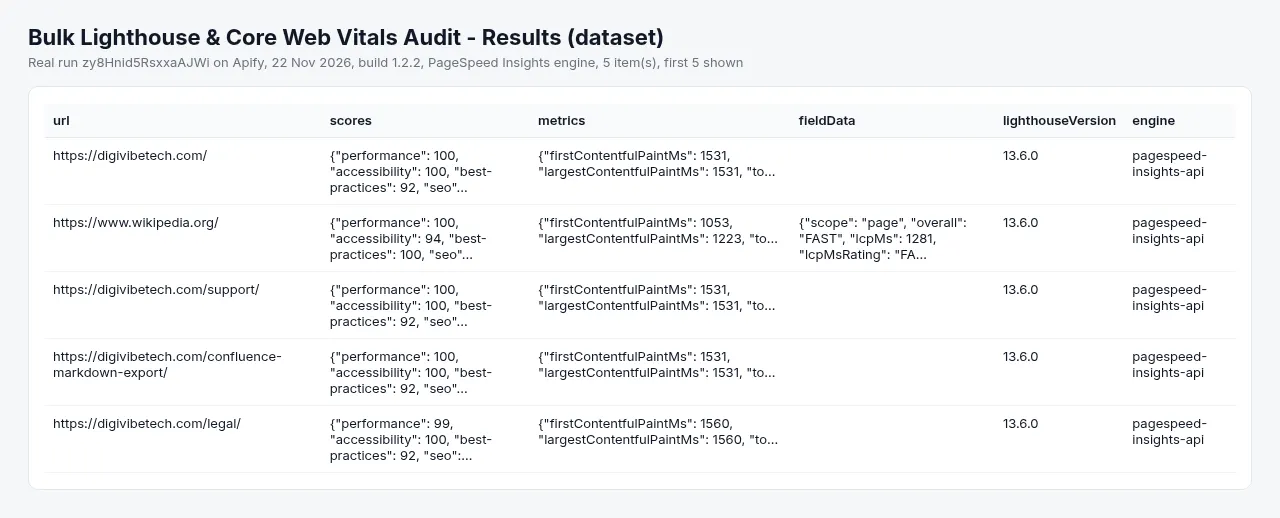
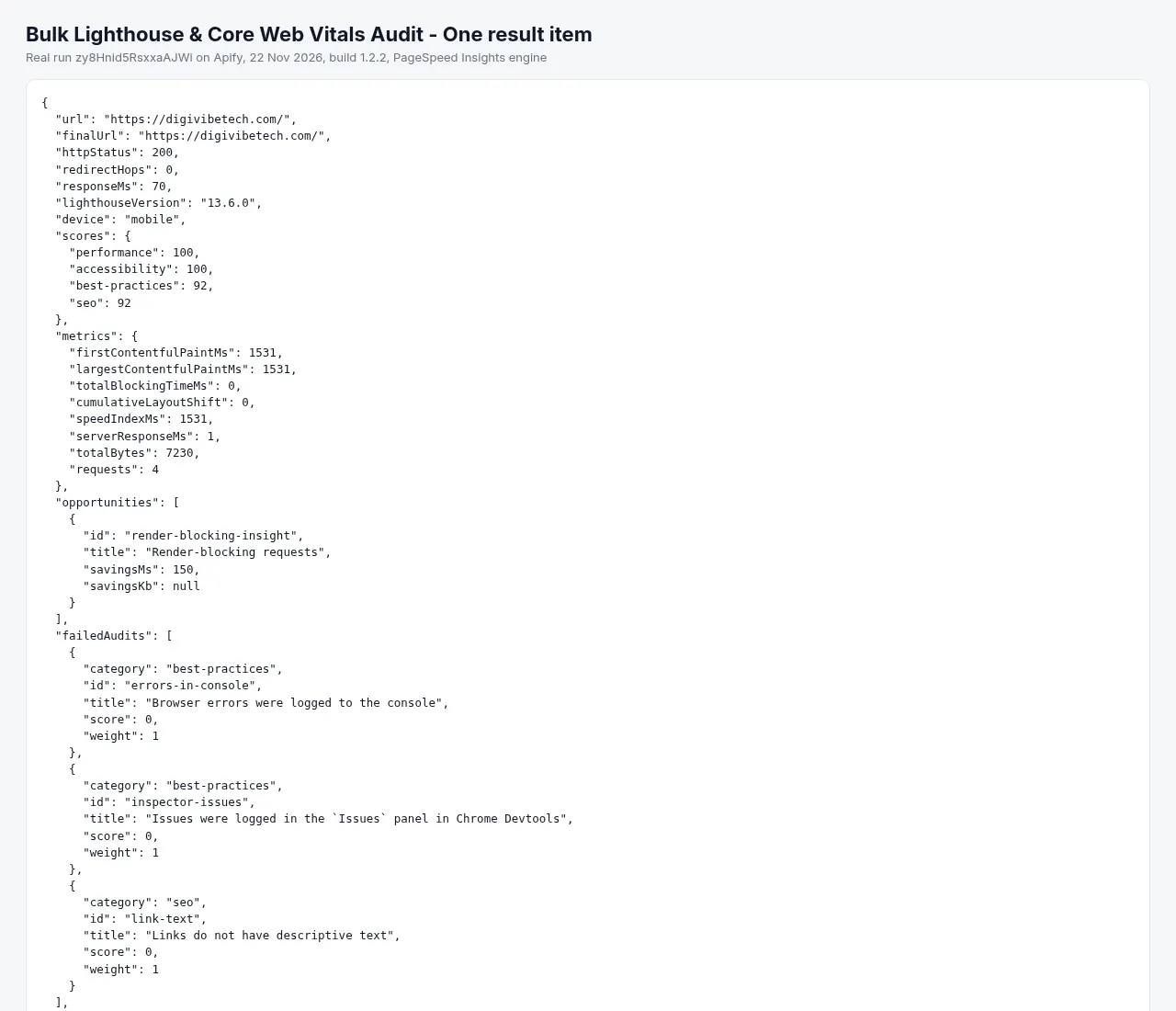
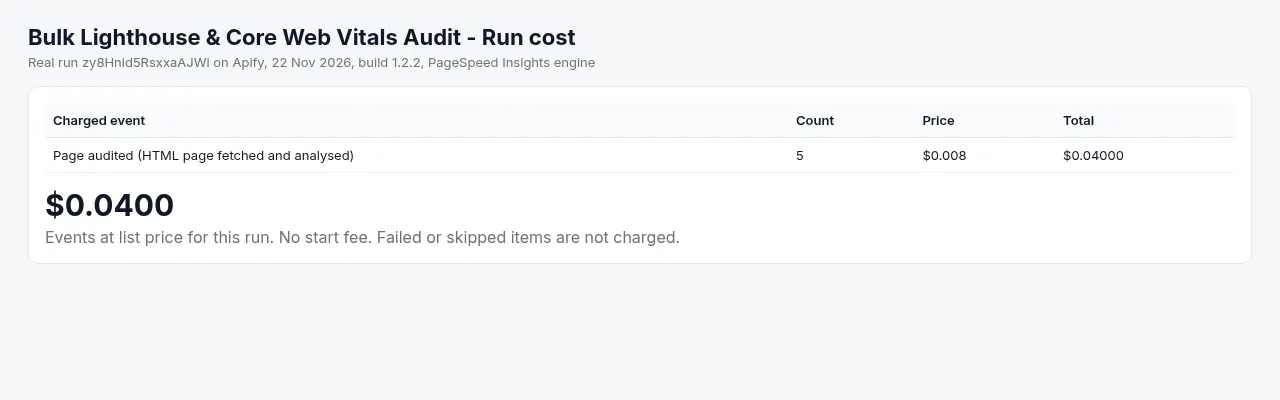
Run zy8Hnid5RsxxaAJWi on Apify, 22 Nov 2026 (build 1.2.2, PageSpeed Insights engine, Lighthouse 13.6.0). Input: startUrls https://digivibetech.com/ and https://www.wikipedia.org/, maxPages: 5, mobile. 5 pages audited and charged, 0 skipped.
fieldScope is page when Google has Chrome UX Report data for that URL, origin when only the whole site has data, and none for low-traffic sites (lab scores still apply).
⬇️ What data you get
Per page (dataset, Overview view):
- Lighthouse scores 0-100: performance, accessibility, best practices, SEO (Lighthouse run by Google PageSpeed Insights; the version is in
lighthouseVersion). - Lab metrics: Largest Contentful Paint, Cumulative Layout Shift, Total Blocking Time, First Contentful Paint, Speed Index, server response time, page weight and request count.
- Real-user field data (
fieldData,originFieldData): p75 LCP, INP, CLS, FCP and TTFB with Google's FAST/AVERAGE/SLOW rating andcoreWebVitalsPassed.nullwhen Google has no data. - Performance insights with estimated savings, and failed Lighthouse audits ranked by weight.
- On-page SEO: title and length, meta description and length, H1s, canonical, noindex (meta and X-Robots-Tag), lang, viewport, images without alt, word count, Open Graph, JSON-LD blocks, hreflang, mixed content.
For the whole site (key-value store, also linked in the Output tab):
REPORT.html: average scores, real-user Core Web Vitals summary, "fix first" list, slowest pages.SITE-REPORT: the same as JSON, with every issue, its priority and the pages it affects.PAGES.csv: one row per page for Excel or Google Sheets, lab and field columns side by side.ERRORS: every skipped or failed page and why (none of them charged).SUMMARY: counts.
🎯 Use cases
- Audit every product, category and blog page of a shop, not just the homepage
- Check whether real visitors pass Core Web Vitals, page by page
- Send a client a one-file report with what to fix first
- Re-run on a schedule to track scores after each release
▶️ How to use
- Open the actor; the input is prefilled with a small real example.
- Put in your own site and set
maxPagesto control the cost. - Press Start. Results appear in the Output tab.
- Download JSON, CSV or Excel, use the API, or schedule the actor.
⚙️ Input
Optional: concurrency (1-8, default 4), pageTimeoutSecs (default 120), categories, includePattern, and googleApiKey if you want your own Google quota for very large volumes. Without it, the actor's own key is used.
⬆️ Output
One record, shortened:
💵 Pricing and cost estimate
$0.008 per audited page plus $0.02 per run ($8 per 1,000 pages, plus the per-run start fee). No subscription. Not charged: pages robots.txt does not allow, pages that answer an error (they still show up in the site report as broken links), non-HTML files, and pages where PageSpeed Insights fails after retries. When your maximum cost per run is reached, the actor stops and lists the skipped pages.
| Pages audited | Cost (including $0.02 start) |
|---|---|
| 100 | $0.82 |
| 1,000 | $8.02 |
| 10,000 | $80.02 |
🔌 Integrations and API
Run it from n8n, Make, Zapier, Clay or any tool that can call an HTTP endpoint, connect a webhook to get notified when a run finishes, or let AI agents call it through the Apify MCP server (mcp.apify.com).
Run it and get the results in one call:
Python (pip install apify-client):
⚠️ Limits
- Lighthouse runs on Google's PageSpeed Insights servers, so lab scores reflect Google's test location and settings, which can differ from your own Chrome DevTools run.
- Field data exists only for pages and sites with enough Chrome traffic; small sites usually show
fieldScope: none. - PageSpeed Insights can audit public pages only. Pages behind a login, on localhost or on a private network cannot be audited.
- Up to 500 pages per run. Links on other hosts and subdomains are not followed.
- The actor stops about 90 seconds before the run timeout and saves everything it has, so a long run never ends without results.
🛡️ Data source, privacy and legality
Page HTML is fetched from the public sites you enter, respecting robots.txt. Lighthouse and Chrome UX Report data come from the official Google PageSpeed Insights API.
Processing, storage and payment
Input, run logs, dataset rows and generated files are processed and stored by Apify. Access to a run's storage depends on Apify settings; some generated file URLs may grant access to anyone who has the link. Treat output URLs as sensitive and do not put secrets, customer records or personal data in sample inputs.
Storage retention depends on your Apify plan, storage settings and deletion actions; no fixed retention period or automatic deletion by this Actor is promised. Apify handles run billing under pay-per-event pricing. Privacy and support information.
Page URLs are sent to the Google PageSpeed Insights API, which loads the pages on Google's servers. Use first-party or permissioned pages; reports contain URLs and page metadata.
❓ FAQ
How much does it cost?
$0.008 per audited page plus $0.02 per run. See the cost table above. There is no monthly fee.
Why PageSpeed Insights and not a local Chrome?
Local Lighthouse needs a 2 GB browser container and a single heavy page can hang it. With PageSpeed Insights, Google runs Lighthouse, you also get real-user Chrome UX Report data, and runs are faster and more reliable.
Do I need my own Google API key?
No. The actor has its own key. Add googleApiKey only if you run very large volumes and want your own Google quota.
Is it legal to audit a website with this actor?
The actor reads only public pages, respects robots.txt, sends at most one HTML request per second per site and uses no logins or anti-bot evasion. Lighthouse runs through Google's official PageSpeed Insights API. Audit your own sites or sites you have permission to test, and follow the site's terms. This is not legal advice.
Can I use it through the API or an MCP server?
Yes. Every run is available through the Apify API and client libraries, and AI agents can call it through the Apify MCP server.
Something does not work. Where do I get help?
Open an issue on the Issues tab or use digivibetech.com/support. Include the run ID.
📝 Changelog
23 Nov 2026
- PageSpeed Insights retries now stop before the run timeout, so a slow Google answer can no longer push a run past its time limit. FAQ: legality question added. Price unchanged.
1.2 (22 Nov 2026)
- Engine switched to the Google PageSpeed Insights API: no local Chrome, 4 audits in parallel, 512 MB instead of 2 GB, retries and a stop-before-timeout guard. Fixes runs that timed out.
- New: real-user Core Web Vitals (Chrome UX Report) per page and per origin, in the dataset, CSV and HTML report.
- Multiple sites in one run now share
maxPagesfairly. Price unchanged.
1.1 (20 Nov 2026)
- Lighthouse 13.6.0 (local Chrome), listing refresh.
🧩 More DigiVibeTech actors
- Website SEO & AI Search Audit (GEO/AEO)
- Broken Link & Image Checker - Sitemap or Crawl
- Bulk WHOIS & DNS Lookup - Domain Expiry, RDAP, SPF, DMARC
- Redirect Chain & Migration Map Checker
Maintained by DigiVibeTech. Questions or bugs: use the Issues tab or digivibetech.com/support; we reply within 2–5 business days.


