

Shop SEO & Product Schema Audit - Merchant-Ready Check
Pricing
$4.97 / 1,000 page auditeds
Shop SEO & Product Schema Audit - Merchant-Ready Check
Audit shop pages for SEO and product data: title, meta, H1, canonical, noindex, alt text plus Product/Offer JSON-LD (price, currency, availability, image, brand, GTIN check digit, shipping, returns) and price mismatches. Score + fix list. $0.00497 per page; failures free.
Pricing
$4.97 / 1,000 page auditeds
Rating
0.0
(0)
Developer

DigiVibeTech
Maintained by CommunityActor stats
0
Bookmarked
2
Total users
1
Monthly active users
2 days ago
Last modified
Categories
Features
Share
Shop SEO & Product Schema Audit — audit shop pages for SEO and product data: title, meta, H1, canonical, noindex, alt text plus Product/Offer JSON-LD (price, currency, availability, image, brand, GTIN check digit, shipping, returns) and price mismatches.
Try it free: press Start — the prefilled input runs a small real job (up to 1 × page audited, about $0.005 in events). Apify's free plan includes monthly platform credit, so a first test costs you nothing. You can also set a maximum cost per run.
- What you get:
url,seoScore,productScore,merchantReady,isProductPage,product.price - Who it's for: e-commerce SEO teams and shop owners
- Price: $0.00497 per page audited
- Data source: Reads the public shop pages you enter.
What is Shop SEO & Product Schema Audit?
Audit the pages of your online shop for SEO basics and product structured data in one run. For every page you get an SEO score, a product score, a Merchant-ready flag and one prioritised fix list.
Built for shop owners, agencies and developers working on WooCommerce, Shopify, Shopware, Magento, PrestaShop or custom shops: check product pages before launch, after a theme update or before submitting a Google Merchant Center feed.
✅ Why this one
- Per page: an SEO score, a product score, a Merchant-ready flag and one prioritised fix list.
- Checks Product / Offer JSON-LD, microdata and Open Graph: price, currency, availability, brand, GTIN with check-digit validation, shippingDetails and return policy.
- Works on WooCommerce, Shopify, Shopware, Magento, PrestaShop or custom shops, for $0.00497 per page with no start fee.
📸 Real-run screenshots
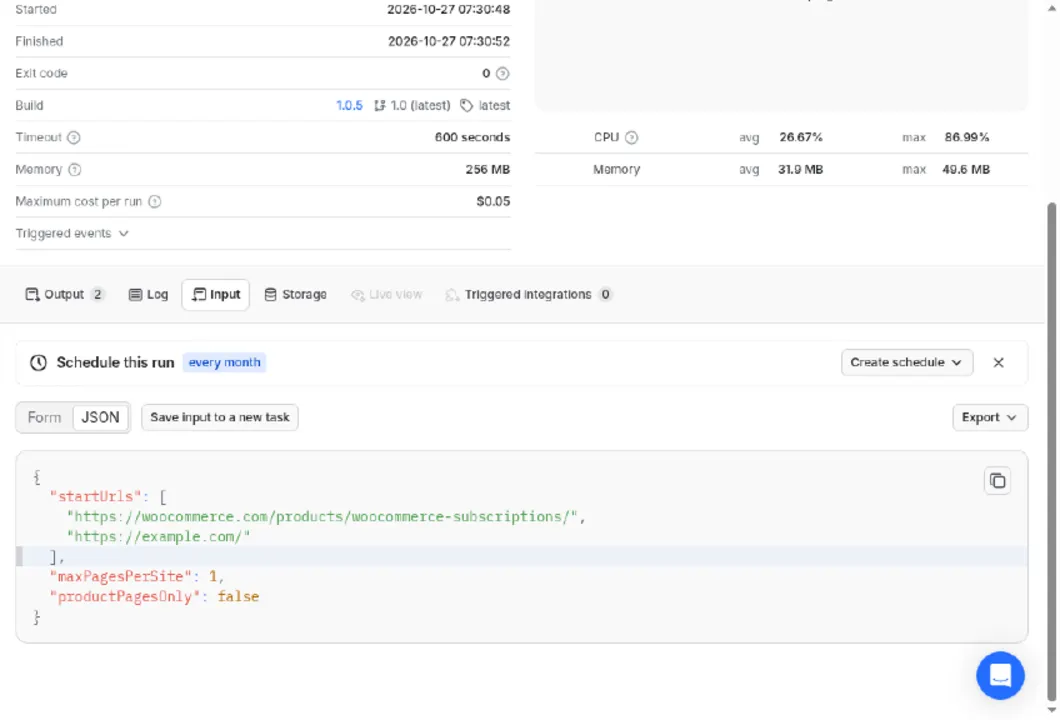
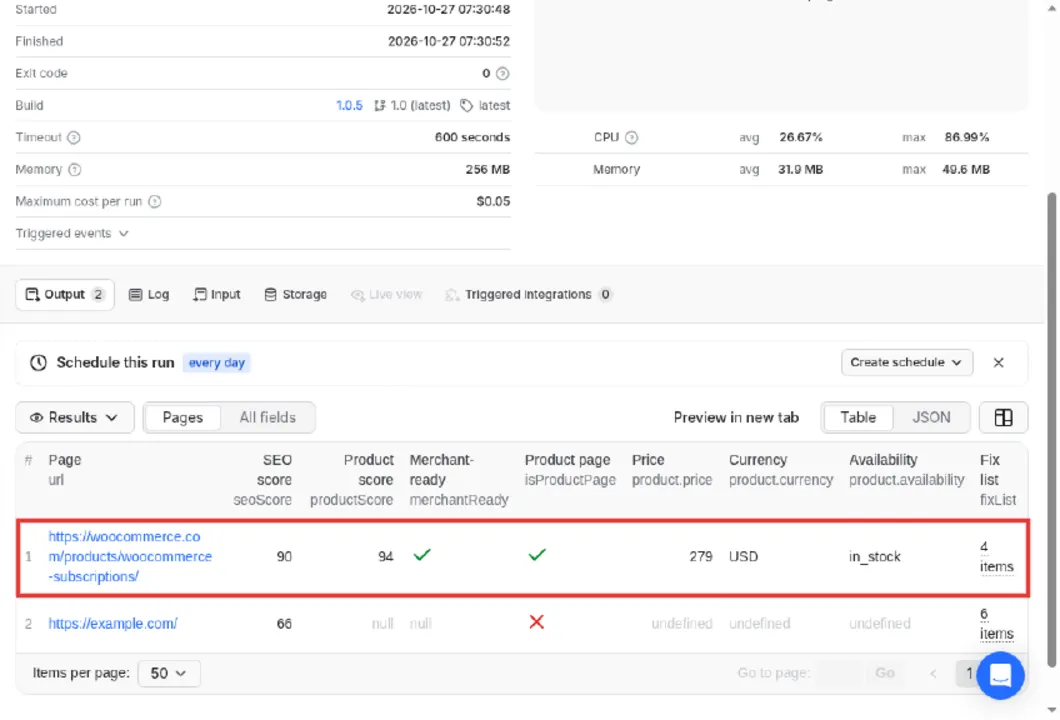
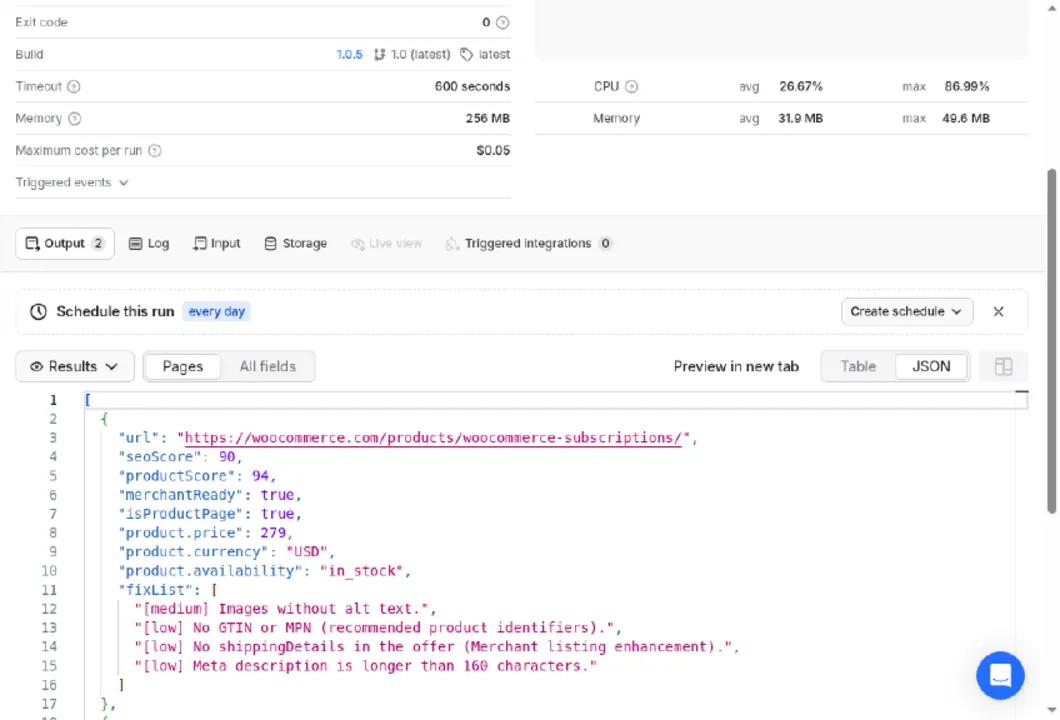
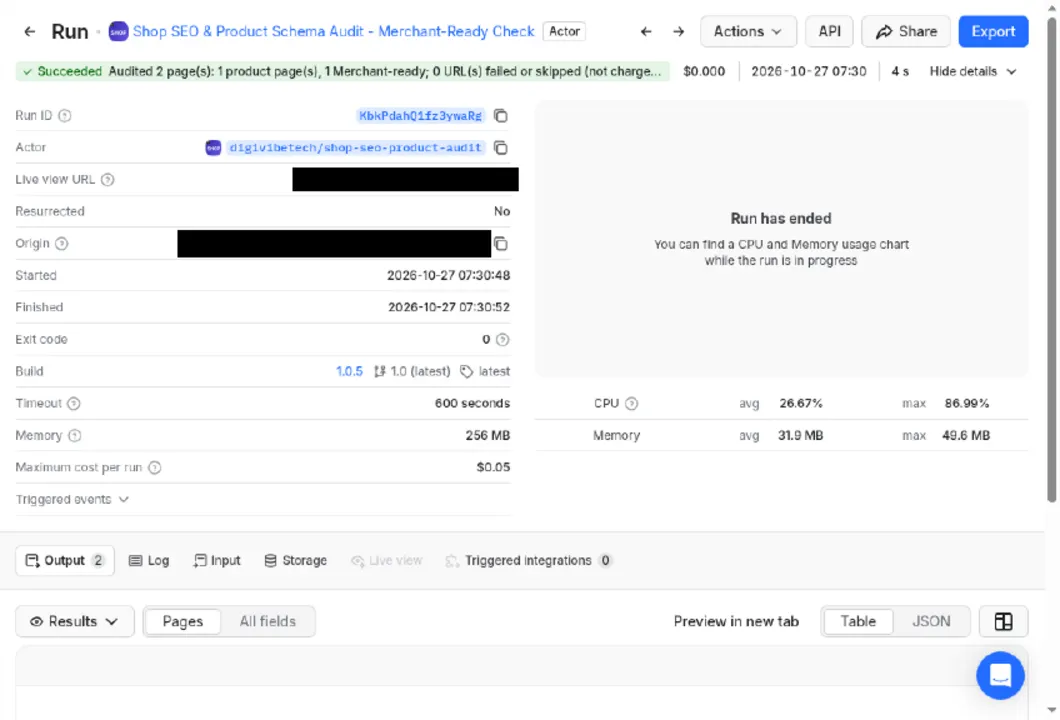
From a real Console run, 27 Oct 2026 (run KbkPdahQ1fz3ywaRg): public WooCommerce Subscriptions product page on woocommerce.com plus example.com, 2 pages audited.
⬇️ What data you get
Product data (Product / Offer JSON-LD, microdata, Open Graph)
- Product structured data present (and not only Open Graph tags)
- Name, price,
priceCurrency(ISO 4217), availability, image, brand - GTIN with check-digit validation, or MPN
shippingDetailsandhasMerchantReturnPolicy(Merchant listing enhancements)- Price mismatch between JSON-LD and the microdata/Open Graph price, including the classic cents-vs-units (x100) error
- Variants (
ProductGroup/hasVariant, AggregateOffer price range)
SEO: title and meta description length, H1, canonical, noindex (meta and X-Robots-Tag), hreflang, viewport, HTTPS and mixed content, image alt text, thin content, Open Graph, invalid JSON-LD, slow response, redirect chains.
🎯 Use cases
- Check Product/Offer JSON-LD before Google Merchant review
- Find price mismatches between page and schema
- Audit titles, meta and alt text on product pages
▶️ How to use
- Open the actor; the input is prefilled with a small real example.
- Replace it with your own input and set
maxPagesPerSiteto control the cost. - Press Start. Results appear in the Output tab (Overview view).
- Download JSON, CSV or Excel, call the results via API, or schedule the actor.
⚙️ Input
startUrls (required), maxPagesPerSite (1 = only the listed pages; higher = crawl the same host), productPagesOnly (when crawling, save and charge only product pages).
Example input
⬆️ Output
One item per audited page: all SEO fields, seoScore, issues[], isProductPage, product (source, title, brand, sku, gtin, mpn, price, currency, availability, imageUrl, variantsCount, priceCheck), productIssues[], productScore, merchantReady and fixList (high first). Failed URLs are in ERRORS; totals in SUMMARY.
Example output (one record, some fields shortened)
Real record from a test run on the input above (dates and values change over time).
💵 Pricing and cost estimate
| Event | Price |
|---|---|
| Page audited | $0.00497 |
Failed, robots-skipped and non-HTML URLs are free, and there is no start fee. A 200-product shop costs $0.99.
Cost estimate
| Page auditeds | Cost |
|---|---|
| 100 | $0.50 |
| 1,000 | $4.97 |
| 10,000 | $49.70 |
You pay only for these events: no subscription. Set Maximum cost per run in the run options and the actor stops before it is reached.
🔌 Integrations and API
Run it from n8n, Make, Zapier, Clay or any tool that can call an HTTP endpoint, connect a webhook to get notified when a run finishes, or let AI agents call it through the Apify MCP server (mcp.apify.com).
Run it and get the results in one call:
Python (pip install apify-client):
Use it in n8n, Make or Zapier
Run it weekly on your product sitemap pages and alert when merchantReady turns false.
⚠️ Limits
- It reads the HTML the server returns. Prices or schema injected later by JavaScript are not seen, which can show up as a missing-product warning.
merchantReadyfollows Google's published Merchant listing fields; it is a checklist, not a guarantee that Google will accept the listing.- Amazon and Google hosts are refused, and pages blocked by robots.txt are skipped.
- GTIN validation checks the check digit only. It cannot confirm that the number is registered to that product.
🛡️ Data source, privacy and legality
Reads the public shop pages you enter.
Responsible crawling
We follow each site's robots.txt (disallowed pages are skipped and not charged), send at most about one request per second per site, use an honest User-Agent (ShopAudit/1.0) and never log in, use proxies or bypass bot protection. Amazon and Google hosts are refused. Audit shops you own or are allowed to analyse. Email addresses and phone numbers are not exported.
❓ FAQ
How much does Shop SEO & Product Schema Audit cost?
$0.00497 per page audited. See the cost estimate table above. There is no monthly fee.
Can I try it for free?
Yes. Press Start with the prefilled input: it runs a small real job (up to 1 × page audited, about $0.005 in events). Apify's free plan includes monthly platform credit, which covers a first test.
Is it legal to use Shop SEO & Product Schema Audit?
Reads the public shop pages you enter. Use the results lawfully (terms of the source, GDPR where it applies). This is not legal advice.
Can I use it through the API or an MCP server?
Yes. Every run is available through the Apify API and the official client libraries, and AI agents can call the actor through the Apify MCP server. See Integrations and API above.
Something does not work. Where do I get help?
Open an issue on the Issues tab or use digivibetech.com/support. Include the run ID so we can reproduce it.
📝 Changelog
20 Nov 2026 — listing refresh
- README, listing text and input form restructured to the DigiVibeTech Apify quality standard v1. No feature or price change.
1.0 — builds 1.0.1 to 1.0.9
- First build 2026-10-14, latest build 2026-11-03 (9 successful builds).
🧩 More DigiVibeTech actors
- Broken Link & Image Checker - Sitemap or Crawl
- Website SEO & AI Search Audit (GEO/AEO)
- Bulk WHOIS & DNS Lookup - Domain Expiry, RDAP, SPF, DMARC
- Redirect Chain & Migration Map Checker
Maintained by DigiVibeTech. Questions or bugs: use the Issues tab or digivibetech.com/support; we reply within 2–5 business days.


