

Reliable Google Trends API
Pricing
from $2.00 / 1,000 keyword results
Reliable Google Trends API
Google Trends data as clean JSON: interest over time, interest by region, related and rising queries and topics for 1-5 keyword comparisons, plus Trending now by country. Retries Google's throttling so runs finish; failed keywords are never charged.
Pricing
from $2.00 / 1,000 keyword results
Rating
0.0
(0)
Developer

Nick Nguyen
Maintained by CommunityActor stats
0
Bookmarked
2
Total users
1
Monthly active users
21 hours ago
Last modified
Categories
Share
Get Google Trends data as clean, flat JSON: interest over time, interest by region, related and rising queries, and related topics for single keywords or comparisons of up to 5 keywords, plus Trending now lists by country. Google throttles automated Trends requests hard, and that is why Trends scrapers fail. This actor is built around that throttling: it retries patiently, finishes the run, and never charges for a keyword it could not deliver.
Features
- Keyword batches in one run: any number of searches, each a single keyword or a comparison of up to 5 keywords on one shared 0-100 scale.
- Everything trends.google.com shows for a keyword in one record: the time series, the regional breakdown (countries, states/regions, or cities, depending on the region you pick), top and rising related queries, and related topics when Google provides them.
- Trending now by country: every trending search with its search volume, growth, start time, categories and related searches.
- Flat, predictable JSON for spreadsheets, scripts and AI agents. Empty sections come with a
plain-English
notesentry saying why they are empty. - Built for reliability: retries per request, then a second pass at the end of the run for anything still throttled. A keyword that still fails is reported with its error and not charged.
- Web, YouTube, News, Image and Google Shopping search, 25 categories, every preset time range, and custom date ranges.
How it works
- Put your keywords in Search terms: one search per line. Put up to 5 keywords on one line, separated by commas, to compare them.
- Choose the region, time range, category and Google property, the same choices as on trends.google.com.
- The actor asks Google Trends for the same data the trends.google.com page loads, through residential proxies with real-browser TLS fingerprints. When Google throttles a request, it waits and retries on the same connection before switching to a fresh one. In our tests that mattered far more than which proxy we used.
- Each keyword becomes one dataset record as soon as all of its data has arrived. You are charged only then.
For Trending now, switch Mode to Trending now and list the countries.
Input
| Field | Type | Default | Description |
|---|---|---|---|
mode | enum | keywords | keywords or trendingNow. |
searchTerms | array | ["coffee"] | One search per line; commas inside a line compare up to 5 keywords. |
geo | string | "" (worldwide) | Country code (US, GB, DE), sub-region (US-CA, GB-SCT), or empty for worldwide: the geo= value of a trends.google.com URL. |
timeRange | enum | today 12-m | now 1-H, now 4-H, now 1-d, now 7-d, today 1-m, today 3-m, today 12-m, today 5-y, all. |
customTimeRange | string | Overrides timeRange: 2024-01-01 2024-12-31, or with hours for ranges under a week: 2026-10-01T00 2026-10-05T23. | |
category | enum | "" (all) | Google Trends top-level category id, e.g. 71 = Food & Drink. |
property | enum | "" (web) | youtube, news, images, or froogle (Google Shopping). |
language | string | en-US | Language for region and topic names. |
trendingCountries | array | ["US"] | Trending now: country codes, one list per country. |
trendingHours | enum | 24 | Trending now: 4, 24, 48 or 168 hours. |
trendingMaxItems | integer | 0 (all) | Trending now: cap on trends per country. |
Example 1, one keyword in the US over the past 12 months (the default run, with geo set):
Example 2, a 5-keyword comparison plus a separate keyword, on YouTube, over 5 years:
This returns 6 records: five sharing one 0-100 scale, and "cold brew" on its own scale.
Example 3, trending searches in the US and Germany over the last 4 hours:
From code (Python, pip install apify-client):
Output
Keywords mode: one record per keyword. A real record (trimmed: the full series has 53 weekly points and the regions list has all 51 states):
| Field | Meaning |
|---|---|
interestOverTime | {date, value} points. date is a day (2025-10-19, the start of a week or month for longer ranges) or, for ranges under a week, a UTC time (2026-10-12T22:00:00Z). isPartial: true marks the current, still-incomplete period; hasData: false marks a point Google has no data for. |
averageInterest | Google's own average for comparisons; for a single keyword, the mean of the series. |
peakDate | The date of the highest point. |
interestByRegion | Regions sorted by value. regionResolution says what they are: COUNTRY (worldwide), REGION (states/provinces), DMA (US metros) or CITY (with lat/lng instead of a code). Regions without data are left out. |
relatedQueriesTop | Most frequent related searches, scored 0-100 against the top one. |
relatedQueriesRising | Fastest-growing related searches: increasePercent is the growth over the previous period; breakout: true is Google's "Breakout" label (growth over 5000%). |
relatedTopicsTop / relatedTopicsRising | {topic, type, mid, value}; mid is the Google Knowledge Graph id. null in comparisons (see Limitations). |
notes | Why a section is empty. Always read it before treating an empty list as zero interest. |
status / error | ok, or failed with the error. Failed records are never charged. |
trendsUrl | The same view on trends.google.com, to check any number by eye. |
Reading Google's 0-100 numbers
Google Trends never reports search counts for keywords. Every number is relative:
- Over time: 100 is the highest point in the chosen range and region; 50 means half as popular as that peak. In a comparison, all keywords share one scale: 100 is the single highest point of any of them, so you can compare keywords directly. The same keyword gets different numbers in a different comparison, region or time range.
- By region, single keyword (
interestByRegionScale: "relativeToTopRegion"): 100 is the region where the keyword makes up the largest share of all searches. That is search share, not volume, so a small state can top the list. - By region, comparison (
"shareOfComparison"): each keyword's share of the compared searches in that region. The values of all keywords in a region add up to 100. 0means too little data, not necessarily zero searches.
Trending now mode: one record per country, with the trends in a list (trimmed to one trend):
searchVolume is Google's rounded lower bound ("20K+" searches); increasePercent is the growth
Google shows next to it; endedAt is set once a trend is no longer active.
The dataset has two table views, Keywords and Trending now (one row per trend), and exports
to JSON, CSV and Excel. For a flat file with one row per trend, add unwind=trends to the export
URL, as the run's Trending now (CSV) output link does.
Pricing
Pay per event, no subscription. Prices below are for Apify's free plan; paid Apify plans pay less per result: $0.0027 (Starter), $0.0024 (Scale) and $0.002 (Business). Platform usage, including the residential proxy, is included. Put many keywords in one run: the run-start fee is charged once per run.
| Event | Price | When it is charged |
|---|---|---|
| Run start | $0.01 | Once per run, when it starts (Apify's standard apify-actor-start event). |
| Keyword result | $0.003 | Once per keyword, after all its data arrived. 5 keywords in one comparison = 5 results. |
| Trending list | $0.003 | Once per country list, however many trends it contains. |
| Monthly use | Cost |
|---|---|
| 250 keywords in 25 runs | $1.00 |
| 1,000 keywords in 100 runs | $4.00 |
| 30 daily trending lists (30 runs) | $0.39 |
Failed keywords are never charged. Low-volume keywords that Google answers with empty data are
charged as normal results, because that answer is real data; their notes say so. Set a maximum
charge in the run options and the actor stops fetching before it would go over: a comparison that
does not fit under the limit is skipped, not half-done.
Limitations
- Related topics are mostly empty right now. As of October 2026 Google returns an empty
related-topics list for most keywords, popular ones included, and sends no topics at all for
comparisons (
null). The fields fill in whenever Google sends topics. Related queries are not affected. - Relative numbers only. Google Trends does not publish absolute search volumes for keywords (see "Reading Google's 0-100 numbers"). Trending-now volumes are Google's rounded buckets.
- At most 5 keywords per comparison, as on trends.google.com. Comparing more needs a shared anchor keyword across several lines.
- Speed. A keyword takes about 2-5 seconds. When Google throttles, the waits between retries stretch that to a minute or more, and a heavily throttled task gets one more try at the end of the run. 100 comparisons usually finish in a few minutes; the default run timeout is 1 hour.
- Not 100%. In our 200-task tests on 2026-10-19, 195-200 of 200 tasks succeeded on the first
pass, depending on how hard Google was throttling at the time. The end-of-run retry pass was added
for exactly those cases. Anything that still fails is listed with
status: "failed", logged, and not charged. - Per-keyword maps inside a comparison (trends.google.com's small map under each keyword) are not fetched; the compared regional breakdown is.
- Region codes are Google's: ISO country codes, ISO sub-regions like
US-CA, and Nielsen metro codes likeUS-NY-501.
Data privacy
This actor reads only public, aggregated Google Trends data. It needs no Google account and no cookies of yours, and it handles no personal data. Your search terms are sent to Google Trends only to fetch their data. Results live only in your own run's dataset, under your Apify account's retention settings.
Screenshots
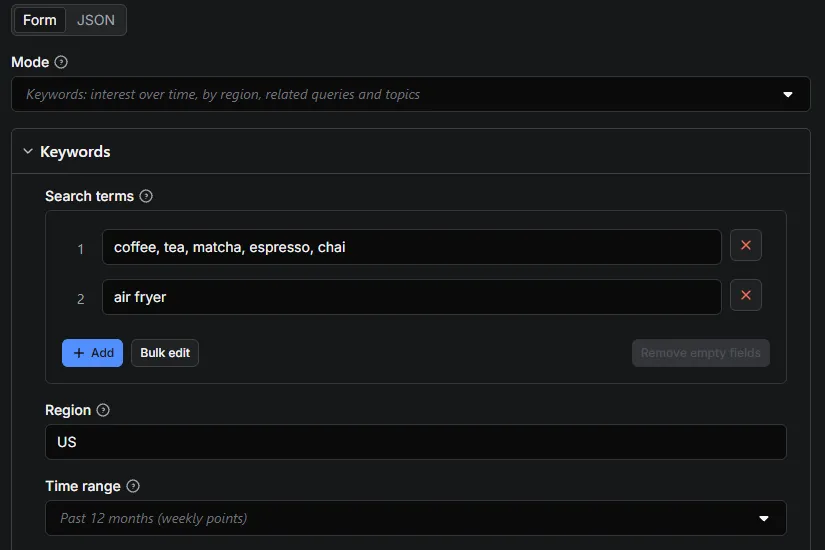
Compare up to 5 keywords per line, as many lines as you like:
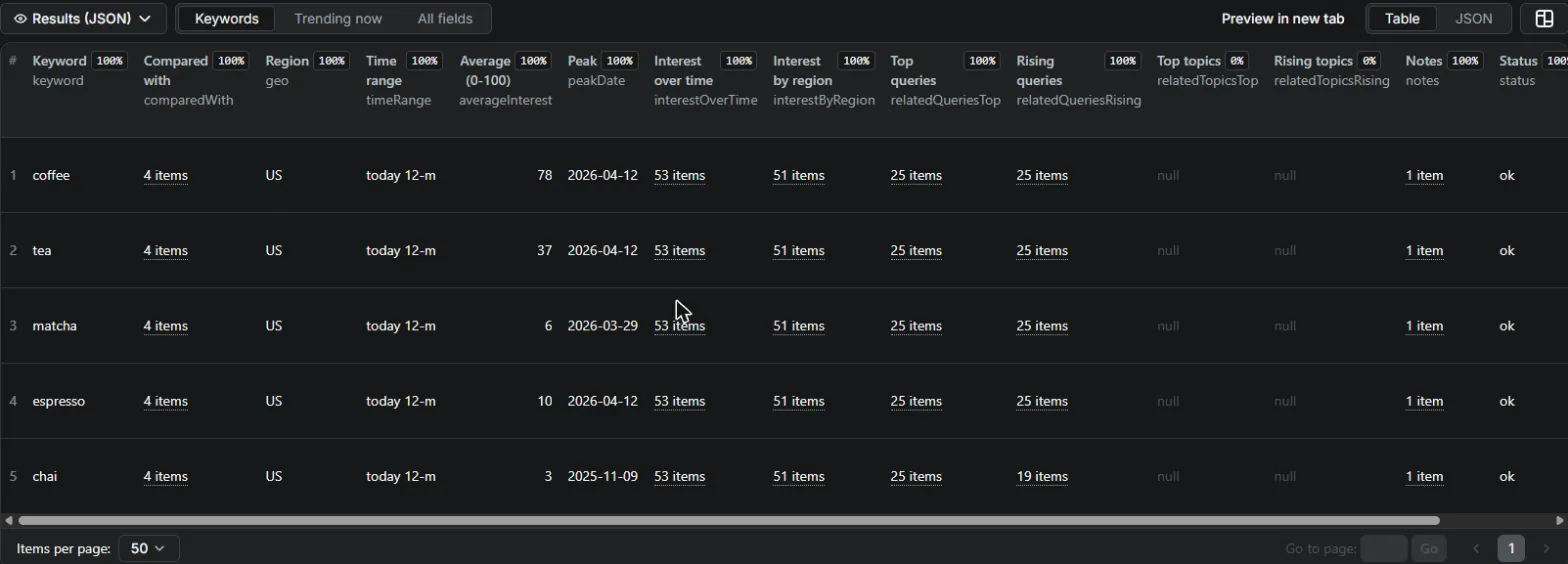
One row per keyword, on the same 0-100 scale, with series, regions and related queries:
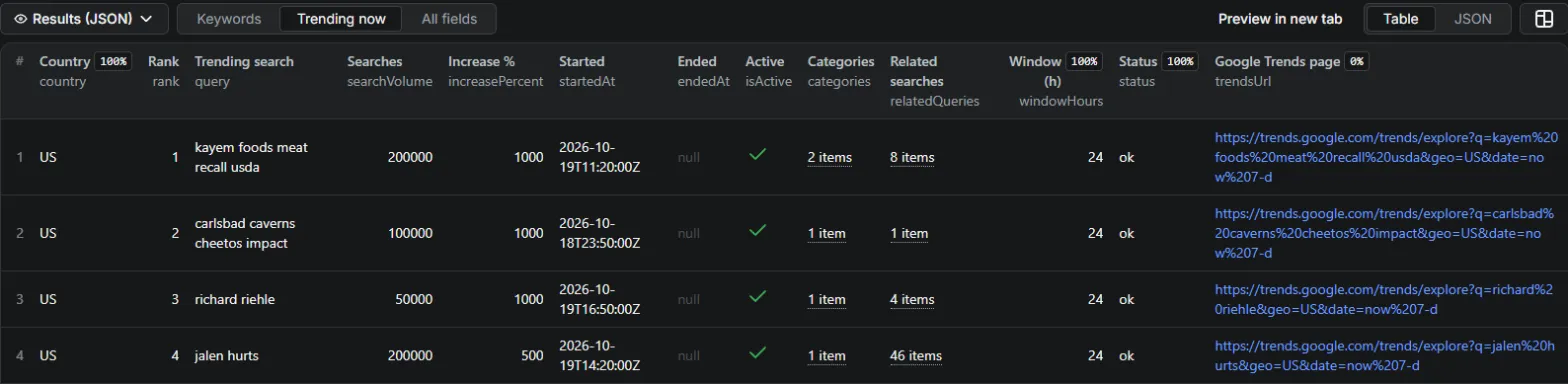
Trending now, one row per trend with volume, growth and related searches:
Support
Open an issue on the actor's Issues tab, ideally with the run link. A keyword that fails repeatedly, or a field that looks wrong next to trends.google.com, is exactly what we want to hear about. Typical response: 1 business day.


