

Argenprop Property Search Scraper
Pricing
Pay per usage
Argenprop Property Search Scraper
Automate property data extraction from Argenprop.com, Argentina's leading real estate platform with 350,000+ listings. Extract property details, prices, addresses, images, and descriptions from apartments, houses, and commercial properties efficiently for market analysis and business intelligence.
Pricing
Pay per usage
Rating
0.0
(0)
Developer

ecomscrape
Maintained by CommunityActor stats
0
Bookmarked
34
Total users
1
Monthly active users
6 days ago
Last modified
Categories
Share
Contact
If you encounter any issues or need to exchange information, please feel free to contact us through the following link: My profile
Professional Argenprop.com Real Estate Data Extraction Solution
Argenprop.com is Argentina's leading online real estate platform, offering rental and sale listings for apartments, houses, offices, commercial spaces, and land across the country. With over 20 years in the real estate business and more than 270,000 active property listings, the platform serves as a crucial marketplace connecting real estate agencies with prospective buyers and renters.
For real estate professionals, market analysts, property investors, and researchers, accessing this vast dataset manually is time-consuming and inefficient. Whether you're conducting competitive market analysis, tracking property price trends, building real estate comparison tools, or generating investment leads, manually collecting data from hundreds or thousands of listings is impractical. This is where automated scraping becomes essential, transforming hours of manual work into minutes of automated data collection.
The Argenprop.com Property Search Scraper is a specialized tool designed to automatically extract structured property data from search result pages on Argenprop.com. This scraper navigates through property listing pages, collects comprehensive information about each property, and delivers the data in a clean, structured format ready for analysis or integration into your systems.
Overview of the Argenprop.com Property Scraper
The Argenprop.com Property Search Scraper is a specialized tool designed to automatically extract structured property data from search result pages on Argenprop.com. This scraper navigates through property listing pages, collects comprehensive information about each property, and delivers the data in a clean, structured format ready for analysis or integration into your systems.
Key Features:
- Bulk extraction: Process multiple search result URLs simultaneously
- Pagination support: Automatically handle paginated search results
- Complete property data: Capture all essential property information including titles, prices, locations, descriptions, and image galleries
- Proxy support: Built-in residential proxy integration to avoid detection and blocking
- Configurable limits: Control the number of items extracted per URL
- Retry mechanism: Automatic retry logic for failed requests
Ideal Users:
- Real estate agencies conducting market research
- Property investment firms analyzing market opportunities
- Data analysts studying housing market trends
- Real estate comparison platforms aggregating listings
- Academic researchers studying urban development and housing markets
Input Configuration Explained
Example url 1: https://www.argenprop.com/departamentos/alquiler?pagina-3
Example url 2: https://www.argenprop.com/departamentos/venta
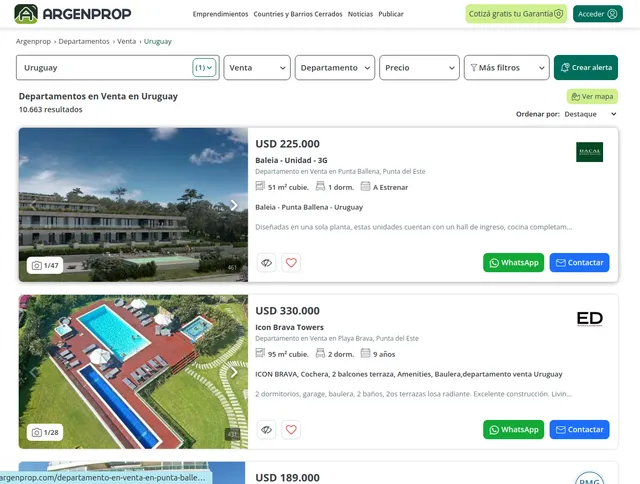
Example url 3: https://www.argenprop.com/departamentos/venta/uruguay
Example Screenshot of property list by query page:
Input Format
The scraper accepts configuration through a JSON object with several key parameters:
Scrape with URLs:
The urls parameter: Add the URLs of the property list pages you want to scrape. You can paste URLs one by one, or use the Bulk edit section to add a prepared list.
The ignore_url_failures parameter: If set to true, the scraper will continue running even if some URLs fail to be scraped after reaching the maximum number of retries. This ensures that one problematic URL doesn't stop your entire scraping job.
When you provide a list of URLs for scraping, all options in the "Scrape with search filters" section will be disabled. The system will only collect data from the URLs you specified.
Scrape with Search Filters:
The location parameter: Enter the location to search for items. Go to the website, choose a location and start search, copy the location value from URL and paste here (e.g., from https://www.argenprop.com/departamentos/alquiler/abasto-ros-o-acindar-o-alberdi-ros-o-parque-casado/ → location = "abasto-ros-o-acindar-o-alberdi-ros-o-parque-casado").
The property_type parameter: Filter properties by type:
"departamento"- Departamento (Apartment)"casa"- Casa (House)"depto-tipo-casa"- PH (Penthouse)"terreno"- Terreno (Land)"local"- Local (Commercial space)"campo"- Campo (Field)"cochera"- Cochera (Garage)"fondo-comercio"- Fondo Comercio (Business)"galpon"- Galpón (Warehouse)"hotel"- Hotel"negocio-especial"- Negocio Especial (Special business)"oficina"- Oficina (Office)"quinta"- Quinta (Estate)
The operation_type parameter: Filter properties by operation type:
"venta"- Buy"alquiler"- Rent"alquiler-temporal"- Temporary/Rent
The number_of_bedrooms parameter: Filter properties by number of bedrooms:
""- Any"1"- 1+"2"- 2+"3"- 3+"4"- 4+"5"- 5+
The number_of_bathrooms parameter: Filter properties by number of bathrooms:
""- Any"1"- 1"2"- 2"3"- 3"4"- 4"5-o-mas"- 5+
The number_of_garages parameter: Filter properties by number of garages:
""- Any"1"- 1+"2"- 2+"3"- 3+"4"- 4+
The price_range parameter: Filter properties by price range in USD (e.g., "500-1000" for properties between $500 and $1000 USD).
The area_range parameter: Filter properties by area range in square meters (e.g., "50-100" for properties between 50m² and 100m²).
The sort_by parameter: Sort properties by various criteria:
""- Highlight (Featured/Relevance)"menorprecio"- Price (low to high)"mayorprecio"- Price (high to low)"masnuevos"- Newest first
The page parameter: Specify the page number to start scraping from, useful for continuing interrupted scrapes or targeting specific result ranges.
When using search filters for scraping, you need to leave the urls field empty in the "Scrape with URLs" configuration.
General Options:
The max_items_per_url parameter: Limit the number of items per URL or search filters you want to scrape. The default value is 20, providing a manageable batch size while allowing for comprehensive data collection.
The max_retries_per_url parameter: Limit the number of retries for each URL or search filters if the scrape is detected as a bot or the page fails to load. The default value is 2, providing a good balance between thoroughness and efficiency.
The proxy parameter: Proxy configuration is essential for maintaining anonymity and avoiding detection. Select proxies to be used by your scraper.
Input Requirements and Limitations
The scraper requires properly formatted Argenprop.com URLs from property search result pages. Direct property detail page URLs are not supported - only search result pages containing multiple property listings. Users must ensure URLs are accessible and contain active property listings. The tool respects rate limiting to maintain server stability and avoid triggering anti-bot measures.
Comprehensive Output Data Structure
You get the output from the Argenprop.com Property Search Scraper stored in a tab. The following is an example of the Information Fields collected after running the Actor.
Output Fields Explained
ID (String): Unique identifier for the property listing on Argenprop.com. This is crucial for:
- Tracking specific properties across multiple scraping sessions
- Deduplicating results when scraping overlapping search queries
- Creating direct links back to the original listing
- Building relational databases with property as the primary key
Title (String): The property headline or main description. Typically includes:
- Property type (apartment, house, office)
- Key features (number of rooms, square footage)
- Location highlights
- Use case: Quick property identification, search indexing, creating user-facing listings
URL (String): Direct link to the full property listing page. Essential for:
- Accessing additional details not captured in search results
- Providing users with source verification
- Re-scraping individual properties for updated information
- Tracking listing history and changes
Price (String/Object): Property price information, which may include:
- Sale price or monthly rent amount
- Currency (typically Argentine Peso - ARS)
- Price qualifiers (e.g., "USD", "negotiable")
- Use case: Price comparison analysis, market trend tracking, filtering properties by budget, calculating ROI
Address (String): Property location information, typically containing:
- Neighborhood or district name
- City/municipality
- Province (if applicable)
- Sometimes street name (depending on listing privacy settings)
- Use case: Geographic analysis, mapping properties, location-based filtering, identifying investment zones
Details (Object/Array): Structured property specifications, commonly including:
- Number of bedrooms and bathrooms
- Total area (square meters)
- Covered area vs. total area
- Property age or construction year
- Amenities (parking, pool, security, etc.)
- Property condition
- Use case: Filtering properties by specific criteria, comparative analysis, matching buyer requirements
Description (String): Full text description provided by the listing agent or owner. Contains:
- Detailed property features
- Neighborhood information
- Nearby services and transportation
- Special selling points
- Contact or viewing instructions
- Use case: Natural language processing for feature extraction, sentiment analysis, generating property summaries, SEO content
Images (Array): Collection of image URLs for the property, including:
- Exterior photos
- Interior room photos
- Amenity images
- Floor plans (if available)
- Use case: Visual property galleries, image recognition for feature detection, quality assessment, social media marketing
How to Use the Argenprop.com Scraper
Step-by-Step Guide
Option 1: Scraping with URLs
Step 1: Identify Target Search URLs Navigate to Argenprop.com and perform searches for your target properties (by type, location, price range). Copy the URLs from search result pages you want to scrape.
Step 2: Configure Your Input
Prepare your JSON configuration with the copied URLs. Adjust max_items_per_url based on how many properties you need from each search page.
Step 3: Set Appropriate Proxy Settings Configure your proxy settings. For best results, consider using proxies that match the website's geographic location to avoid detection.
Step 4: Execute the Scraper Run the scraper with your configuration. The tool will automatically navigate through each URL, extract property data, and compile results.
Step 5: Process the Output Review the extracted data, remove duplicates if necessary (using the ID field), and integrate into your analysis pipeline or database.
Option 2: Scraping with Search Filters
Step 1: Identify Target Location
- Visit Argenprop.com and search for your desired location
- From the search result URL, copy the location value
- Example: From
https://www.argenprop.com/departamentos/alquiler/abasto-ros-o-acindar-o-alberdi-ros-o-parque-casado/, the location is"abasto-ros-o-acindar-o-alberdi-ros-o-parque-casado"
Step 2: Configure Search Filters
- Set location: Add the
locationparameter with the copied value - Define property type: Choose
property_type(e.g.,"departamento"for apartments,"casa"for houses) - Set operation type: Configure
operation_type("venta"for buy,"alquiler"for rent,"alquiler-temporal"for temporary/rent) - Add property specifications: Set
number_of_bedrooms,number_of_bathrooms, andnumber_of_garagesto filter by property features - Set price and area ranges: Configure
price_range(in USD, e.g.,"500-1000") andarea_range(in m², e.g.,"50-100") - Configure sorting: Use
sort_byto order results (e.g.,"menorprecio"for lowest price first) - Set pagination: Use
pageparameter to start from a specific result page
Step 3: Configure General Settings
- Set
max_items_per_urlto control the number of properties to scrape - Configure proxy settings for optimal access
- Set
max_retries_per_url(2-3 is typically sufficient) - Leave the
urlsfield empty when using search filters
Step 4: Execute and Monitor
- Submit your filter configuration to the scraping platform
- The scraper will automatically construct search URLs based on your filters
- Monitor the execution progress and review logs for any issues
Step 5: Process and Analyze Output
- Export the resulting data in your preferred format (JSON, CSV, Excel)
- Validate that the scraped properties match your filter criteria
- Remove duplicates if necessary using the ID field
- Integrate into your analysis pipeline or database
Best Practices
General Optimization:
- Start small: Test with 2-3 URLs or narrow filters and low
max_items_per_urlvalues before scaling up - Respect rate limits: Don't scrape excessively in short periods; space out large scraping jobs
- Use pagination wisely: Instead of scraping one URL with 1000 items, scrape multiple paginated URLs with smaller limits
- Monitor for changes: Website structure may change; verify your scraper is still capturing data correctly
- Handle missing data: Not all listings have complete information; implement null/undefined checks in your processing logic
Filter Strategy:
- For targeted searches: Use specific location with tight property_type and price_range criteria
- For market research: Start with broader filters (location + operation_type only), then progressively narrow down
- For budget analysis: Focus on price_range and area_range with minimal other filters to understand market pricing
- For property comparison: Set specific number_of_bedrooms, number_of_bathrooms, and area_range to compare similar properties
- Combine approaches: Use URLs for specific listings and filters for systematic exploration of different market segments
Price and Area Range Tips:
- Format price_range as
"min-max"in USD (e.g.,"50000-100000") - Format area_range as
"min-max"in m² (e.g.,"30-80") - Leave ranges empty to get all properties without price/area restrictions
- Use wide ranges initially to understand market distribution
Common Issues and Solutions
Issue: Scraper returns empty results
- Solution: Website structure may have changed, or you're being blocked. Verify URLs are accessible and proxy settings are correct. If using filters, verify the location value is correct.
Issue: Duplicate properties in results
- Solution: Different search URLs or overlapping filters may include the same properties. Use the ID field to deduplicate results.
Issue: Some images are missing
- Solution: Some listings have limited images. Handle empty image arrays gracefully in your application.
Issue: Prices in different currencies
- Solution: Implement currency normalization in your data processing. Argenprop listings may be in ARS or USD.
Issue: No results from filters
- Solution: Verify the location parameter is correctly formatted. Try broadening your criteria by removing restrictive filters like price_range or property specifications.
Issue: Too many results to process
- Solution: Narrow down filters using price_range, area_range, and property specifications. Use pagination to process results in manageable batches.
Issue: Filter combinations return unexpected results
- Solution: Test filters individually first, then combine them progressively. Some filter combinations may be too restrictive and return no results.
Benefits and Practical Applications
Time and Efficiency Savings
Manual data collection from hundreds of property listings would take days or weeks. Automated scraping reduces this to hours or minutes, freeing your team to focus on analysis and decision-making rather than data collection.
Real-World Applications
Market Analysis: Track price trends across neighborhoods, identify emerging investment areas, and understand market dynamics in different Buenos Aires districts or Argentine cities.
Competitive Intelligence: Real estate agencies can monitor competitor listings, pricing strategies, and market positioning to adjust their own offerings.
Investment Decision Support: Property investors can identify undervalued properties, analyze price-per-square-meter ratios, and spot opportunities matching their investment criteria.
Lead Generation: Automatically collect property listings matching specific criteria for buyer clients, providing curated options that meet their requirements.
Academic Research: Urban planning researchers and economists can study housing market patterns, gentrification trends, and socioeconomic factors reflected in real estate data.
Business Value
The structured data enables data-driven decision making in real estate, replacing intuition with quantifiable insights. Whether you're managing a portfolio of properties, developing a proptech solution, or conducting economic research, automated access to comprehensive real estate data is invaluable.
Conclusion
The Argenprop.com Property Search Scraper provides efficient, reliable access to Argentina's largest real estate dataset, transforming manual browsing into automated intelligence gathering. With comprehensive property information including prices, locations, specifications, and images, you gain the competitive advantage of data-driven insights in the Argentine real estate market.
Ready to streamline your real estate data collection? Start extracting valuable property data from Argenprop.com today and unlock the power of automated market intelligence.
Related Actors
- Argenprop.com Property Details Scraper: A specialized data extraction tool engineered to harvest detailed property information from Argenprop's dominant Dutch real estate marketplace.
Your feedback
We are always working to improve Actors' performance. So, if you have any technical feedback about Argenprop.com Property Search Scraper or simply found a bug, please create an issue on the Actor's Issues tab in Apify Console.


![Zonaprop.com.ar [Only $1💰] API Scraper avatar](https://images.apifyusercontent.com/-O_OxiJ6xFWExPSaZjcaazBzjhHZMywpuQhYhXydPnI/rs:fill:76:76/cb:1/aHR0cHM6Ly9hcGlmeS1pbWFnZS11cGxvYWRzLXByb2QuczMudXMtZWFzdC0xLmFtYXpvbmF3cy5jb20vbmduOHZSRVNUa3NleVdFNnAtYWN0b3ItUHlDaXBCcmJOTzdLQmZuUWUtOHdOdXZCVHpDWC16b25hcHJvLnBuZw.webp)


