

Loopnet Property Search Scraper
Pricing
Pay per usage
Loopnet Property Search Scraper
Automate commercial real estate data extraction from LoopNet.com. Collect property listings, lease information, and investment opportunities from the world's largest commercial real estate marketplace for market analysis and portfolio research.
Pricing
Pay per usage
Rating
0.0
(0)
Developer

ecomscrape
Maintained by CommunityActor stats
1
Bookmarked
31
Total users
3
Monthly active users
17 days ago
Last modified
Categories
Share
Contact
If you encounter any issues or need to exchange information, please feel free to contact us through the following link: My profile
LoopNet.com Property Search Scraper: Extract Commercial Real Estate Listings Efficiently
Introduction
LoopNet.com stands as the premier online marketplace for commercial real estate, featuring millions of property listings across office spaces, retail locations, industrial facilities, land, and multifamily properties. As the most visited commercial real estate website globally, LoopNet serves investors, brokers, tenants, and property professionals seeking comprehensive market intelligence.
Manually collecting commercial property data from LoopNet is time-intensive, particularly when analyzing multiple markets, tracking investment opportunities, or conducting competitive market analysis. The LoopNet Property Search Scraper automates this process, enabling efficient extraction of property listings with detailed information for investment analysis, market research, and portfolio development.
Scraper Overview
The LoopNet Property Search Scraper is a specialized data extraction tool designed to systematically collect commercial real estate listings from LoopNet's extensive property database. This scraper navigates through search results and extracts detailed property information including offers, descriptions, and visual assets.
The tool provides key advantages including configurable retry mechanisms for reliable data collection, flexible pagination controls for large datasets, and proxy support for uninterrupted access. It's particularly valuable for commercial real estate investors, brokers, market research analysts, and portfolio managers who need structured property data for investment decisions, competitive analysis, and market trend identification.
The scraper handles various property search parameters including location-specific queries, property types (for-lease, for-sale), and custom filters. Users can customize extraction parameters to focus on specific geographic markets, property categories, or price ranges relevant to their investment criteria.
Input and Output Details
Input Configuration Explained
Example url 1: https://www.loopnet.com/search/commercial-real-estate/london-england--united-kingdom/for-lease/
Example url 2: https://www.loopnet.com/search/commercial-real-estate/manchester-gtm--united-kingdom/for-lease/?view=map
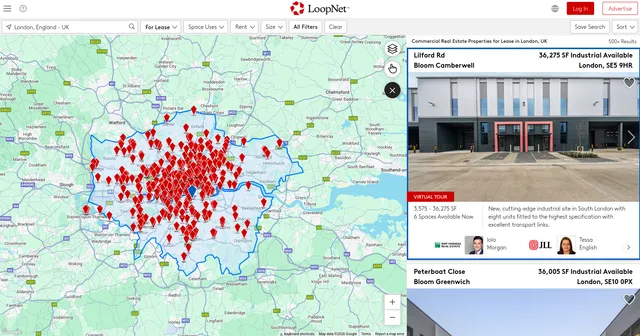
Example Screenshot of bussiness list by query page:
Input Format
The scraper accepts JSON configuration for precise control over data extraction:
The urls parameter: Add URLs of LoopNet property search pages you want to scrape. Navigate to LoopNet, configure your search with desired filters (location, property type, lease/sale status, price range), then copy the resulting URL. You can paste URLs individually or use Bulk edit for prepared lists.
The max_items_per_url parameter: Limit the number of properties to scrape per URL. Default value is 20, balancing data collection volume with processing efficiency.
The max_retries_per_url parameter: Set retry attempts for each URL if scraping fails due to network issues or detection. Default is 2 retries, providing reliability without excessive delays.
The ignore_url_failures parameter: When true, the scraper continues running even if some URLs fail after maximum retries. This prevents one problematic URL from stopping your entire scraping job.
The proxy parameter: Configure proxy settings to maintain access and avoid detection. Essential for large-scale data collection or when scraping multiple markets simultaneously.
Output Format
The scraper returns structured property data with the following fields:
-
Offers: Comprehensive offer details including lease terms, sale prices, square footage, and financial information. Critical for investment analysis, deal comparison, and financial modeling. Enables quick assessment of property economics and investment viability.
-
Name: Property name or address identifier. Essential for property identification, tracking listings across time, and organizing data in CRM or investment databases.
-
Description: Detailed property description including features, amenities, location highlights, and specifications. Provides context for investment decisions, reveals property condition and capabilities, and supports due diligence processes.
-
URL: Direct link to the full property listing on LoopNet. Valuable for accessing complete property details, contacting listing brokers, viewing additional photos, and conducting deeper research.
-
Image: Property image URL for visual reference. Enables quick visual assessment of property condition, supports presentation materials, and enriches investment databases with visual assets.
Each field serves specific purposes in commercial real estate workflows, investment analysis, market research, and portfolio management strategies.
Example Output:
Usage Guide
Setting Up Property Searches
To effectively use the LoopNet scraper, start by constructing targeted property search URLs on LoopNet.com that match your investment criteria.
Step 1: Define Search Parameters on LoopNet
Navigate to LoopNet.com and configure your search using available filters:
- Location: City, state, region, or specific address
- Property Type: Office, retail, industrial, land, multifamily, specialty
- Transaction Type: For Lease, For Sale
- Price Range: Minimum and maximum lease rates or sale prices
- Size: Square footage requirements
- Building Class: Class A, B, or C
Step 2: Copy Search URLs
After configuring filters and viewing results, copy the URL from your browser's address bar. This URL contains all your search parameters and will be used for scraping.
Step 3: Configure JSON Input
Add copied URLs to the urls array in your configuration. Set appropriate values for:
max_items_per_url: Based on how many properties you need per searchmax_retries_per_url: Keep at 2 for standard reliabilityignore_url_failures: Set totruefor multi-URL scraping jobsproxy: Configure if experiencing access issues or scraping large volumes
Best Practices
URL Construction:
- Test search URLs manually before adding to scraper configuration
- Use specific location filters rather than broad geographic searches for better results
- Include property type filters to focus on relevant listings
- Verify URLs return expected results before bulk scraping
Data Collection Strategy:
- Start with smaller
max_items_per_urlvalues (20-50) to test configuration - Monitor extraction progress for any blocked requests
- Implement delays between large scraping sessions
- Use proxy rotation for high-volume data collection
Market Coverage:
- Create separate URL lists for different property types within a market
- Run parallel scrapes for multiple markets with appropriate delays
- Track collected properties to avoid duplicates across sessions
- Store results with timestamps for historical market analysis
Common Troubleshooting
Access Issues:
- Enable proxy configuration if encountering access restrictions
- Verify URLs are correctly formatted and publicly accessible
- Check that property listings are active (not expired or removed)
- Adjust retry settings if experiencing intermittent connection issues
Empty Results:
- Verify search URL returns results when accessed manually in browser
- Check if property filters are too restrictive
- Confirm location spelling and formatting in URL
- Try broader search parameters if specific queries return no data
Data Quality:
- Validate that extracted offers contain expected fields
- Check image URLs are accessible and valid
- Verify property descriptions are complete
- Cross-reference sample results with actual LoopNet listings
Benefits and Applications
The LoopNet Property Search Scraper delivers significant time savings for commercial real estate professionals. What typically requires hours of manual browsing and data recording is reduced to minutes of automated extraction.
Primary Applications:
Investment Deal Flow: Build comprehensive property databases for investment analysis, track new listings in target markets, compare deals across locations, and identify off-market opportunities through listing pattern analysis.
Market Research: Conduct comparative market analysis across multiple geographies, analyze rental rates and cap rates by property type and location, identify market trends through historical data collection, and benchmark portfolio properties against market comparables.
Brokerage Intelligence: Monitor competitor listings and pricing strategies, track inventory levels by market and property type, identify potential clients through listing patterns, and maintain updated market knowledge for client advisory services.
Portfolio Management: Track properties of interest across multiple markets, monitor lease expiration dates and renewal opportunities, analyze comparable properties for valuation purposes, and maintain databases for portfolio optimization decisions.
The scraper provides competitive advantages through:
- Systematic access to commercial property data across multiple markets
- Complete property information including financial terms and specifications
- Visual assets for property assessment and presentation materials
- Scalable research capabilities supporting both individual deals and market-wide analysis
- Time efficiency enabling focus on analysis rather than data collection
The structured output integrates seamlessly with CRM systems, investment analysis tools, and commercial real estate databases, enabling immediate use of collected data for investment decisions and market intelligence.
Conclusion
The LoopNet Property Search Scraper transforms manual commercial real estate research into efficient automated data collection. By providing structured access to LoopNet's extensive property database, it empowers investors, brokers, and analysts to make data-driven decisions and accelerate their market research processes.
Whether you're sourcing investment opportunities, conducting market analysis, tracking competitive listings, or building comprehensive property databases, this scraper provides the systematic data extraction capabilities needed to enhance your commercial real estate operations.
Ready to streamline your commercial real estate data collection? Start extracting valuable property insights from LoopNet today and transform your investment research and market analysis capabilities.
- Loopnet Property Details Scraper: A specialized data extraction tool engineered to harvest detailed bussiness information from loopnet's bussiness marketplace.
Your feedback
We are always working to improve Actors' performance. So, if you have any technical feedback about loopnet.com Property Search Scraper or simply found a bug, please create an issue on the Actor's Issues tab in Apify Console.


![LoopNet US + UK + Realla [$1.5💰] Commercial Property Scraper avatar](https://images.apifyusercontent.com/OWa9kJL7gqsCWnKo6lZR80k_riG91PzwIe70jgZCt_s/rs:fill:76:76/cb:1/aHR0cHM6Ly9hcGlmeS1pbWFnZS11cGxvYWRzLXByb2QuczMudXMtZWFzdC0xLmFtYXpvbmF3cy5jb20vbmduOHZSRVNUa3NleVdFNnAtYWN0b3ItMFpDUU9OeEIzQmR5T3pyYkQtSmVPT0FKRE5idS1sb29wbmV0LmpwZw.webp)


