

Crexi Property Search Scraper
Pricing
from $1.50 / 1,000 results
Crexi Property Search Scraper
Crexi.com Property Search Scraper automates extraction of commercial real estate listings including office, retail, industrial, and multifamily properties. Efficiently collect property data, pricing, broker details, and market information for CRE investment analysis and competitive intelligence.
Pricing
from $1.50 / 1,000 results
Rating
0.0
(0)
Developer

ecomscrape
Maintained by CommunityActor stats
2
Bookmarked
73
Total users
5
Monthly active users
7 months ago
Last modified
Categories
Share
Contact
If you encounter any issues or need to exchange information, please feel free to contact us through the following link: My profile
Crexi.com Property Search Scraper: Extract Commercial Real Estate Data for Investment Analysis
Introduction
Crexi.com is North America's leading commercial real estate (CRE) marketplace, connecting property buyers, sellers, brokers, and investors across the United States. The platform hosts thousands of listings spanning office buildings, retail centers, industrial facilities, multifamily properties, land parcels, and special-use assets. With comprehensive property data including pricing, square footage, location details, and broker information, Crexi serves as an essential resource for CRE professionals.
Manually collecting property data from Crexi is inefficient for professionals analyzing markets, tracking inventory, or building investment pipelines. The Crexi.com Property Search Scraper automates this extraction, enabling systematic data collection for market analysis, deal sourcing, and competitive intelligence across commercial real estate sectors.
Scraper Overview
The Crexi.com Property Search Scraper systematically extracts property listing data from search result pages. It captures comprehensive information including property details, pricing data, broker information, and listing metadata. The tool is valuable for CRE investors analyzing markets, brokers tracking competition, developers identifying opportunities, and data analysts building market intelligence databases.
Key capabilities include processing multiple search result pages, configurable extraction limits, error handling for continuous operation, and structured output optimized for analysis and integration with CRM or investment platforms.
Input and Output Details
Example url 1: https://www.crexi.com/properties?mapZoom=7&placeIds%5B%5D=ChIJZYIRslSkIIYRA0flgTL3Vck&showMap=false
Example url 2: https://www.crexi.com/lease/properties?mapZoom=7&placeIds%5B%5D=ChIJZYIRslSkIIYRA0flgTL3Vck&showMap=false
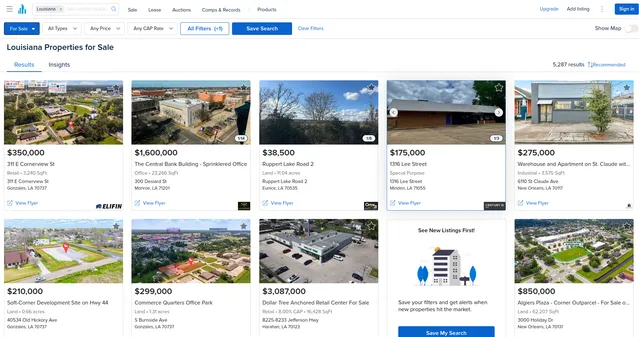
Example Screenshot of property list by query page:
Input Format
The urls parameter: Property search result page URLs from Crexi.com. Navigate to Crexi, apply desired filters (property type, location, price range, size), then copy the URL. Can include multiple search URLs for comprehensive market coverage.
The max_items_per_url parameter: Limits properties extracted per search URL. Default 20. Adjust based on market size and analysis needs.
The ignore_url_failures parameter: When true, continues scraping if individual URLs fail. Essential for multi-market extraction projects.
Output Format
-
ID: Unique property identifier. Critical for tracking listings, preventing duplicates, and linking data across systems.
-
Name: Property name or address. Primary identifier for research and reporting.
-
Description: Full property description. Provides investment narrative, key features, and seller positioning.
-
Types: Property type classifications (office, retail, industrial, multifamily, etc.). Essential for sector-specific analysis and portfolio categorization.
-
Thumbnail URL: Main property image. Enables visual verification and enriched data presentations.
-
URL Slug: Direct link to property listing. Reference for accessing full details and sharing opportunities.
-
Status: Listing status (active, under contract, sold). Critical for tracking market velocity and deal flow.
-
User Is Asset Owner: Indicates if listing is owner-direct. Identifies off-market opportunities and direct seller relationships.
-
Broker Team Logo URL / Broker Logo URL: Brokerage branding. Enables broker analysis and relationship mapping.
-
Brokerage Name: Listing brokerage firm. Important for understanding market share and broker specialization.
-
Activated On: Listing activation date. Enables time-on-market calculations and freshness filtering.
-
Asking Price: Listed sale price. Core metric for valuation, comp analysis, and market trends.
-
Rate Yearly / Rate Monthly: Annual or monthly lease rates. Essential for income property analysis and lease comparisons.
-
Rate Yearly Min/Max: Lease rate ranges. Indicates negotiation flexibility and space variation.
-
Rentable Sqft Min/Max: Available space ranges. Critical for tenant requirements and space planning.
-
Has Flyer / Has OM / Has Video: Marketing material indicators. Shows listing quality and seller investment level.
-
Number Of Suites / Gallery Items / Images: Property documentation depth. Indicates information completeness and marketing sophistication.
-
Square Footage: Total building or space size. Fundamental metric for analysis and comparisons.
-
Price Per Sq Ft: Unit pricing metric. Key valuation benchmark for market comparison.
-
Price Per Acre Land: Land valuation metric. Important for development and land investment analysis.
-
Show Countdown As Date: Urgency indicator for time-sensitive listings. Signals motivated sellers or auction scenarios.
-
Is In Opportunity Zone: Federal tax incentive program eligibility. Identifies properties with tax advantages for qualified investors.
-
Is Outdated: Data freshness indicator. Helps filter stale listings and focus on active opportunities.
-
Location: Geographic coordinates and address. Enables mapping, geographic analysis, and proximity research.
-
Updated On: Last modification timestamp. Tracks listing changes and seller activity.
-
Rate Type: Pricing structure (NNN, modified gross, full service). Critical for lease comparison and expense analysis.
-
Has Virtual Tour: Virtual tour availability. Indicates premium marketing and remote viewing capability.
-
Recomm ID: Recommendation system identifier. Internal platform metric.
-
Is New: Recent listing indicator. Identifies fresh market inventory.
-
Lot Size Acres: Land parcel size. Essential for development analysis and land investment.
Usage Guide
Setting Up Property Extraction
Step 1: Define Search Criteria on Crexi
Navigate to Crexi.com and configure search filters:
- Property types (office, retail, industrial, multifamily, land, special use)
- Geographic markets (metro areas, states, specific submarkets)
- Price ranges (sale or lease rates)
- Size parameters (square footage, lot size)
- Status filters (active, under contract)
- Special criteria (opportunity zones, auction properties)
Copy the resulting search URL.
Step 2: Configure Extraction Parameters
Add URLs to the urls array. For comprehensive market coverage:
- Multiple property types in same market
- Same property type across different markets
- Various price tiers within a market
- Specific submarkets or corridors
Set max_items_per_url based on market depth. Enable ignore_url_failures for multi-URL extraction.
Best Practices
Search Strategy:
- Start broad, then refine based on initial results
- Separate searches by property type for cleaner segmentation
- Use geographic filters matching your target markets
- Save working URLs as market conditions change
Data Collection:
- Run regular extractions to track new listings
- Monitor
activated_onandupdated_onfor market velocity - Track
statuschanges for deal flow analysis - Compare
asking_priceover time for pricing trends
Market Analysis Applications:
Investment Deal Flow: Build automated pipelines of properties matching investment criteria. Filter by price per square foot, property type, and location. Track new listings daily.
Competitive Intelligence: Monitor broker market share through brokerage_name analysis. Track listing quality via marketing material indicators. Identify market leaders.
Market Research: Analyze pricing trends by property type and market. Calculate average cap rates and price per square foot. Track inventory levels and absorption rates.
Portfolio Strategy: Identify opportunity zone properties for tax benefits. Compare markets for expansion decisions. Track similar properties for disposition timing.
Common Issues
URL Format Changes: Verify URLs still generate results. Crexi may update search parameters. Test URLs before large extraction runs.
Data Completeness: Some fields may be empty depending on listing type. Lease vs. sale properties have different data sets. Handle null values appropriately.
Rate Limiting: Space out large extraction jobs. Process URLs in batches if scraping extensively.
Benefits and Applications
Primary Use Cases:
CRE Investment Analysis: Systematic deal sourcing across markets. Automated comp analysis through price and size metrics. Portfolio diversification research across property types and geographies.
Broker Market Intelligence: Track competitive listings and pricing strategies. Monitor market share by brokerage. Identify co-brokerage opportunities.
Market Research: Analyze supply trends by property type. Track pricing dynamics across markets. Measure time-on-market and listing velocity.
Development Planning: Identify land opportunities through lot size and pricing data. Analyze comparable sales for feasibility studies. Track opportunity zones for tax-advantaged projects.
Advantages:
- Comprehensive commercial property data across all major types
- Pricing metrics ($/SF, $/acre) for immediate valuation benchmarking
- Broker information enabling relationship mapping
- Status tracking for market velocity analysis
- Opportunity zone identification for tax strategy
- Marketing quality indicators showing serious sellers
Output integrates with investment platforms, CRM systems, and analytical tools for immediate activation in deal workflows.
Conclusion
The Crexi.com Property Search Scraper transforms manual commercial real estate research into efficient automated data collection. It empowers investors, brokers, and analysts to make data-driven decisions about property acquisitions, market positioning, and investment strategy.
Whether sourcing deals, analyzing markets, or tracking competition, this scraper provides systematic extraction capabilities to accelerate commercial real estate intelligence gathering.
Your feedback
We are always working to improve Actors' performance. So, if you have any technical feedback about Housing.com Property Search Scraper or simply found a bug, please create an issue on the Actor's Issues tab in Apify Console.
![LoopNet US + UK + Realla [$1.5💰] Commercial Property Scraper avatar](https://images.apifyusercontent.com/OWa9kJL7gqsCWnKo6lZR80k_riG91PzwIe70jgZCt_s/rs:fill:76:76/cb:1/aHR0cHM6Ly9hcGlmeS1pbWFnZS11cGxvYWRzLXByb2QuczMudXMtZWFzdC0xLmFtYXpvbmF3cy5jb20vbmduOHZSRVNUa3NleVdFNnAtYWN0b3ItMFpDUU9OeEIzQmR5T3pyYkQtSmVPT0FKRE5idS1sb29wbmV0LmpwZw.webp)


![Crexi [$1.9💰] Scraper: Properties, Brokers & Instant Database avatar](https://images.apifyusercontent.com/zeR420eFYAaJR8jAo1W4pZ9q840EwX0iS_tVwkQGDzI/rs:fill:76:76/cb:1/aHR0cHM6Ly9hcGlmeS1pbWFnZS11cGxvYWRzLXByb2QuczMudXMtZWFzdC0xLmFtYXpvbmF3cy5jb20vbmduOHZSRVNUa3NleVdFNnAtYWN0b3ItUkZIS0libjFOclpiRVlCTEMtSk5xTUtUYmlaQy1jcmV4aS53ZWJw.webp)


