

AutoTrader Cars Search Scraper
Pricing
Pay per usage
AutoTrader Cars Search Scraper
AutoTrader.co.nz Cars Scraper extracts New Zealand vehicle listings with pricing, specs, dealer info & images. Automate automotive market research, competitive analysis & inventory tracking. Perfect for dealerships, analysts & researchers monitoring NZ's car market.
Pricing
Pay per usage
Rating
0.0
(0)
Developer

ecomscrape
Maintained by CommunityActor stats
0
Bookmarked
1
Total users
0
Monthly active users
23 days ago
Last modified
Categories
Share
Contact
If you encounter any issues or need to exchange information, please feel free to contact us through the following link: My profile
AutoTrader.co.nz Cars Scraper: Extract New Zealand Vehicle Listings & Dealer Data
Introduction
AutoTrader.co.nz is New Zealand's premier online automotive marketplace, connecting car buyers with dealerships and private sellers across the country. With thousands of vehicle listings spanning new and used cars, the platform provides detailed specifications, pricing, dealer information, and high-quality imagery that makes it an invaluable resource for automotive market research and business intelligence.
For automotive businesses, market analysts, and industry professionals operating in the New Zealand market, accessing this comprehensive vehicle data is essential for competitive pricing analysis, inventory tracking, market trend identification, and dealer performance monitoring. However, manually collecting vehicle information across hundreds or thousands of listings is impractical and time-consuming.
The AutoTrader.co.nz Cars Scraper automates this data extraction process, enabling systematic collection of vehicle listings with complete specifications, pricing details, dealer information, and visual content. Whether you're analyzing the SUV market, monitoring competitor inventory, or researching pricing trends across vehicle segments, this scraper provides the automated data collection capabilities needed for informed decision-making in New Zealand's automotive sector.
Scraper Overview
The AutoTrader.co.nz Cars Scraper is a specialized data extraction tool designed to collect comprehensive vehicle listings from New Zealand's leading automotive marketplace. This scraper employs advanced web automation to navigate search results and extract detailed vehicle profiles including specifications, pricing, dealer contact information, and multimedia content.
Key advantages include residential proxy support for reliable data collection, configurable retry mechanisms for handling network disruptions, and flexible pagination controls for managing large vehicle inventories. The tool is particularly valuable for automotive dealerships conducting competitive analysis, market researchers tracking pricing trends, inventory managers monitoring vehicle availability, and business analysts evaluating New Zealand's automotive market dynamics.
The scraper handles various search parameters including vehicle type queries (SUVs, sedans, trucks), filtering options (price range, mileage, year), and sorting preferences (price, popularity, latest listings). It maintains high data accuracy while implementing ethical scraping practices and provides structured output ready for integration with automotive CRM systems, inventory management platforms, and business intelligence tools.
Input and Output Details
Example url 1: https://autotrader.co.nz/used-cars-for-sale?isNew=true&sortType=80&query=suv
Example url 2: https://autotrader.co.nz/used-cars-for-sale?isNew=true&priceTo=10000&sortType=80&query=suv
Example url 3: https://autotrader.co.nz/used-cars-for-sale?isNew=true&pageNumber=4&sortType=80&query=suv
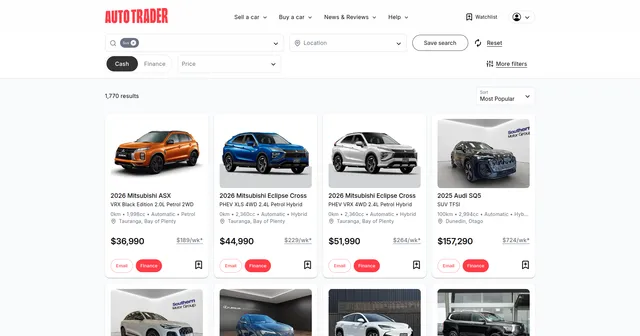
Example Screenshot of automotive list by query page:
Input Format
The scraper accepts JSON configuration for precise control over data extraction from AutoTrader.co.nz vehicle listings.
Scrape with URLs:
The urls parameter: Add URLs of AutoTrader.co.nz search result pages you want to scrape. Paste URLs individually or use Bulk edit for prepared lists. Ideal for targeting specific vehicle categories, price ranges, or filtered search results.
The ignore_url_failures parameter: When true, the scraper continues running even if some URLs fail after maximum retries. Prevents single problematic URLs from stopping your entire extraction job.
When using URLs, all "Scrape with search filters" options are disabled.
Scrape with Search Filters:
The keyword parameter: Enter search terms to find vehicles (e.g., "toyota", "suv", "mazda cx-5", "ute"). Use vehicle makes, models, or types commonly searched on AutoTrader.co.nz.
The sort_by parameter: Control result ordering:
""- Featured First"0"- Relevance"20"- Lowest Price"30"- Highest Price"60"- Lowest KMs (mileage)"65"- Highest KMs"50"- Oldest vehicle (by year)"40"- Newest vehicle"70"- Latest Listings"80"- Most Popular
The page parameter: Specify starting page number for scraping. Useful for resuming interrupted extractions or targeting specific result ranges.
When using search filters, leave the urls field empty.
General Options:
The max_items_per_url parameter: Limit items collected per URL or search. Default is 20, balancing speed with comprehensive coverage.
The max_retries_per_url parameter: Maximum retry attempts if pages fail to load or bot detection occurs. Default is 2 for efficient operation.
The proxy parameter: Essential for avoiding detection. New Zealand proxies recommended for optimal AutoTrader.co.nz access.
Output Format
The scraper returns structured vehicle data with extensive fields for comprehensive automotive intelligence:
Vehicle Identification & Basic Info:
- Vehicle ID: Unique listing identifier. Critical for tracking specific vehicles, preventing duplicates, and monitoring listing changes over time.
- Make: Vehicle manufacturer (e.g., Toyota, Ford). Essential for brand-specific market analysis and manufacturer performance tracking.
- Make ID: Manufacturer identifier code. Useful for database normalization and manufacturer-level aggregation.
- Model: Specific vehicle model (e.g., Corolla, Ranger). Key for model-level competitive analysis and market segmentation.
- Model ID: Model identifier code. Enables precise model tracking across listings and dealerships.
- Variant: Specific trim or variant level. Important for detailed pricing analysis and feature comparison.
- Headline: Listing title/headline. Captures dealer marketing approach and key selling points.
- Short Description: Brief vehicle description. Provides context on condition, features, or unique selling propositions.
Dealership & Contact Information:
- Dealership Name: Selling dealer name. Essential for dealer competitive intelligence and market share analysis.
- Dealership ID: Dealer identifier. Enables tracking dealer inventory size, pricing strategies, and market presence.
- Listing Contact Phone: Direct contact number. Critical for immediate dealer outreach and lead generation.
- Account Name: Account holder name. Identifies listing owner for B2B relationship mapping.
- Account ID: Account identifier. Useful for tracking multiple listings from same seller.
- Dealer Logo URL: Dealer branding image link. Valuable for dealer recognition and enriched databases.
Vehicle Specifications:
- Vehicle Class: Primary category (e.g., SUV, Sedan). Fundamental for market segmentation and category analysis.
- Vehicle Class ID: Category identifier. Enables precise category-level data aggregation.
- Stock No: Dealer stock number. Important for dealer inventory tracking and reference.
- Year: Manufacturing year. Critical for depreciation analysis and age-based market trends.
- Body Style Display: Body type description (e.g., Station Wagon, Coupe). Useful for detailed body style preference analysis.
- Body Style ID: Body style identifier. Enables standardized body style categorization.
Exterior & Interior:
- Exterior Colour 1: Primary exterior color. Important for color preference trends and inventory planning.
- Exterior Colour 2: Secondary/accent color if applicable. Relevant for two-tone or special editions.
- Exterior Features: Listed exterior features. Provides detail on cosmetic and functional exterior additions.
- Interior Colour: Interior color scheme. Useful for understanding interior preference patterns.
- Interior Features: Listed interior features. Details comfort, technology, and luxury features.
- Seat No: Number of seats. Critical for family vehicle analysis and capacity-based segmentation.
- Door No: Number of doors. Important for practical vehicle classification.
Engine & Performance:
- Engine Size: Engine displacement value. Key specification for performance and efficiency analysis.
- Engine Size Unit: Measurement unit (typically liters). Ensures correct interpretation of engine size.
- Fuel Type 1: Primary fuel type (e.g., Petrol, Diesel). Essential for fuel preference trends and operating cost analysis.
- Fuel Type 1 ID: Primary fuel type identifier. Standardizes fuel type categorization.
- Fuel Type 2: Secondary fuel type for hybrids. Identifies hybrid and dual-fuel vehicles.
- Fuel Type 2 ID: Secondary fuel type identifier. Enables hybrid vehicle tracking.
- Engine Type: Engine configuration description. Provides detail on engine technology (e.g., V6, inline-4).
- Engine Type ID: Engine type identifier. Standardizes engine classification.
- Drive System ID: Drivetrain type identifier (2WD, 4WD, AWD). Critical for capability and market segment analysis.
- Cylinder No: Number of cylinders. Relevant for performance and efficiency evaluation.
- Transmission Display: Transmission description (e.g., Automatic, Manual). Important for buyer preference analysis.
- Transmission ID: Transmission type identifier. Enables transmission preference tracking.
- Turbo: Turbocharged indicator. Identifies performance-enhanced vehicles.
- Mechanical Features: Listed mechanical features. Details performance and capability enhancements.
- Fuel Saver Rating: Fuel efficiency rating. Important for environmental and cost considerations.
Condition & Usage:
- Odometer Reading: Current mileage value. Critical for pricing analysis and condition assessment.
- Odometer Unit: Mileage unit (typically kilometers). Ensures correct mileage interpretation.
- Is New: Boolean indicating new vehicle status. Distinguishes new from used vehicle markets.
Pricing:
- Retail Price Amount: Standard asking price. Primary pricing data for market analysis.
- Special Price Amount: Promotional or discounted price. Identifies pricing strategies and deals.
- Price Applicable: Effective price indicator. Clarifies which price is currently valid.
- ORC Price Amount: On-road cost price. Total cost including fees and charges.
- ORC Included: Boolean showing if ORC is included in displayed price. Important for true cost comparison.
- Disable Finance: Finance availability indicator. Shows dealer financing options.
- Payment Info: Payment plan details. Useful for understanding financing terms offered.
- Payment Info Fix: Fixed payment information. Details structured payment options.
Listing Features:
- Is Featured: Featured listing status. Identifies premium-positioned listings.
- Is Super Featured: Super featured status. Highlights highest-tier promotional listings.
- Is Basic Listing: Basic tier indicator. Identifies non-promoted listings.
- Is Special: Special listing designation. Marks listings with special status.
- Is Hot: Hot listing indicator. Shows trending or high-interest vehicles.
- Has Offer: Active offer/deal indicator. Identifies vehicles with special promotions.
- Offer Text: Promotional offer description. Details special deals or incentives.
- Offer Expiry Date: Offer end date. Creates urgency context for deals.
- Offer Expiry Seconds: Time remaining on offer. Precise timing for time-sensitive promotions.
- Has Price Drop: Recent price reduction indicator. Identifies motivated sellers or market adjustments.
Multimedia Content:
- Has Images: Image availability indicator. Ensures visual content is present.
- Has Video: Video content indicator. Identifies listings with video tours.
- Has 360: 360-degree view availability. Shows premium visual presentation.
- Has Express View: Express viewing option. Indicates quick-view functionality.
- Primary Image Full: Full-size primary image URL. Main vehicle photo for detailed viewing.
- Primary Image Full CloudFlare URL: CDN-optimized primary image. Fast-loading primary image.
- Primary Image Thumb: Primary thumbnail URL. Compact image for list views.
- Primary Image Thumb CloudFlare URL: CDN-optimized thumbnail. Fast-loading thumbnail.
- Thumbnail 2: Second thumbnail URL. Additional viewing angle.
- Thumbnail 2 CloudFlare URL: CDN-optimized second thumbnail. Fast-loading alternate view.
- Thumbnail 3: Third thumbnail URL. Third viewing angle.
- Thumbnail 3 CloudFlare URL: CDN-optimized third thumbnail. Fast-loading third view.
Performance Metrics:
- Views 7 Days: Weekly view count. Recent interest indicator.
- Views 14 Days: Two-week view count. Short-term popularity metric.
- Views 21 Days: Three-week view count. Medium-term interest tracking.
- Views 28 Days: Monthly view count. Monthly popularity indicator.
- Ranking: Search result ranking. Position in search results.
- Search Score: Relevance score. Algorithm-based listing relevance.
Geographic & Additional:
- Area Name: Specific area/suburb. Local market positioning.
- Region Name: Broader region. Regional market analysis.
- Standard Features: Standard equipment list. Base feature inventory.
- Additional Info: Supplementary information. Extra details not captured elsewhere.
- Kudos Badges: Quality or trust indicators. Dealer reputation signals.
- Created Date UTC: Listing creation date. Age tracking for freshness analysis.
- Is Favourite: Favorited status. User engagement indicator.
- Auction: Auction listing indicator. Identifies auction-style sales.
- Listing Type: Type of listing. Categorizes listing format.
Each field enables comprehensive automotive market intelligence, competitive analysis, inventory monitoring, and pricing strategy development for New Zealand's automotive sector.
Example Output:
Usage Guide
Option 1: Scraping with URLs
Navigate to AutoTrader.co.nz, perform your desired search with filters for vehicle type, price range, location, or features, then copy the resulting URL into your configuration's urls array.
Configure retry limits and proxy settings appropriately. Set max_items_per_url to balance extraction speed with data volume needs. Enable ignore_url_failures to prevent single URL failures from stopping your job.
Best practices:
- Test URLs individually before batch processing
- Monitor for access restrictions or rate limiting
- Use New Zealand-based proxies for optimal access
- Keep backup URL lists as search result URLs may expire
- Verify URL parameters match current AutoTrader.co.nz structure
Troubleshooting:
- Adjust proxy settings if encountering blocks
- Reduce retry counts for timeout issues
- Verify URL format matches current site structure
- Check for URL parameter changes after site updates
Option 2: Scraping with Search Filters
Setting Up Search Criteria
Step 1: Define Search Keyword
Enter vehicle-related search terms:
- Makes: "toyota", "ford", "mazda", "holden", "nissan"
- Models: "hilux", "ranger", "cx-5", "corolla", "navara"
- Types: "suv", "ute", "sedan", "wagon", "hatchback"
- Combinations: "toyota hilux", "ford ranger", "mazda cx-5"
Step 2: Configure Sort Order
Select sort_by parameter based on research goals:
- Price Analysis: "20" (Lowest Price) or "30" (Highest Price)
- Mileage Research: "60" (Lowest KMs) or "65" (Highest KMs)
- Age Trends: "40" (Newest) or "50" (Oldest)
- Market Activity: "70" (Latest Listings) or "80" (Most Popular)
- Best Matches: "0" (Relevance) or "" (Featured First)
Step 3: Set Pagination
Use page parameter for systematic coverage:
- Start with
1for beginning of results - Use incremental pages (2, 3, 4) for comprehensive extraction
- Resume interrupted scrapes from last collected page
- Plan page ranges based on
max_items_per_urlsetting
Best Practices for Filter-Based Scraping
Keyword Strategy:
- Use specific model names for targeted analysis
- Apply broader terms (vehicle types) for market overviews
- Test keywords on AutoTrader.co.nz before bulk scraping
- Consider New Zealand-specific vehicle terminology
Sort Order Selection:
- "Latest Listings" for tracking new inventory
- "Lowest Price" for budget segment analysis
- "Most Popular" for demand trend identification
- "Lowest KMs" for low-mileage vehicle research
Systematic Coverage:
- Start with broad searches to assess result volumes
- Narrow to specific makes/models for detailed analysis
- Use sorting to prioritize most relevant results
- Track pagination progress for complete coverage
Data Validation and Quality Control
Verify extracted data:
- Vehicle specifications match search criteria
- Pricing information is complete and current
- Contact details are properly formatted
- Images and multimedia content are accessible
- Odometer readings are realistic for vehicle age
- No duplicate listings within dataset
Common Issue Resolution
Access Problems:
- Switch to New Zealand proxies if encountering blocks
- Verify proxy configuration for residential type
- Check for temporary site accessibility issues
- Adjust retry settings for network stability
Search Issues:
- Confirm keyword spelling and formatting
- Test keywords directly on AutoTrader.co.nz
- Try alternative search terms for better results
- Broaden searches if specific terms return no results
Pagination Management:
- Track page numbers to avoid gaps
- Adjust
max_items_per_urlbased on results per page - Handle end-of-results gracefully
- Use consistent page increments
Advanced Techniques
Market Segment Analysis:
- Run separate searches for each vehicle class
- Compare pricing across makes and models
- Track inventory levels by dealership
- Identify market gaps and opportunities
Competitive Intelligence:
- Monitor competitor dealer inventories
- Track pricing strategies across dealerships
- Analyze feature offerings by price point
- Identify market positioning patterns
Trend Monitoring:
- Schedule regular extractions for time-series data
- Track pricing changes over time
- Monitor new listing volumes
- Analyze view count trends for demand signals
Benefits and Applications
The AutoTrader.co.nz scraper eliminates manual vehicle data collection, converting days of research into hours of automated extraction. This efficiency enables automotive professionals to focus on analysis and strategy rather than data gathering.
Primary Applications:
Competitive Pricing Analysis: Dealerships can monitor competitor pricing across vehicle segments, identify pricing opportunities, and optimize their own pricing strategies based on real-time market data.
Inventory Intelligence: Track competitor inventory levels, identify popular vehicle configurations, and make informed purchasing decisions for dealership stock.
Market Research: Analyze New Zealand automotive market trends, assess vehicle segment popularity, and identify emerging buyer preferences through comprehensive listing data.
Lead Generation: Sales teams can identify dealerships with specific vehicle inventory, gather direct contact information, and build targeted outreach lists for B2B automotive services.
Valuation Analysis: Used car businesses can establish accurate market values based on comprehensive pricing data across mileage, age, and feature combinations.
The scraper provides competitive advantages through:
- Comprehensive vehicle specifications for detailed analysis
- Real-time pricing data across the New Zealand market
- Dealer contact information for B2B relationship building
- Performance metrics (views, popularity) for demand assessment
- Multimedia content URLs for enriched vehicle databases
Structured output integrates with automotive CRM systems, inventory management platforms, pricing tools, and business intelligence dashboards for immediate data activation.
Conclusion
The AutoTrader.co.nz Cars Scraper transforms manual vehicle research into efficient automated data collection across New Zealand's premier automotive marketplace. By providing structured access to comprehensive vehicle listings with detailed specifications, pricing, dealer information, and performance metrics, it empowers automotive businesses to make data-driven decisions about inventory, pricing, and market positioning.
Whether you're monitoring competitor pricing, tracking market trends, building dealer contact databases, or conducting comprehensive automotive market research, this scraper delivers the systematic extraction capabilities needed to accelerate your business intelligence in New Zealand's automotive sector.
Ready to streamline your automotive data collection? Start extracting valuable vehicle insights from AutoTrader.co.nz today and transform your market analysis capabilities.
Your feedback
We are always working to improve Actors' performance. So, if you have any technical feedback about autotrader.co.nz Property Search Scraper or simply found a bug, please create an issue on the Actor's Issues tab in Apify Console.


