
Macys Product Search Scraper
Pricing
Pay per usage
Macys Product Search Scraper
Automate product data extraction from Macys.com including prices, availability, images, and specifications. Perfect for price monitoring, competitive analysis, inventory tracking, and e-commerce research across fashion, home goods, and beauty categories.
Pricing
Pay per usage
Rating
0.0
(0)
Developer

ecomscrape
Maintained by CommunityActor stats
0
Bookmarked
2
Total users
0
Monthly active users
15 days ago
Last modified
Categories
Share
Contact
If you encounter any issues or need to exchange information, please feel free to contact us through the following link: My profile
Macy's Product Scraper: Extract Product Data from America's Iconic Department Store
Introduction
Macy's stands as one of America's most iconic department store chains, with Macys.com serving as a comprehensive e-commerce platform featuring hundreds of thousands of products across fashion, home goods, beauty, and accessories. For retailers, resellers, market analysts, and price intelligence professionals, Macy's extensive product catalog represents a valuable data source for competitive pricing, trend analysis, and inventory research.
Manual collection of product data from Macy's website is impractical given the scale of their catalog and frequent price changes. The Macy's Product Search Scraper automates this process, enabling systematic extraction of product information, pricing data, availability status, and product specifications efficiently.
Scraper Overview
The Macy's Product Search Scraper is a specialized e-commerce data extraction tool designed to collect detailed product information from Macys.com search results and category pages. This scraper navigates through product listings and captures comprehensive product data including identifiers, specifications, pricing, imagery, and availability information.
Key advantages include configurable retry mechanisms for handling dynamic content loading, flexible pagination controls for large product catalogs, and proxy support for reliable access. The tool is valuable for e-commerce businesses monitoring competitor pricing, resellers sourcing products, market researchers analyzing fashion trends, and price intelligence teams tracking retail pricing strategies.
The scraper handles various search parameters including keyword searches, category browsing, and filtered results with sorting options. It extracts structured product data suitable for price comparison, inventory management, market analysis, and competitive intelligence workflows.
Input and Output Details
Example url 1: https://www.macys.com/shop/featured/shoe/Pageindex,Sortby/2,PRICE_HIGH_TO_LOW?ss=true
Example url 2: https://www.macys.com/shop/mens/shop-all-mens-shoes/mens-boots?id=55637
Example url 3: https://www.macys.com/shop/makeup-and-perfume/skin-care/serum-treatments?id=50363
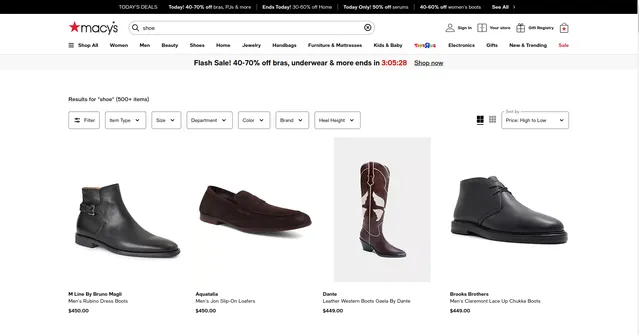
Example Screenshot of product information page:
Input Format
The scraper accepts JSON configuration controlling the extraction process with parameters for URL-based scraping or search-filter-based collection.
Scrape with URLs:
The urls parameter: Add URLs of product search or category pages from Macys.com. Include URLs with filters, sorting, or pagination as needed. Use Bulk edit for multiple URLs.
The ignore_url_failures parameter: Set to true to continue scraping even if some URLs fail after maximum retries, ensuring one problematic URL doesn't halt the entire job.
When using URLs, search filter options are disabled. Only specified URLs will be scraped.
Scrape with Search Filters:
The keyword parameter: Enter search terms to find products (e.g., "running shoes", "dresses", "kitchen appliances", "bedding sets"). Use terms matching Macy's product categories and descriptions.
The page parameter: Specify starting page number for scraping. Useful for resuming interrupted scrapes or targeting specific result ranges.
When using search filters, leave the urls field empty.
General Options:
The max_items_per_url parameter: Limit items to scrape per URL or search query. Default is 20, balancing data volume with extraction efficiency.
The max_retries_per_url parameter: Set retry attempts for each URL if scraping fails or encounters bot detection. Default is 2, providing reliability without excessive delays.
The proxy parameter: Configure proxy settings for avoiding detection and maintaining access. Essential for large-scale or frequent scraping operations.
Output Format
The scraper returns structured product data with fields serving specific e-commerce intelligence purposes:
-
ID: Unique Macy's product identifier. Essential for tracking products across time, avoiding duplicates, and linking to Macy's systems for updates.
-
Identifier: Product identification codes including SKU, UPC, or model numbers. Critical for inventory matching, cross-platform price comparison, and supplier identification.
-
Detail: Comprehensive product information including title, description, brand, specifications, materials, dimensions, and features. Provides complete product context for catalog building, competitive analysis, and customer research.
-
Relationships: Product relationship data such as color variants, size options, related products, and product groupings. Valuable for understanding product families, variant tracking, and cross-selling opportunities.
-
Imagery: Product image URLs including main images, alternate views, zoom images, and lifestyle shots. Essential for visual product catalogs, competitive visual analysis, and e-commerce listing creation.
-
Availability: Stock status, size availability, and inventory indicators. Critical for inventory tracking, identifying trending products, and monitoring out-of-stock situations.
-
Traits: Product attributes including color, size, style, category, department, and other classification tags. Useful for product categorization, filtered searches, trend analysis by attributes, and market segmentation.
-
Pricing: Complete pricing information including list price, sale price, discounts, promotional pricing, and price history indicators. Core data for price monitoring, competitive pricing strategy, margin analysis, and deal identification.
Each field supports specific use cases in price intelligence, competitive monitoring, inventory management, and e-commerce strategy development.
Example Output:
Usage Guide
Option 1: Scraping with URLs
To scrape specific Macy's product pages, navigate to Macys.com and construct your desired search using filters for category, price range, brand, or sorting options. Copy the resulting URL into the urls array.
Best practices:
- Test individual category URLs before batch processing
- Include sorting parameters in URLs for consistent results (e.g., PRICE_HIGH_TO_LOW, BEST_MATCH)
- Monitor for pagination limits on large categories
- Use department-specific URLs for focused data collection
- Verify URL structure remains valid as Macy's may update their site
Troubleshooting:
- Enable proxy if encountering access restrictions
- Reduce
max_items_per_urlif experiencing timeouts - Check URL parameters haven't expired or changed
- Verify category pages are publicly accessible
Option 2: Scraping with Search Filters
Use keyword search for automated product discovery without manually constructing URLs.
Step 1: Define Search Keywords
Use product-specific terms:
- Apparel: "men's suits", "women's dresses", "kids' shoes", "athletic wear"
- Home: "bedding sets", "kitchen appliances", "furniture", "bath towels"
- Beauty: "skincare", "makeup", "fragrances", "hair care"
- Brands: "Calvin Klein", "Ralph Lauren", "KitchenAid", "Cuisinart"
Step 2: Configure Pagination
Set page parameter to control starting point:
- Start at
1for complete catalog scraping - Use higher numbers to resume interrupted scrapes
- Coordinate with
max_items_per_urlfor systematic coverage
Best practices for keyword scraping:
- Use specific brand names for focused results
- Combine category terms (e.g., "men's running shoes" vs just "shoes")
- Test keywords on Macys.com first to verify result relevance
- Plan pagination strategy for large result sets
- Monitor total available results to calculate required pages
Common issues:
- Generic keywords may return too many irrelevant results
- Very specific terms might return no results
- Brand name spelling must match Macy's catalog exactly
- Seasonal products may have limited availability
Data Validation and Quality Control
After extraction, verify:
- Product IDs are unique and valid
- Pricing data includes both list and sale prices where applicable
- Image URLs are accessible and load correctly
- Availability status matches current inventory
- Product variants are properly linked
- Brand names and categories are correctly extracted
Proxy Configuration
When to use proxies:
- Large-scale scraping (100+ products)
- Frequent repeated scrapes
- Encountering rate limiting or blocks
- Running multiple concurrent scraping jobs
Proxy best practices:
- Use US-based residential proxies for optimal Macys.com access
- Rotate proxies for large extraction jobs
- Enable
useApifyProxywith residential proxy groups for reliability - Monitor for proxy failures and adjust configuration as needed
Benefits and Applications
The Macy's Product Scraper significantly reduces time required for product data collection, transforming hours of manual research into automated extraction.
Primary applications:
Price Monitoring: Track competitor pricing across categories, identify promotional patterns, monitor discount frequencies, and optimize pricing strategies based on Macy's market positioning.
Inventory Intelligence: Monitor stock availability trends, identify fast-moving products, track seasonal inventory patterns, and discover emerging product opportunities.
Competitive Analysis: Compare product assortments, analyze pricing strategies, benchmark promotional activities, and identify market gaps.
E-commerce Operations: Source products for resale, build price comparison databases, automate catalog updates, and maintain competitive pricing.
Market Research: Analyze fashion trends, track brand presence, study seasonal patterns, and identify category growth areas.
Advantages:
- Comprehensive product data including specifications and variants
- Real-time pricing and availability information
- Structured data format for immediate analysis
- Scalable extraction across entire product catalog
- Integration-ready output for pricing tools and databases
Conclusion
The Macy's Product Scraper transforms manual product research into efficient automated data collection from one of America's largest department store platforms. Whether monitoring competitor prices, sourcing products, analyzing market trends, or building pricing intelligence systems, this scraper provides systematic access to Macy's extensive product catalog.
Ready to automate your Macy's product data collection? Start extracting comprehensive product information, pricing data, and inventory insights today.
Related Actors
- Macys.com Product Details Scraper: A specialized data extraction solution engineered to harvest comprehensive product information from Macys.com's.
Your feedback
We are always working to improve Actors' performance. So, if you have any technical feedback about Macys.com Product Search Scraper or simply found a bug, please create an issue on the Actor's Issues tab in Apify Console.


