

Manta Business Search Scraper
Pricing
Pay per usage
Manta Business Search Scraper
Professional Manta.com Business Search Scraper extracts comprehensive business data from Manta. Automatically collects company profiles, contact info, ratings & descriptions in structured JSON format. Perfect for market research, lead generation, competitive analysis & business intelligence.
Pricing
Pay per usage
Rating
0.0
(0)
Developer

ecomscrape
Maintained by CommunityActor stats
1
Bookmarked
42
Total users
0
Monthly active users
20 days ago
Last modified
Categories
Share
Contact
If you encounter any issues or need to exchange information, please feel free to contact us through the following link: My profile
Manta.com Business Data Extraction Made Simple
Introduction
Manta.com stands as one of America's leading business directories, serving as a vital resource for over 20 years by connecting people to local and small businesses in their neighborhoods. With millions of unique visitors searching their platform, Manta contains an extensive database of business information that can prove invaluable for lead generation, market research, and competitive analysis.
The challenge many businesses face is efficiently extracting this wealth of data from Manta's platform. Manual data collection is time-consuming and inefficient, especially when dealing with large-scale research projects or comprehensive market analysis. Our Manta.com Business Search Scraper solves this problem by automating the data extraction process, enabling you to gather targeted business information quickly and systematically.
Scraper Overview
The Manta.com Business Search Scraper is a sophisticated data extraction tool designed to systematically collect business information from Manta's comprehensive directory. This scraper leverages advanced web automation techniques to navigate through search results and extract detailed business profiles efficiently.
The tool offers several key advantages including residential proxy support for reliable data collection, configurable retry mechanisms for handling network issues, and flexible pagination controls to manage large datasets. It's particularly valuable for sales professionals, market researchers, lead generation specialists, and business analysts who need access to structured business data from Manta's platform.
The scraper is designed to handle various search parameters including industry-specific queries, geographic targeting, and custom filters. It maintains high data accuracy while respecting rate limits and implementing best practices for ethical web scraping. Users can customize extraction parameters to focus on specific business types, locations, or other criteria relevant to their research objectives.
Input and Output Details
Input Format
The scraper accepts a JSON configuration that allows precise control over the data extraction process. The input structure includes several critical parameters that determine how the scraping operation will be executed.
Scrape with URLs:
The urls parameter: Add the URLs of the business list pages you want to scrape. You can paste URLs one by one, or use the Bulk edit section to add a prepared list.
The ignore_url_failures parameter: If set to true, the scraper will continue running even if some URLs fail to be scraped after the maximum number of retries is reached. This ensures that one problematic URL doesn't stop your entire scraping job.
When you provide a list of URLs for scraping, all options in the "Scrape with search filters" section will be disabled. The system will only collect data from the URLs you specified.
Scrape with Search Filters:
The keyword parameter: Enter the keyword to search for items (e.g., "Doctors", "Lawyers", "Restaurants", "Hotels").
The lat_long parameter: Enter the Latitude & Longitude to search for items in the format 'lat,long' (e.g., '51.507538,-0.127804' for London).
The zip_code parameter: Enter the zip code to search for items (e.g., "10001", "90210", "60601").
The radius parameter: Enter the radius to search for items:
"32"- within 20 miles"16"- within 10 miles"8"- within 5 miles"1.6"- within 1 mile
The page parameter: Specify the page number to start scraping from.
When using search filters for scraping, you need to leave the urls field empty in the "Scrape with URLs" configuration.
General Options:
The max_items_per_url parameter: Limit the number of items per URL or search filters you want to scrape. The default value is 20, providing a manageable batch size while allowing for comprehensive data collection.
The max_retries_per_url parameter: Limit the number of retries for each URL or search filters if the scrape is detected as a bot or the page fails to load. The default value is 2, providing a good balance between thoroughness and efficiency.
The proxy parameter: Proxy configuration is essential for maintaining anonymity and avoiding detection. Select proxies to be used by your scraper.
Output Format
The scraper returns structured business data in the following format:
- ID: Unique identifier for each business listing, essential for database management and duplicate prevention
- URL: Direct link to the business profile page on Manta.com, valuable for manual verification and additional data collection
- Name: Official business name as listed on Manta, crucial for lead identification and outreach
- Rating: Customer rating score, indicating business reputation and service quality for lead qualification
- Total Reviews: Number of customer reviews, providing insight into business popularity and customer engagement
- Phone: Direct contact number, essential for sales outreach and lead conversion
- Address: Complete business address, vital for local market analysis and geographic targeting
- Web URL: Business website link, valuable for additional research and direct marketing efforts
- Tags: Industry categories and business descriptors, useful for market segmentation and filtering
- Verification: Business verification status on Manta, indicating legitimacy and active business status
- Description: Business profile description, providing context about services and specializations
Each field serves specific purposes in lead generation workflows, market research analysis, and competitive intelligence gathering.
Example 1 - Normal search
Input:
Example url 3: https://www.manta.com/mb_54_A306F_JKQ/legal_services/rapid_city_sd
Example Screenshot of business information page:
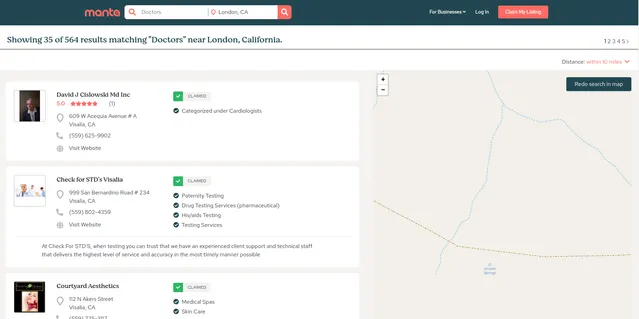
Output:
You get the output from the Manta.com Business Search Query Scraper stored in a tab. The following is an example of the Information Fields collected after running the Actor.
Example 2 - Select one Business Directory in home page
Business Directory list
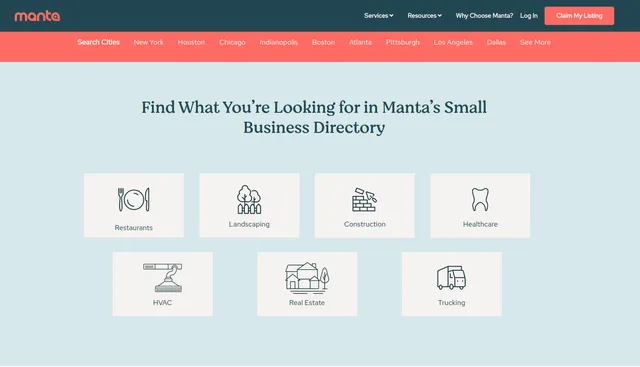
- If you want to collect data from any page, please add the parameter pg=x (where x is the page number you want to start collecting from).
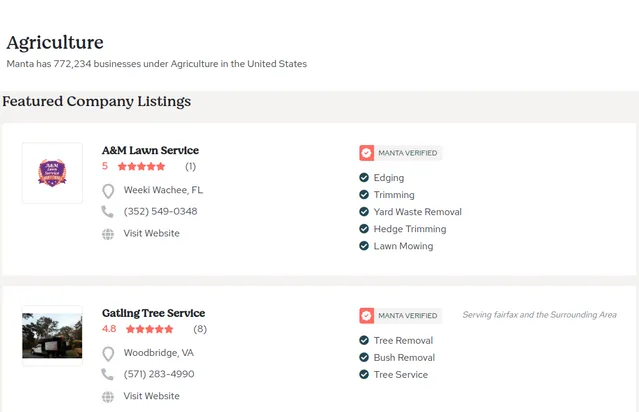
Example url: https://www.manta.com/mb_33_C0_000/agriculture?pg=2
Example Screenshot of business information page:
Input:
Output:
You get the output from the Manta.com Business Search Query Scraper stored in a tab. The following is an example of the Information Fields collected after running the Actor.
Example 3 - Search items with filters
Input
output
Usage Guide
Option 1: Scraping with URLs
To effectively use the Manta.com scraper with URLs, start by constructing targeted search URLs on Manta.com that match your research criteria. Navigate to the website, perform your desired search using filters for industry, location, and other parameters, then copy the resulting URL into the urls array in your input configuration.
Configure your JSON input with appropriate retry limits and proxy settings. Set reasonable limits for max_items_per_url to balance data collection speed with system stability. Enable ignore_url_failures to ensure one problematic URL doesn't stop your entire scraping job.
Best practices include testing with smaller datasets first, monitoring extraction progress for any blocked requests, and implementing delays between large extraction batches. Common troubleshooting steps involve adjusting proxy settings if encountering access restrictions, reducing retry counts if experiencing timeout issues, and verifying URL formats for proper query parameter structure.
Option 2: Scraping with Search Filters
Setting Up Search Criteria
Instead of manually creating URLs, use search filters to automatically generate business searches. This method is ideal for systematic business data collection across different locations and industries.
Step 1: Define Search Keyword
- Enter a
keywordparameter to search for specific business types (e.g., "Doctors", "Lawyers", "Restaurants", "Hotels") - Use industry-specific terms or general business categories
- Keywords should match common business classification terms used on Manta.com
Step 2: Configure Location Parameters
You have multiple options for specifying location:
Option A: Using Latitude & Longitude
- Set
lat_longparameter in the format'lat,long'(e.g.,'51.507538,-0.127804') - This provides precise geographic targeting
- Useful for targeting specific neighborhoods or areas
- Find coordinates using Google Maps or similar services
Option B: Using Zip Code
- Enter
zip_codeparameter (e.g., "10001", "90210", "60601") - Simpler than coordinates but still provides accurate location targeting
- Ideal for targeting specific postal areas
Step 3: Set Search Radius
Configure the radius parameter to define how far from your location to search:
"32"- within 20 miles (broader coverage, more results)"16"- within 10 miles (moderate coverage)"8"- within 5 miles (focused local area)"1.6"- within 1 mile (immediate vicinity only)
Step 4: Configure Pagination
- Set
pageparameter to start from a specific result page - Useful for resuming interrupted scrapes or targeting specific result ranges
Best Practices for Filter-Based Scraping
Keyword Strategy: Use specific business categories for targeted results:
- Industry-specific terms: "Doctors", "Lawyers", "Accountants", "Plumbers"
- General categories: "Restaurants", "Hotels", "Retail Stores"
- Service types: "Auto Repair", "Home Services", "Professional Services"
Location Targeting: Choose the right location method for your needs:
- Use
lat_longfor precise geographic targeting of specific areas - Use
zip_codefor simpler postal code-based searches - Combine with appropriate
radiusto control coverage area
Radius Selection: Balance coverage and relevance:
- Start with smaller radius (5-10 miles) for dense urban areas
- Use larger radius (20 miles) for suburban or rural areas
- Adjust based on business density in your target location
Progressive Expansion: For comprehensive coverage:
- Start with a small radius and central location
- Gradually expand radius or move to adjacent locations
- Track collected businesses to avoid duplicates across searches
Pagination Strategy:
- Set reasonable
max_items_per_urlvalues (20-50 items) - Use
pageparameter to continue from specific points - Monitor total results to plan complete coverage
Data Validation and Quality Control
After extraction, verify that:
- Business locations match your geographic criteria (coordinates or zip code)
- All businesses relate to your search keyword
- Distance from search center point is within specified radius
- No duplicate businesses appear across multiple searches
- Contact information and business details are complete
Common Issue Resolution
Location Code Errors:
- Verify
lat_longformat is correct:'latitude,longitude'with comma separator - Ensure coordinates are valid and within reasonable ranges
- Check that zip codes are valid for the target country/region
Empty Results:
- Broaden your search radius if getting no results
- Try more general keywords if specific terms return nothing
- Verify location parameters are correct (try on Manta.com website first)
Keyword Matching Issues:
- Test keywords on Manta.com directly to see available results
- Use industry-standard terminology rather than colloquial terms
- Try variations of keywords if initial searches are unsuccessful
Radius Coverage:
- If too many results, reduce radius to focus on closer businesses
- If too few results, expand radius or adjust location to more central point
- Consider business density in your target area when setting radius
Proxy Configuration:
- Configure proxy settings for optimal access
- Use US-based proxies for better Manta.com access
- Rotate proxies if encountering rate limiting
Advanced Search Techniques
Multi-Location Coverage: For comprehensive regional coverage, run multiple searches with:
- Different zip codes or coordinate sets across the region
- Overlapping radii to ensure no gaps in coverage
- Systematic grid pattern for urban areas
Industry Segmentation: For thorough industry analysis:
- Run separate searches for different business sub-categories
- Use specific keywords rather than broad categories
- Combine results for complete industry picture
Geographic Mapping: Plan your searches geographically:
- Identify key cities or areas of interest
- Get coordinates or zip codes for each location
- Set appropriate radius based on area characteristics
- Create search matrix covering all target locations
General Best Practices
Always ensure compliance with Manta.com's terms of service and implement respectful crawling practices including reasonable request intervals. Test with smaller datasets first to validate your configuration before running large-scale extractions.
Monitor extraction progress regularly and adjust parameters based on:
- Success rates and error patterns
- Data quality and completeness
- Extraction speed and efficiency
- Any access restrictions or rate limiting
Store extracted data with clear timestamps and search parameters for tracking and analysis. Implement validation procedures to check for duplicates and data completeness across multiple search sessions.
Benefits and Applications
The Manta.com scraper delivers significant time savings compared to manual data collection, reducing hours of research into minutes of automated extraction. This efficiency enables businesses to focus on analysis and action rather than data gathering.
Primary applications include lead generation for B2B sales teams, competitive analysis for market positioning, local business research for franchise development, and market sizing for business planning. The structured output integrates seamlessly with CRM systems, marketing automation platforms, and business intelligence tools.
The scraper provides competitive advantages through access to comprehensive business contact information, geographic market insights, industry-specific data filtering, and scalable research capabilities that support both small-scale projects and enterprise-level data needs.
Conclusion
Our Manta.com Business Search Scraper transforms time-consuming manual research into efficient automated data collection. By providing structured access to Manta's extensive business directory, it empowers businesses to make data-driven decisions and accelerate their market research processes.
Ready to streamline your business data collection? Start extracting valuable insights from Manta.com's comprehensive business directory today and transform your lead generation and market research capabilities.
Related Actors
- Manta Business Details Scraper: Your comprehensive tool for extracting valuable business information from Manta extensive directory platform.
Your feedback
We are always working to improve Actors' performance. So, if you have any technical feedback about Manta.com Business Search Query Scraper or simply found a bug, please create an issue on the Actor's Issues tab in Apify Console.
![B2B 🟢 Leads Finder [NO COOKIES] - like apollo, linkedIn avatar](https://images.apifyusercontent.com/pmNk2HVEQxnz9G6TI30r99fkbrtzL1pwMtXpGuv-Kjw/rs:fill:76:76/cb:1/aHR0cHM6Ly9hcGlmeS1pbWFnZS11cGxvYWRzLXByb2QuczMudXMtZWFzdC0xLmFtYXpvbmF3cy5jb20va2FzMWhZNXVSNFlvaUpRaXUtYWN0b3ItSkExZTVCWGIxNzR3S0NpcWotUWpza0JIb2Ziby1TY3JlZW5fU2hvdF8yMDI1LTA4LTE0X2F0XzIuMDAuNTRfUE0ucG5n.webp)


