Ecommerce · Universal
Under maintenancePricing
from $1.00 / 1,000 results
Ecommerce · Universal
Under maintenanceThe last ecommerce scraper you'll need. Our AI analyzes any store, builds a custom crawler, and delivers rich product data in a consistent schema.
Pricing
from $1.00 / 1,000 results
Rating
5.0
(2)
Developer

Extralt
Maintained by CommunityActor stats
4
Bookmarked
60
Total users
2
Monthly active users
4 months ago
Last modified
Categories
Share
Ecommerce · Universal
One actor, any ecommerce website
AI-generated crawlers that adapt to any store automatically.
🔥 Why This Actor
The last ecommerce scraper you'll need. One actor, any store, consistent schema.
- Any ecommerce site: Works on most stores out of the box — no hunting for site-specific actors
- Consistent schema: Same product structure across all sites — no per-site field mapping
- Portable: Reuse across stores with consistent output for your pipeline
- Fast & cheap: Custom Rust engine — no AI during extraction, orders of magnitude faster than LLM-based scraping
✨ Use Cases
- Price Intelligence: Monitor competitor pricing across multiple stores
- Inventory Tracking: Track product availability and variants across brands
- Market Research: Aggregate product catalogs from entire verticals
- Multi-store Aggregation: Combine data from dozens of stores into one consistent dataset
💡 About Extralt
We're rethinking web scraping. Our crawlers are generated by AI but run as compiled code — giving you enterprise-scale performance without the brittleness of traditional scrapers or the cost of pure AI solutions.
🪙 Pricing
This actor uses a pay-per-event pricing model — you only pay for successfully extracted pages:
| Subscription | Discount | Price per dataset item |
|---|---|---|
| Starter | Bronze | $0.002 |
| Scale | Silver | $0.0015 |
| Business | Gold | $0.001 |
Example: Extracting 1,000 pages on a Business plan costs: 1,000 × $0.001 = $1.00
All-inclusive pricing: We only use premium residential proxies, with no hidden costs or add-ons.
Why paid plans only? Apify excludes free plan users from revenue calculations (see docs), so we restrict this actor to paying customers only.
Concurrent runs: You can run up to 3 Extralt actors simultaneously. If you need more concurrent runs, please wait for one to finish before starting a new one. This number will increase as we scale up our infrastructure.
⬇️ Input
| Parameter | Required | Description |
|---|---|---|
| Start URLs | Yes | One or more URLs to begin crawling |
| Country | Yes | Proxy location for regional content |
| Budget | No | Maximum number of products to extract |
Start URLs
The crawler adapts based on URL type:
- Product page (PDP): Extracts the product data, extracts products of the same group if applicable, stops when budget is reached or all products of the group have been extracted.
- Catalog/category page (PLP): Follows pagination, finds products on the page for that category, stops when budget is reached or when no more products can be found.
- Any other page: Parses sitemap or follows internal links, stops when budget is reached or when no more products can be found.
Constraints:
- All URLs must be from the same host
- URLs should match your target country (e.g.,
example.frorexample.com/frfor France) - Only ecommerce URLs are supported
⬆️ Output
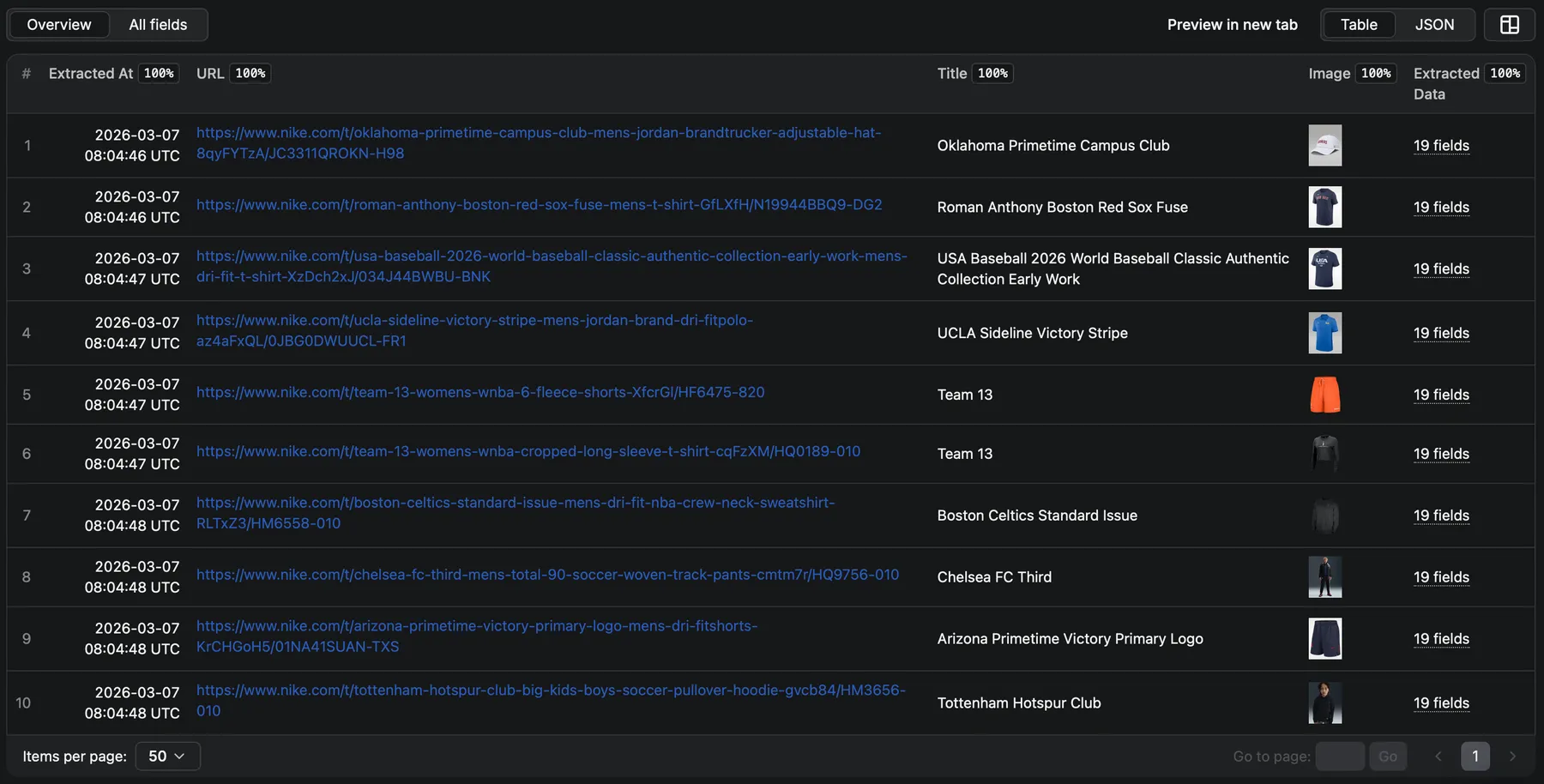
Each extracted item contains metadata and extracted data:
| Field | Description |
|---|---|
extracted_at | Unix timestamp of extraction |
url | Page URL |
title | Page title |
image | Main product image URL |
data | Extracted product data |
Use the Overview view in Apify to browse results as a formatted table, or download in JSON, CSV, HTML, or Excel.
Product Data Schema
The data field contains comprehensive product information. Fields depend on what's available on the target website.
Example Output
This page was extracted from https://www.nike.com:
⚙️ Under the Hood
How It Works
- First run — AI analyzes the site and generates a custom crawler (3-5 minutes)
- Subsequent runs — Crawler is reused, extraction starts immediately
The crawler is regenerated when you change the website or country.
Why It's Fast
Unlike LLM-based scrapers that call AI for every page, we use AI once to generate a compiled Rust extractor. This means:
- No per-page AI costs — extraction runs as pure code
- High throughput — up to 50 pages/second (3,000/minute)
- Consistent results — same extractor, deterministic output
Infrastructure
Extraction runs on our dedicated infrastructure, not Apify's platform. There may be a brief delay (~15-20s) while provisioning resources before the crawl starts.
Stealth
Our Rust engine includes custom HTTP and browser implementations built specifically for web scraping:
- Smart request routing (Chrome rendering, fast HTTP, direct API calls)
- Anti-detection measures to avoid blocks
- Premium residential proxies included
🛠️ Troubleshooting
Extraction taking longer than expected?
- First run: AI is generating your custom crawler (3-5 minutes). Subsequent runs start immediately.
- Provisioning: Brief delay (~15-20s) while infrastructure spins up.
Getting blocked or no results?
- Verify the start URL is accessible in your browser
- Ensure the selected country matches the website's region
- Try a smaller budget to reduce request volume
- Some sites have aggressive bot protection — report persistent issues
🎙️ Feedback & Support
We're actively improving extraction quality based on your feedback.
- Bugs, questions, feature requests: Issues tab