

Traveloka Hotel Reviews Scraper - Guest Ratings & Replies
Pricing
from $1.50 / 1,000 reviews
Traveloka Hotel Reviews Scraper - Guest Ratings & Replies
Scrape Traveloka hotel & activity reviews - guest reviews, 1-10 ratings, category sub-scores, owner replies, reviewer data, photos and full timestamps, with LLM-ready markdown. Structured JSON/CSV for analytics, AI and market research. No login.
Pricing
from $1.50 / 1,000 reviews
Rating
5.0
(3)
Developer

Factden
Maintained by CommunityActor stats
4
Bookmarked
9
Total users
3
Monthly active users
11 days ago
Last modified
Categories
Share
Traveloka Hotel & Activity Reviews Scraper (September 2026)
Extract guest reviews from Traveloka hotels and Traveloka Xperience activities in a single run - no login, no proxy setup, no code required.
From $4 per 1,000 reviews (drops to $1.50 / 1,000 on higher Apify plans) · effectively-free $0.00005 start fee · New Apify users get ~1,250 reviews free with the $5 platform credit.
▶ Watch the 60-second walkthrough: https://www.youtube.com/watch?v=NhIrJ8fyfg8
Contents: What's different · Who it's for · Use cases · Step by step · Input · Output · Pricing · Schedule · AI agents & RAG · GDPR · FAQ · Changelog · Support
What's different
Two things no other Apify actor for Traveloka does today:
- Hotels and activities in one run. Add Traveloka
/hotel/…URLs and Traveloka Xperience/activities/…/product/…URLs together - the actor returns each listing's full review set from the same run. Most Traveloka scrapers do hotels only; Traveloka's huge attractions, tours, and experiences catalog (theme parks, water parks, day tours) is left on the table. This actor reads both. - Original text and English machine translation, per review. Traveloka reviews are mostly Bahasa Indonesia,
Thai, and Vietnamese. Each row carries the original body and an English translation (
isMachineTranslatedflags it), so a non-Indonesian analyst can use the data directly - no separate translation step.
Plus:
- Every review the listing shows - native Traveloka reviews and the partner reviews Traveloka aggregates
onto the page (Expedia, Agoda, Booking and others), each tagged with its real origin in
reviewProvider. Paginated to completion (or to yourmaxReviewscap), on Traveloka's 10-point scale, matching the website exactly. SetincludePartnerReviewstofalsefor native Traveloka reviews only. Text and rating-only reviews are both included. - Owner/management responses (translated + original + responder name + date).
- Reviewer profile, trip type (Business / Family / Staycation / Romantic / …), helpful-reaction count, and attached photo URLs.
- Hotel-level category sub-ratings (cleanliness, comfort, food, location, service) on the per-listing summary.
- LLM-ready
markdownContentper review - a self-contained chunk ready for direct vector-DB / RAG ingestion.
No-setup checklist:
- No login or account required
- Apify Proxy bundled (Residential by default for clean routing to Traveloka)
- No code required (form-based input in the Apify Console)
- Pay-per-event pricing - no subscription, no commitment
What does this scraper do?
You paste hotel or activity URLs (mix freely, up to 500 per run). The actor returns two structured datasets:
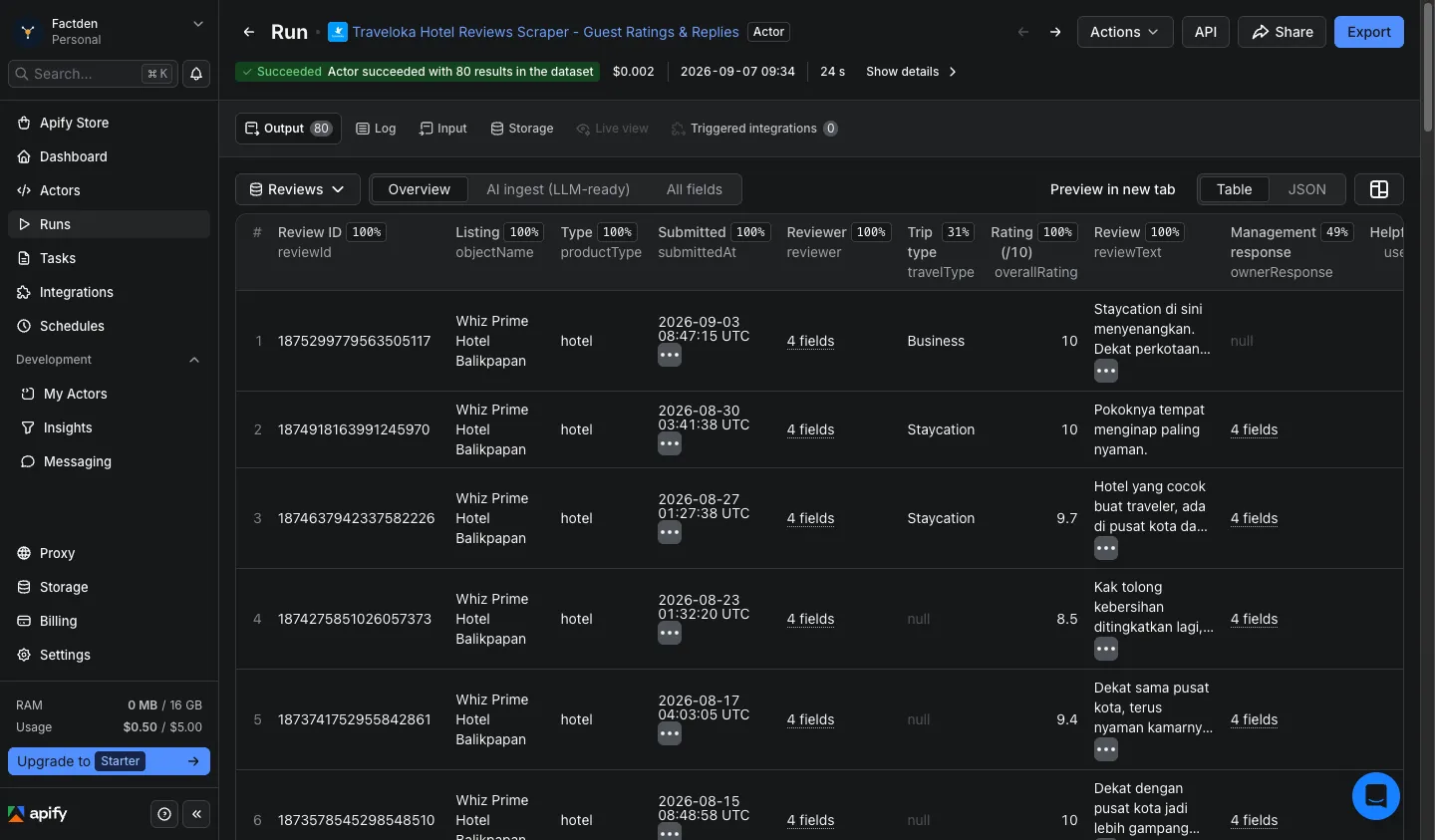
Reviews dataset - one row per guest review:
- Core:
overallRating(10-point),travelType,submittedAt,productType(hoteloractivity) - Text:
reviewText(original) +reviewTextTranslated(English) +isMachineTranslated - Reviewer:
reviewer.name,reviewer.reviewerId,reviewer.isAnonymous,reviewer.photoUrl - Management response:
ownerResponse.text,ownerResponse.textOriginal,ownerResponse.replierName,ownerResponse.date - Media & engagement:
usefulCount,imagesCount,imageUrls,hasVideo - AI-ready:
markdownContent- self-contained per-review markdown block, direct vector-DB input
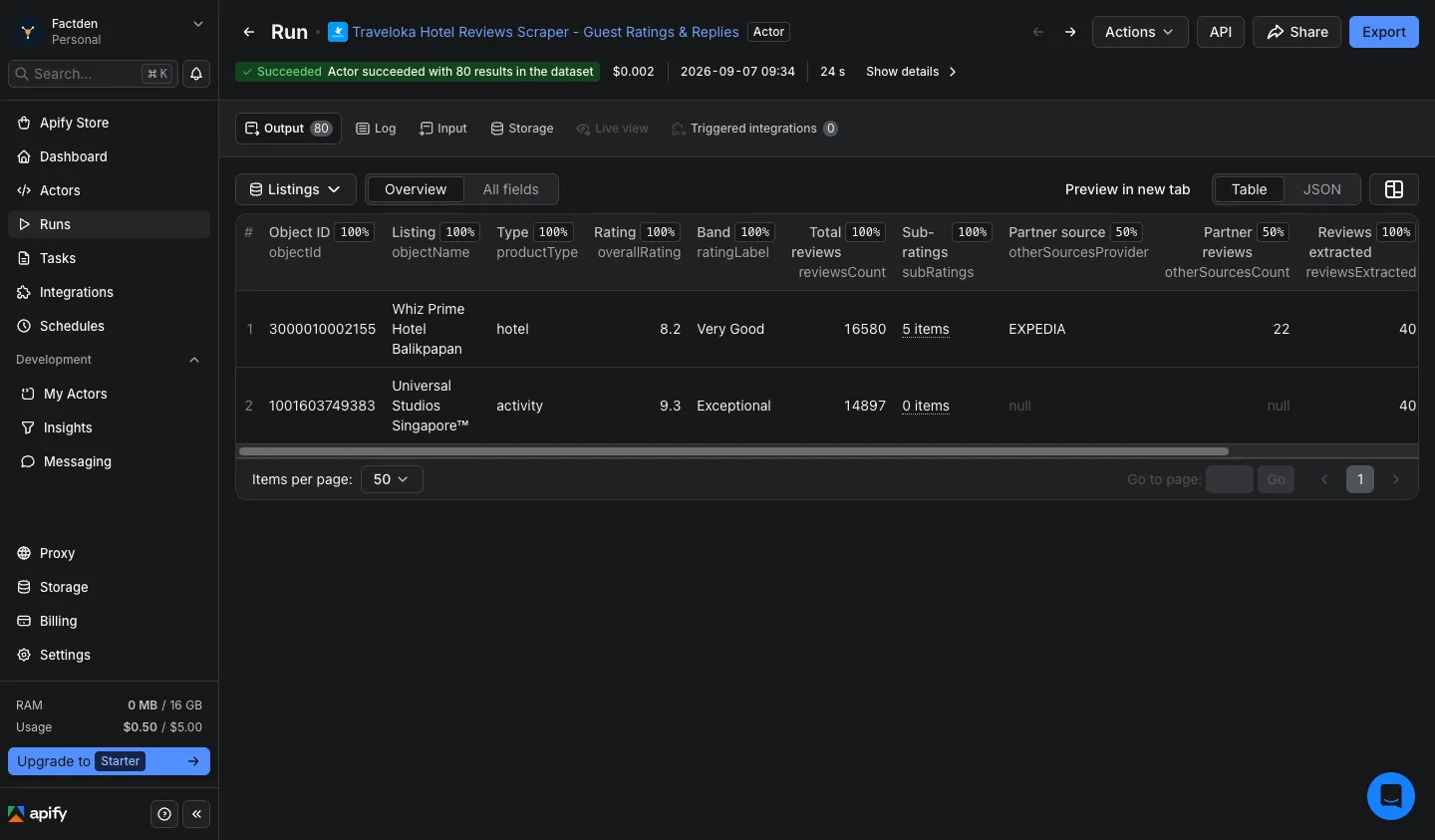
Listings dataset - one summary row per hotel/activity: aggregate rating, rating band, total review count, category sub-ratings (hotels), partner-source count, and completeness percentage.
Both datasets are accessible via the Output-tab dropdown - see Output.
Why this scraper (vs the official API and other Apify scrapers)
Traveloka publishes no public reviews API - scraping the public review data is the only way to get it at scale. Among the Apify actors that do, this is the only one that reads hotels and activities in a single run and keeps the per-review depth most others drop:
| Capability | This actor | Other Apify Traveloka scrapers | Official API |
|---|---|---|---|
| Traveloka hotel reviews | ✅ | ✅ (most) | ❌ none |
| Traveloka Xperience activity reviews (same run) | ✅ | ❌ hotels-only | ❌ |
| Original text + English machine translation | ✅ both | ❌ original only | ❌ |
| Hotel-level category sub-ratings (cleanliness / comfort / food / location / service) | ✅ | varies | ❌ |
| Owner / management responses | ✅ | varies | ❌ |
| Reviewer profile + trip type + photo URLs | ✅ | varies | ❌ |
LLM-ready markdownContent per review | ✅ | ❌ | ❌ |
| No login, proxy, or anti-bot setup | ✅ | ✅ | n/a |
| Pricing | from $4 / 1,000 reviews (to $1.50 on higher plans) | varies | n/a |
The headline difference is activities coverage: hotels-only tools ignore Traveloka Xperience entirely, while this actor reads theme parks, water parks, tours, and attractions with the same schema - so you can analyze a resort and the nearby water park in one dataset.
Who this scraper is for
- Hotel revenue & reputation managers tracking competitor properties' rating trends and category sub-ratings on Traveloka across Indonesia and Southeast Asia.
- Attractions & experiences operators (theme parks, tours, activities) monitoring guest sentiment on Traveloka Xperience - a segment most scrapers can't reach.
- AI / RAG engineers ingesting reviews into vector databases -
markdownContentis chunk-ready, and the English translation means multilingual reviews are usable without a separate pipeline. - Market researchers filtering by
travelType, rating, and date for ICP-scoped Southeast-Asia travel datasets. - Brand reputation teams monitoring
ownerResponsecoverage and rating movements across a portfolio.
Common use cases
1. Daily sentiment monitoring for a hotel portfolio
Pair with the Schedule section to run nightly with fromDate
set to yesterday.
2. Negative-review mining for a competitor analysis
Cap the rating at 5 (on the 10-point scale) to surface only the reviews rated 5/10 or lower - the painful ones.
ownerResponse.text shows how the hotel handles complaints.
3. Attraction / experience intelligence (Traveloka Xperience)
Activity rows use the same schema as hotels (productType: "activity"), so theme-park and tour reviews slot straight
into the same analysis - a segment hotels-only scrapers can't touch.
4. Backfill a full review history for AI / RAG ingestion
The markdownContent field on each row is a self-contained chunk - original text, English translation, rating, trip
type, and owner reply inlined - ready for direct embedding. See
AI agents & RAG.
How to scrape Traveloka reviews - step by step
- Click Try for free on this actor's Apify Store page.
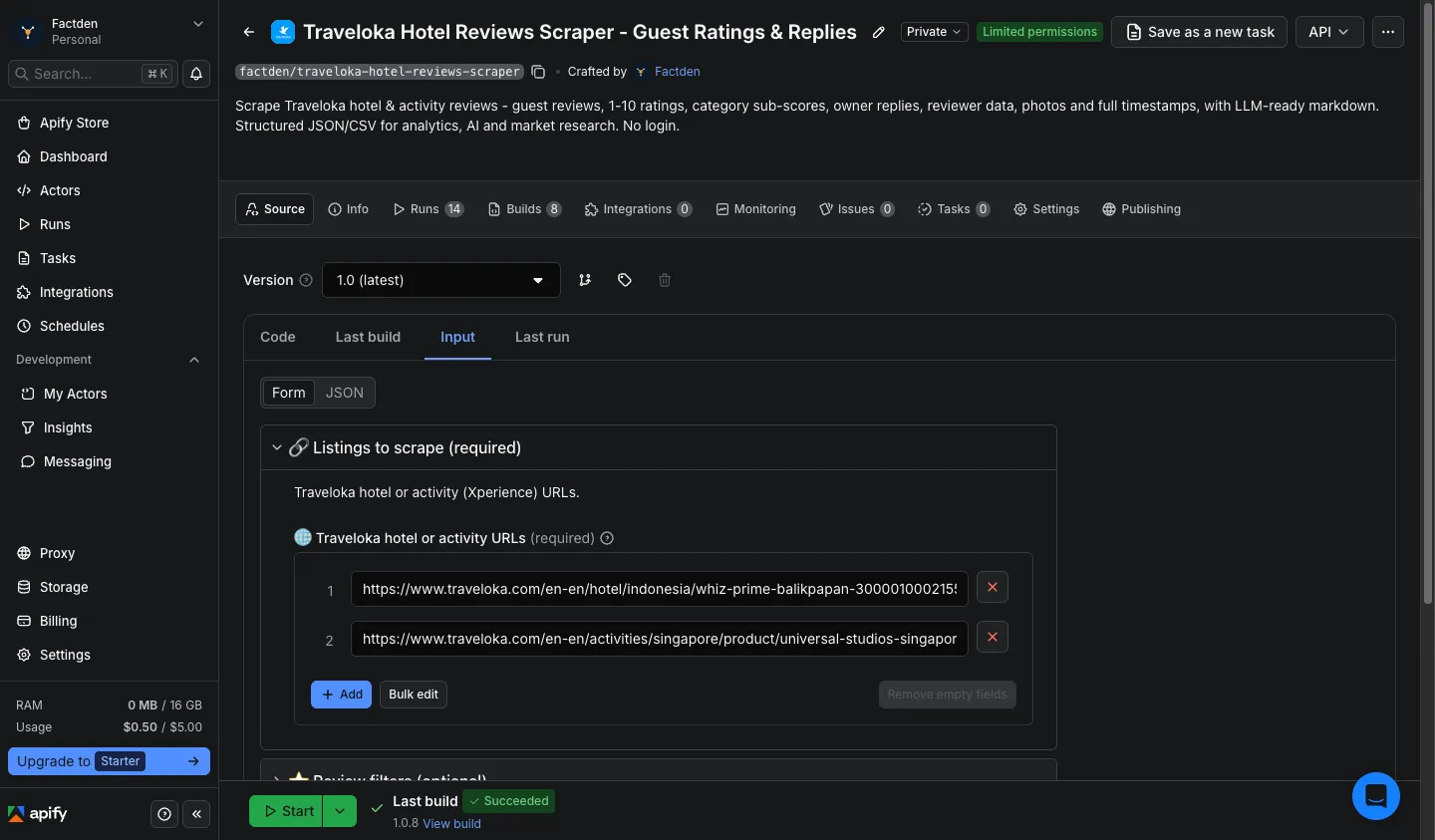
- Paste one or more Traveloka hotel or activity URLs into Start URLs (mix freely; up to 500 per run).
- Set
maxReviews,fromDate,minRating/maxRating, andsortByas needed. - Click Start. Results stream into the Output tab in real time.
- Switch the Output-tab dropdown between Reviews and Listings to inspect either dataset. Download as JSON, CSV, or Excel.
completenessPct on the Listings dataset tracks how much of each listing's exposed reviews you retrieved. See
Pricing below for per-event rates and the tiered discount ladder.
Where to find a Traveloka URL
Open any hotel or activity on traveloka.com and copy the address bar. Both shapes work:
- Hotel:
https://www.traveloka.com/en-en/hotel/{country}/{name}-{id} - Activity:
https://www.traveloka.com/en-en/activities/{country}/product/{name}-{id}
Input
| Field | Type | Default | Description |
|---|---|---|---|
startUrls | array of URL | (prefilled) | Traveloka hotel or activity URLs. Mix freely. Max 500. |
maxReviews | integer | 200 | Max reviews per listing (1–5,000) |
sortBy | enum | mostRecent | mostRecent / mostRelevant / mostHelpful |
fromDate | date | - | YYYY-MM-DD; only reviews submitted on or after this date |
minRating | integer | 1 | 1–10 (Traveloka's 10-point scale) |
maxRating | integer | 10 | 1–10; the default 10 means no cap. Set e.g. 5 to keep only reviews rated 5/10 or lower |
includePartnerReviews | boolean | true | Include the partner reviews Traveloka aggregates (Expedia/Agoda/Booking/…) alongside native ones, each tagged in reviewProvider. Set false for native Traveloka reviews only |
proxyConfiguration | proxy | Apify Proxy (Residential) | Residential recommended for clean routing |
URL examples:
https://www.traveloka.com/en-en/hotel/singapore/marina-bay-sands-3000010001272https://www.traveloka.com/en-en/hotel/indonesia/whiz-prime-balikpapan-3000010002155https://www.traveloka.com/en-en/activities/singapore/product/universal-studios-singapore-1001603749383
Output
Two named alias datasets, accessible via the Output-tab dropdown in the Apify Console:
- Reviews - one row per review. Two table views: Overview (the columns most users want) and
AI ingest (LLM-ready columns led by
markdownContent).
- Listings - one summary row per hotel/activity scraped: aggregate rating, rating band, total review count, category sub-ratings (hotels), partner-source count, and completeness percentage.
Sample review row
Sample listing summary row
Timestamps: submittedAt and ownerResponse.date come from Traveloka as calendar dates; we emit them as UTC ISO
8601. extractedAt is our scrape time in UTC. Sources: by default the actor returns both native Traveloka
reviews and the partner reviews Traveloka aggregates onto the page (Expedia/Agoda/Booking/…), each row tagged with its
true origin in reviewProvider (source stays traveloka = the platform scraped). Set includePartnerReviews to
false for native only. On the Listings summary, otherSourcesProvider / otherSourcesCount report the partner
bucket's provider and size.
Pricing
Pay-per-event. No subscription, no minimum spend.
| Event | Rate |
|---|---|
apify-actor-start | $0.00005 per run (one-time, effectively free) |
apify-default-dataset-item | from $0.004 per review row |
Effective rate: $4 per 1,000 reviews at base (Free) tier, dropping automatically with your Apify subscription - down to $1.50 per 1,000 reviews on higher plans. The start fee is a one-time $0.00005 per run (negligible). You are only charged for the reviews you actually receive.
Cost examples (base tier):
| Scope | Reviews | Cost |
|---|---|---|
| Quick validation (1 listing, 50 reviews) | 50 | ~$0.20 |
| Single listing pull | 200 | ~$0.80 |
| Competitor set (10 listings × 100 reviews) | 1,000 | ~$4.00 |
| Deep pull (10 listings × 500 reviews) | 5,000 | ~$20.00 |
Apify's $5 new-account credit covers ~1,250 reviews on day one - enough to validate end-to-end before any spend. Incremental daily runs (50–200 new reviews per listing) typically cost a few cents each.
How to run this Traveloka reviews API on a schedule
For continuous monitoring, daily delta refreshes, or ORM dashboards:
- Open the Apify Schedules tab in your Console.
- Add a new schedule and select this actor.
- Set the cron expression (e.g.,
0 6 * * *for daily at 06:00 UTC). - In the schedule's input override, set
fromDateto a sliding window - for example, yesterday's date via Apify's{{NOW - 1.day | date('YYYY-MM-DD')}}template. - (Optional) Wire an Apify webhook on
ACTOR.RUN.SUCCEEDEDto push the dataset into Snowflake, BigQuery, S3, or your CRM.
With fromDate set to a sliding window, each run returns only the reviews posted since the previous sync - so
incremental runs stay small and cheap. Pair it with sortBy: "mostRecent" for newest-first, and maxReviews to cap
each run.
AI agents & RAG - using the data with LLMs
The markdownContent field on every review is a self-contained markdown block - title, rating, trip type, original
body, English translation, and property response inlined. Designed for direct vector-DB ingestion and LLM context
windows.
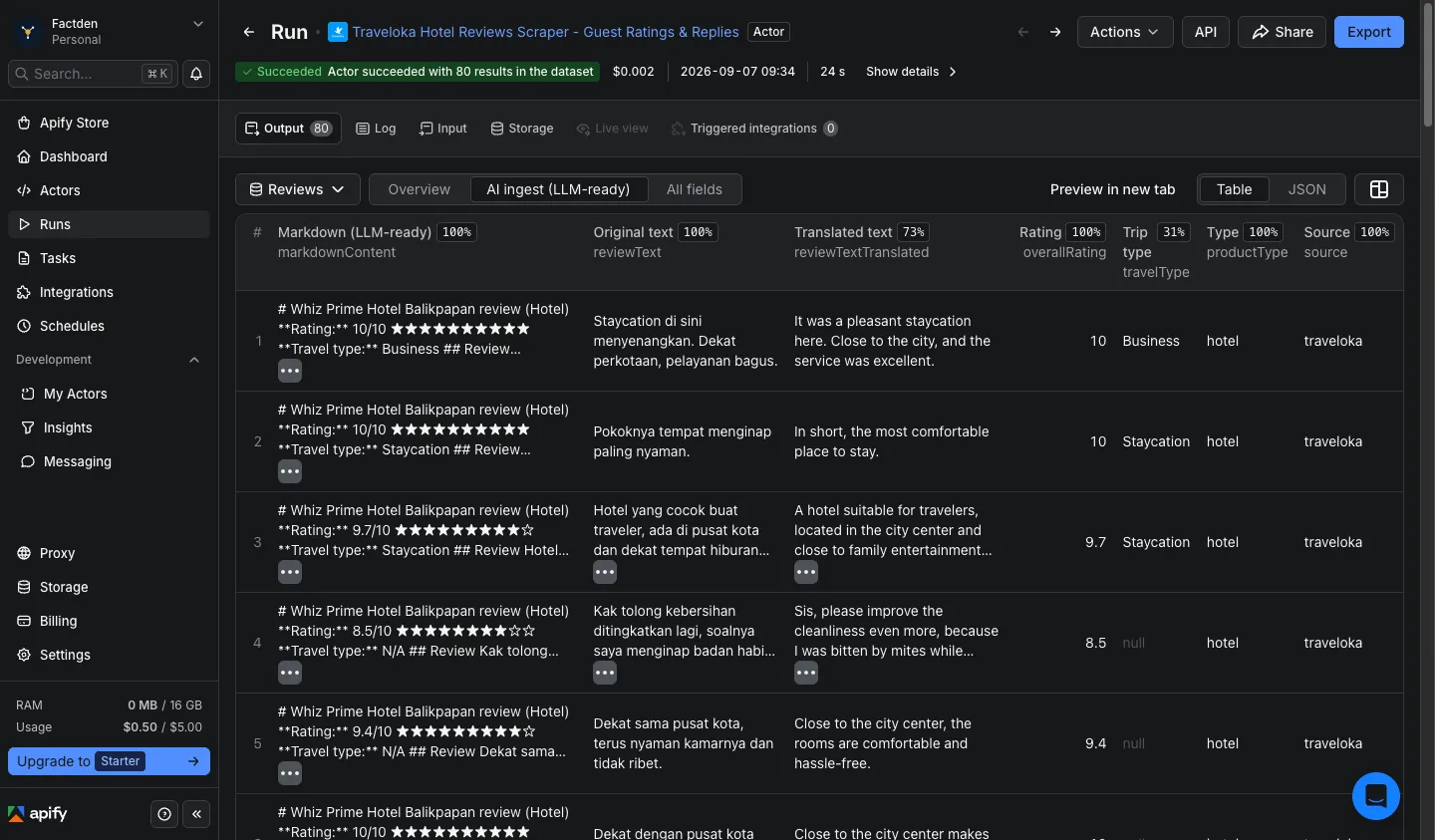
Use the standard Apify API or client libraries to run the actor and iterate the Reviews
dataset - markdownContent is your ready-to-embed chunk.
Field glossary for AI agents
| Field | What it carries | Why an agent cares |
|---|---|---|
markdownContent | Per-review self-contained markdown chunk | RAG / vector-DB ingestion |
reviewTextTranslated | English machine translation of the original body | Multilingual reviews usable without a translation step |
productType | hotel or activity | Segment hotels vs experiences before embedding |
reviewProvider | True origin of the review: traveloka or a partner (expedia/agoda/booking/…) | Filter or weight by source; source stays traveloka (platform) |
travelType | Business / Family / Staycation / Romantic / … (hotels) | ICP filtering before embedding |
subRatings (Listings dataset) | Category scores as a labeled array (cleanliness, comfort, food, location, service) | Fine-grained sentiment retrieval |
ownerResponse.text | Property management reply (English) | Reputation-management agents |
otherSourcesCount (Listings dataset) | Size of the partner-review bucket for the listing | Coverage / completeness signal |
Data sources & GDPR
This actor extracts publicly visible review data from Traveloka. The reviewer.name field may contain the display
name a reviewer chose to show publicly; anonymous reviewers are surfaced as a masked handle with
reviewer.isAnonymous: true. You are responsible for ensuring your downstream use of this data complies with GDPR,
Indonesia's PDP Law, and any other applicable data-protection regulations in your jurisdiction.
FAQ
How much does it cost to scrape 10,000 Traveloka reviews?
10,000 × $0.004 = $40.00 at base tier, plus a one-time $0.00005 start fee (negligible). New Apify accounts get a $5 credit that covers ~1,250 reviews - enough to validate the actor end-to-end before any spend. Tiered discounts reduce the per-row price automatically as your Apify plan scales, down to $1.50 per 1,000 (so 10,000 reviews for ~$15 on higher plans).
Can I scrape both hotels and activities in one run?
Yes. Hotels are the primary focus, and Traveloka Xperience activity URLs work too - paste them together in
startUrls (up to 500) and the actor handles both in one pass. Activity rows use the same schema with
productType: "activity" (activities carry no trip type or category sub-ratings).
Does this return non-English (Bahasa Indonesia / Thai / Vietnamese) reviews?
Yes, and it translates them. Each review row carries the original body (reviewText) and an English machine
translation (reviewTextTranslated), with isMachineTranslated flagging which rows were translated. So a
non-Indonesian analyst can use the dataset directly.
How does this compare to other Traveloka scrapers on Apify?
Three things unique to this actor: (1) hotels and activities in one run - most competitors are hotels-only and
skip Traveloka Xperience entirely; (2) original text plus English translation on every review, not just the
original; (3) markdownContent chunks - self-contained per-review markdown ready for direct vector-DB / RAG
ingestion. Plus hotel-level category sub-ratings, owner responses, reviewer profile, and trip type.
How fresh is the review data?
Real-time. Every run pulls fresh data from Traveloka directly - there is no caching layer between the upstream and your dataset. A review posted recently appears in the next run as soon as Traveloka's own indexing picks it up.
Can I export Traveloka reviews to CSV or Excel?
Yes. The Output tab in Apify Console offers JSON, JSONL, CSV, Excel, and HTML downloads on both the Reviews and Listings datasets. The Overview view is column-ordered for clean import into Google Sheets or Excel without reformatting. For large exports use the Apify API for direct dataset streaming.
Can I scrape incrementally instead of refetching everything?
Yes. Set fromDate to your last successful scrape date and the run returns only the reviews posted since then - much
cheaper than a full re-scrape. Use sortBy: "mostRecent" to get the newest first. See
Schedule for cron + webhook wiring.
Do the ratings match the Traveloka website?
Yes. overallRating is on Traveloka's 10-point scale, exactly as shown on the site. The minRating / maxRating
filters operate on the same 1–10 scale - the default maxRating of 10 means no cap; set e.g. 5 to keep only reviews
rated 5/10 or lower.
Do I need a Traveloka account, API key, or proxy to use this scraper?
No. Only an Apify account (free) is required. No Traveloka login, no API key, and no proxy configuration - Apify's built-in Residential proxy is bundled and handles routing automatically. You can run your first extraction in under a minute with zero infrastructure setup.
Is scraping Traveloka legal?
This actor extracts publicly visible data - no login is required, no rate-limit bypass is performed. Whether your downstream use is permissible depends on your jurisdiction's regulations (GDPR, PDP Law, CCPA, etc.) and on Traveloka's Terms of Service for the data category you're collecting. Reviewing both is your responsibility before deploying at scale.
Related Actors
Pair Traveloka Hotel & Activity Reviews Scraper with our other FactDen actors on the Apify Store:
- Zomato Restaurant Reviews Scraper
- Qunar Hotel Reviews Scraper — the only Apify actor for Qunar (去哪儿): per-review sub-scores, sentiment, owner replies and LLM-ready markdown
- Agoda Hotel Reviews Scraper - Agoda hotel reviews at scale: scores, review text, traveler type & owner responses, in 33 languages
- MakeMyTrip & Goibibo Reviews Scraper - MakeMyTrip + Goibibo hotel reviews & details (India's largest OTAs)
- Trip.com & Ctrip Reviews Scraper - bilingual Trip.com + Ctrip (携程) hotel reviews with owner responses and sub-ratings
- Google Hotels Scraper - live hotel prices, OTA rate ladder, per-room rates & guest reviews from Google Hotels
- Expedia Reviews Scraper - hotel reviews, ratings, and sentiment across Expedia Group brands
- Hotels.com Reviews Scraper - hotel ratings, review text, and sentiment from Hotels.com listings
- Airbnb Data Scraper - Airbnb listings, prices, availability, occupancy, ADR/RevPAR, and reviews; a pay-per-use AirDNA alternative
- G2 Reviews Scraper - B2B SaaS competitive intelligence and battlecard data
Changelog
v1.0 - Public launch (2026-08-31)
Initial public release. Traveloka hotel and activity review extraction in a single run, original text + English
machine translation, hotel-level category sub-ratings, owner responses, reviewer profile and trip type, LLM-ready
markdownContent, and pay-per-event pricing with tiered discounts. Ratings on Traveloka's 10-point scale;
minRating / maxRating operate on the same scale (default maxRating 10 = no cap).
Support & maintenance
⭐ Found this useful? Leaving a quick review on this page helps other travel-data teams discover the actor - and tells us what to build next. Thank you!
Actively maintained. Bug reports and feature requests are typically triaged within 1–2 business days.
- Apify Issues tab - primary support channel; we get notified instantly and other users can upvote your report. Please include the run ID, one example URL, and what you expected vs what you saw.
- Email - support@factden.com for billing or support questions.
Looking for reviews from another OTA? Try our sibling Agoda Hotel Reviews Scraper or Trip.com & Ctrip Reviews Scraper.
Built by factden on the Apify platform. Try the Traveloka Hotel & Activity Reviews Scraper free with Apify's $5 monthly credit - covers ~1,000 reviews on first run.


