

Qunar Hotel Reviews Scraper - 去哪儿 Ratings & Reviews
Pricing
from $3.00 / 1,000 reviews
Qunar Hotel Reviews Scraper - 去哪儿 Ratings & Reviews
Scrape Qunar (去哪儿) hotel reviews - guest ratings, review text, per-review sub-ratings, travel type, photos, owner replies and reviewer data, with LLM-ready markdown.
Pricing
from $3.00 / 1,000 reviews
Rating
5.0
(3)
Developer

Factden
Maintained by CommunityActor stats
3
Bookmarked
16
Total users
0
Monthly active users
21 days ago
Last modified
Categories
Share
Qunar Hotel Reviews Scraper - 去哪儿 Ratings, Reviews & Sub-scores (August 2026)
Qunar Hotel Reviews Scraper extracts guest reviews from Qunar (去哪儿), the China-market travel brand in the Trip.com Group, into clean JSON, CSV or Excel. It is the only Qunar review scraper on Apify: paste a hotel URL and get guest ratings, per-review sub-scores, review text, travel type, photos, owner replies, sentiment and reviewer data, each with an LLM-ready markdown field. No login, no API key, no code required.
⭐ Found this useful? Please rate and bookmark the actor. It helps other China-market researchers find it.
From $4 per 1,000 reviews (dropping to $3 with volume) plus a small per-run start fee. New Apify accounts get free platform credit, enough to validate the scraper end to end before any real spend.
Contents: What's different · What data can I extract? · Why scrape Qunar reviews? · Step by step · Input · Output · Pricing · Qunar vs other scrapers · Schedule · AI & RAG · GDPR · FAQ · Related actors · Changelog · Support
What's different
Qunar runs one of the largest Chinese-language hotel review systems, and no other Apify actor covers it. This scraper is built for it, so you get review data you cannot get from Trip.com, Ctrip or Western OTA scrapers:
- Everything the Qunar page shows. Qunar displays reviews written natively on Qunar plus reviews it
aggregates from Ctrip, undifferentiated. You get them all, and every row is tagged with its origin
(
reviewSource,isCtripImport) so you always know where each review came from. - Per-review sub-ratings. Native reviews carry service, location, facilities, cleanliness and breakfast scores per review, not just a hotel-level average. Most OTA scrapers only give the overall star.
- Domestic-China coverage. Qunar's audience is mainland domestic travelers, the corpus that Trip.com's international listings and Western OTAs largely miss.
- LLM-ready markdown. Each review carries a self-contained
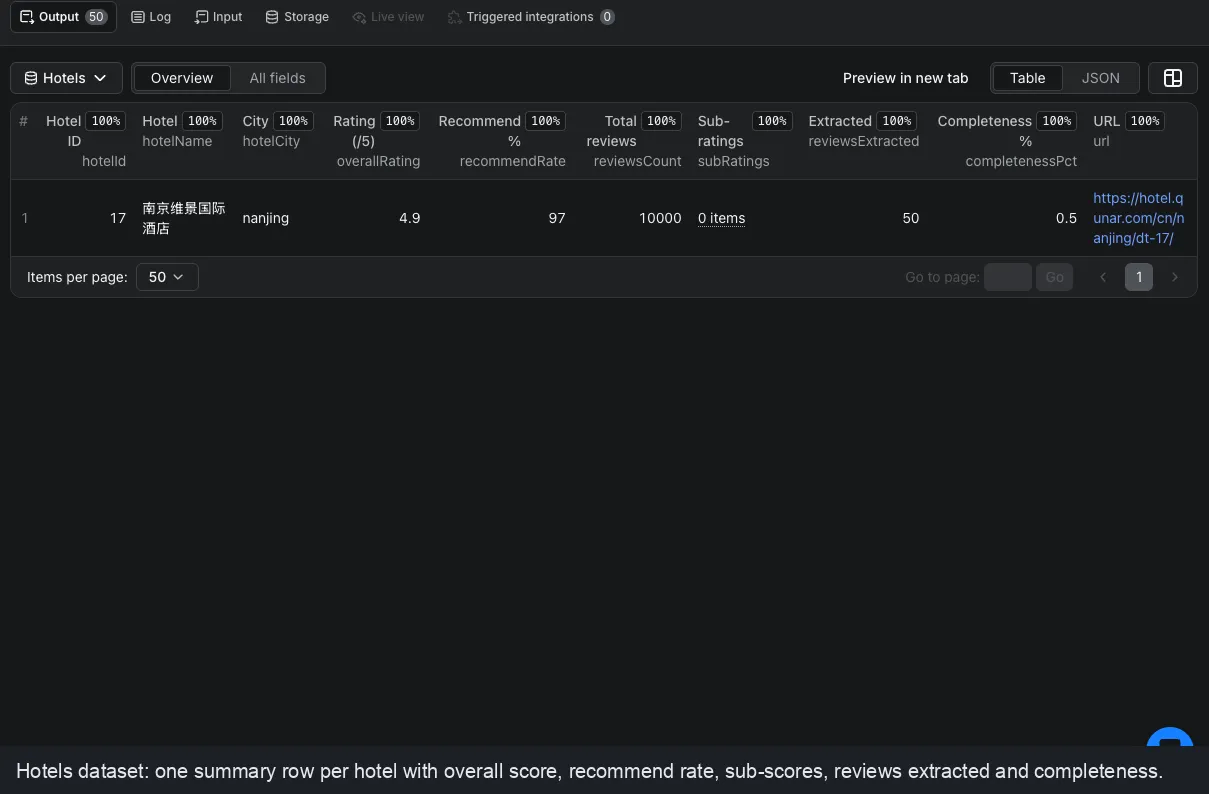
markdownContentblock, ready to embed straight into a vector database. No other hotel-review actor ships this. - A paired Hotels dataset with the hotel's overall score, recommend rate and sub-scores, one summary row per hotel.
No-setup checklist: no login or account, Apify Proxy bundled (datacenter by default), form-based input in the Apify Console.
What data can I extract?
| Field group | Fields |
|---|---|
| Identity | reviewId, hotelId, hotelName, hotelCity, hotelUrl, url, source, reviewSource, isCtripImport |
| Timing | submittedAt, checkInMonth |
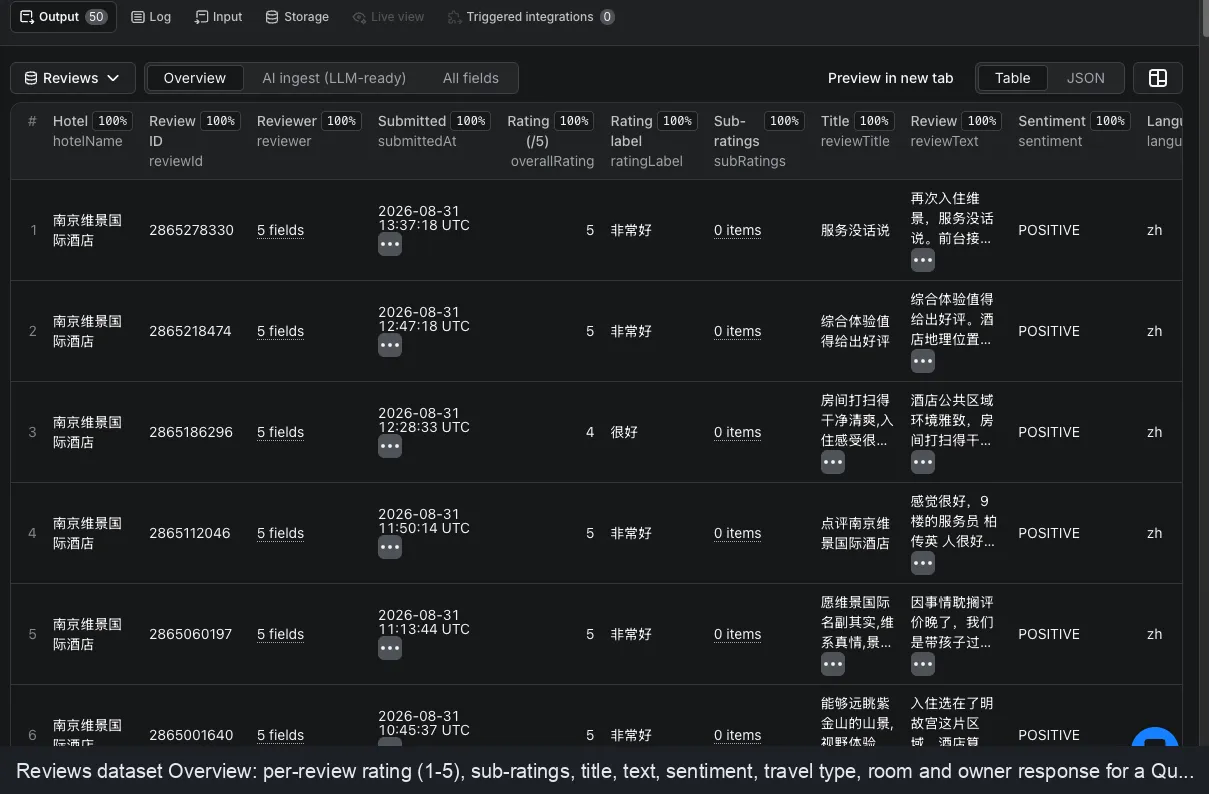
| Ratings | overallRating (1-5), ratingLabel, subRatings, sentiment (POSITIVE / NEGATIVE / NEUTRAL) |
| Content | reviewTitle, reviewText, travelType, roomName, language |
| Media | imagesCount, images |
| People | reviewer (name, userId, avatar, isAnonymous, identityLevel), ownerResponse |
| AI | markdownContent (LLM-ready) |
Ratings are on Qunar's native 1 to 5 scale, matching the website. Reviews are Chinese-language and are returned as written (Qunar provides no translation).
Why scrape Qunar reviews?
- Reputation and revenue teams tracking guest sentiment on China's price-led OTA, the domestic market Western tools do not cover.
- Market researchers comparing Qunar reception against Ctrip, Trip.com and the wider field.
- AI and RAG builders who need clean, per-review Chinese-language markdown for question-answering.
- Data teams feeding review pipelines, dashboards or sentiment models.
How to scrape Qunar reviews, step by step
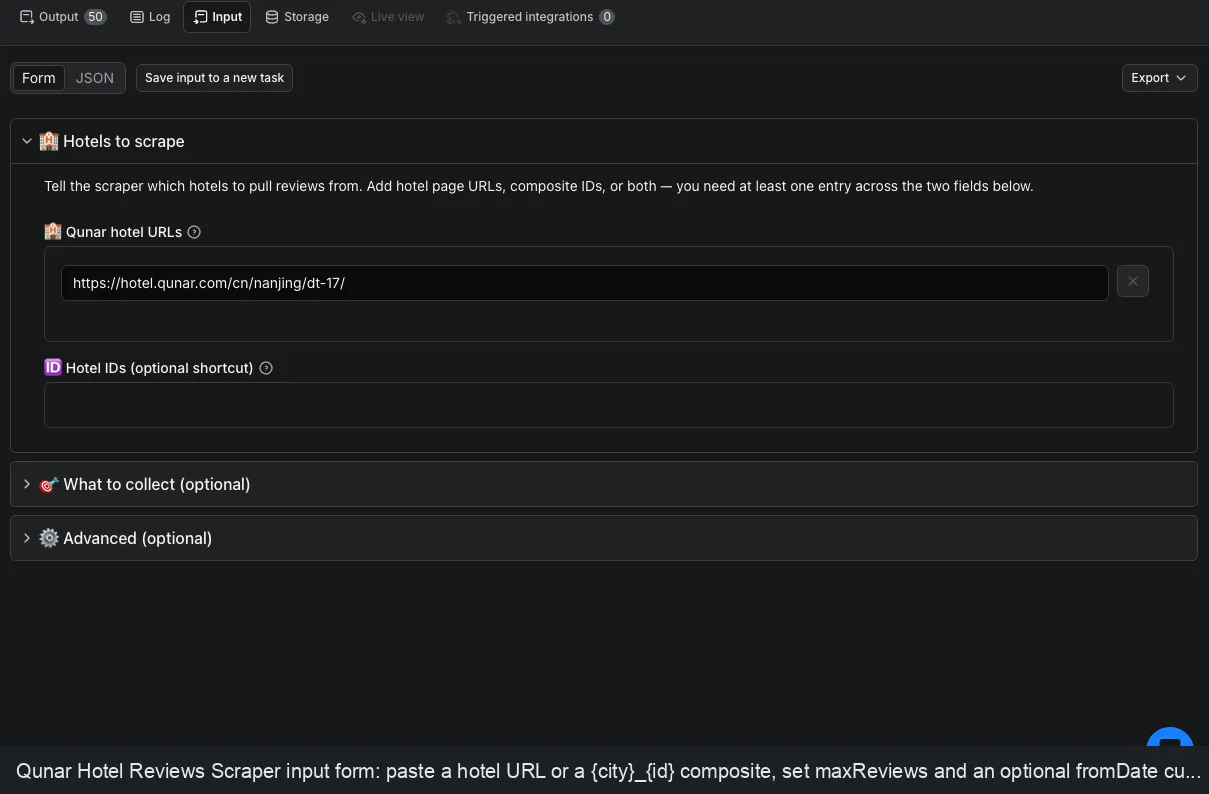
- Open the input form.
- Paste one or more Qunar hotel URLs into Qunar hotel URLs, for example
https://hotel.qunar.com/cn/nanjing/dt-17/orhttps://touch.qunar.com/hotelcn/nanjing/dt-17. You can also add composite IDs likenanjing_17under Hotel IDs. - Optionally set
maxReviewsper hotel, or afromDatecutoff for incremental syncs. - Click Start. Download results as JSON, CSV or Excel, or pull them from the API.
Input
| Field | Type | Description |
|---|---|---|
startUrls | array | Qunar hotel page URLs. Combined with hotelIds, up to 100 hotels per run. |
hotelIds | array | Optional composite IDs in {city}_{id} form, e.g. nanjing_17. A bare number is rejected (it has no city). |
maxReviews | integer | Max reviews per hotel, newest first. Qunar caps accessible reviews at 10,000. Default 200. |
fromDate | string | Keep reviews submitted on or after this YYYY-MM-DD date. Reviews are read newest-first, so this stops the crawl at the date boundary (fast incremental syncs) instead of scanning the whole history. |
proxyConfiguration | object | Apify Proxy. Datacenter by default. |
Rating filtering is done downstream, not in the input: Qunar's endpoint offers no server-side rating sort,
so every row carries overallRating (1-5) and sentiment for you to sort or filter after export.
Example input
Output
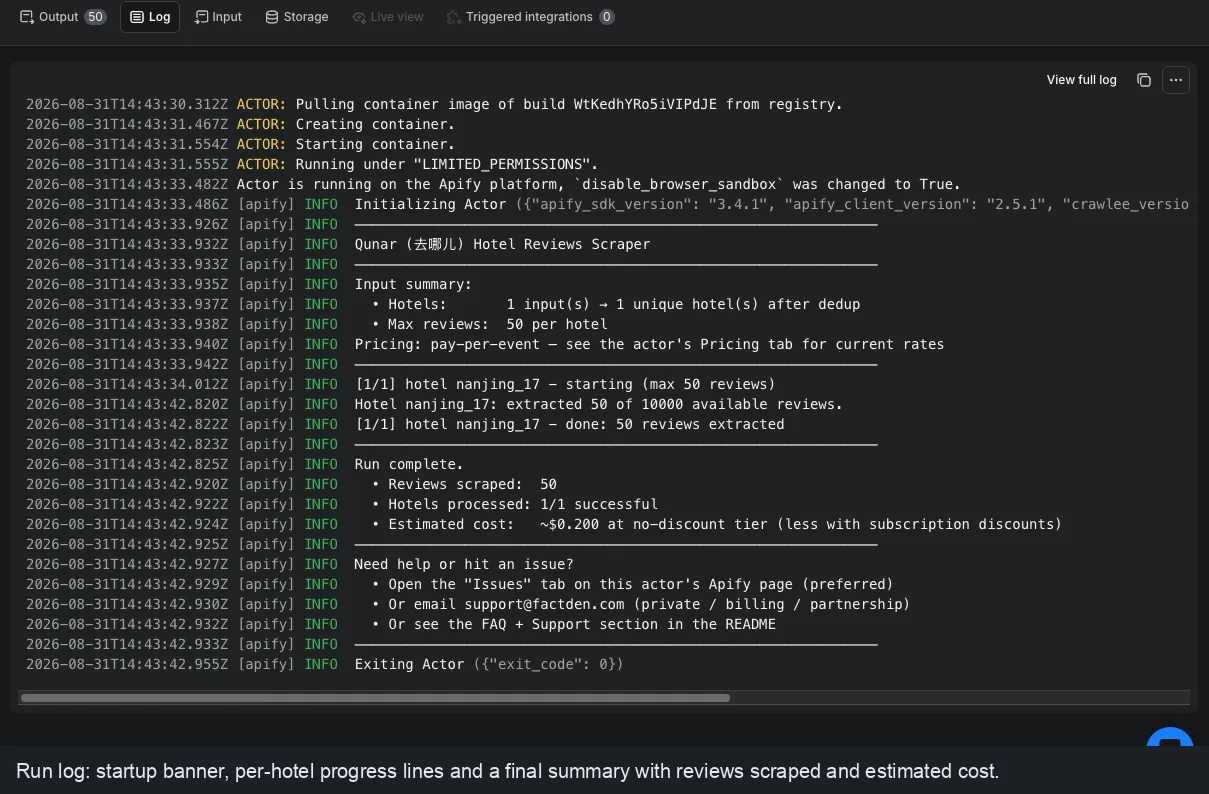
Two datasets: Reviews (one row per review, with markdownContent) and Hotels (one summary row per
hotel). Timestamps (submittedAt) are in Qunar's own China local time (UTC+8), matching qunar.com, and
the fromDate filter keys on that local date. (The Apify Console table converts these naive times to UTC for
display, so an early-morning review can show on the previous day there; the stored value is authoritative.)
Sample review row
Pricing
Pay per result, on Apify's pay-per-event model. Both events carry automatic volume discounts that kick in as your Apify plan scales:
| Event | Free / Bronze | Silver | Gold and above |
|---|---|---|---|
| Review (per review row) | $0.004 | $0.0035 | $0.003 |
| Actor start (once per run) | $0.01 | $0.008 | $0.006 |
Effective rate: $4 per 1,000 reviews, dropping to $3 per 1,000 at higher tiers. Reviews removed by your
fromDate filter are not charged.
Qunar vs other review scrapers
There is no other Qunar scraper on Apify, so the honest comparison is against what general OTA and review scrapers can and cannot reach:
| Capability | This actor | Trip.com / Ctrip scrapers | Generic review scrapers |
|---|---|---|---|
| Qunar (去哪儿) native reviews | Yes | No | No |
| Per-review sub-ratings | Yes | Hotel-level only | Rarely |
| Domestic-China corpus | Yes | Partial | No |
| Owner responses + sentiment | Yes | Sometimes | Sometimes |
| LLM-ready markdown field | Yes | No | No |
| Paired hotel-summary dataset | Yes | Sometimes | No |
Run on a schedule
Use Apify Schedules to run this actor daily or weekly. Combine a schedule with fromDate set to your last
sync date so each run returns only new reviews, keeping incremental costs low.
AI agents & RAG
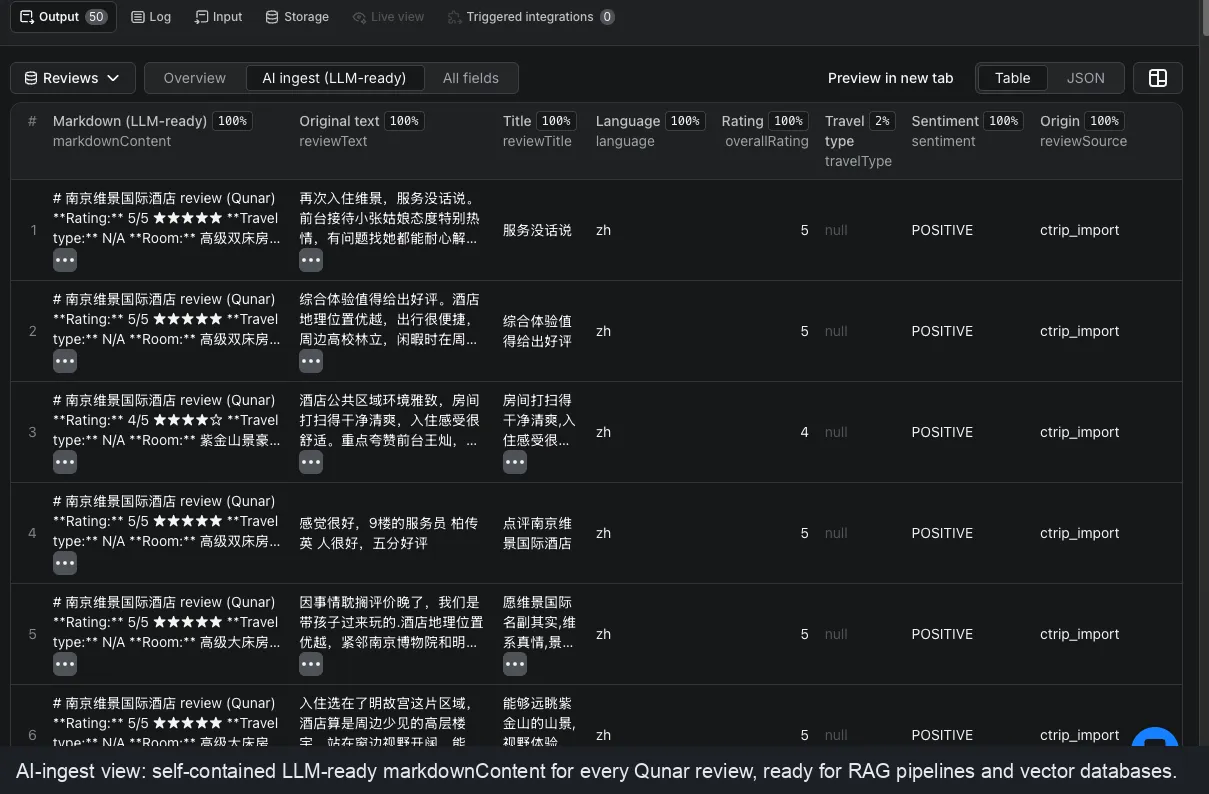
Every review row carries a self-contained markdownContent block (rating, sub-scores, travel type, body and
the hotel's reply), and the AI ingest dataset view puts it first, so you can push results straight into a
vector store with no reformatting.
Does it work with MCP and AI agents? Yes. The actor runs through the Apify API and the Apify MCP server, so an AI agent can call it with a hotel URL and get structured reviews back.
Data & GDPR
This actor collects publicly displayed hotel reviews. Reviewer names on Qunar are already masked or pseudonymous and are passed through as shown; you are responsible for using the data in line with applicable laws (including GDPR where relevant) and Qunar's terms. Reviews are Chinese-language; the source does not provide translations.
FAQ
Is it legal to scrape Qunar reviews? Scraping publicly available data is generally lawful, but how you use it is regulated. Reviews here are public and reviewer names are already pseudonymized. Use the data in line with GDPR and Qunar's terms. See Apify's guide: https://blog.apify.com/is-web-scraping-legal/
Does Qunar have a public reviews API? No. Qunar offers no supported reviews API, and the reviews are not in the page HTML (they load from a separate guarded call). This actor is the no-code way to get them as structured data.
Is Qunar the same as Ctrip or Trip.com? Qunar (去哪儿) is a separate brand in the same Trip.com Group. It is the price-led, domestic-China site, and it shows both native Qunar reviews and reviews aggregated from Ctrip. This actor returns both, tagged by origin.
Can I use this actor with the Apify API? Yes. Start runs and pull the dataset from the Apify API in any language, or use the JS/Python Apify client. Every run writes a Reviews dataset and a Hotels dataset.
Can I use it through an MCP server? Yes. The actor is callable from the Apify MCP server, so Claude,
ChatGPT and other MCP-aware agents can run it with a hotel URL and receive structured review JSON, including
the LLM-ready markdownContent field.
Can I integrate it with Make, Zapier, n8n or Google Sheets? Yes. Use Apify's integrations or webhooks to push new reviews into Make, Zapier, n8n, Google Sheets, Slack or your database on every run.
How do I scrape only new Qunar reviews by date? Set fromDate to your last sync date. Because reviews are
read newest-first, the actor stops at that boundary instead of scanning the whole history, so daily syncs stay
cheap.
Are the reviews translated? No. Qunar serves Chinese-language reviews and provides no machine translation,
so reviewText is the original Chinese. Run it through your own translation step if you need English.
Related actors by FactDen
- Zomato Restaurant Reviews Scraper - Zomato restaurant reviews & owner responses, plus restaurant leads (phone, address, GPS) by city & cuisine
- Traveloka Hotel & Activity Reviews Scraper - Traveloka hotel & Xperience activity reviews: 1-10 ratings, category sub-scores, owner replies & English translation
- Trip.com & Ctrip Reviews Scraper
- Agoda Hotel Reviews Scraper
- Google Hotels Scraper
- Expedia Hotel Reviews Scraper
- Hotels.com Reviews Scraper
- MakeMyTrip Scraper
- Airbnb Data Scraper
Support
Open the Issues tab on this actor's Apify page (preferred), or email support@factden.com for billing or support questions.
Changelog
- 2026-08 (v1.0.4): Tiered volume pricing (Review $4 to $3 per 1,000; start fee tiered). Curated Overview
dataset view; documented
submittedAtas Qunar China local time. - 2026-08 (v1.0): Initial release. Native + Ctrip-imported Qunar reviews, per-review sub-ratings, per-review permalink, sentiment, photos, owner replies, hotel summary dataset, and LLM-ready markdown.


