

AI Visibility Report — ChatGPT, Perplexity, Claude
Pricing
from $80.00 / 1,000 visibility checks
AI Visibility Report — ChatGPT, Perplexity, Claude
Check if AI assistants recommend your brand when customers ask for advice. See who gets mentioned instead of you, with sources — and what changed since your last check.
Pricing
from $80.00 / 1,000 visibility checks
Rating
0.0
(0)
Developer

Andrea Moscariello
Maintained by CommunityActor stats
0
Bookmarked
2
Total users
1
Monthly active users
2 months ago
Last modified
Categories
Share
AI Visibility Report — is your brand recommended by ChatGPT, Perplexity and Claude?
Your customers now ask AI assistants what to buy. This Actor asks the AIs the same questions your customers ask — and tells you whether your brand shows up, who gets recommended instead of you, and why.
Platform compute is on me — you only pay for results delivered. No second bill for compute time: the price below is the whole price.
- ✅ See yourself as the AIs see you: realistic buyer-intent questions, auto-generated for your industry and language, checked on ChatGPT (with web search), Perplexity and Claude (with web search).
- ✅ Know who wins instead — with the sources behind those answers, so you know where they come from. Every source comes with a link you can open.
- ✅ Get a report you can forward as-is: plain-language insights and three prioritized moves, not a wall of JSON. Run it weekly against your previous results and it tells you exactly what changed.
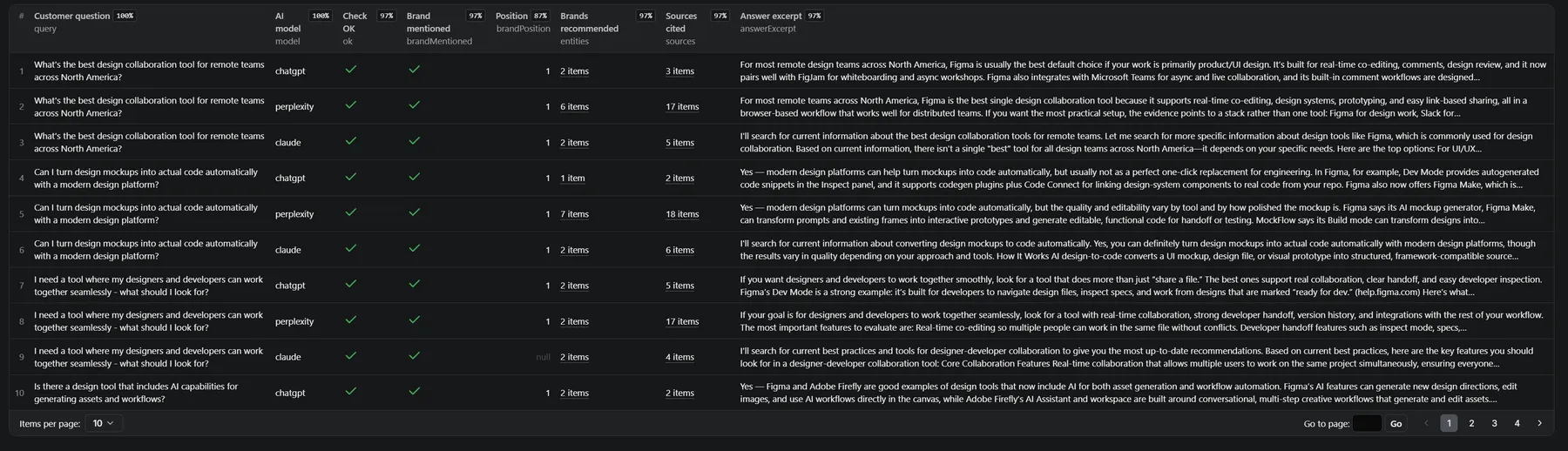
What do you get?
| Field | What it tells you |
|---|---|
brandMentioned, brandPosition | Whether (and how prominently) your brand appears in each AI answer |
entities | Every brand the AI recommended, in order — your real competitive set |
sources | The websites behind the answer — where AI answers in your industry come from |
sourceUrls | The full addresses of those pages, so you can open them |
totals, perModel | Mention rate and share of voice, overall and per AI model |
gaps | The exact customer questions where you never appear |
report | The interpretive report (Markdown): who wins, why, what changed, three moves |
delta | What changed vs. your previous run: new mentions, lost mentions, new competitors |
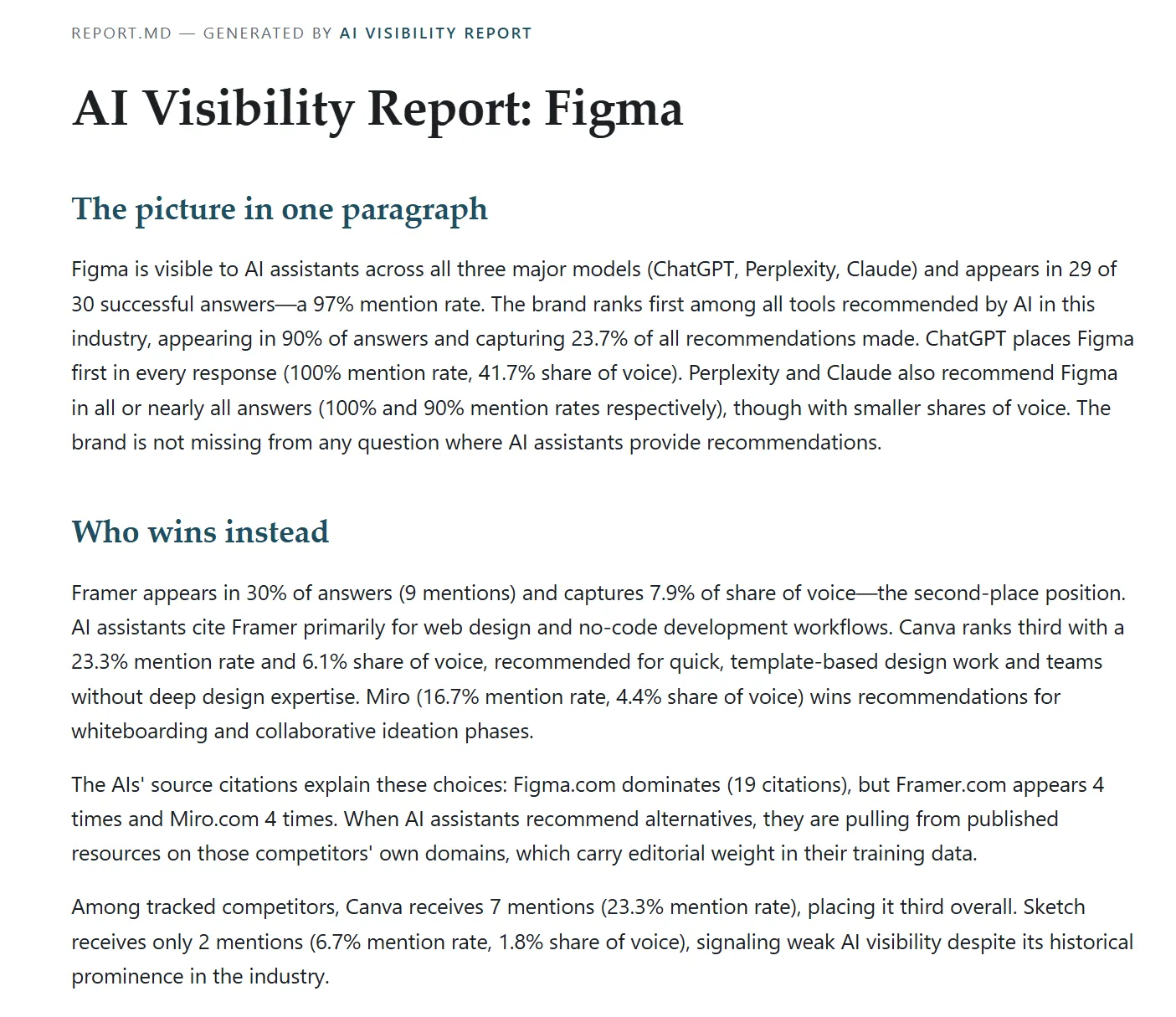
Sample output
And one summary item per run with the scores, the gaps, and the full Markdown report (also saved as REPORT.md in the key-value store). Here is a real report, generated in the brand's language:
How much does it cost?
Transparent pay-per-event pricing — you only pay for what runs:
| Event | Price |
|---|---|
| Visibility check (1 question × 1 AI model) | $0.08 |
| Insight report (1 per run, optional) | $0.29 |
A typical run with defaults (10 questions × 3 models + report) costs $2.69. A weekly check for a client costs ~$11/month. No API keys needed — everything is included.
How to use it (3 steps)
- Enter your brand name and website.
- (Optional) add competitors to track, or your own questions — otherwise realistic questions are generated for your industry, in your language.
- Run it. Read
REPORT.md, or export the dataset to Excel/Sheets/API.
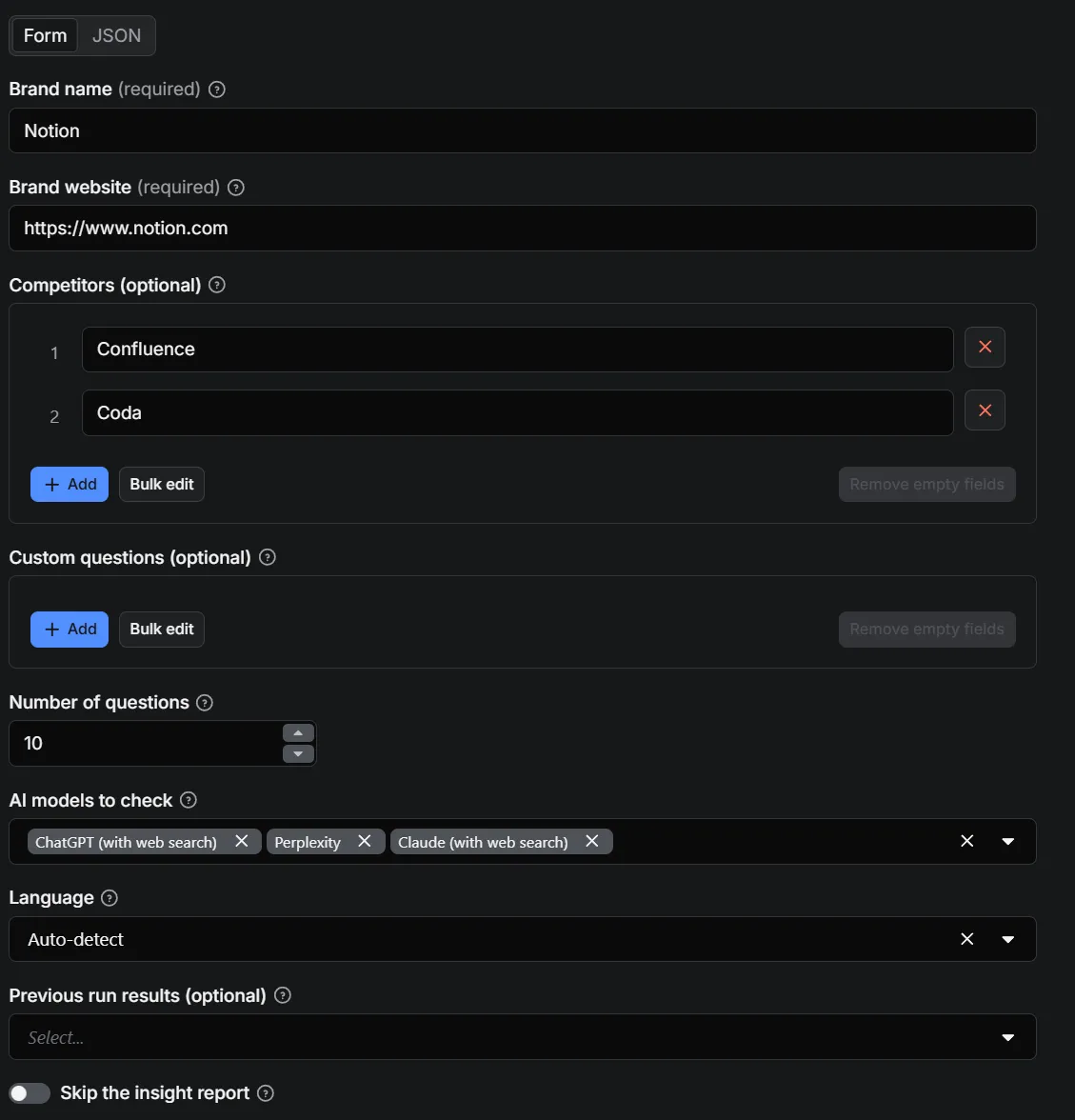
To track changes over time: in Previous run results, pick the dataset of any earlier execution for the same brand — the report will include a "what changed" section. For a clean comparison, reuse the same questions across runs. Use Apify Schedules to run it weekly.
Input options
| Field | Required | Notes |
|---|---|---|
brand, brandUrl | ✅ | Name + website of the brand to check |
competitors | — | Competitor names to track; auto-detected if empty |
queries | — | Your own questions; auto-generated if empty |
maxQueries | — | 1-30, default 10 |
models | — | Any of chatgpt, perplexity, claude (default: all three) |
language | — | auto (detected from your site), or en/it/de/es/fr |
previousDataset | — | Dataset of a previous run: enables the "what changed" comparison |
skipReport | — | Raw checks only, no interpretive report |
Use cases
- Marketing & SEO agencies: add an "AI visibility" section to client reports — a deliverable your competitors don't offer yet.
- In-house marketing teams: know whether ChatGPT recommends you or your competitor, and which sources to influence.
- Founders: check what the AIs tell your potential customers about your category — before your customers do.
- GEO/AEO practitioners: measure the effect of your optimizations over time with weekly runs and deltas.
Is it legal?
Yes. This Actor talks to the official APIs of the AI providers (OpenAI, Perplexity, Anthropic) under their terms — no scraping, no automation of consumer accounts, no logins. Your brand's website is fetched once (a single normal page load) to detect your industry and language, and its robots.txt is respected.
How the checks are run: questions go to the providers' official APIs (for example the OpenAI API with web search enabled), which approximate — but can differ from — the consumer chat apps.
Privacy & data flow: your inputs and the AI answers pass through the developer's paid API accounts at OpenAI, Perplexity and Anthropic (paid tiers, where providers do not train on API data) and the results are stored only in your Apify dataset. The developer keeps no copy. Providers may briefly retain requests for abuse monitoring under their own terms; where the API allows it, storage is explicitly disabled on our side.
AI-generated content: the interpretive report is written by an AI model. Factual statements should be verified before you rely on them.
Integrations & API
Works with everything Apify supports out of the box: REST API, scheduled runs, webhooks, and exports to JSON/CSV/Excel. Run it from code:
Also available to AI agents via the Apify MCP server — an agent can run visibility checks as a tool.
FAQ
How do I check if my brand is mentioned by ChatGPT?
Run this Actor with your brand name and website. It asks ChatGPT (with web search enabled) the questions your customers ask, and reports every mention with its position.
What is AI visibility / GEO (Generative Engine Optimization)?
AI visibility is whether AI assistants mention your brand when users ask for recommendations. GEO is the practice of improving it — the AI-era equivalent of SEO. This Actor is the measuring instrument.
Which AI models are checked?
ChatGPT (with web search), Perplexity, and Claude (with web search) — three assistants people actually use for buying advice. Each can be toggled in the input. Every check runs through the providers' official APIs, on terms that allow us to analyse and deliver the results to you.
Do I need my own OpenAI or Perplexity API key?
No. All API costs are included in the per-check price.
How are the customer questions generated?
From your website: the Actor detects your industry and language, then generates realistic buyer-intent questions (never mentioning your brand, to keep the test honest). You can always supply your own instead.
Can I track my competitors?
Yes — list them in competitors, or let the Actor auto-detect who the AIs recommend in your space. The topCompetitors ranking shows who dominates the AI answers.
How do I see what changed since last week?
Select the dataset of an earlier run in Previous run results (previousDataset). The summary gains a delta section and the report a "what changed" chapter: questions where you appeared or disappeared, and new competitors.
Why does my brand appear on one AI model but not another?
Each model draws on different sources (check the sources field). The report tells you which sites each AI trusts in your industry — that's where visibility is won.
How often should I run it?
Weekly is the sweet spot: AI answers shift when the underlying sources change.
One thing to know if you schedule it. A Schedule always starts the run with the same saved input, so it would keep comparing every new run against the same old dataset — after a month, "what changed" would be measuring the whole month, not the week. And once that dataset expires (datasets are kept for a limited time on most plans), the comparison chapter disappears.
Until the Actor tracks this for you, the reliable habit is: run it, then update previousDataset to the run you just finished. That way each week is compared with the week before. It takes a few seconds, and it is the difference between a trend and a series of unrelated snapshots.
Is the report in my language?
Yes — the report and the generated questions follow your website's language (or the one you select): English, Italian, German, Spanish or French.
Support & feedback
Found an issue or want a feature (more models, more markets)? Open an issue on the Actor's Issues tab — issues are typically answered within hours. Your feedback shapes the roadmap.
This Actor is an independent, unofficial tool and is not affiliated with, endorsed or sponsored by OpenAI, Perplexity or Anthropic. ChatGPT, Perplexity and Claude are trademarks of their respective owners, used here only to identify the services being measured.


