

Google Hotels Scraper
Pricing
from $1.99 / 1,000 results
Google Hotels Scraper
Google Hotels Scraper — Extract hotel data from Google Hotels, including names, prices, ratings, reviews, locations, amenities, availability, booking options, and hotel URLs. Useful for hotel research, price comparison, travel analysis, and market research.
Pricing
from $1.99 / 1,000 results
Rating
0.0
(0)
Developer

Fast Data API
Maintained by CommunityActor stats
0
Bookmarked
2
Total users
1
Monthly active users
11 days ago
Last modified
Categories
Security
Limited permissionsShare
Google Hotels Scraper — Prices by Booking Site, Ratings and Contacts
Google Hotels Scraper extracts hotels from Google Hotels for any destination and stay dates. Each hotel comes with its name, address, phone number, website, guest rating, review count, up to 15 photos, GPS location and the stay price from every booking site Google lists. Every response is structured JSON — ready to pass directly to an LLM, index into a vector store, or feed a travel price monitoring pipeline. No Google account or cookies needed. Start with one city, then track rates across every market you sell in.
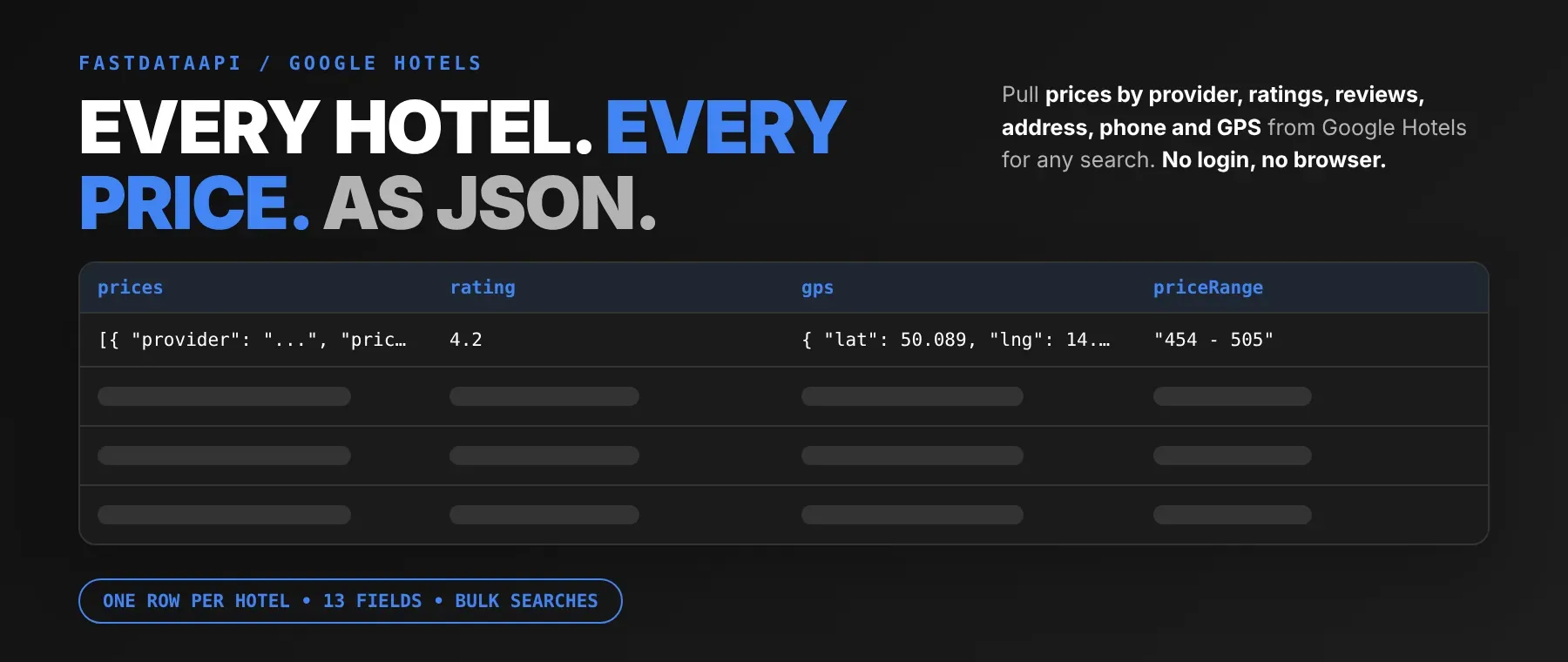
What data can I extract with Google Hotels Scraper?
Using this Google Hotels API, you will be able to extract the following Google Hotels hotel data:
| 🏨 Hotel name | 💶 Prices by booking site | 💰 Price range for your stay | ⭐ Guest rating |
|---|---|---|---|
| 💬 Review count | 📍 Street address | 📞 Phone number (if listed) | 🌐 Hotel website (if listed) |
| 🧭 GPS coordinates | 🖼️ Thumbnail | 📷 Photos (up to 15) | 🔗 Google Hotels page link |
| 🔎 Search term that found it |
How to use Google Hotels Scraper
Revenue managers, travel analysts and app builders use it to scrape Google Hotels and extract hotel data from Google for a whole destination in one run.
Copy to your AI assistant:
Google Hotels Scraper MCP Server: use these Actors from ChatGPT, Claude or Cursor
Point your AI assistant at the Apify MCP server with this Actor as a tool and it can call it on its own, no glue code and no scraping logic in your prompts.
Step by step
- Create a free Apify account.
- Open Google Hotels Scraper in the Apify Store.
- Enter the Google Hotels destination or hotel search phrase, your dates, guests and currency.
- Click Start (or send your API request).
- Download or stream your results in JSON, CSV or Excel.
How to scale Google Hotels Scraper to bulk
The search terms field takes a list, so one run can cover many destinations: add "Prague hotels", "Vienna hotels" and "Budapest hotels" and each entry is searched in turn, with up to your max hotels per entry. Repeated entries are searched only once. Every row keeps the search term that found it, so a multi-city run still splits cleanly when you export Google Hotels to CSV or Excel. To track rates over time, save the input as a task and put it on an Apify schedule, or loop API calls with different dates.
✨ Features
Google Hotels Scraper fetches clean, structured hotel data from Google Hotels ⚡ — a Google Hotels price scraper and Google Travel hotels scraper in one. It's ideal for rate-parity checks, competitor price benchmarking, hotel directory building and feeding travel assistants with current prices.
It extracts, per hotel:
- Prices by booking site – the stay total from each site Google lists, with its booking link
- Price range – the lowest and highest stay price across those sites
- Guest rating and review count – the average rating out of 5 and how many reviews it is based on
- Contact details – street address, phone number and the hotel's own website
- Location – GPS coordinates for mapping
- Photos – a thumbnail plus up to 15 photo links
⚡ Prices are checked against the dates and currency you asked for before a hotel is saved, and vacation rentals are left out, so every row is a hotel priced for your stay.
Use cases 💡
- Revenue manager — compare rival stay prices for the same dates, booking site by booking site.
- Rate-parity analyst — use it as a hotel price comparison scraper across booking sites.
- Travel app developer — plot hotels by GPS location with ratings and website links.
- Hotel sales team — build lead lists with phone numbers and websites per city.
- AI agent builder — feed hotel prices and ratings into a RAG pipeline for travel answers.
Building an AI agent? Connect Google Hotels Scraper over MCP and let it call the actor on its own.
Why choose this actor?
- Ten priced hotels in seconds. A recorded run returned 10 Prague hotels for a 4-night June stay in 5.5 seconds, each with its booking-site prices, rating and contact details.
- The details behind each hotel. A recorded hotel, ibis Praha Old Town, came back with a 4.2 rating from 4,749 reviews, a phone number, a website, GPS coordinates and stay prices from 454 to 505 EUR across 10 booking sites.
- 13 fields per hotel, 8 inputs. Dates, guests, currency and a hotel cap per search shape every run, and every row carries the same 13 fields.
⬇️ Input
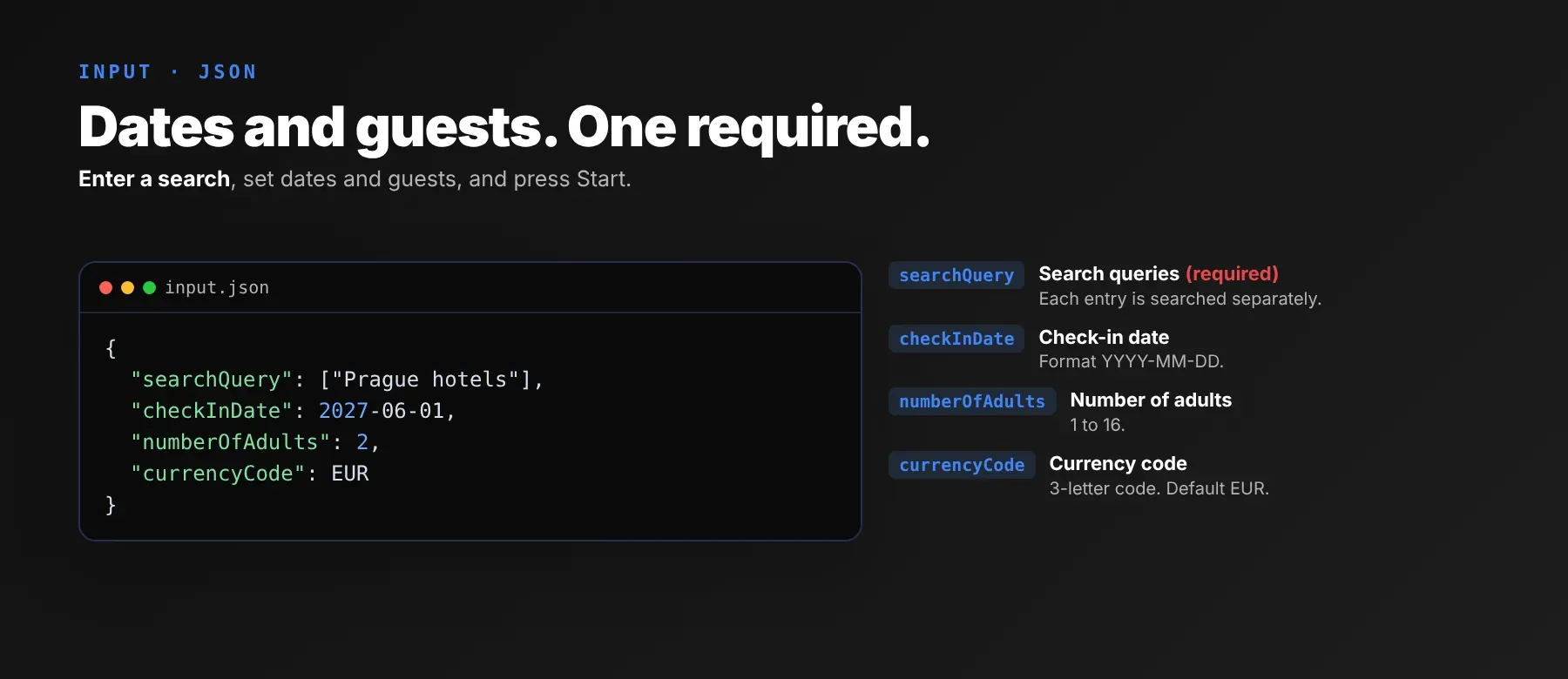
The actor takes a list of destinations or hotel search phrases; the search terms field is the only required input. Dates, guests, currency and the hotel cap apply to every entry in the run.
| Parameter | Required | Type | Description | Example value |
|---|---|---|---|---|
searchQuery | Yes | array | Cities, areas or hotel search phrases, each searched separately; repeated entries run once. | ["Prague hotels"] |
maxResults | No | integer | Max hotels saved per search entry, 1–5000. Default 10. | 10 |
checkInDate | No | string | Arrival date YYYY-MM-DD, today or later. Default "2027-06-01". | "2027-06-01" |
checkOutDate | No | string | Departure date YYYY-MM-DD, after check-in and at most 30 nights later. Default "2027-06-05". | "2027-06-05" |
numberOfAdults | No | integer | Adult guests, 1–16. Default 2. | 2 |
numberOfChildren | No | integer | Children, 0–16; each child is searched as 8 years old. Default 0. | 0 |
currencyCode | No | string | 3-letter currency code for all prices. Default "EUR". A search answered in another currency is skipped with a log warning. | "EUR" |
proxyConfiguration | No | object | Off by default (direct connection, blocked requests retried with fresh connections). Turn on Apify Proxy (residential when no group is chosen) or add your own proxy URLs. | { "useApifyProxy": false } |
Free plan limits
Users on the Apify free plan can fetch up to 20 hotels per run (all search entries together) and 200 hotels per month. When the limit is reached, the run finishes successfully with a status message explaining the limit. Upgrade to any paid Apify plan to remove these limits.
Example input
⬆️ Output
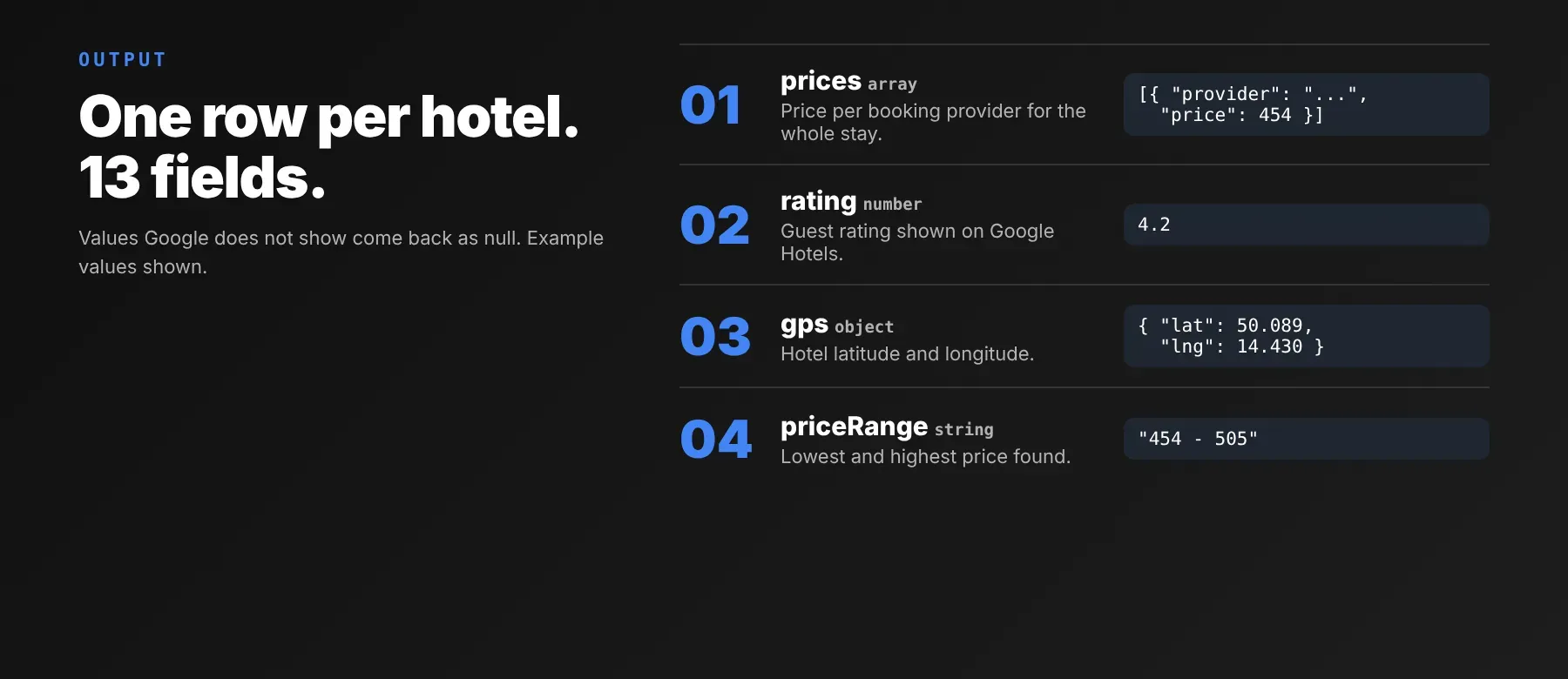
Every hotel is one typed, normalized JSON item with the same 13 fields on every run; values Google Hotels does not show for a hotel are null. Export the dataset as JSON (default), CSV or Excel.
Example output
How does it work?
You type a destination the way you would in Google Hotels, and the actor reads the same public hotel results any visitor sees, without signing in. It uses plain HTTP requests, no browser, and pages through the result list until it has enough hotels for your cap, searching the wider area when the first list runs short. For each hotel it collects the contact details, rating, photos and the stay price from every booking site, and checks that those prices match your dates and currency before saving the hotel. Vacation rentals are left out. Blocked requests are retried with fresh connections after short pauses. A proxy is used only when you turn one on: Apify Proxy, residential by default, or your own proxy URLs. Every hotel is saved with the same field names and types, so your code keeps working across runs.
How do you integrate Google Hotels Scraper into your stack?
This actor works with what you already use: the REST API from any language, MCP for AI agents, and no-code tools like n8n and Make.
Using Google Hotels Scraper with the Apify API
Works in Go, Ruby, Node.js, cURL — any language that can make an HTTP request.
MCP integration for AI agents
Register the Apify MCP server once with this Actor as a tool and your agent can run it with your input right away:
This registers Google Hotels Scraper as a tool your agent can call directly. It works with Claude Code, Cursor and Windsurf, so an agent can pull hotel prices and ratings mid-conversation.
No-code tools (n8n, Make, LangChain)
In n8n, use the Apify node's "Run an Actor" operation with this Actor and your input JSON, then read the dataset items in the next node. In Make, add the Apify app's "Run an Actor" module followed by "Get Dataset Items" to pass each hotel to your scenario. In LangChain, install langchain-apify and load a finished run's results with ApifyDatasetLoader to turn each hotel into a document.
Is it legal to scrape Google Hotels data?
Scraping publicly available Google Hotels data is generally legal when you collect only what any visitor can see. The actor returns only public hotel listing data — names, addresses, business phone numbers, ratings and prices shown without logging in. Under GDPR, collecting public data is generally permissible, but storing and using it must still comply with your local data-protection law. Consult legal counsel if your use case involves bulk storage of personal data.
Frequently asked questions
What fields does Google Hotels Scraper return?
It returns the hotel name, the stay price from each booking site, the price range, the guest rating and the review count — so it also works as a hotel ratings and reviews scraper — plus address, phone number, website, GPS location and photos. See the data fields section for the full list.
Does Google Hotels Scraper require a Google account or login?
No. Only public Google Hotels data is extracted, and no credentials, cookies or API key are needed.
How fast does Google Hotels Scraper run?
A recorded run returned 10 hotels for one search in 5.5 seconds, and a one-hotel run took 2.9 seconds. Prices are live for your dates, not cached.
What happens if a hotel or destination doesn't exist?
If Google Hotels has no hotels for a search entry, does not recognize the place, or answers in another currency, that entry returns no rows, a warning is logged, and the run moves on. A hotel that still fails after retries is skipped, never saved as an empty row; a value Google does not show (for example a missing phone number or rating) is null, so check for null in your code.
Can I scrape multiple Google Hotels destinations at once?
Yes. Put several cities, areas or hotel search phrases in the search terms list; each is searched in turn with the same dates, guests, currency and hotel cap.
Does Google Hotels Scraper work with Claude, ChatGPT, and other AI agent tools?
Yes — Google Hotels Scraper is available as an MCP tool. Register the Apify MCP server with claude mcp add --transport http apify "https://mcp.apify.com?tools=fastdataapi/google-hotels-scraper" in Claude Code, Cursor or Windsurf, and any agent that can call an HTTP endpoint can use the REST API directly.
Does Google Hotels Scraper return data in a format LLMs can use directly?
Yes. Output is typed, normalized JSON with consistent field names — no HTML parsing, no selectors. Pass it straight to an LLM, index it into a vector store, or feed it to an agent tool with no transformation step.
What happens when Google Hotels changes its layout or updates its anti-bot system?
The actor is maintained. When Google Hotels changes, the actor is updated, and your calls keep returning the same JSON schema with no changes on your end.
Can I use Google Hotels Scraper without managing proxies or browser infrastructure?
Yes. Retries with fresh connections run on the actor's side, a proxy is optional, and no browser is involved. You send one request and get structured JSON back.
Which Google Hotels hotel fields work best for AI training data and RAG indexing?
For RAG, use the hotel name, full address and the booking-site names with their prices. For training data, use the numeric fields: guest rating, review count, stay prices and coordinates. All fields are typed primitives or simple lists — no normalization needed.
Your feedback
Found a bug or a missing field in this hotel rates scraper? Let us know through the Issues tab on the Actor's page. Every report is read, and fixes ship as updates to the Actor.


