

Company Jobs Scraper — Hiring Signals from 5 Job Boards
Pricing
from $1.50 / 1,000 jobs
Company Jobs Scraper — Hiring Signals from 5 Job Boards
Hiring signals for lead gen: every open job at the companies you list, with title, location, salary, posted date and apply link from Greenhouse, Lever, Ashby, SmartRecruiters and Workable. Get it daily, weekly or monthly with Apify schedules, n8n, Make or Zapier. Companies without jobs are free.
Pricing
from $1.50 / 1,000 jobs
Rating
0.0
(0)
Developer

Fermaja
Maintained by CommunityActor stats
0
Bookmarked
2
Total users
1
Monthly active users
21 hours ago
Last modified
Categories
Share
Company Jobs Scraper: hiring signals from 5 job boards
Company Jobs Scraper turns a list of companies into hiring signals: every open job, straight from the company's own Greenhouse, Lever, Ashby, SmartRecruiters or Workable job board. Just paste websites, and the job board is found for you.
- 💼 The jobs: title, department, team, employment type and a direct apply link for every open role
- 📍 The where: location plus remote / hybrid / onsite, so you can target exactly the market you sell to
- 📅 The when: posted date and days since posting, to reach out while the need is fresh
- 💰 The money: salary range whenever the company publishes it (common on Ashby and Lever)
- 📈 The growth signal:
companyOpenJobson every row, so you instantly see who is hiring fast
Export as CSV, Excel or JSON, send it to Google Sheets, HubSpot, Slack, Make, Zapier or n8n, or call it from the API. No login, no browser, no API key.
Try it now: leave the form as it is and click Start. You get 15 jobs from 3 companies in about 4 seconds.
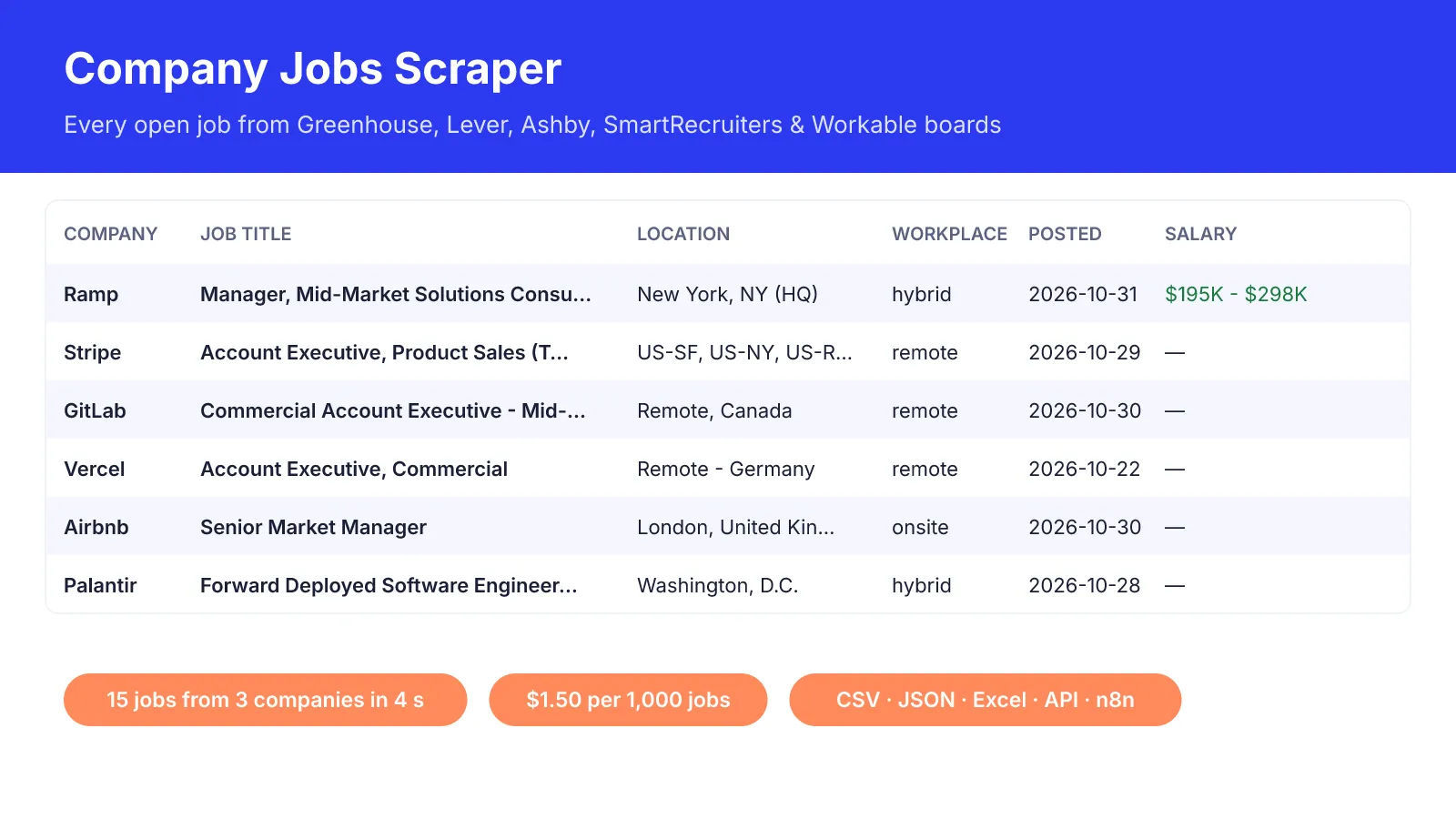
Real results from our test runs: open jobs at Ramp, Stripe, GitLab, Vercel, Airbnb and Palantir.
✨ Why people pick it
- ✅ Paste anything.
ramp.com, a careers page, a job board link or just a company name. A messy paste of 5 companies (Notion, Hugging Face ; stripe.com,GITLAB.COM/jobs,info@vercel.com) found 4 job boards and 1,224 open jobs in 6 seconds. - ✅ Same clean fields for all 5 job boards. One flat row per job, ready for your CRM or spreadsheet.
- ✅ Smart filters. Job title keywords (
sales,SDR,data engineer), excluded words, locations and "posted in the last 14 days". - ✅ Only new jobs on repeat runs. Schedule it daily or weekly and get (and pay for) only the jobs you haven't seen yet.
- 💸 Pay only for jobs. Companies without a job board or without matching jobs get a free row with the reason, so your list stays complete.
Who uses it
| You are… | You use it to… |
|---|---|
| 🎯 Sales & lead-gen teams | Find companies hiring SDRs, account executives or a "Head of RevOps" this month, and reach out while the budget is fresh |
| 🤝 Recruiters & staffing agencies | Watch target companies and get every new opening the day it's posted |
| 🔍 Founders & analysts | Track competitors' hiring by department to see where they are investing |
| 🤖 Automation builders | Feed hiring signals into n8n, Make or Zapier workflows, then enrich them with contacts |
How it works
- Add companies. Websites (
ramp.com), careers pages, job board URLs (jobs.lever.co/palantir,boards.greenhouse.io/airbnb,jobs.ashbyhq.com/ramp) or names, or import the dataset of another Actor. - It finds the job board. It reads the careers links on the website; if there are none, it checks the job boards for the company name.
- It reads the official public job feed of that board. Exact data, fast, no browser and no login.
- You get one clean row per job, newest first, ready to export or sync.
💡 Automate it: save your input as a Task, turn on Only new jobs since the last run and add a weekly Schedule. Every Monday you get only the new openings, delivered to Google Sheets, Slack or your CRM.
Ready-made inputs
1. 🎯 Who is hiring salespeople right now?
2. 🌍 Remote engineering roles in Europe
3. 🔔 Weekly: only jobs that are new since last week
Example result
One real row from a test run (trimmed):
A company without a job board gives one free row: "status": "no-job-board-found" with the reason in error. Other statuses: no-matching-jobs, no-new-jobs (monitor mode) and error (the board did not answer; try again later).
🔗 Use it in n8n
Install the official Apify node (n8n Cloud: search "Apify" in the nodes panel; self-hosted: install @apify/n8n-nodes-apify under Settings > Community Nodes) and add your Apify API token.
Workflow 1: 📊 hiring-signal lead list from a Google Sheet
- Google Sheets: read your target accounts (a
websitecolumn). - Aggregate: combine
websiteinto one list, so the Actor runs once for the whole sheet. - Apify → Run an Actor and get dataset: Actor
fermaja/company-jobs-scraper, custom input (Expression mode):
- Remove Duplicates on
companyDomain(one lead per company), then HubSpot, Pipedrive or Google Sheets: mapcompanyName,companyDomain,jobTitle,postedAt,companyOpenJobsandjobUrl. Your personalisation line writes itself: "saw you're hiring a {{jobTitle}}".
Workflow 2: 📧 find the hiring companies, then get their contacts. Chain two Actors:
- Apify → Run an Actor
fermaja/company-jobs-scraperwith the input above. - Apify → Run an Actor and get dataset
fermaja/website-contact-scraperwith{ "datasetId": "{{ $json.defaultDatasetId }}", "datasetField": "companyDomain" }. - Filter rows with
primaryEmail, then Instantly, Lemlist or HubSpot.
It also works the other way round: point Dataset ID at the output of a Google Maps or website contact scraper ({{ $json.defaultDatasetId }}) and this Actor reads its website column.
Workflow 3: 🔔 weekly new-jobs alert. Schedule Trigger (Mondays 08:00) → Apify: Run an Actor and get dataset with "onlyNewJobs": true and "monitorId": "competitors" → Slack or Gmail with companyName, jobTitle, department, location and jobUrl. Only jobs posted since last week arrive, and only those are charged.
💡 Every row has the same flat fields (no nesting), so n8n maps them directly. Keep the custom input in Expression mode, or n8n sends the text {{ $json.defaultDatasetId }} instead of the ID (the run then stops and tells you so).
⏰ Run it on autopilot: daily, weekly or monthly
Job boards change every day, and a fresh opening is the best reason to reach out. Set it once:
- 🗓️ Without any workflow tool: in Apify Console, save your input as a task, open Schedules → Create new, pick daily, weekly or monthly (or a cron such as
0 8 * * 1for Mondays at 08:00) and add the task. In the task's Integrations tab, send results to Google Sheets, Slack, email or a webhook. - ⚙️ Inside your workflow: run it from n8n, Make or Zapier on any schedule (see the n8n section above).
Turn on Only new jobs since the last run for scheduled runs. The scraper remembers which jobs it already returned (key-value store company-jobs-monitor in your own account, one memory per Monitor ID), so each run delivers and charges only new postings. In our test, the first run on Ramp returned 77 sales jobs; the second run returned none and charged no jobs.
Popular rhythms: daily for recruiters watching target companies, weekly for sales teams building hiring-signal lists, monthly for competitor hiring reports by department.
💵 Pricing
You pay per job saved. Companies without a job board or without matching jobs are free.
| Event | Price |
|---|---|
| 💼 Job (one open job with all fields) | $0.0015 ($1.50 per 1,000 jobs) |
| ▶️ Actor start | $0.005 per GB of memory ($0.0025 per run at the default 512 MB) |
Example: you check 200 target accounts for sales roles posted in the last 30 days and 60 companies have 3 matching jobs each. You pay 180 × $0.0015 + $0.0025 = $0.27. The 140 companies without matching jobs cost nothing.
🙌 Just testing or comparing scrapers? You're very welcome. Click Start with the prefilled input: 15 jobs from 3 companies in about 4 seconds, about 2.5 cents. Apify's free plan includes $5 of credit every month, which covers about 3,000 jobs, so you can try it on your own list first.
🛡️ Set Maximum cost per run in the run options to cap your spend; the scraper stops cleanly when it is reached and says so in the status message. Use Max jobs per company (default 100, newest first) to keep big employers from filling your budget.
❓ FAQ
Which job boards are supported?
Greenhouse, Lever, Ashby, SmartRecruiters and Workable, which together power the careers pages of a large share of tech and growth companies. Companies on other systems (Workday, in-house careers pages) get a free no-job-board-found row.
Is it legal? The scraper reads the public job feeds that companies publish for anyone to see. It does not log in and collects no personal data. You are responsible for how you use the data under the laws of your country.
Do I need a proxy? No. The job feeds are public APIs. If you ever see rate-limit errors on a very long list, enable Apify Proxy (datacenter); it is used only after repeated rate limits.
A company I know is hiring shows "no-job-board-found". Why?
It may use a job board this Actor does not cover, or a careers page that loads its jobs with JavaScript from an unusual domain. Paste the job board URL directly (for example https://jobs.lever.co/company) to skip detection.
Can I get the full job description?
Yes: turn on Include job description text for descriptionText (plain text, up to 5,000 characters), handy for AI scoring or personalised outreach.
How fresh is the data?
Live: every run reads the job board at that moment. postedAt is the publication date the board reports.
⚠️ Limits
- Five job board platforms. Others are listed as
no-job-board-found(free). - Matching by company name checks Greenhouse, Lever, Ashby and Workable; a common word as a name can match a different company. Websites and job board URLs are exact.
- Salary is only available when the company publishes it on the board.
- Keyword filters match the start of words in the title, department and team (
salesmatches "Inside Sales", not "Wholesale").
🆕 What's new
- 🚀 1.0 (November 2026): first release. Five job boards, automatic board detection from websites and names, keyword, location, workplace and date filters, salary fields, dataset import for chaining, and an only-new-jobs monitor for schedules.
🧩 Related Actors
- 📧 Website Email & Contact Scraper: get emails, phones and social profiles for the hiring companies you found.
- 🚀 Product Hunt Scraper: fresh launches, makers and their websites.
- ⭐ Google Play Reviews Scraper: app reviews in any language.


